





JEThree
Members
-
Joined
-
Last visited
Everything posted by JEThree
-
The array is fine. Everything worked. But my 'App Data' folder changed to 'appdata'. Easy fix. Thanks for the help!
-
UPDATE: That 2tb I found was the first dead drive. Replacement is coming on monday. I am going to attempt @itimpi's suggestion. I will update after the 2nd or 3rd rebuild. Approximately 1 week. Also, I found a working 8TB(?!?!) in a bin and will probably be adding that too. Thanks!
-
Then I have 2 x10TB to shove in there for a parity shuffle *and added storage* *edit*
-
Is that not what's happening? This could work. I went digging and found an old 2tb drive. This sounds like a 3-rebuild solution.
-
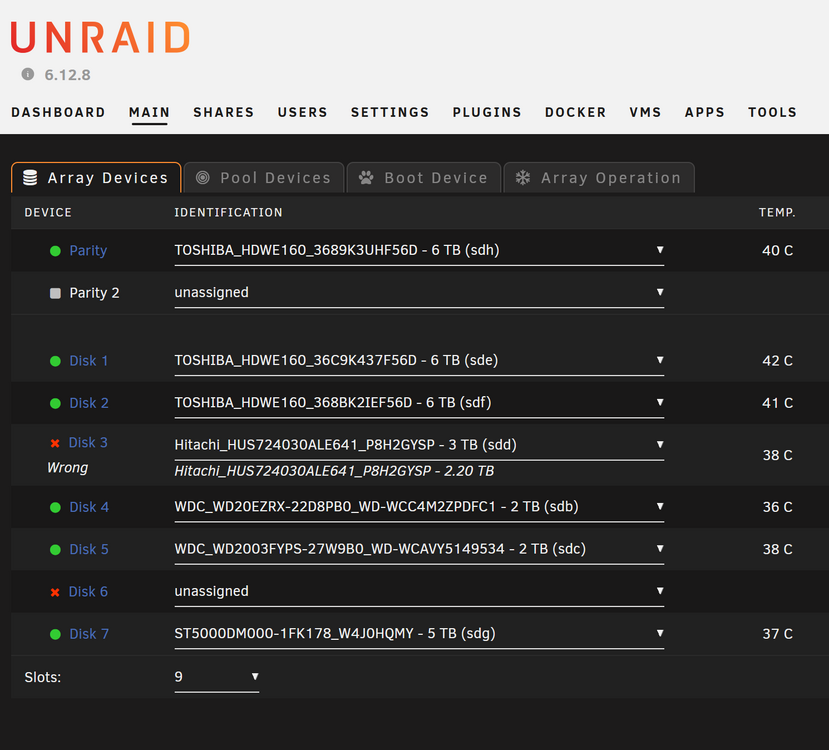
I did do it one at a time. Card first. It recognized everything correctly. Which is great. But, one of my "2TB" drives is actually a 3, but showed up as a "2.2" before because of the card limitations. So now it shows up as it's full capacity and unraid says it's invalid. *see attached screenshot* I cannot physically have both cards in the computer. It seems I cannot spin up or rebuild until I also replace the first missing drive. Does that mean I /have/ to do a parity shuffle now in order to even attempt a rebuild?(with regards to my only replacement drives being so large) homeplanet-diagnostics-20240616-1409.zip
-
I reseated just that drive and two others fell off. Reseated all cables on drives. Boot up & spin up worked. So now that that's working. Can I swap my LSI card and do a parity shuffle in one go? Thanks for the help! homeplanet-diagnostics-20240615-1344.zip
-
Ope! It just went down. Looks like it's Disk 2. Here's an updated diagnostics. homeplanet-diagnostics-20240614-1350.zip
-
Here is the diagnostics file. homeplanet-diagnostics-20240614-1303.zip
-
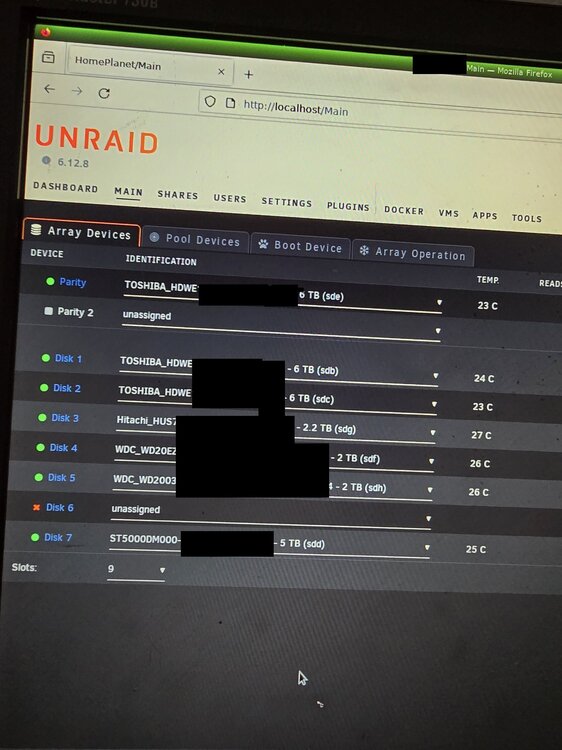
Hello, I have an Unraid server for my data storage and a few dockers too. *See attached image for drive sizes in TB: Parity:6 Other drives: 6, 6, 5, "2, 2, X, 2" ""The lsi card I have(lsi 3081E-r) is a 3G/s which limits drive sizes to 2TB, I just have now a 6G/s in the unlocked mode to allow for larger drives (lsi 9211-8i)"" """X= first dead drive""" It is setup to allow 2 drive failures before data loss. One drive died a few months ago. I figured I'd replace it after I move soon. I moved and the transport was less than ideal. Booted the server with a non-gui interface but with a screen hooked up to monitor it. About an hour later, it started throwing smart errors. Then a second drive failed and the array shut itself off. I have rebooted the server, and the failed drive appears again. I now have a pair of 10TB drives to put in the machine. I am worried about that drive failing during a parity shuffle/rebuild. (I didn't get the info of the 2nd drive that failed[pretty sure it's one of the 2TB drives]) I also would like to remove the low TB drives soon. :read: the 2Tb drives Any guidance would be great. Currently the plan is to swap the lsi card, shove the 10's in there. One as a parity the other as the first missing drive. Parity would move to the regular array(according to the parity shuffle docs) and it would do a rebuild. Success...?!
-
Hello, Love the apps, thank you. Having trouble with deluge vpn crashing and not starting. Currently in a boot cycle. 2023-04-19 04:12:09,434 DEBG 'start-script' stdout output: 2023-04-19 04:12:09 WARNING: file 'credentials.conf' is group or others accessible 2023-04-19 04:12:09 OpenVPN 2.6.0 [git:makepkg/b999466418dddb89+] x86_64-pc-linux-gnu [SSL (OpenSSL)] [LZO] [LZ4] [EPOLL] [PKCS11] [MH/PKTINFO] [AEAD] built on Jan 25 2023 2023-04-19 04:12:09,434 DEBG 'start-script' stdout output: 2023-04-19 04:12:09 library versions: OpenSSL 3.0.8 7 Feb 2023, LZO 2.10 2023-04-19 04:12:10,434 DEBG 'start-script' stdout output: 2023-04-19 04:12:10 NOTE: the current --script-security setting may allow this configuration to call user-defined scripts 2023-04-19 04:12:10,437 DEBG 'start-script' stdout output: 2023-04-19 04:12:10 TCP/UDP: Preserving recently used remote address: [AF_INET]IP:PORT 2023-04-19 04:12:10 UDPv4 link local: (not bound) 2023-04-19 04:12:10 UDPv4 link remote: [AF_INET](IP:PORT) 2023-04-19 04:13:10,966 DEBG 'start-script' stdout output: 2023-04-19 04:13:10 [UNDEF] Inactivity timeout (--ping-restart), restarting 2023-04-19 04:13:10,967 DEBG 'start-script' stdout output: 2023-04-19 04:13:10 SIGHUP[soft,ping-restart] received, process restarting 2023-04-19 04:13:10,968 DEBG 'start-script' stdout output: 2023-04-19 04:13:10 DEPRECATED OPTION: --cipher set to 'AES-128-CBC' but missing in --data-ciphers (AES-256-GCM:AES-128-GCM:CHACHA20-POLY1305). OpenVPN ignores --cipher for cipher negotiations. It seems to not load my credentials and doesn't load the GUI. It's been working for months, happened before but restarts fixed it. Had all the -arr apps using it with no problem. Has crashed before, can't see the logs because reasons. Have tried privileged mode to no success. Can't see memory runaway or crash info because it's too late before I find it. Any help would be great.

