





Knights21
Members
-
Joined
-
Last visited
Everything posted by Knights21
-
I'm having the same problem with a 1TB NTFS USB drive, Uassisgned devices see the disk but not the FS and only offers 'pool' as an option. Mount reported: The disk contains an unclean file system (0, 0). The file system wasn't safely closed on Windows. Fixing. ntfs-3g-mount: failed to access mountpoint /x: No such file or directory This worked (\x): mount -t ntfs /dev/sdh \x Now I can enter cd \x and run ls to see the contents at the command line. I found 'X' in \root, just need a nice dual window file manager now to make movements easy.
-
They were correct at time of posting, now a few days old. Trial and error has resolved the issue, my default gateway was set to the modem and not the router. 🙄
-
Hello, hoping someone can help me with this. I've installed a HG612 fibre modem and connected it via ethernet cable to a NightHawk R8000 router. All my devices can access the server and internet via LAN but the server does not connect to the internet. I tried the DNS settings and default gateway address but couldn't figure it out. TIA tower-diagnostics-20230131-1329.zip
-
After the latest UnRaid update the problem seems to have resolved itself. Still using the second drive but now no read errors at all. Two parity checks done since the update.
-
Perhaps I should revert back to SATA drives and ditch the HBA?
-
The three SAS drives are connected via a HP HBA card whereas the parity and cache via the onboard SATA controller.
-
None of the other discs report errors in the main window of the UI. Will try a bay swap. Thanks 👍
-
Disc 3 in my array came up with a lot of read errors so I swapped out the disc and rebuilt the array only for the replacement disc to report read errors a few days later. Although the replacement was not a new disc, made me suspicious that it was not actually the disc. Would someone far cleverer than me take a look at the two smart logs for me and determine if it is the discs or a power issue? 😎 Earlier date smart is previous disc. TIA. HP ProLiant Gen 8 tower-smart-20220807-1021.zip tower-smart-20221028-1640.zip tower-diagnostics-20221028-1700.zip
-
No nothing and not reported on other two SAS drives on same controller.
-
Strange thing is, only just started logging this error and has been fine since February when I had the drive trim issues (which is why I had to go back to 16).
-
I'm getting some SAS drives errors and needs some diagnostic help please.
-
Just happened again when I came out of maintenance mode: Oct 1 04:20:53 Tower kernel: blk_update_request: I/O error, dev sdg, sector 0 op 0x1:(WRITE) flags 0x800 phys_seg 0 prio class 0 Oct 1 04:20:53 Tower kernel: sd 1:0:3:0: [sdg] tag#487 UNKNOWN(0x2003) Result: hostbyte=0x00 driverbyte=0x08 cmd_age=0s Oct 1 04:20:53 Tower kernel: sd 1:0:3:0: [sdg] tag#487 Sense Key : 0x2 [current] Oct 1 04:20:53 Tower kernel: sd 1:0:3:0: [sdg] tag#487 ASC=0x4 ASCQ=0x2 Oct 1 04:20:53 Tower kernel: sd 1:0:3:0: [sdg] tag#487 CDB: opcode=0x88 88 00 00 00 00 00 2b b0 42 30 00 00 00 08 00 00 Oct 1 04:20:53 Tower kernel: blk_update_request: I/O error, dev sdg, sector 732971568 op 0x0:(READ) flags 0x0 phys_seg 1 prio class 0 All three SAS drives are identical so odd that only sdg is flagging?
-
I had trouble with the HP 220 branded Broadcom / LSI 2308 card after I updated to V20 as I then had problems with SSD trim operations which turns out V20 doesn't support so I had to downgrade to p16.
-
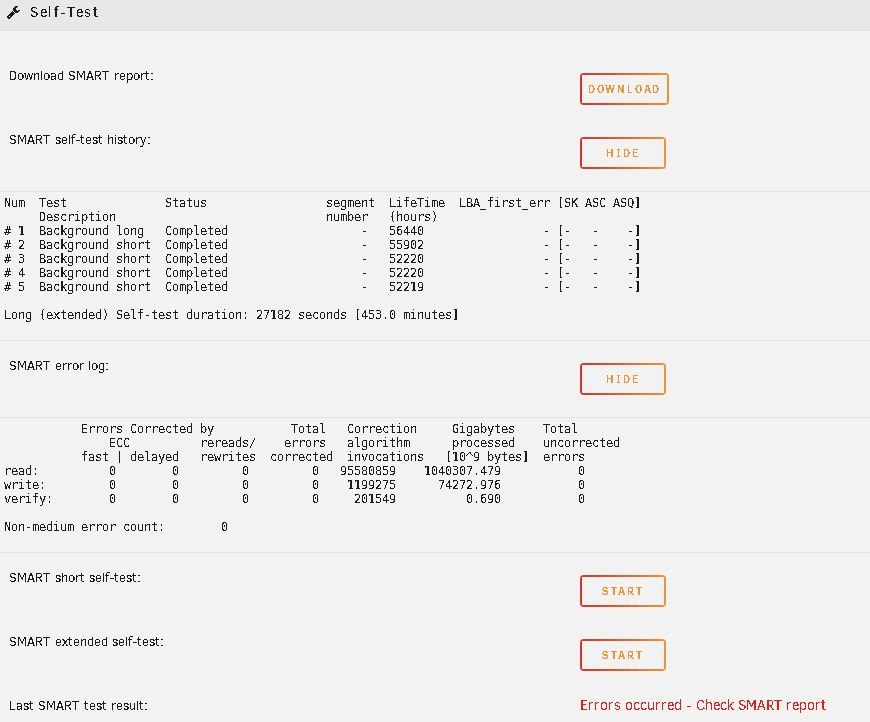
Hope someone can give me advice, Had an error warning stating: Tower kernel: blk_update_request: I/O error, dev sdg, sector 732971568 op 0x0:(READ) flags 0x0 phys_seg 1 prio class 0 and array shows 1 error against sdg. This was after a successful parity check stating the array health was a pass. SMART page states an error but nothing is obvious (to me) in the extended SMART report. HP Proliant Microserver Gen 8 1 SATA parity drive 3 SAS drives via HBA 1 SATA Cache HUS723030ALS640_YVK45Z0K_35000cca03eb0b998-20211004-0701.txt tower-diagnostics-20211004-0731.zip

-
Yes SAS. sde | HUS723030ALS640 | 1000:0087:1590:0041 | n/a | sdf | HUS723030ALS640 | 1000:0087:1590:0041 | n/a | sdb | HUS723030ALS640 | 1000:0087:1590:0041 | n/a |
-
I had this a few times before the event: Jan 31 23:47:49 Tower emhttpd: spinning down /dev/sdb Jan 31 23:47:49 Tower SAS Assist v0.84: Spinning down device /dev/sdb Jan 31 23:50:04 Tower kernel: sd 1:0:0:0: attempting task abort!scmd(0x00000000b1f693c0), outstanding for 15157 ms & timeout 15000 ms Jan 31 23:50:04 Tower kernel: sd 1:0:0:0: [sdb] tag#5941 CDB: opcode=0x85 85 06 20 00 00 00 00 00 00 00 00 00 00 40 e5 00 Jan 31 23:50:04 Tower kernel: scsi target1:0:0: handle(0x000d), sas_address(0x5000cca03ec60451), phy(7) Jan 31 23:50:04 Tower kernel: scsi target1:0:0: enclosure logical id(0x500605b008e61e80), slot(8) Jan 31 23:50:04 Tower kernel: sd 1:0:0:0: task abort: SUCCESS scmd(0x00000000b1f693c0) Then this error text in the early morning: Feb 1 04:20:20 Tower kernel: blk_update_request: I/O error, dev sdb, sector 0 op 0x1:(WRITE) flags 0x800 phys_seg 0 prio class 0 Feb 1 04:20:20 Tower kernel: blk_update_request: I/O error, dev sdb, sector 732965640 op 0x0:(READ) flags 0x0 phys_seg 2 prio class 0 Feb 1 04:20:20 Tower kernel: md: disk3 read error, sector=732965576 Feb 1 04:20:20 Tower kernel: md: disk3 read error, sector=732965584 Feb 1 04:20:20 Tower kernel: blk_update_request: I/O error, dev sdb, sector 732965640 op 0x1:(WRITE) flags 0x20800 phys_seg 1 prio class 0 Feb 1 04:20:20 Tower kernel: md: disk3 write error, sector=732965576 Feb 1 04:20:20 Tower kernel: blk_update_request: I/O error, dev sdb, sector 732965648 op 0x1:(WRITE) flags 0x20800 phys_seg 1 prio class 0 Feb 1 04:20:20 Tower kernel: md: disk3 write error, sector=732965584 Feb 1 04:20:50 Tower kernel: blk_update_request: I/O error, dev sdb, sector 64 op 0x0:(READ) flags 0x0 phys_seg 1 prio class 0 Feb 1 04:20:50 Tower kernel: md: disk3 read error, sector=0 Feb 1 04:20:50 Tower kernel: blk_update_request: I/O error, dev sdb, sector 64 op 0x1:(WRITE) flags 0x0 phys_seg 1 prio class 0 Feb 1 04:20:50 Tower kernel: md: disk3 write error, sector=0
-
Many thanks doron, much appreciated. New job for today, I have a red x against disk 3 🤕
-
Just last week had to increase the capacity of my array and went for 3 x 3TB SAS data drives and a Seagate IronWolf ST10000VN0008 10TB SATA as the parity drive, with a Crucial/Micron RealSSD m4/C400/P400 M4-CT128M4SSD as the Cache. All connected through a new HP220 HBA in IT mode as my Gen8 Proliant board doesn't support NAS. At first I had issues with the Dynamix cache folders plugin that kept my cpu bouncing between 15-100% and found a thread here that pointed me to uninstall it and fixed the problem. Then realised I had this issue where the SAS drives were not spinning down, found this thread and istalled the plugin. At first I thought it had cured the problem, but then found for some reason parity and disk 1 were spinning down but not 2 & 3 ? (all on HBA connector 0, Cache on HBA 1) Log was full of: Jan 31 10:34:28 Tower kernel: mdcmd (162): spindown 1 Jan 31 10:34:43 Tower kernel: mdcmd (163): spindown 2 Jan 31 10:34:43 Tower SAS Assist v0.84: spinning down slot 1, device /dev/sde (/dev/sg4) Jan 31 10:34:58 Tower kernel: mdcmd (164): spindown 3 Jan 31 10:34:59 Tower SAS Assist v0.84: spinning down slot 2, device /dev/sdf (/dev/sg5) Jan 31 10:35:12 Tower SAS Assist v0.84: spinning down slot 3, device /dev/sdb (/dev/sg1) ......continously and you could hear a spindown attempt, followed by an immediate spinup every 30 seconds or so. Manual spin down seemed to have no effect but all temp displayed * Updated the OS to the Version: 6.9.0-rc2 beta release, instant spindown on all drives (audible confirmation too) on button select and no instant re-spinup. Question is, do I uninstall this plugin or is it still required? Log states: Jan 31 18:56:50 Tower emhttpd: spinning down /dev/sdd Jan 31 18:56:50 Tower emhttpd: spinning down /dev/sde Jan 31 18:56:50 Tower emhttpd: spinning down /dev/sdb Jan 31 18:56:50 Tower emhttpd: spinning down /dev/sdf Jan 31 18:56:50 Tower SAS Assist v0.84: Spinning down device /dev/sde Jan 31 18:56:50 Tower SAS Assist v0.84: Spinning down device /dev/sdb Jan 31 18:56:50 Tower SAS Assist v0.84: Spinning down device /dev/sdf

