





Magicaldave
Members
-
Joined
-
Last visited
-
Guess I'm coming back to re-report a five year old bug. I have the exact same issue as this Differences are mostly the version, but if it's important, my dockers are Adguard-Home and Trilium. The network is br0 for Adguard, and a custom one, "Homeproxy" for trilium. unRAID OS Version:6.8.3 Description: If you edit a container in advanced view and change the Webui field under Additional Fields, the changes are not reflected in the Webui context menu item you use to launch the application webpage. How to reproduce: Add a new container and let it complete building. Then edit the container and change the Webui field (I tried changing the port #) and save the container. Once the container restarts, the Webui context menu icon will attempt to launch the container's webui using the old value. Expected results: The Webui context menu should be updated to reflect the changes and launch the application's webui with the new values. Actual results: The application is launched with the old webui value. Other information: Tried removing the container, then the container and the image, but was only able to resolve by deleting the container, image, and user template located at /boot/config/plugins/dockerMan . Interestingly enough, web ui changes worked completely as expected after doing this, but only for that specific docker. So my Adguard docker is fine now, but my second Trilium instance is not. I've left the trilium instance broken in case anyone wants some info from it. Of 9 containers I'm running, 7 never had this issue, but my second trilium instance and adguard both did. I'm installing quite a few more dockers over the next couple days so if I run across it for another container I'll mention it here. Diagnostics and screenshots of my current trilium addresses attached, and xml for the trilium instance below. <?xml version="1.0"?> <Container version="2"> <Name>trilium-joran</Name> <Repository>bgameiro/trilium</Repository> <Registry>https://hub.docker.com/r/zadam/trilium</Registry> <Network>homeproxy</Network> <MyIP>172.18.0.9</MyIP> <Shell>sh</Shell> <Privileged>false</Privileged> <Support>https://forums.unraid.net/topic/94979-trilium-docker/</Support> <Project>https://github.com/zadam/trilium</Project> <Overview>Trilium Notes is a hierarchical note taking application with focus on building large personal knowledge bases> [br][br] [b][u][span style='color: #E80000;']Links[/span][/u][/b][br] [b]Repository:[/b] https://github.com/zadam/trilium[br] [b]Wiki:[/b] https://github.com/zadam/trilium/wiki[br] [b]Docker:[/b] https://hub.docker.com/r/zadam/trilium[br] [br][br] [b][u][span style='color: #E80000;']Configuration[/span][/u][/b][br] [b]/root/trilium-data[/b] Where Trilium should store logs, databases and configuration[br] [b]/root/trilium-data/backup[/b] Where Trilium should store the backups[br]</Overview> <Category>Productivity: Tools:Utilities</Category> <WebUI>redacted.duckdns.org/</WebUI> <TemplateURL>https://raw.githubusercontent.com/BGameiro2000/unraid-ca/master/trilium/trilium.xml</TemplateURL> <Icon>https://raw.githubusercontent.com/BGameiro2000/unraid-ca/master/trilium/icon.png</Icon> <ExtraParams/> <PostArgs/> <CPUset/> <DateInstalled>1603742480</DateInstalled> <DonateText/> <DonateLink>https://bgameiro.me/page/donate</DonateLink> <Description>Trilium Notes is a hierarchical note taking application with focus on building large personal knowledge ba> [br][br] [b][u][span style='color: #E80000;']Links[/span][/u][/b][br] [b]Repository:[/b] https://github.com/zadam/trilium[br] [b]Wiki:[/b] https://github.com/zadam/trilium/wiki[br] [b]Docker:[/b] https://hub.docker.com/r/zadam/trilium[br] [br][br] [b][u][span style='color: #E80000;']Configuration[/span][/u][/b][br] [b]/root/trilium-data[/b] Where Trilium should store logs, databases and configuration[br] [b]/root/trilium-data/backup[/b] Where Trilium should store the backups[br]</Description> <Networking> <Mode>homeproxy</Mode> <Publish> <Port> <HostPort>8889</HostPort> <ContainerPort>8080</ContainerPort> <Protocol>tcp</Protocol> </Port> </Publish> </Networking> <Data> <Volume> <HostDir>/mnt/user/appdata/trilium</HostDir> <ContainerDir>/root/trilium-data</ContainerDir> <Mode>rw</Mode> </Volume> <Volume> <HostDir>/mnt/user/appdata/trilium/backup</HostDir> <ContainerDir>/root/trilium-data/backup</ContainerDir> <Mode>rw</Mode> </Volume> </Data> <Environment/> <Labels/> <Config Name="WebUI" Target="8080" Default="8080" Mode="tcp" Description="WebUI - Default 8888" Type="Port" Display="al> <Config Name="Appdata" Target="/root/trilium-data" Default="/mnt/user/appdata/trilium" Mode="rw" Description="Container> <Config Name="Backups" Target="/root/trilium-data/backup" Default="/mnt/user/appdata/trilium/backup" Mode="rw" Descript> </Container> last-giant-diagnostics-20201026-1428.zip
-
Actually I’m using the internal Bluetooth/WiFi, but it is USB-attached. From what I’ve read the wi-fi isn’t compatible with MacOS so maybe I just got lucky on Bt, kind of? Thanks so much for the info from clover btw! I got sidelined working on some original Xboxes but this will definitely be useful once I have the chance to look at audio again. I have another usb-attached Bluetooth device but I figure it’ll probably do the same. Is is there a particular guide floating around here on passing through your usb bus, or at least a portion of it? I certainly have enough ports that I don’t think it’d be a big deal, but been hesitant to mess with it as I didn’t wanna accidentally pass through my boot drive.
-
Welp, didn’t originally have my CPU cores isolated. Doing this helped quite a bit, after isolating cores 4-7 I managed to combine Some tweaks with Audio Midi Devices and clover config to get my 3.5 audio in a *workable* state. I even ran lstopo to ensure I had the cores closest to my GPU and RAM and minimize latency. Still tweaking FSB speeds, as there’s a measurable loss in quality when leaving it blank. Seems to be a sweet spot somewhere between 99.44MHz and 99.99MHZ. That’s a LOT of reboots and EFI mounts to work out, but sounds better than bare metal installing Windows just to run CPU-Z for FSB speed. USB and Bluetooth devices are still completely unlistenable. Over USB the audio skips so bad, you can’t even tell there’s anything playing save for a crackle or pop every few seconds. Bluetooth plays but crackles so bad you can’t even tell what’s playing. Any further tips for these? Also, in reference to my question about Duel-booting, I was referring to the practice of bare metal installing an is, then running that same boot drive as a VM with pass through. Since I’ve sort of worked out rear 3.5 audio, I don’t see this as being worth the trouble.
-
to;dr I’ve done a tone of cpu and clover tuning, nothing seems to fix it - although as far as native audio goes, I’ve made enough headway to fairly confidently say I could fix it with the right DSDT edits - no clue what edits to make though. Maybe I’ll try and compare the q35 dsdt to one I get from a baremetal install. Does “duel-booting” work with OS X? I guess I’ll try again with usb audio, try to get Voodoohda in reasonable shape, and if I can make that happen I’ll just order a DAC for my 3.5 kit. What about Bluetooth, though?
-
I like your thinking here, but I’m a little hesitant to try this as I’ve had issues with not just onboard audio, but usb and Bluetooth as well. In fact that’s where the audio is worst. What’re you using? Think an add-in card could achieve the same effect, or does it *have* to be usb-attached?
-
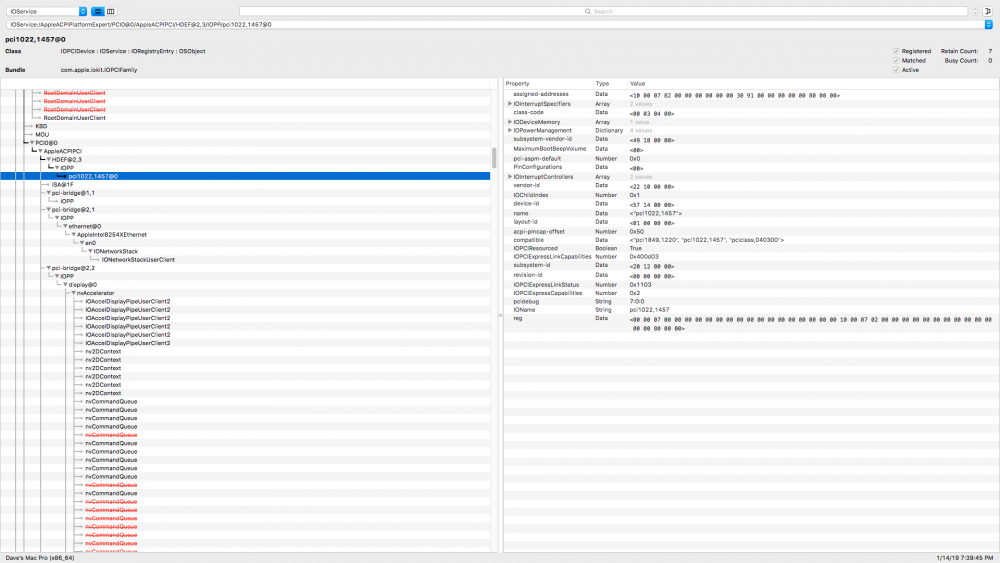
Did some CPU tweaking, but after rolling back to stock CPU and RAM clocks in BIOS/clover and setting the VM to cores 0-3, 4-7, 8-11, and 12-15 did nothing to fix audio on VoodooHDA. I tried adjusting the bitrate through Audio midi devices, but usually testing with System Preferences just made the whole VM crash and require a full reboot of the system since I can't properly reset my audio device. As for native audio, I did manage to make some tweaks and get my audio device recognized as HDEF: Doesn't seem to have done much, I now just get a different error when running the install script:
-
I was looking into this in particular, it didn’t get me far. MSI seems to be a driver-level thing in macOS, so perhaps an alteration to applehda.kext or realtekalc.kext could allow MSI to be enabled, but I actually have the crackling audio issue with usb AND Bluetooth headphones even if I use a vanilla Applehda.kext and completely remove voodoo or realtekalc. I think I may have mentioned this previously, but I can’t reproduce the audio issues on other OSes, and my audio codec is running in LSI mode in windows. As for whether is OS X needs it? Got me there.
-
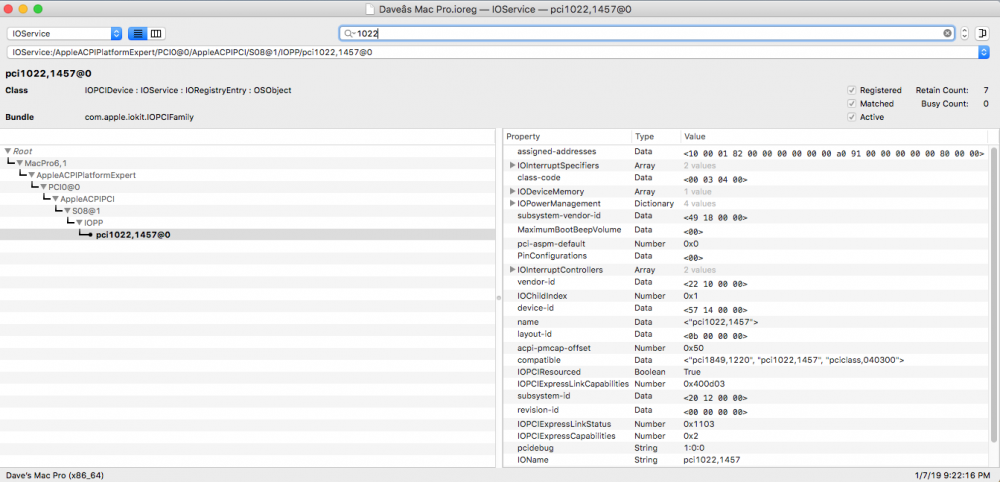
Jeez, sorry guys, I really should've done better on that. Was really late when I drafted this post so I missed a couple things. What I attached is pretty simple. Config.plist, minus serials: The third file is basically just a copy of the terminal output in my first post, nothing super important. What I think might be useful here is my ioReg dump which shows my audio device connected, but not as HDEF or HDAU as (I think?) it should be. macOS has got it.. just confused about what to do with it?
-
Hey All! Glad to be a part of the unRAID forums, best OS ever. Anyway, was hoping one of the experts over here could help me out. I managed to get an OSX virtual machine running really well with GPU acceleration and everything seemed to be working well until I tried to play audio. Using voodooHDA, my bluetooth and onboard audio devices have this really horrible crackling and distortion, it's totally unlistenable. Here's my build: Asrock X399 Taichi ultimate + TR4 1950x +16GB G. Skill Ripjaws (I know, not enough RAM) + gtx 1080/960. My windows vms work great, as do the limited linux vms I've tried. I've followed numerous guides to fix this issue, starting with Gridrunner/Spaceinvader's latest guide to build a Mojave/HS vm. From there, I tried: https://www.tonymacx86.com/threads/audio-realtek-alc-applehda-guide.143757/ - This didn't work, as I couldn't figure out how to make any of the applicable fixes work on my x399. Didn't seem compatible. I tried - https://forum.amd-osx.com/viewtopic.php?f=24&t=4880 - made a post on this thread but didn't get a response. also tried - https://forum.amd-osx.com/viewtopic.php?f=23&t=4642 - basically the same thing but without a script to potentially break things. When following the second guide, I receive the following error in terminal: Also here is my XML: And my IOMMU groups just in case it's relevant for some reason: I'd really appreciate any help that the members of unRAID's forum here could provide. I've been screwing around with this for the better part of a week now on the audio alone and I'm feeling pretty clueless at this point. Surely there's a config issue I'm missing somewhere here, as I've seen others with similar systems that have been met with much success. Also, I've attached the files that were requested for problem reporting in the second thread I mentioned. Hopefully someone can provide more info than I was able to glean from them myself. Cheers! config.plist Dave’s Mac Pro.ioreg Terminal Saved Output

