





jvorn
Members
-
Joined
-
Last visited
Everything posted by jvorn
-
This is great but I have a question, is this a UserScript that runs for you on startup or something? Thanks!!!
-
Rolled back to suggested version, but now I'm getting this error repeated tons of times: Traceback (most recent call last): File "<frozen importlib._bootstrap>", line 92, in acquire File "/usr/lib/python3.8/site-packages/twisted/internet/defer.py", line 962, in __del__ log.failure(format, File "/usr/lib/python3.8/site-packages/twisted/logger/_logger.py", line 190, in failure self.emit(level, format, log_failure=failure, **kwargs) File "/usr/lib/python3.8/site-packages/twisted/logger/_logger.py", line 144, in emit self.observer(event) --- <exception caught here> --- File "/usr/lib/python3.8/site-packages/twisted/logger/_observer.py", line 131, in __call__ observer(event) File "/usr/lib/python3.8/site-packages/twisted/logger/_legacy.py", line 93, in __call__ self.legacyObserver(event) File "/usr/lib/python3.8/site-packages/deluge/log.py", line 204, in emit getattr(LoggingLoggerClass, event_dict['log_level'].name)( File "/usr/lib/python3.8/logging/__init__.py", line 1481, in critical self._log(CRITICAL, msg, args, **kwargs) File "/usr/lib/python3.8/logging/__init__.py", line 1565, in _log fn, lno, func, sinfo = self.findCaller(stack_info, stacklevel) builtins.TypeError: findCaller() takes from 1 to 2 positional arguments but 3 were given
-
Responses in blue, thanks for helping! Let me know if you need any logs or info.
-
Any thoughts on my issue?
-
My private tracker only has whitelisted a version of deluge that @binhex never even made (Deluge 1.3.11; earliest binhex is 1.3.12-01), but I've been using this docker for a year with no issues, I'm sure why that would suddenly change.
-
Ever since about 2 weeks ago, I can no longer add torrents of seemingly any type to the server anymore. Methods that had previously worked for a year no longer work. That includes delugesiphon, adding via URL, and adding a .torrent file. When I try to add this is the logs that seem to be correlated. Traceback (most recent call last): File "/usr/lib/python3.7/site-packages/twisted/web/client.py", line 2019, in connectionLost self.original.connectionLost(reason) File "/usr/lib/python3.7/site-packages/deluge/httpdownloader.py", line 78, in connectionLost self.finished.callback(self.agent.filename) File "/usr/lib/python3.7/site-packages/twisted/internet/defer.py", line 460, in callback self._startRunCallbacks(result) File "/usr/lib/python3.7/site-packages/twisted/internet/defer.py", line 568, in _startRunCallbacks self._runCallbacks() --- <exception caught here> --- File "/usr/lib/python3.7/site-packages/twisted/internet/defer.py", line 654, in _runCallbacks current.result = callback(current.result, *args, **kw) File "/usr/lib/python3.7/site-packages/deluge/core/core.py", line 542, in on_download_success return self.add_torrent_file(filename, b64encode(data), options) File "/usr/lib/python3.7/site-packages/deluge/core/core.py", line 483, in add_torrent_file filedump=filedump, options=options, filename=filename File "/usr/lib/python3.7/site-packages/deluge/core/torrentmanager.py", line 532, in add 'Unable to add torrent, decoding filedump failed: %s' % ex deluge.error.AddTorrentError: Unable to add torrent, decoding filedump failed: unexpected end of file in bencoded string Any thoughts? If you need any more logs I'm happy to provide. UPDATE: It looks like torrents not from my private tracker work (just torrented archlinux as a demo). Very strange. Any thoughts @binhex?
-
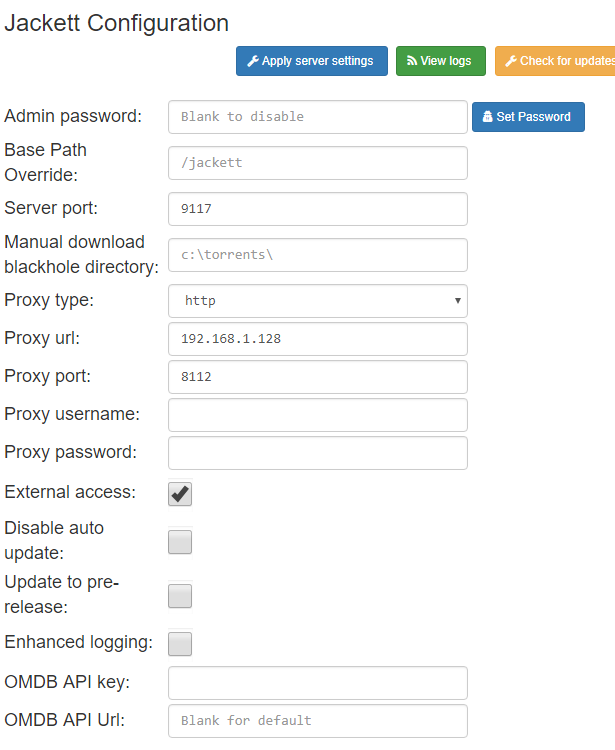
My ISP doesn't block it as I can navigate there in my browser. Some more strangeness. I was able to add the tracker from a fresh install of the docker, but the second I added the proxy info back in it starting failing. Adding to the confusion, when I removed the proxy info it STILL didn't work. The proxy does work though, my Deluge is reporting the correct VPN IP...
-
Deluge? Yes, using it now. Jackett? Only the first day, it stopped working after an update.
-
I removed the proxy from the settings and it still fails. I know I have DelugeVPN set up correctly because my torrents are correctly downloading from my new IP. I noticed that video doesn't mention Jackett at all, did I miss it?
-
Sure thing!
-
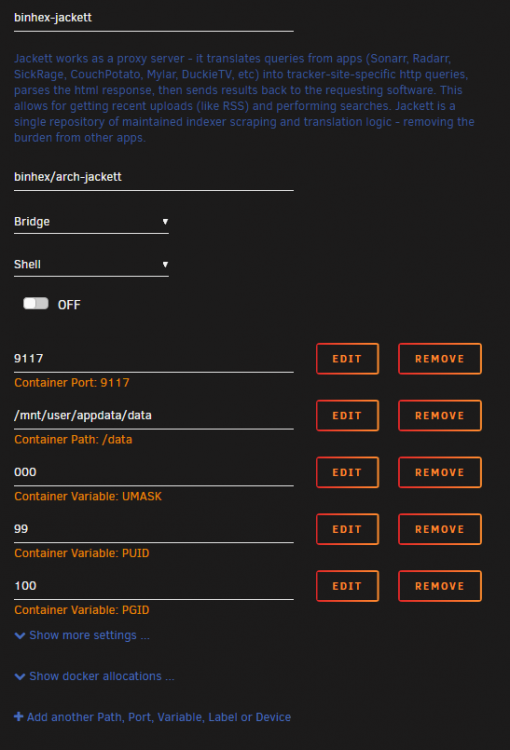
I can't seem to add indexers to Jackett, when I search for one and hit the gear to configure it I get "Request to Jackett server failed". It does generate a large error in the logs of which the first line is "System.Net.Http.HttpRequestException: An error occurred while sending the request ---> System.Net.WebException: Error: ProtocolError". I am using Binhex-DelugeVpn container and configure Jackett to use it as well. Thanks!
-
Makes sense! I would have never thought to change those, I thought for sure it was a docker config issue since Im new at this... turns out I should have trusted myself more!
-
I did have them both checked and unchecking and restarting the docker fixed it! Why do you think those settings were blocking things? Thanks!!
-
I do have a cache drive and did your change. Nothing appeared to be different (torrents still stuck at paused). Here is the log requested: supervisord.log
-
Everything looks good here, IP is different and reporting Toronto.
-
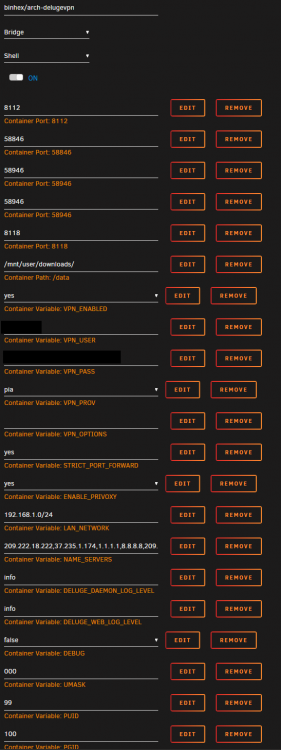
Thanks! Run command: root@localhost:# /usr/local/emhttp/plugins/dynamix.docker.manager/scripts/docker run -d --name='binhex-delugevpn' --net='bridge' --privileged=true -e TZ="America/Chicago" -e HOST_OS="Unraid" -e 'VPN_ENABLED'='yes' -e 'VPN_USER'='REDACTED' -e 'VPN_PASS'='REDACTED' -e 'VPN_PROV'='pia' -e 'VPN_OPTIONS'='' -e 'STRICT_PORT_FORWARD'='yes' -e 'ENABLE_PRIVOXY'='yes' -e 'LAN_NETWORK'='192.168.1.0/24' -e 'NAME_SERVERS'='209.222.18.222,37.235.1.174,1.1.1.1,8.8.8.8,209.222.18.218,37.235.1.177,1.0.0.1,8.8.4.4' -e 'DELUGE_DAEMON_LOG_LEVEL'='info' -e 'DELUGE_WEB_LOG_LEVEL'='info' -e 'DEBUG'='true' -e 'UMASK'='000' -e 'PUID'='99' -e 'PGID'='100' -p '8112:8112/tcp' -p '58846:58846/tcp' -p '58946:58946/tcp' -p '58946:58946/udp' -p '8118:8118/tcp' -v '/mnt/user/downloads/':'/data':'rw' -v '/mnt/user/appdata/binhex-delugevpn':'/config':'rw' 'binhex/arch-delugevpn' 006a8d92a28b4bdbfdb873f5a604e8766389e1c2c953c2eda6aba34951e6b145
-
Forgive my ignorance, is the docker run command found in the logs for the docker?
-
Yes sorry I should have said that, pressing resume appears to change nothing.
-
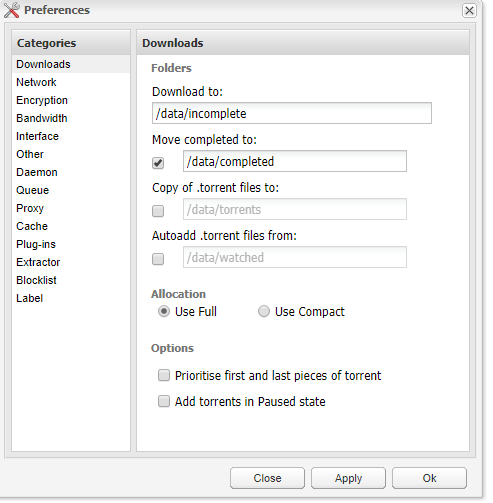
Hey all! Trying to get the DelugeVPN container to work. Followed SpaceInvaderOne's tutorial but seem to have an issue with torrents not starting. They get added but forever stay paused at 0%. I am using PIA and input my user and pass into the config, changed STRICT_PORT_FORWARD and ENABLE_PRIVOXY to yes, selected a PIA Server that supports port forwarding (CA Toronto) and placed that ovpn file in the openvpn folder along with the 2 ca.rsa.2048 files. Everything appears fine when it starts but when I add torrents they just stay paused at 0%. Any thoughts? Thanks!

