





poniz
Members
-
Joined
-
hello JorgeB Unfortunately i already rebooted by the time i got your reply last week. I ended up connecting the drive to different set of power and SATA cables. So far so good. Run both SMART tests it passed lets see what happens. If it fails again i'll get the diagnostics file and remember not to reboot Thank you for your reply!
-
hello, so randomly UNRAID reports one of my drives fails, but then after a reboot it comes back in Unassigned Disk Devices. So then i check the drive in Hard Disk Senntinel and it doesnt report any issues in SMART or HEALTH. Oh and also did a Surface Test with MiniTool Partition Wiz and it passed with no errors. Now is my drive really failing or could it be something else? could it be the power connector or SATA cable or SATA port ? What's a good program to run a proper test and see if my drive is actually good ? i guess once i can verify my drive is good then what should i check first SATA cable? or POWER? Now i'm starting to think some of my other drives that were reported as failed could be still good, thankfully i kept them all in a box and would like to test each one to make sure i'm not throwing away good drives. any help would be greatly appreciated
-
Thank you but that didn't work. i ended up create a new VM .
-
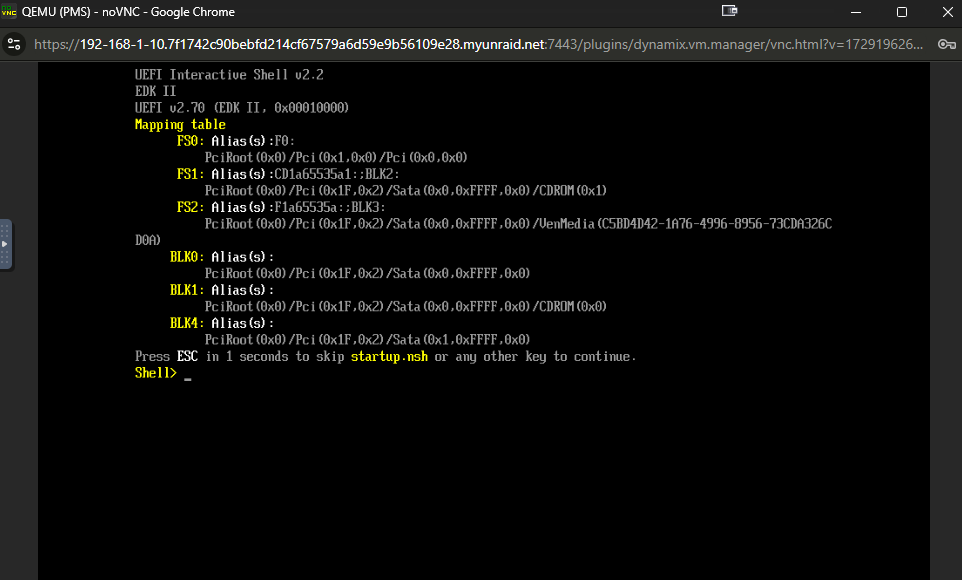
Hello, not sure what happened but after I had some USB issues I ended up fixing. And then updating to v7. Now i noticed my VM will not boot any more. It just stuck at this screen. Any idea how to fix the VM ? The OS is Windows Server 2008. Should i just create a new VM and cut my losses ? All i have running on the server is Plex Media Server. Any help will be greatly appreciated. Diagnostic Zip Attached. Thank you xenon-nas-diagnostics-20250115-1753.zip
-
Yea me to and the thing i am using USB 3.0 ports i thought they just would be faster for the read/write. I didn't know unRAID ran better on USB 2.0. I should switch to the USB2 on my next reboot. And the dongle straight to the mobo does some like a sweet idea thanks. I also heard of people using USB DOMs. Its supposed to be really reliable just not the greatest write speeds but unRAID only needs USB2.
-
some strange i shutdown the server and tried a different USB port and its working with no error but your right since i have it up and running time to run a full backup just in case in fails at any point
-
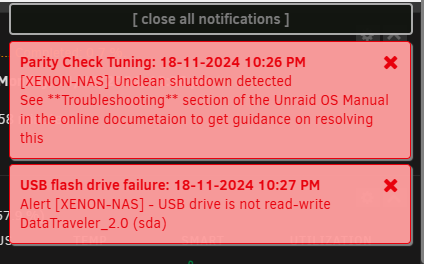
Got the following pop up today after a power outage. is my USB toast ? then i can not update an plugin i am assuming they can not write to USB any more. is there a chkdsk for the USB ? Last thing my dockers work fine and my VMs i guess since they don't write to usb but the array User Notes Page Notes: An update is available.Click here to install version 2024.11.18 but when i try to update i get the following error when i try to do the unassigned.devices.plg update unassigned.devices.plg: An update is available.Click here to install version 2024.11.16 i get this error as well Man i am having some bad lately with my server
-
Sorry for the late reply been busy with work. Hmm ok maybe i should try and install the plugin in enable/disable lol. Thanks for the clarification
-
Hello, so before i wanted my system to sleep when i am not using it but it never woke up properly and i always missed downloads. So i decide to disable sleep in the plugin but the system kept going to sleep. So then i removed the plugin all together and the system still goes to sleep at random times. is there another place where i can check if sleep mode is enabled ? or a cmd i can run to fully disable sleep mode? xenon-nas-diagnostics-20241114-1422.zip
-
Thank you for all your help!
-
Hello again, docker still wont start, just wanted to say thank you for all your help UUID: de68d996-50ba-4769-822a-45f1c30c1dd3 Scrub started: Thu Sep 12 13:30:26 2024 Status: finished Duration: 0:09:36 Total to scrub: 526.00GiB Rate: 935.12MiB/s Error summary: no errors found xenon-nas-diagnostics-20240912-1923.zip
-
ok no problem .. still got 4 uncorrectable. FYI had a power outage so i had a unclean shutdown but here are the results. to get my docker working again do you think i need to recreate my .img file? UUID: de68d996-50ba-4769-822a-45f1c30c1dd3 Scrub started: Wed Sep 11 21:48:45 2024 Status: finished Duration: 0:09:28 Total to scrub: 526.00GiB Rate: 948.29MiB/s Error summary: csum=4 Corrected: 0 Uncorrectable: 4 Unverified: 0 xenon-nas-diagnostics-20240911-2204.zip
-
Hello, ok no problem. while running scrub my box went to sleep while i have the plugin disable thats a separate issues. here are the results of the scrub before it adborted UUID: de68d996-50ba-4769-822a-45f1c30c1dd3 Scrub started: Tue Sep 10 01:40:07 2024 Status: aborted Duration: 0:18:06 Total to scrub: 526.00GiB Rate: 249.38MiB/s Error summary: verify=15251 csum=6891912 Corrected: 6907161 Uncorrectable: 2 Unverified: 0 ran scrub again this time the box didn't not go to sleep and it completed UUID: de68d996-50ba-4769-822a-45f1c30c1dd3 Scrub started: Tue Sep 10 18:05:51 2024 Status: finished Duration: 0:09:27 Total to scrub: 526.00GiB Rate: 949.96MiB/s Error summary: csum=4 Corrected: 0 Uncorrectable: 4 Unverified: 0 xenon-nas-diagnostics-20240910-2051.zip
-
Looks like the drive might be ok after swap out the cable but now my docker will not start. Do i have to remake my .img file again or is there another way to get the docker service to start ? should i be looking at replacing my cache drive or you think it was just a bad cable? Sep 10 01:26:44 XENON-NAS root: Starting Avahi mDNS/DNS-SD DNS Server Configuration Daemon: /usr/sbin/avahi-dnsconfd -D Sep 10 01:26:44 XENON-NAS avahi-dnsconfd[21838]: Successfully connected to Avahi daemon. Sep 10 01:26:44 XENON-NAS emhttpd: shcmd (77): /usr/local/sbin/mount_image '/mnt/cache/docker/docker.img' /var/lib/docker 20 Sep 10 01:26:44 XENON-NAS kernel: loop2: detected capacity change from 0 to 41943040 Sep 10 01:26:45 XENON-NAS root: mount: /var/lib/docker: wrong fs type, bad option, bad superblock on /dev/loop2, missing codepage or helper program, or other error. Sep 10 01:26:45 XENON-NAS root: dmesg(1) may have more information after failed mount system call. Sep 10 01:26:45 XENON-NAS kernel: squashfs: Unknown parameter 'space_cache' Sep 10 01:26:45 XENON-NAS kernel: fuseblk: Unknown parameter 'space_cache' Sep 10 01:26:45 XENON-NAS kernel: UDF-fs: bad mount option "space_cache=v2" or missing value xenon-nas-diagnostics-20240910-0137.zip
-
Hello, i replaced cables as you asked. and I have attached the file xenon-nas-diagnostics-20240909-1918.zip


