





ytwytw
Members
-
Joined
-
it works!!!!! thanks lots!!!!
-
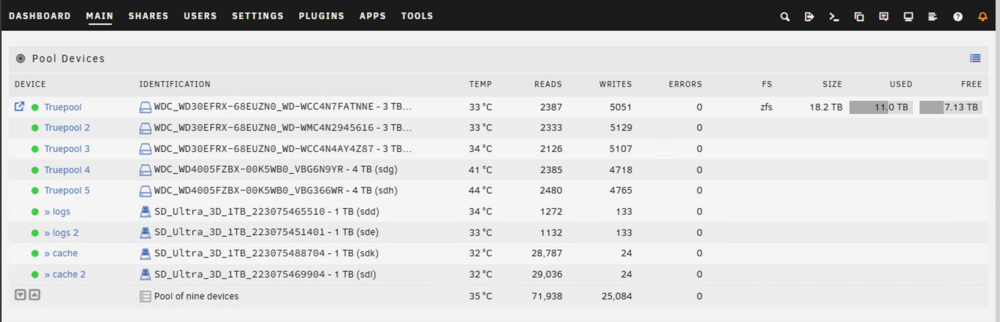
Here is the result Do I create a new pool with the identical order? How does the log and cache gonna work?
-
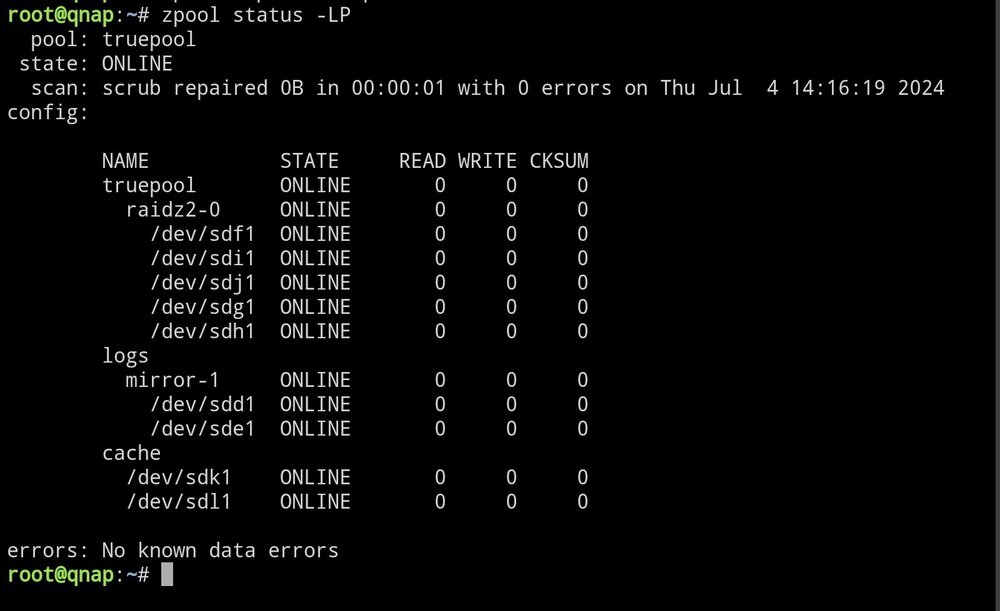
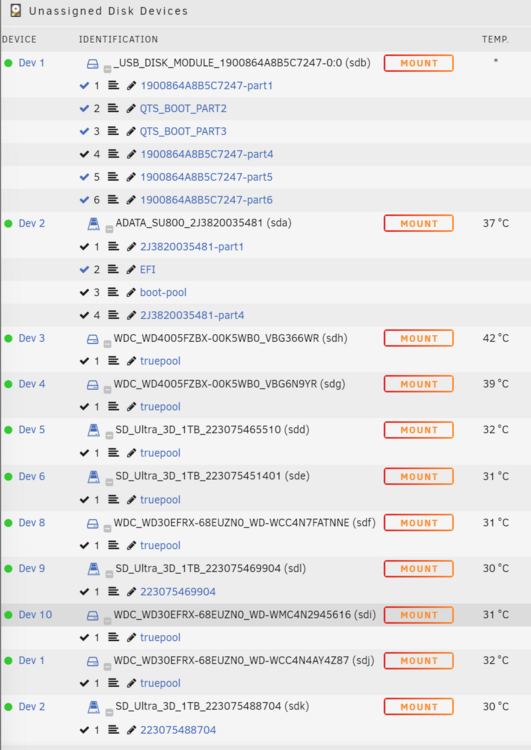
here is my truenas pool root@qnap:~# zpool status pool: truepool state: ONLINE scan: scrub repaired 0B in 00:00:01 with 0 errors on Thu Jul 4 14:16:19 2024 config: NAME STATE READ WRITE CKSUM truepool ONLINE 0 0 0 raidz2-0 ONLINE 0 0 0 75f1b2bb-ea06-4791-a8d6-71c6ad37fa1d ONLINE 0 0 0 8faca14b-95b4-4dbd-a5bd-1e92d434d1f5 ONLINE 0 0 0 c2bbbe64-badc-4c2a-addc-4ef4bb7f97c4 ONLINE 0 0 0 3daba285-bbd3-4bac-a336-542d4fe2f087 ONLINE 0 0 0 d6b7f7e8-4ce1-4ce8-8690-b52a1b2b3d1f ONLINE 0 0 0 logs mirror-1 ONLINE 0 0 0 a311bf25-b15f-43fb-8758-93a58a42f8e1 ONLINE 0 0 0 a18c4569-bab3-4145-9198-df595d489c4d ONLINE 0 0 0 cache 5b366e6a-2e81-4835-b92f-96770c011290 ONLINE 0 0 0 188f24c2-a0bd-483b-8e12-0e9fa9573fa2 ONLINE 0 0 0 here is my unraid 7 unassigned device trying to add the same disk as the pool, but I'm having difficulty to do it for example root@qnap:~# gdisk -l /dev/sdf GPT fdisk (gdisk) version 1.0.10 Found valid GPT with protective MBR; using GPT. Disk /dev/sdf: 5860533168 sectors, 2.7 TiB Model: WDC WD30EFRX-68E Sector size (logical/physical): 512/4096 bytes Disk identifier (GUID): 27BA38CF-E39D-431C-BA55-75EF7C1B5084 Partition table holds up to 128 entries Main partition table begins at sector 2 and ends at sector 33 First usable sector is 34, last usable sector is 5860533134 Partitions will be aligned on 2048-sector boundaries Total free space is 4972 sectors (2.4 MiB) Number Start (sector) End (sector) Size Code Name 1 4096 5860532224 2.7 TiB BF01 root@qnap:~# gdisk -l /dev/sdg GPT fdisk (gdisk) version 1.0.10 Found valid GPT with protective MBR; using GPT. Disk /dev/sdg: 7814037168 sectors, 3.6 TiB Model: WDC WD4005FZBX-0 Sector size (logical/physical): 512/4096 bytes Disk identifier (GUID): 906E1CD8-58D2-4B91-9AAD-70BCAA34C082 Partition table holds up to 128 entries Main partition table begins at sector 2 and ends at sector 33 First usable sector is 34, last usable sector is 7814037134 Partitions will be aligned on 2048-sector boundaries Total free space is 5740 sectors (2.8 MiB) Number Start (sector) End (sector) Size Code Name 1 4096 7814035456 3.6 TiB BF01 the guid isn't really matching the one from zpool import output Any idea how should i proceed as next step? don't want to copy the data out to backup disk and import again, as it will take me several days just copy data out also when i add a pool with fs auto, i cannot add log or cache disk either, are they required when importing pool?
-
Thanks for the info, zfs set dedup=on works perfectly Im using it for my secondary backup array, it helps lots on saving spaces
-
I am trying to find how to enable ZFS Deduplication on ZFS pool but in the pool setting, I can only see Compression, but i don't think that's the same as dedup Already searched the forum but could not find the instruction, or i didn't search hard enough I have a test machine on unraid 7 beta 2 as well as 6.12.11, both could not find the dedup Thanks
-
I would like just to have a basic file explore to delete bad folders, create folders, copy/move files doing with docker solution is still not convenient as web interface plus, we can already browse files...



