





blakeslade
Members
-
Joined
-
Last visited
-
Hello! I'm getting an Unable to Connect error and then an Internal Server Error when I try again to connect to my Nextcloud docker. Had some major PSU issues recently resulting is false HDD failures and errors. Replaced PSU, MB, CPU and RAM and rebuilt the server and the array. IP address has changed as well, perhaps this has something to do with it? Initially none of my dockers worked, but after a couple of reboots they are all working except for NC and Transmission. Thanks for your help!
-
Hello! I'm getting an "Unable to Connect" error to my Transmission docker. Tried both FF and Edge same error. While waiting for a reply I went ahead and removed the docker and then reinstalled it. Still having the same issue. How do I resolve an unable to connect error via web browser for transmission? And while we're at it, is it usually the same solution for all dockers? Secondly, how do I connect via consol? Had some major PSU issues recently resulting is false HDD failures and errors. Replaced PSU, MB, CPU and RAM and rebuilt the server and the array. IP address has changed as well, perhaps this has something to do with it? Initially none of my dockers worked, but a couple of reboots later and a HDD xfs_repair only Transmission and NC are refusing to work. Thanks for your help!
-
Yes of course. Thank you!
-
Initially none of them worked at all using the GUI. I am not familiar with how to connect via console. I am now only having issues with two dockers: Nextcloud (unable to connect initially then internal server error) and Transmission client (unable to connect). How to connect via console?
-
Thank you JorgeB. And now I have a question about the dockers, I am unable to connect to any of them. Is this as simple as redoing the settings files? When I upgraded the MB, CPU, RAM and PSU the server got a new ip address. Should I tell the router to set the old one? Thanks!
-
Here is the xfs_repair -n result: and then again with xfs_repair -v: When array is started the drive is mounted but I cannot browse the content. How do I replay the log? Or do I use xfs_repair -L to destroy the log?
-
Update: Now the plugin FixCommonProblems has discovered that disk 5 is being reported as full, but it is not (2.66Tb / 6Tb used). Additionally, I cannot connect to any of my dockers. What should I do?
-
Thanks for joining the thread JorgeB! I rebooted the server and started the array and all drives are mounted and no errors have appeared... yet. Before I cheer, is there anything I should do next? Run parity check again with the now mounted disk2? Thanks again! tower-diagnostics-20220321-1739.zip
-
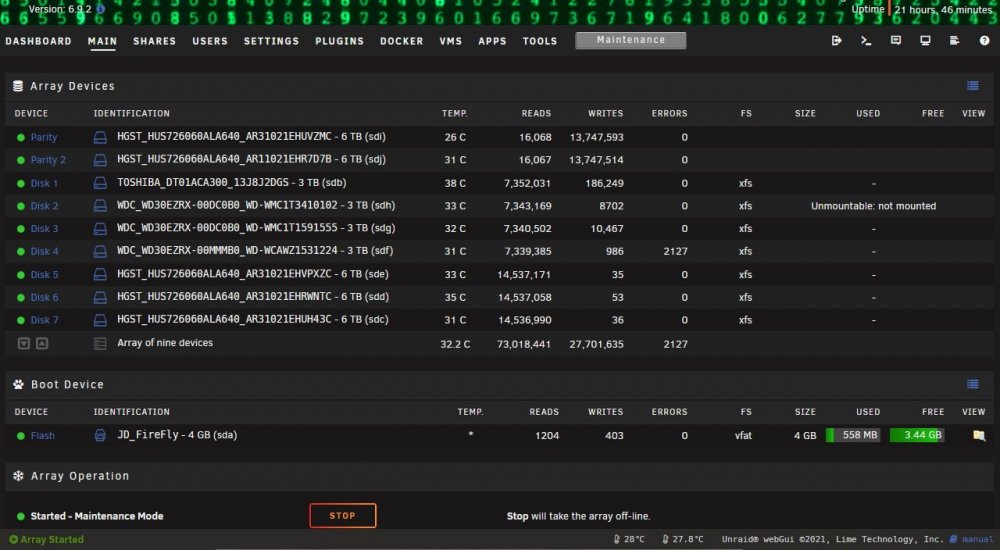
Hello! I'm a basic Unraid user and have run into some trouble with my server. As the title reads, I have a data disk (with data on it) that is being reported as unmountable and another disk with errors reported when building a new config. I have attached the tower diagnostics the downloaded smart report for sdh and sdf and a screen shot of Tower Main. What I have done: - Ran a full smart diagnostic which passes on the unmountable disk (sdh) - Mounted array in Maintenance Mode and ran xfs_repair (through GUI) with arguments removed on both disks (sdh and sdf) I don't know what steps to take next? A little back story for some context: A Defective PSU has been giving random HDD errors off and on over the past year. I didn't realize it was the PSU and kept changing SATA cables, SATA headders and PCIe slots for the LSI SATA card, and SATA brake out cables. This would work for a little while then errors would appear again. Only this past week did I make the connection, but not before I went to Tools and selected "New Config" and all hell broke loose. HDD's were disappearing with every boot and errors in parity. In hind sight I should have made a post here in the forums and saved myself a whole lot of trouble. I really appreciate your help! tower-diagnostics-20220320-1536.zip tower-smart-20220319-2009.zip xfs_repair_output.txt tower-smart-20220320-1739-sdf.zip
-
Thank you skois! I now have nc up and running! I'm amazed that you were able to recreate my issue and state the work around so easily. Thank you for taking the time to help me out. I really appreciate it. I'm going to continue the setup process here, with letsencrypt (after I get letsencrypt installed using spaceinvaderone's instructions). Is there another resource that will be helpful to me?
-
I say hot damn! I am floored by your steps. Thank you so much skois! I will get on this later today, and report my results.
-
Getting a 504 Gateway time out error now. I feel like this is a comedy of errors on my end. Here are the commands I entered for mariadb: mysql -uroot -p password create user 'nextcloud' identified by 'mypassword'; create database if not exists nextcloud; grant all privileges on nextcloud.* to 'nextcloud' identified by 'mypassword'; I used nano for the config.php file, which looked like this before opening the nc webui: <?php $CONFIG = array ( 'memcache.local' => '\\OC\\Memcache\\APCu', 'datadirectory' => '/data', 'trusted_domains' => array ( 0 => '10.0.0.72:444', 1 => '10.0.0.*', ), ); Now the config.php looks like this (after the 504 timeout): <?php $CONFIG = array ( 'memcache.local' => '\\OC\\Memcache\\APCu', 'datadirectory' => '/data', 'trusted_domains' => array ( 0 => '10.0.0.72:444', ), 'instanceid' => 'ocj51yowyofq', 'passwordsalt' => 'MrmUOLhtq7TnzskZxDQePo8gChclH+', 'secret' => 'Ee5QoOEXhdGDvIzD61ogzdx4g53tXVsCe6RB2eddED4DnWzI', 'dbtype' => 'mysql', 'version' => '20.0.4.0', 'overwrite.cli.url' => 'https://10.0.0.72:444', 'dbname' => 'nextcloud', 'dbhost' => '10.0.0.72:444', 'dbport' => '', 'dbtableprefix' => 'oc_', ); I've attached an updated nextcloud.log from the /data folder (on my array /mnt/user/Nextcloud) and docker page logs. Ideas? nextcloud.log Nextcloud_Log_2021.01.13.txt Mariadb_log_2021.01.13.txt
-
Thanks ton skois, I'll give that a go this afternoon. I'm not currently using a cache drive, so my appdata is located at: /mnt/user/appdata That's the only place I need to delete the data?
-
So nextcloud is still stuck in the inital setup phase. It's stuck there. Every time I open the WebGUI it's asking me for an admin user and pw along with db options. When I open a shell to "/config/www/nextcloud" this is what I get: occ config:system:set trusted_domains 1 --value=10.0.0.* Nextcloud is not installed - only a limited number of commands are available There are no commands defined in the "config:system" namespace. At this point I've tried a few times and am running out of user names since it seems to save the ones I've tried in the past (lots of admin variations)? Thanks again!
-
Thanks for your help! Gave this a shot but no go. I stopped the nc docker, updated the config.php file using krusader and confirmed that I had the changes saved. Then started up the nc container which brought me back to the initial set up page. I entered all the details as before and ended up back at the Internal server error page. Looking at the config.php file I see that my entry has been removed and it's back the way it was now. Should I be using nano or a command line based editor instead? I've attached a new log file and the config.php as it was edited, before being reset. Thank your for your time skois! I'm sure you're very busy and I appreciate your help. Edit: I've got wireguard installed, is that causing a problem? nextcloud.log config.php
