





garycase
Moderators
-
Joined
-
Last visited
Everything posted by garycase
-
By the way, I presume you know you either need to run these from the UnRAID console (if you have one) or via Screen. You could also Telnet in for each session, but if you do that the Telnet sessions have to stay open for the entire duration of the pre-clear [Not necessary with Screen, or of course from an attached console]. I always run pre-clears from an attached console -- then a simple Alt-F1, F2, F3, etc. can switch between the sessions.
-
I always run one cycle at a time, so I can't answer the "what happens" question if there are errors in an early cycle when multiple cycles are selected. I suspect it keeps running unless the error is severe (i.e. if there are simply reallocated sectors, I suspect it just runs the additional passes ... which is what you'd want anyway, as the important thing would be to see if they are cleared and no more occur).
-
I've pre-cleared 3 at a time with no problem without any of the extra options ... just a simple "preclear_disk.sh /dev/sdX" for each of the sessions. That was on an Atom D525 with 8GB of memory. Timing was almost identical to what it took for one.
-
Actually I just took a look at a basic, Plus, and Pro system and all three default to 4K aligned (all are v5RC16c). By the way, I noticed something else vis-à-vis pre-clear's behavior with v5 ==> if the array is stopped, a preclear_disk.sh -l will list ALL disks, including those that are assigned to the array. I'm fairly sure it did NOT do that with v4.7. Apparently something has changed regarding what your script "looks at" to determine which disks are okay to pre-clear. If the array has been started, it correctly lists only those that are not part of the array.
-
Incorrect, if no option is specified, then the unRAID configuration preference setting is used. Look under Settings->Disk Settings->Default-partition-format to set your default preference. Thanks for the details Joe. But just for clarification, isn't it true that the default setting for v5 is 4K aligned? ... in which case I'd think you don't need the -A switch (with v5) UNLESS you've changed that setting. Correct?
-
By the way, I just did a couple quick tests, and the options for preclear have to go BEFORE the disk. i.e. if you were using the -C 64 option the command wouldn't be as I listed above, it would be like this: preclear_disk.sh -C 64 /dev/sdb
-
No, that won't work anymore since the disk is no longer a cleared disk. You'll need to run an actual preclear cycle on it. Since you're reasonably confident in the disk, you can skip the pre-read and speed things up a bit. Just use the -W option when you invoke the preclear. [i believe you can actually skip both the pre-read and post-read with a -N switch, but I've not tried that ... and it's a good idea to thoroughly check the disk after clearing it anyway.]
-
I thought that the latest version of the pre-clear script would, when run on a system with UnRAID v5, automatically always use sector 64 => but perhaps that's not the case. So I'd change the second disk to start on sector 64. You can make this change without a long pre-clear run by running preclear with the -C 64 option. ... i.e. if the disk is sdb the command would be: preclear_disk.sh /dev/sdb -C 64
-
The values all look fine.
-
You should look at the final SMART report to confirm there were no bad values in both the start and ending reports ... but yes, the overall report looks good => no values changed (except temperature), and all zeroes on the reallocated sector counts.
-
Looks very good => nothing to be concerned about in the SMART data, and no re-allocated sectors. Exactly what you want to see
-
I've had FAR better luck with professional packaging and very well-packed boxes for hard drives from Amazon, TigerDirect, and SuperBiiz ==> and will be buying ALL of my hard drives from them in the future. As for cables -- I agree completely with Monoprice as the source for most cables; although there are some systems that you can configure much more neatly with "left-hand" SATA cables, which they don't sell. A good source for those (in fact the only source I've found for these hard-to-find cables) is here: http://www.cpustuff.com/left-angle-to-straight-sata-cable/
-
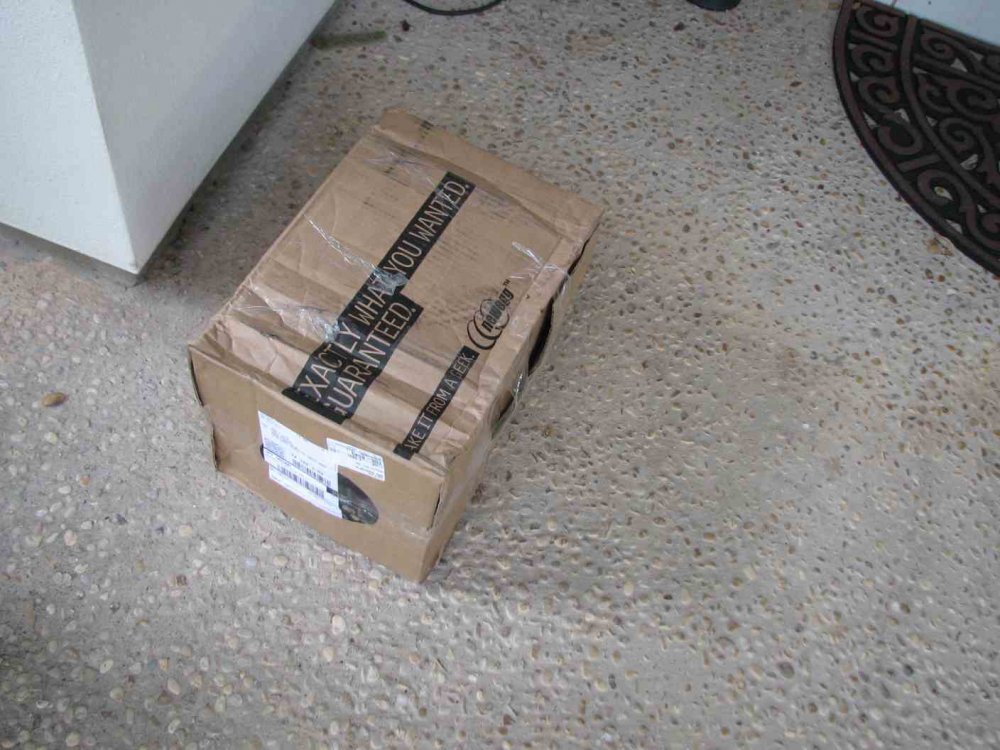
Here's the sight that greeted me when I got home last Thursday ...
-
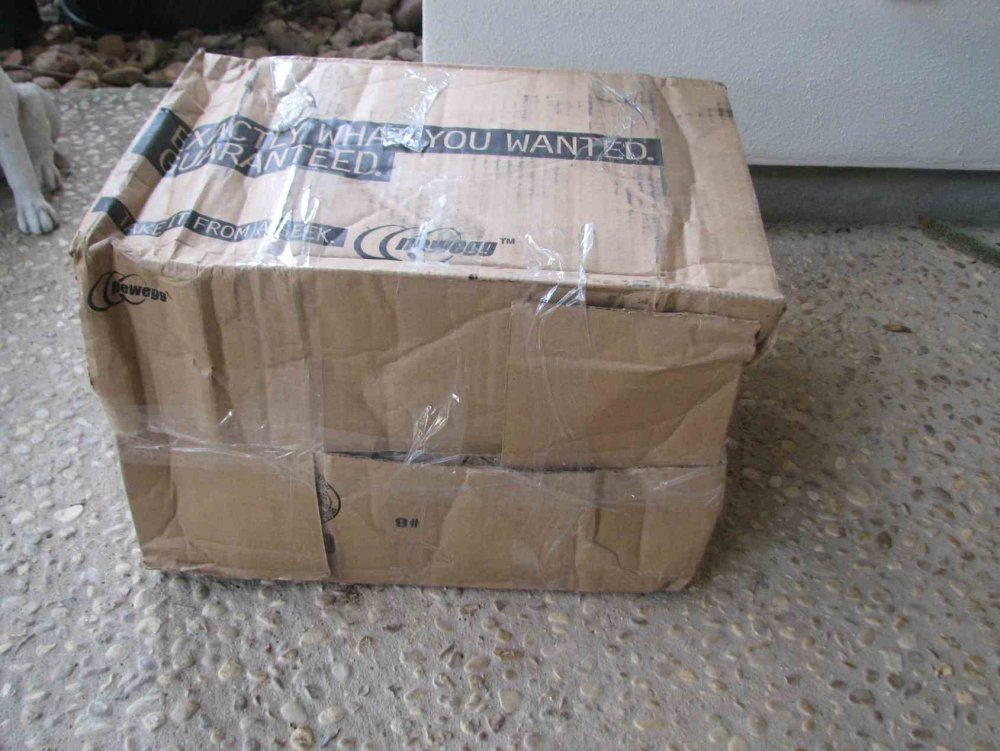
I'll add a bit of counterpoint to the title => and note that here's someplace to NOT shop for hard drives !! I've bought a LOT of stuff from Newegg over the years, including at least 100 hard drives. But in the past year or two they've become much more cavalier about "packing" their hard drive shipments .. and I suspect that much of the reason they seem to have a relatively high DOA rate for drives is they simply don't pack them well. I just got a shipment of seven drives -- 5 4TB Seagate NAS units and 2 3TB WD Reds -- and this time they REALLY outdid themselves. I've not yet completed testing all of these, but at least two are going to have to be replaced, and possibly more. THIS is the box they were shipped in:
-
Thanks Joe => Any comment r.e. #3 (the high fly writes) ?? Is this something to simply ignore, regardless of whether or not it's "near threshold" or not? The two drives that have finished so far weren't near the threshold, but with a "within 25" standard, they came fairly close ... just a few more "high fly writes" and it would have said "near threshold". From the comments I've seen r.e. this parameter, it's not clear what it actually means ... but I'm certainly interested in your opinion on it.
-
I'm in the process of pre-clearing several new 4TB Seagate NAS drives, and have the following results from the first 2 drives (the two sets of results are nearly identical, so I've only listed one, as it shows what I'd like to know). I'd appreciate some feedback on the results. My thoughts/questions are as follows: (1) The Raw Read Error Rate actually shows improvement (from 100 to 110), so I assume it's fine, and I should simply ignore the raw value. Is that correct? (2) Both the Spin Retry Count and End-to-End Error values are the same (100 before, 100 after), but the status shows "Near Threshold". Any comment on these? ... or are they fine and "ignorable" ?? (3) From what I've read earlier in this thread, I assume I should simply ignore the High Fly Writes. [status shows "Ok" anyway] (4) The temps seem fine. Not sure why the airflow is shown as "Near Threshold", but I don't see anything to worry about -- agree? ** Changed attributes in files: /tmp/smart_start_sdb /tmp/smart_finish_sdb ATTRIBUTE NEW_VAL OLD_VAL FAILURE_THRESHOLD STATUS RAW_VALUE Raw_Read_Error_Rate = 110 100 6 ok 26923560 Spin_Retry_Count = 100 100 97 near_thresh 0 End-to-End_Error = 100 100 99 near_thresh 0 High_Fly_Writes = 34 100 0 ok 66 Airflow_Temperature_Cel = 70 71 45 near_thresh 30 Temperature_Celsius = 30 29 0 ok 30 No SMART attributes are FAILING_NOW
-
Thanks Joe. Nice to know it's that simple.
-
Thanks Joe. I may do a bit of reading on dd, but the real bottom line is ... If you don't care about those numbers, neither do I !! :)
-
Ditto. I've got some new drives coming next week, so will definitely look to see if they have the same "+" numbers. And while I'll trust the SMART reports and final Pre-Clear results page, like you I'd just like to know what these numbers are reporting
-
What did the pre-clear report show at the end of this pre-clear? I've never noticed this (don't usually watch the pre-clear until it's done) ... but now that you noted it, I undoubtedly will on my next pre-clear And of course I'll wonder the same thing if the "+" number is anything but zero !! I'm surprised Joe L didn't provide some feedback on this. Joe L ??
-
I'm well aware of what thrashing is ... it can be caused by a number of factors, not just paging in the virtual memory system (thrashing can be an issue even on systems that don't use virtual memory). Perhaps it's a bit of overstatement to call every disk access that Cache_Dirs makes during a parity check "thrashing" ... but technically that's what it is => any access that causes excess head movement is thrashing the disk ... even if only a little bit. NOT complaining, by the way ... if Cache_Dirs only causes 2-3 thousand "thrashes" during a 7 hour parity check, that is VERY GOOD. No complaints at all.
-
Definitely strange ... perhaps the every-10-seconds CPU activity to do its buffer checks is enough "extra" activity to prevent whatever is causing those stalls. With only 6,000 files cached, I'm much less surprised at your results.
-
Well, it's doing something that occupies an extra 180,000 ms I'd think anything done entirely in memory would not be adding time (thus Robj's results) ... so the extra time would seem to be from actual disk accesses from Find commands. I agree, however, that 3 extra seconds is much less impact than I expected (My guess was that it'd probably take 15-30 minutes more). I'm far less concerned about having Cache_Dirs suspend itself now ... still think it'd be on balance a good thing; but clearly it's not as much of an impact as I had assumed. Based on Robj's results and mine, I'd guess he has somewhat fewer files than the 270,000+ my system does; and that up to some point there's virtually no impact [Clearly where this point is depends on more than just the # of files ... i.e. amount of memory, size of other assigned buffers, etc.] In any event, I'm very pleased with the results.
-
Okay, the parity check took 7:43:59 => almost exactly 3 minutes longer than without Cache_Dirs. [My last two checks took 7:41:01 and 7:41:00 ... so it's VERY consistent) I'm impressed that there was so little difference ... although 3 minutes is 180,000 ms, so that's probably 2-3 thousand "thrash and cache" cycles. Nevertheless, it's less difference than I anticipated -- clearly it's not a big deal whether or not Cache_Dirs suspends itself during parity checks with the file mix I have (those with more files would probably get a lot more benefit from this modification).
-
Wow -- 7 million + files is definitely a bunch One of my servers has 270,128 (w/8GB RAM); the other 134,063 (w/4GB RAM). The first is the one I'm testing with Cache_Dirs right now ... the other one is my older v4.7 server that's got all my media files on it => I plan on testing it overnight tonight if the first one shows no notable impact from Cache_Dirs.

