





ctviggen
Members
-
Joined
-
Last visited
-
Thanks. Somewhere in this thread was a recommendation to briefly press the power button, and unraid would attempt a clean shutdown. I did that, and unraid must have completed a clean shutdown, as it shutdown and after I got done moving everything and turned on the server, it came up without a parity check.
-
I just tried to stop the server using the Web interface. Now, it's stuck. I can't do anything. When I get to this point, what do I do? (I have to move the physical server, so I had to shut it down manually.) Mine seems to go through phases -- the last few times, I've been able to shutdown with no issues. This time, I couldn't. I'm assuming something is running (though I don't know what).
-
Ugh. Sorry. I found a post that did not have this error, but had something similar. The time on the motherboard/server was incorrect. So, I logged into my motherboard via IPMI and saw that it was set for the incorrect GMT area. I set it for the correct GMT, and the upgrade is going now. How do I mark this as solved?
-
I get the following when I tried to upgrade from 6.9.2 to 7.0.1. Any idea what the cause is?

-
Are there any tools that can help me determine what is running and shut it down? I've found some tools I can use via Telnet, but they aren't great, as the processes keep moving around (up and down depending on how much CPU they're using). I found out this morning that the plug into the system is precarious. I moved some cables, and the plug disconnected briefly, shutting down the system. So, now I'm running a 10+ hour parity check. But this weekend, I'd like to shut down the system and correct the plug issue. (Then, if I have time, which I likely won't, upgrade to 7.x.x.)
-
Thank you. The parity check took 15 hours and 40 minutes for the parity check, which I seem to remember is normal. I am going to upgrade from version 6.9.2 to version 7.x.x. I was trying to fix the cache drive issue before I did that. Then, I'll look into the parity check tuning plugin.
-
Thanks. The parity check usually goes over night, but goes 16 hours or so. If it starts at midnight on the 1st of the month (which is how I think it's set, but I'll look), it lasts until 4pm the next day. Yesterday, I replaced the parity drive because it had thrown an error a while back and people here said I should do that. So, it ran from the afternoon yesterday, and it's sill going this morning. And, we have plenty of times when we get power outages, where the system doesn't shut down correctly (don't know why -- most times, it does not, but sometimes it does; like yesterday it did a clean shutdown, but last week did not). I have a battery backup, but there's no power, so I can't interface with the server. (I can after I get a gas generator going, but that takes a while.) I have the system set to begin shutdown not too long after power goes out, because the backup has to run WiFi, and I want that on as long as I can. Once we get power back, the system automatically starts a parity check if there was no clean shutdown. Is there no way to prioritize this, so that the parity check has lower priority than fetching data or is stopped while fetching data? Or is the solution to go from spinning disks to all SSDs?
-
When my server is doing a parity check, the connection slows down so much that it is hard or impossible to watch recorded TV that is stored on the server. I don't have anything running on the server or other than TV being taken on/off the server. I had to buy a new home theater computer, which is what I use to watch recorded TV. So, it's about as fast as it can get. Right now, the server is doing a parity check and the CPU load is only around 2%. What could be the cause of the slowdown?
-
So, I was able to do a clean shutdown. I assume whatever was running before to prevent shutdown was not running. I also had normal CPU readouts. After some hick ups (I had to download a different version of the same program), I was able to get my IPMI password reset by booting into a DOS stick and running a program. I took out 1 8gb memory stick and replaced with 2x8GB to get dual channel. I replaced the parity drive with a better parity drive. The system is up and a parity check is started. I'll be back to discuss how to ensure all processes are off before shutting down, and then to discuss upgrading.
-
Will do as soon as I can. I had to manually shut it down. The PDF I have downloaded for this server is for a different motherboard, which has HDMI. The motherboard I have only has VGA. Well, I don't have a VGA cord, so I can't connect it to a monitor, which I need to do to boot into DOS and correct the IPMI password issue. Ugh. Off to BestBuy to get a cord. I took this over to my desk, where I have a ground mat and wrist straps, took the top off to see what it's like in there. I bought a massive cooler for the processor. I only have one DIMM. I probably did not know back then that two DIMMs were better. Rebooted and doing a parity check, so of course the CPU/threads are fine. Will check back once I do something else.
-
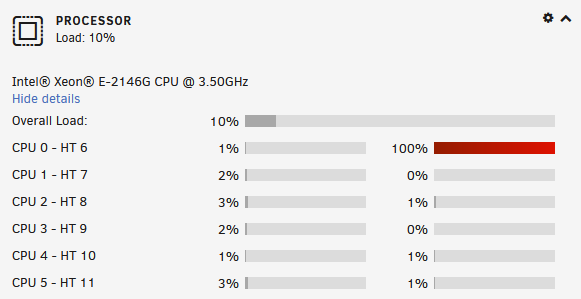
Thanks. Any idea why I get 100% on different threads/CPUs? Maybe this isn't real? I've figured out how to do the IPMI password, so I'm going to do that, since it involves booting into a DOS environment. I can put in the new cache drive at the same time. I'll see what happens with the shutdown.
-
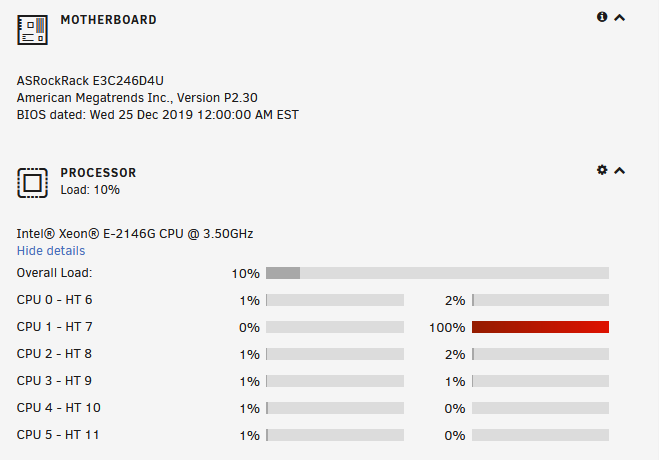
I have not had time to do work on my unraid server. I finally have (some) time to do this. I need to: 1) Upgrade from 6.9.2 to 7.x.x (is there an upgrade fee for this?). 2) My server motherboard's (AS Rock Rack) IPMI password does not work, and I have to correct this (anyone know how?). 3) My cache drive threw an error a long time ago, and I have the replacement drive. (Have never had a second error, but folks here recommended I replace the drive.) 4) I have shutdown problems where I manually have to shut down. 5) I have this odd issue where one of the CPUs/threads is at 100%, though it's a different CPU/thread each time I look: What order should I attempt to do all of this? Thank you.
-
I don't know that it's that hot. This is what I get: I bought a "fancy" motherboard that allowed me to remote into it...until the password got corrupted somehow. If I could remote into it, I could access the temperature. I have figured out how to correct this, but I need to make a bootable USB, shut everything down, boot, change the password, etc. I haven't had time to do that. I did buy a heat sink for this and put it on when I installed it. Can't remember what I bought though. The system is in the basement, which is generally cool. It's right by my workout "room", and yesterday in the morning when I was working out, the fan was coming on, going off, coming on, going off.... I'll adjust the temperature and see if that helps. I also have to change out a hard drive, so I'll look into this again this weekend when I do that.
-
Thank you both. Well, I have another system using Kodi where the motherboard is going bad. I thought since I have to buy all that (motherboard, M.2 storage, processor...), I should consider fixing this issue, if it is one. Huh...I do see I can set a warning and critical threshold. I did not know I could do that. What is a high temperature for an SSD? And, whoa, when I bought 256GB 4+ years ago, I thought that was big and costly. Now, 1TB versions really aren't that expensive.
-
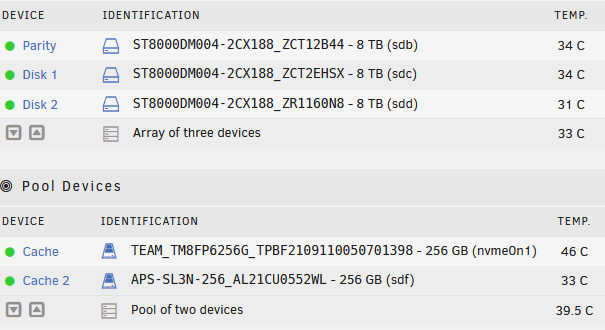
In 2021, I bought a new system for Unraid. For the cache, I used a 256GB M.2 SSD and another 256GB SSD. I believe I bought a Teamgroup MP33 M.2 PCIe SSD, and I put a heat sink on it. It, unfortunately, is always hot. It's at 46C right now, while the other SSD is 33C and the drives are 31-34C. This causes alarms and intermittent fan spikes. The info for the motherboard lists this: M.2 Socket (M2_1) (Type 2230/2242/2260/2280)* Can anyone recommend a replacement that isn't as hot? And should I put a heat sink on it? Thank you.

