15goudreau
Members
-
Joined
-
Last visited
-
Hi Jorge, I think I misunderstood exactly what unbalanced was doing, so I think things are actually ok at the moment. I included the HDD which was sitting in the disk share to the global user share. This seems to be working as expected when booting up the array. I do think there are some lingering permission issues with my nextcloud docker, but I will create a new thread if I can't figure that out.
-
Hi, I was in the process of consolidating all my data from 5 disks into 1 disk. I used the unbalanced plugin to do this. After this completed, I noticed that under shares that disk 6 wasn't assignable and then I started googling... And found out that I should never move data from a user share to a disk share. Currently I have my array stopped, to see what the best path moving forward is. Luckily a lot of my data is still on my cache drives which I haven't touched. However, a lot of raw data such as my NAS and nextcloud data storage was on disks in the user share. I did go into the disk share and click around on some photos, which seem to be loading file. But I'm unsure if things are corrupted or how to tell. Before I do anything further, I'm wondering if there is a good way to either undo what was done, or since I didn't move data from a disk array to a user array, if things aren't as bad as it seems. Any help here would be appreciated. My last backup of the system was quite a while ago, so it sounds like some files might be permanently lost. Lesson learned. I also was struggling to find a way to convert my disk share to a user share. The plan would be to unassign all the disks associated with the user share, create a new assignment with this disk share as disk1 and then rebuild parity. If this isn't a strategy that works, please let me know what would be best. Thanks!
-
So myself, probably and many others, set stuff up as spaceinvaderone suggest with the appdata. Can you elaborate why it might not be a good idea for /mnt/user to be used instead of /mnt/cache? Is it fine to just have the folder in /mnt/cache? Will that mess up any cache settings of the docker? I'm not a super power user in unraid so there aren't always reasons why to do something and I am just using a suggestion from someone else without knowing the full reason. Would love more information about that.
-
It could be just the default location for the /config as explained up. I am going to re-set up instead of using appdata and put in directly onto the cache drive and see if it happens again when an update hits. I agree this is obnoxious and none of my other containers suffer this issue so I have to think it's an openvpn-as issue completely.
-
Thanks, I'll try this when I get home.
-
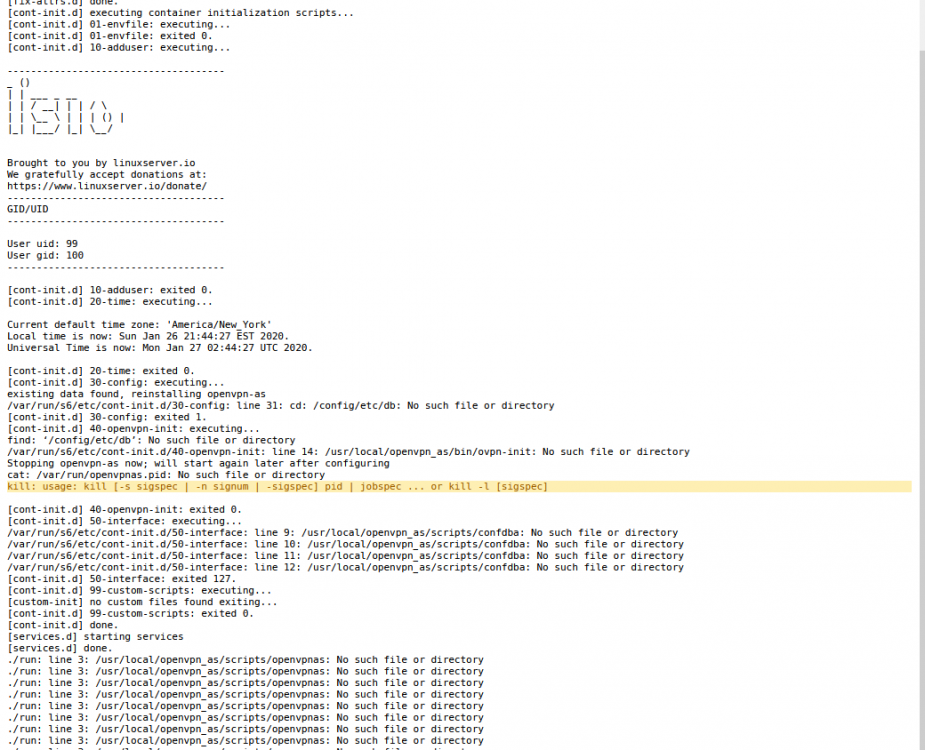
Hi All, I seem to have a reoccuring problem with openvpn whenever I update the docker container. This has happened multiple times, and I have usually fixed it by deleting the whole docker and starting from scratch, I don't feel like this is a valid way of dealing with this problem though. So whenever I update the docker, it seems to start fine, but fails to load anything. This is the run command and the log file I am unsure what is going on here, if it's a file location, a configuration error or what. I followed the spaceinvaderone video that was update in 2019 to set this up. Any help would be much appreciated as this is a real pain point in my vpn. Thanks!