





watchmeexplode5
Members
-
Joined
-
Last visited
Everything posted by watchmeexplode5
-
@DZMM @testdasi Saw the same performance you guys observed with high object count. I ran some r/w tests on a tdrive while filling it up with more objects. No performance loss till ~100K objects. After 100K, there started to begin a gradual performance loss. Initially very small but by 350K+ objects it was significant and numbers varied a lot. Performance bounced around a lot but I saw stuff like 40-70% decrease. Definitely was struggling dealing with the objects. Isolated everything to make sure mergerfs and rclone weren't causing the issue. Seems like it's googles end where the performance loss is. So anyway... best practice would be to shoot for <100K objects. Anything higher, it's probably best to seperate/gdrive it if you want to squeeze out every bit of speed.
-
@Bjur What do the logs say when you run the second mount script? Sounds like something was configured wrong and the script thinks you have already mounted that drive
-
@Bjur Yeah, you should have not have any resource issue running 2+ mount/upload scripts. You can run them at the same time or staggered. I'd run them staggered just to keep the api calls down. I don't know much about the nfos but I think that should work fine. I'm making the assumption that plex imports the data to it's library based off the nfo so after import the nfo file is un-needed. If the nfo file is only accessed on import you could even leave those with the files and upload them to gdrive as well. If plex is constantly referencing the nfo file, then that might lead to slow scans/navigation. Again, I don't know much about that since I've never used them or that addon.
-
@DZMM Interesting finding about the object count. I've got ~95K objects and I'm seeing load times similar to your time after you split your mounts. Are you still using mergerfs to put all the mounts in a singe folder for access? Could it be a mergerfs/rclone issue due to high object count? Or are we pretty sure there is some "soft-limit" in place? I might make a test t-drive and stuff 350K objects in it and see if my r/w speeds suffer.
-
@Bjur Feel free to separate them as you see fit. I was just purposing the simplest file structure for ease of setup. Having two remotes would certainly reduce the change of having too many objects in the drive. In reality, I'd say 90% of users are not likely to hit that object limit so I really only consider it as a [more-advanced user/special use case] issue. But again the two remotes would work fine. Just a little more effort on the end user during setup. Benefits of using 1 shared drive vs multiple are that you only have to run a single script for upload. Makes for simple setup of the scripts. If I'm not mistaken, with multiple drives you would need another instance of the script to upload to the second drive. But it does sound like DZMM saw a bit of a performance bump with seperate drives. I might have to run a few tests and see if I can squeeze out a little more performance. On my fiber gigabit line I've got about a 2-3s startup time and like 1/2s for all media. On high bitrate files (80+Mbps) there might be 1 extra second or so added. Are you going to stick with the nfo metadata and keep them locally stored? Let me know how it works. I'm always looking to improve my server haha!
-
@DZMM, @testdasi Quick question with regards to the 400K object limit. I don't have any experience with it but plan on hitting it sometime in the future. Are there any advantages to moving from tdrive ---> gdrive vs. tdrive ----> tdrive2? Both should still be able to do server side transfers with no quota issues, correct? Ever experienced this 150k/400K+ objects slowdown on a gdrive?
-
@Bjur Ember takes me back haha. I haven't used that for like 8 years but what a god sent that program was back in the mysql+XBMC days! Preview Images: Personally, if preview images aren't a 100% must to you, don't enable them. They are a huge pain when gdrives is involved, take up a huge amount of local space (rip 2tb ssd), and have cause so many users headache due to api bans when enabled. They can be done with gdrives but it's kind of like playing with fire. Maybe something to explorer once you have everything stable. File Structure: With regards to your local location. You are correct. Your local location in your case (remote name googleFI_crypt). All your locations look good for SAB/Filebot. You should point Sonarr/Radarr/ect to /mergerfs/remote/[movie/tv] This will allow those programs to see the combined local/gdrive folder so the can monitor both as if it's one drive. /mnt/user/local/ └──googleFI_crypt/ (YOUR REMOTE NAME) └── ├── Downloads (Stuff here excluded from upload) | ├── Movies (Moved when running upload) | ├── TV (Moved when running upload) | ├── Whatever_you_want (Moved when running upload) Metadata: Regarding the XBMCnfoMoviesImporter. That is a tricky situation. I've never used the plugin but I looked at it and it just adds a custom agent to import the nfo files. You might want to try plex with some foreign titles. I have no experience with this but you might be surprised at how well it can scrape (fix anything with the fix match tool). With regards to the .nfo files. You could exclude them and that in theory would work fine. But your /local/ file is going to get very busy quickly (lost of folders and subfolders just for a single nfo file). Might make it difficult to manage just from a file view standpoint. I personally like to open the /local file and only see my /downloads folder (my only excluded folder) and nothing else. Someone else can chime in on this practice. If your nfo files are perfectly curated, simply excluding them might be the best way to do it. That is if you really want the nfo files in the first place. I use no renames or metadata programs for management. I let sonarr/radarr grab the files, rename them, and move to their location. Then I let plex/emby scrape them and it works 99% of the time. Anime needs a custom agent but now it scrapes just like the rest with ease. Your use may vary though with foreign media (no experience there). I'd do a test on like 20 or so ones you think plex would struggle with and see what it spits out without any nfo file. Exclusion Time: New files can be excluded for X amount of time. YOU define this in your upload script. It's the minage variable. Set it to whatever you want. Mines at 15 minutes. Regarding MergerFS mounts: I think in your case it's best to have just one. One crypt with subfolders being /movie and /tv. My crypt has tons of subfiles (movie, movie4k, documentary, tv, tv4k, tvcomedy). If you run into the issue of 400K limit you can simply move the teamdrive folders ---> gdrive and make a new merger mount for them there. (IE. combines /local/movie, /tdrive/movie, /gdrive/movie --> /mergerfs/movie) The limit is fairly hard to reach, honestly. If you don't have music uploaded (lot of subfolders and files). It's something you can deal with once you get close to the limit.
-
@testdasi Just FYI if you don't already know. There is a android rclone project that supports encrypted mounts: https://x0b.github.io/ Github Project I haven't used it in a while but it has a very polished interface and worked great when tested it. Simply sideload the apk and your config and you're good to go. Not sure about syncing options but a cool project nonetheless.
-
@Bjur Sorry for the long post but.... Metadata is a hard one with cloud drives. Some other might chime in on how they handle metadata for large libraries. Currently I store all my metadata locally. When the metadata is stored on the cloud it has a few issues. One being file limit like you said. Another issue is rapid access to the metadata. With rclone overhead, and plex/emby pulling the metadata too fast all the time; you will likely receive some form of an api ban and slow interfaces when browsing. So most choose to store it locally on something fast like nvme or ssd (default setting in plex). If you are utilizing chapter/preview images (the thumbnail that appears when you scrub through a video file). Make sure plex/emby generates them BEFORE uploading. If you scrape for preview images once they are on a drive, plex needs to download THE WHOLE file to generate the image. That will result in crazy download amounts and an api ban quickly. Regarding the 400000 limit. Might be best to have @DZMM chime in here. If I recall he uploads to teamdrive (which allows 750+gb via SA) and later runs another script to move from teamdrive to standard drive (since server ---> server transfers don't count towards quota). Standard drives don't have a file limit but service accounts can't be utilized with them so you need to flip-flop a little to solve the file limit and upload limit issue together. For Downloader/Filebot folder location: Again, some users might take a different method, but I point to my ../local/REMOTE/XXXX. The files added there will be included in the merged mount so any application referencing /mergerfs/ will see your cloud files and local files as if they are in the same place. Although you could point to /mergerfs and the files would be initially placed in the /local/ during writing. This introduces more IO overhead and results in slower moves/writes/extractions. Not much slower but its definitely noticeable on any large file. Regarding temp. folders like incompletes/seeds/ect. I keep those on the /local/REMOTE/downloads/[respected] folder (script automatically makes most frequent user case directories). No need to have them anywhere else on the array and they can quickly be moved from their temp. ---> proper location when needed. Again, writing to /local/ is better practice than writing to /mergerfs/ for reasons stated above. Photos: I don't know about google photos (I don't use it). But to my knowledge it's completely separate from teamdrive. Not sure if you can link your google photos to a teamdrive. Somebody correct me if I'm wrong though. Encrypt vs Un-encrypted: Kind of a ethical question (Extremely safe and bad for the gdrive community vs Pretty safe and good for the gdrive community) *To my knowledge* - If this drive is a business gsuite account, Team-drive/google drive files are yours and only yours. Google does not look at these. The only thing google does with regards to the files is create a md5 like fingerprint of the file on upload. This is for de-duping purposes (if two users upload the same file - they only will store one copy on their servers - like hyperlinking on steroids). This only holds true if this is YOUR gsuite account (IE you pay for the business drive). If you are using something like a free edu provided teamdrive then Admins of the institution/business account could have access to your drive. So technically un-encrypted remotes are fine and many many users use un-encrypted without issue. I've never heard of google deleting personal un-encrypted accounts. The only ones that get deleted are people selling streaming services from their gdrive to 100s of users. Encrypted remotes are great though because of the obvious. It's encrypted and only for your eyes regardless of anything. The downside is that is since your file is now unique to you... google can't de-dupe it. This means google has to store way more duplicates of the exact same data == cost more. Eventually google could take up action and start enforcing the 5 user for unlimited space in the TOS, fingerprinting files for copywrite protection, and more restrictions on uploads/downloads. Lots choose encrypted for peace of mind but it's a long going debate. Can't comment on sync. I don't use it. I only use move and have never had a problem with the DZMM's scripts. You could always use copy and verify that it went as expected by looking at your /local and /rclone mounts. But again, I've never had issues with copy. If they were absolutely irreplaceable files I might keep a backup somewhere on the array while verifying but I personally still keep irreplaceable things on my own drives. Feel free to comment back or message me if you have any more issues/questions.
-
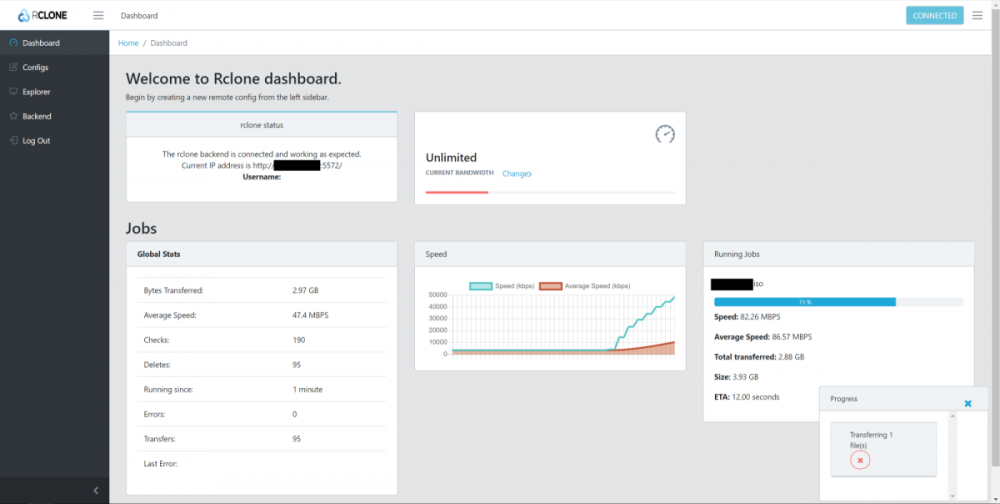
Here is a little teaser of an update I've been working on! Addition of the beta Rclone GUI (created by negative0) which can show drive activity. More info about rclones gui project found here: Reacted Rclone WebUi Project is fairly new but has some pretty active development and official support from Rclone so hopefully it keeps improving rapidly 😛
-
@teh0wner I have the same issue/errors on unmount but I haven't looked into too much. Honestly, there is always something holding up my unmount (my fault not unraids). I'll let you know if I dig anything up on whats causing it.
-
@Bjur, Personally and to save on a lot of headaches. I would structure it differently. Keep it simple and it should avoid a lot of problems. Something along these lines is what sonarr and raddar love. gcrypt/ └── ├── _Movies | └── Movie Name | └── Movie Name.mkv ├── _Tv | └── Tv Show Name | └── Season XX | └── TV Show SXXEXX.mkv With this you can freely move files into whatever directory you want at /mnt/user/mergerfs/{movie, tv, whatever - even make a new folder} and also point any downloaders to send files to these locations as well. They will be temporarily copied to /mnt/user/local/[remotename]/{Folder or File}. When your run the upload script they will be moved/copied/synced from the local portion to your teamdrive. Everything you place in the crypt folder will be encrypted by rclone "automagically". So it will look normal and act normal to you but if you go to your drive in something like a web browser, it will be all sorts of gibberish characters. Setup your config something like this. [gdrive] type = drive client_id = xxxxxxxx client_secret = xxxxxxxxxxxxx scope = drive token = {"access_token":"xxxxxxxxxxxxxxxxxx"} server_side_across_configs = true [gcrypt] type = crypt remote = gdrive:crypt filename_encryption = standard directory_name_encryption = true password = xxxxxxxxxxxxxxx password2 = xxxxxxxxxxxxxxxxxxxxxxxxxxx No need for an upload client. The upload credentials will be handled by the service accounts you created therefore there isn't any positive use case for you to make a separate upload account. The option for additional remote upload is just there encase somebody needs it. When you use service accounts and an upload is called with the SA, that will be used for credentials. So in this case, it will upload through [gdrive] remote (after passing through the crypt) with the SA credentials. It will ignore your token, client_id, client_secret and only use the service account for credentials. The SA rotates so you will theoretically not get API bans for excessive upload. That being said, some people like to keep it separate for easier tracking purposes or other individual use cases. Your settings in the scripts would look something like: Mount: RcloneRemoteName="gcrypt" # Name of rclone remote mount WITHOUT ':'. NOTE: Choose your encrypted remote for sensitive data Upload: RcloneCommand="move" # choose your rclone command e.g. move, copy, sync RcloneRemoteName="gcrypt" # Name of rclone remote mount WITHOUT ':'. RcloneUploadRemoteName="gcrypt" # If you have a second remote created for uploads put it here. Otherwise use the same remote as RcloneRemoteName. Rest of the values can be left what you have posted above (make sure to fill in your service accounts settings correctly) If you want an unecrypted remote in addition to your crypt. You will have to make another remote in your rclone config and run another copy of the script with it's own settings for that to upload. I'd personally put it on a different team drive just for book keeping sake but you could link it to the same one if you want (but might get confusing with file structure, best to give it it's own home to live at). You can still use your service accounts with the other un-encrypted remote as well. No need to enter them into your rclone.conf. The script applies it automatically if you fill out the settings for it. That way your SA's credentials will be used for uploads and you won't have any api issues for excessive upload.
-
@DZMM I was thinking the same thing. Probably best; I've noticed it's been causing some users headaches (especially difficult to track down errors when the -verbose isn't pushed to the script logs portion). Roll-back sounds like the best option 👍 I've also got a new update I've been playing with (gotta keep busy with something during this COVID-19 quarantine 😑 ). I'll push it when I've made more progress and it's more stable. I'll push it as a new branch so users still can choose the stable version of your scripts.
-
Service accounts rotated every time script runs at X interval as @DZMM stated. IMO you should always use SA to avoid any issues. I've seen zero issues using 100 SA rotating every 15mins on a single tdrive (that's an excessive number). 5-25 SA is plenty. Google servers will simply see a new 1/100 user uploading every 15 min. I saturate a gigabit line on a single service account but speeds will still be dependent on you and your distance to googles servers. Rotating through that many accounts, you physically can't hit the 750gb/day max on a single account and rotate all the way back to that account again. It simply takes longer than a day to rotate through all the accounts (with 100x15min intervals). The addition of the --drive-stop-on-upload-limit flag should prevent a single SA from attempting to upload your 750+gb in one script run (ie using a single SA) and would resume where it left off when it runs again with a new SA. I haven't tested this though, never stored that much pending to be uploaded so never run into this issue.
-
@JohnJay829 I use to use plexguide on a different box a long long long time ago. Make sure to backup your config file prior to modifying it. You should be able to adapt it to work with the scripts fairly easily. If plexguide hasn't changed (which I don't believe it has), it adds all the service accounts as separate remotes ( [GDSA01], [GDSA02], ect. ). This is NOT necessary with these scripts. You simply need 1 or 2 mounts depending on if you are encrypted (and solely using tdrive for storage). So to edit your config simply copy and paste the values from your [tdrive] and [tcrypt] into the "XXXXXX" for the following config (assume encrytion): [tdrive] values get copied here: [gdrive] type = drive scope = drive server_side_across_configs = true client_id = XXXXXXXXXX client_secret = XXXXXXXXXX token = XXXXXXXXXX team_drive = XXXXXXXXXX [tcrypt] values get copied here: [gdrive_vfs] type = crypt remote = gdrive:/encrypt filename_encryption = standard directory_name_encryption = true password = XXXXXXXXXX password2 = XXXXXXXXXX If you don't have encryption then you simply need [gdrive]. Now configure your mount script (self explanatory with the comments in the mount script). Run the mount script and you should see your files from your tdrive that plexguide was utilizing. --------------- Service account setup. If you still have plexguide running / on a hard drive, locate the service account files (.json). If memory serves me correctly they are stored in "/opt/appdata/plexguide/.blitzkeys/" and are named GDSA01, GDSA02....... You only need about 4-15 but you can grab as many as you want. I think plexguide defaults at something like 6ish. Might have to rename and remove the "0" in front of 1,2,3 ect to work with the script to properly work with their names or you can mass rename (see readme on github) but for a handful I'd just manually rename. Copy those to unraid "/mnt/user/appdata/other/rclone/service_accounts/" so now you have GDSA1.json, GDSA2.json, ect. Rclone upload script should be: RcloneRemoteName="gdrive_vfs", RcloneUploadRemoteName="gdrive_vfs", ServiceAccountFile="GDSA". Edit the rest of the script for your setup: script explains each variable. No need to re-add the service accounts into your team drive authentication... plexguide should already have listed them as members and given them access. --------------- That should be it. Simple transition, much cleaner config file. Unraid is about 100x more stable and less frustrating than plexguide. Everything can be changed and you get control over whats going on as oppose to plexguide utilizing a million scripts to perform in only 1 manner with no ability to modify functionality. Feel free to chime back in or pm me if you need help. I think everything should be as listed above but again, I'm recalling the plexguide configs and service accounts from memory
-
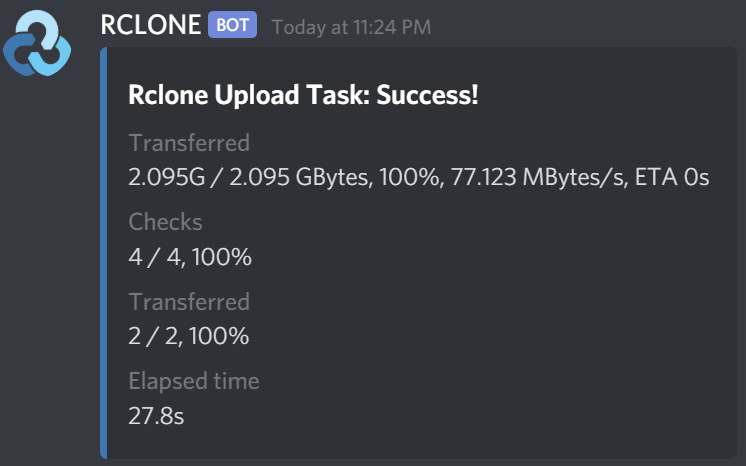
@jrdnlc Hmmm, mines been running for 2 days now with notifications without issue . I don't know why you would have a log with nothing but a hanging upload output. Nothing was changed in the actual rclone move command besides adding logging, changing -vv ---> -vP, and placing the command to output into a variable. Those changes shouldn't result in anything hanging. Couple questions: Beta or stable Rclone plugin? (I'm running stable, rclone v1.51.0. Didn't test beta so that could be it) Does the script ever finish? (script log have something like --> INFO: Script complete) Are there files needing to be uploaded in your local (to be uploaded) folder or is it empty? Code was adopted from SenpaiBox and no5tyle's (github) works, setting the rclone move output into a variable. The notification is dependent on a specific format expected from rclone's output. When testing with "-vv" it would not function, therefore I utilized "-vP" within the rclone move command. This produces the needed output for the variables to be extracted (and also cleans up the logs significantly imo). That is why you are no longer seeing the rclone move progress every few seconds. ---------------------- I agree that the notifications would be better with more info (upload speed / progress / files / ect). That being said, I think progress and such would cause a massive flood of discord notifications. Wouldn't really work great in a static push notification system. That would be better displayed in as a dynamic stats in something like a webgui (like in rclone beta gui). ---------------------- Here is the output of my logs that rclone generates for reference: 2020/03/14 21:00:45 INFO : Starting HTTP transaction limiter: max 8 transactions/s with burst 1 2020/03/14 21:00:47 INFO : Encrypted drive 'gdrive_media_vfs:': Waiting for checks to finish 2020/03/14 21:00:47 INFO : Encrypted drive 'gdrive_media_vfs:': Waiting for transfers to finish 2020/03/14 21:00:49 INFO : testdir/test.pptx: Copied (new) 2020/03/14 21:00:49 INFO : testdir/test.pptx: Deleted 2020/03/14 21:00:49 INFO : Transferred: 1.451M / 1.451 MBytes, 100%, 861.632 kBytes/s, ETA 0s Checks: 2 / 2, 100% Deleted: 1 Transferred: 1 / 1, 100% Elapsed time: 1.7s Has anybody else tried the recent discord notifications and experienced similar issues?
-
@DZMM, @jrdnlc Decided to play around with the discord notifications. Got something working and put in a pull request. Had to rewrite a clean up a bit of it before adding it to your script but it appears to be working as intended (reports transfer number, rate, amount,, ect). I'm sure there is room for improvement like displaying transferred file names would be awesome! Couldn't get error reporting but didn't go digging too deep. Just scrapped that bit rather than pulling my hair out over trivial things. Credit to no5tyle or SenPaiBox or whoever wrote it.
-
@DZMM, Haven't check this post for a bit. Just wanted to let you know I updated to your latest github releases. Only settings I changed were in the required/optional settings. No changes needed to the core scripting. Now that the cut command has been removed I no longer have to edit it to fix errors. I can confirm that they run fine for me with no issue. All functions working as expected!
-
@DZMM New script looks good but doesn't work if you use encryption because you need to edit the service account remote but then upload to the crypt for the service account. To edit the service account but upload via crypt I made these changes (added ServiceAccountRemote variable): # REQUIRED SETTINGS RcloneUploadRemoteName="service_account_vfs" # If you have a second remote created for uploads put it here. Otherwise use the same remote as RcloneRemoteName. # Use Service Accounts. Instructions: https://github.com/xyou365/AutoRclone ServiceAccountRemote="service_account" # Name of Remote which authenticates via service_account.json files # Adjusting service_account_file if using Service Accounts if [[ $UseServiceAccountUpload == 'Y' ]]; then ServiceAccountFile+=$CounterNumber.json rclone config update $ServiceAccountRemote service_account_file $ServiceAccountDirectory/$ServiceAccountFile echo "$(date "+%d.%m.%Y %T") INFO: Adjusted service_account_file for upload remote ${ServiceAccountRemote} to ${ServiceAccountFile} based on counter ${CounterNumber}." else echo "$(date "+%d.%m.%Y %T") INFO: Uploading using upload remote ${RcloneUploadRemoteName}" fi This way rclone updates the ServiceAccountRemote instead of the RcloneUploadRemoteName.
-
@DZMM, didn't see your last post in time... I played around with it and implemented a Service Account rotation option like @Spladge suggested. Got a script up and running while maintaining the ability to utilize multiple remotes (so people have options to choose from). I tried to stick to your naming scheme so everything should work well. I dunno if you want to use my edits but I attached it here if you do. My scripting is very novice so you might have a better way of adding in the feature. I simply took what you wrote and emulated it to fit the case. Just figured I'd add it here encase you want to use some pieces of it. **Naming relies on the .json being named the same as the count ie 1.json, 2.json and so on** If you want to use it. Changes/Additions are found in Line 47-54, 63-70, 100-131 and finally line 195. With the changes I can simply have a single service account remote in the rclone config. So far everything seems to be working as expected. Again, @DZMM thank you for all the hard work and @Spladge for the cleaner way of rotation. Rclone_Upload_With_SA.txt
-
@Spladge I just finished looking at the rotation script you posted. Updating a single remote to reflect the rotating service account looks like a infinitely better solution than having all the service accounts as unique remotes in the rclone config. It seems like it would be easy to implement to DZMM's upload script so that it changes the count and updates the rclone remote every time the upload script runs. I'm going to play around with it and see what I can get working. Thank you for linking to that script!
-
@DZMM Nice catch on the counter edits. That should fix the earlier issue I was having. I also left the SA as a gobbledygook.json and referenced those names in my config. Now I'm realizing it would have been much cleaner to rename them so I did 😛 There is probably a better way to achieving a rotation with scripts like what @Spladge referenced to but here is how I did it: I'll use AutoRclone in the example but it should work with similar scripts (IE 88lex's sa-gen). To my knowledge the end result is the same... (1) ---- Follow steps 1-4 here https://github.com/xyou365/AutoRclone. Might have to add some dependencies via nerdtools. This should generate the accounts, add them to your group, and finally add the group to teamdrive so they all have authorization. (2) ---- Copy all your .json accounts to /mnt/user/appdata/other/sa_accounts/ **** I'd copy them over to the new location just encase anything get messed up along the way, you will still have the originals to fall back on.***** (3) ---- Run the commands to rename all the *.json files: cd /mnt/user/appdata/other/sa_accounts/ Test Command just encase prior to renaming: n=1; for f in *.json; do echo mv "$f" "$((n++)).json"; done If echo output is desired remove echo to rename the files: n=1; for f in *.json; do mv "$f" "$((n++)).json"; done All .json files should now be renamed 1.json------------->100.json ********************************************EDIT******************************************* STEPS BELOW ARE NO LONGER NEEDED *********SEE LATER POSTS ABOUT MODIFYING SINGLE RCLONE MOUNT FOR ROTATION******** (4) ---- Use template I attached here and replace with your values (client_id, secret, token, password, password2, and possibly remote name) To do this use some editor (I used notepad++) and use "find and replace all" with your values: IE: YOUR_PASSWORD --> PASSWORD from your conf Your remote name needs to match your config. I use ":/encrypt" but others like DZMM use ":crypt" so find and replace those as well To find out your values and where your config file is located on your machine run the following command: rclone config file (5) ---- Once you are happy with the edits. Save it or copy and paste to your rclone config. Done. That should work and rotate service accounts with the DZMM's scripts. Rclone_conf_with_sa_template.txt
-
@DZMM No problem. It did throw me for a loop when the new remote had a different obfuscated password. Let me know if you need anything else tested. btw, all the service accounts seem to be running smoothly. No issues uploading. Accounts are rotating and all new files are visible in the mount.
-
@DZMM K, so maybe I've missed something, however, adding the obfuscated passwords (all users using same obfuscated password) seems to work still with decryption/encryption of files. Testing this out I just created a new remote called testpassword1. I input my original, plaintext 'readable' password and gave it the original salt I used on creation. Looking at the config, this did indeed output a new unique password and password2. This was not the same string of characters as the original remote crypt password so you are correct that it will give UNIQUE password/2 on new creation. Tested the remotes: I was able decrypt the whole mount and I pushed a test file (via gdrive_counter1_vfs) Checked the teamdrive via web browser and a new file has been placed there (name is crypted). Checked that the test file is viewable in all remotes. It is, even in remotes with different obfuscated passwords. 🤔 gdrive_media_vfs and gdrive_coounter1_vfs have the EXACT SAME password and password2. testpassword1 has it's OWN UNIQUE password/2. root@Tower:~# rclone lsf gdrive_media_vfs:/testdir test.txt root@Tower:~# rclone lsf gdrive_counter1_vfs:/testdir test.txt root@Tower:~# rclone lsf testpassword1:/testdir test.txt I don't know how the obfuscation process works but it appears that using the same obfuscated key does work. I've moved mounts between systems before and followed a similar procedure. Simply copy and paste conf works (that's what admins recommended on the rclone forum). Edit: To reflect DZMM post on why this functions this way https://forum.rclone.org/t/crypt-remote-generating-different-hash-each-time-for-the-same-password/13154/11
-
@DZMM Maybe I'm being an idiot and don't know whats going on but......... isn't the rclone config PASSWORD1 and PASSWORD2 simply for decryption on rclones side, correct? So that a file name like DJFKLJDSASDSLF decrypts to ---> My Backup Folder. So those passwords will all be the same to de-crypt the files stored on the teamdrive. Similar if you were copying your rclone config from one computer to the next. You would simply copy the PASSWORD1/2 so that you can decrypt. Please correct me if I'm wrong and made a stupid mistake and need to change something. On the note about service accounts needing authentication/passwords: (PSA: I don't know much about this so some information may be off but this is what I think is correct) A “service account” is an account you create in your gsuite that can interact with your data and google apis, but has limitations (one being they cannot interact with "my drive" however they can interact with teamdrives). The service accounts are auto-generated through your gsuite account via a created project. Each project can have 100 service accounts associated with it. Each account must be given permission to access the teamdrive via add members (long way of doing it) or add group (short way of doing it). Essentially they are "non-human users" functioning under your gsuite domain and since each account counts as a "user", they each receive a 750gb limit (not that anybody should actually need a 75tb/day upload 🤣) Every single service account has a unique access token, client id, key, ect which is stored within the .json file (contents shown below for example) This is then referenced by rclone to provide authentication to the teamdrive. After authentication it's simply like any other user. Move, sync, ect work the same as it would on a "unique account" which would have access to the teamdrive. So authentication to the drive is done via the xxx.json which each service account has associated with it AND decryption of file names is achieved with the SAME (IE Not unique) password1/password2 via rclone. XXXXXXXXXXXXXXXXXXXXX.json (each service account gets it's own .json file so 100 service accounts == 100 xx.json files) { "type": "service_account", "project_id": "saf-XXXXXXXXXXXXXXXXXX-XX", "private_key_id": "XXXXXXXXXXXXXXXXXXXXXXXXXXXXX", "private_key": "-----BEGIN PRIVATE KEY-----\XXXXXXXXXXXXX\n-----END PRIVATE KEY-----\n", "client_email": "XXXXXXXXXXXXXXXXXXXXXXXXXXXXXXX.iam.gserviceaccount.com", "client_id": "XXXXXXXXXXXXXXXXXX", "auth_uri": "https://accounts.google.com/o/oauth2/auth", "token_uri": "https://oauth2.googleapis.com/token", "auth_provider_x509_cert_url": "https://www.googleapis.com/oauth2/v1/certs", "client_x509_cert_url": "https://www.googleapis.com/robot/v1/metadata/x509/XXXXXXXXXXXXXXXXXX-qp.iam.gserviceaccount.com" } This is what I have gathered but my info could be off. Others such as AutoRclone, cloudbox, and plexguide have utilized service accounts in this manner for awhile now to increase the upload limit without getting api bans. I believe plexguide uses a script to populate the config file with the accounts (similar to your/my setup) From there it rotates accounts in some manner, just like yours. AutoRclone and cloudbox ustilize a different scripts which runs before rclone and rotates through the accounts, then feeding the commands to rclone (this info could be off though, I haven't used these programs for quite some time and I'm going off memory). An in-depth implementation of service accounts (for cloudbox but is a good read) can be seen here: https://drive.google.com/open?id=1LdyXb5AyqV8_A_CFeOp9DE0SkhXPEn3VPQhPJVOdUv0 For editing the config I made a stupidly simply macro that just put flipped between two notepads with the info needed. I had a list of all the service names (from ls command issued in my folder that contains my sa.json accounts) in a notepad and the other notepad had my rclone conf that with 100 blank counters needing to be edited properly to reflect the correct path. The macro simply copied the first line of the XX.json, alt-tabbed to the conf file and pasted in the correct location. Then alt-tabbed back keyed down one line and repeated the procedure. Extremely barbaric way of mass editing but it worked fast (5 minutes to get the macro down, and about 10 seconds to run the macro and edit the file). There is probably an easy way of scripting the config edit but my neanderthal macro seemed to work well without the need of learn scripting 🤤




