





CrazySam
Members
-
Joined
-
Last visited
-
yes! ... now its working and NOW i also get the relations of those folders inside the docker and inside owncloud - THANKS Im new to everything - its the first time i handle with linux since i set Unraid as my OS - but i keep on learning Thank you very much! LG SAM
-
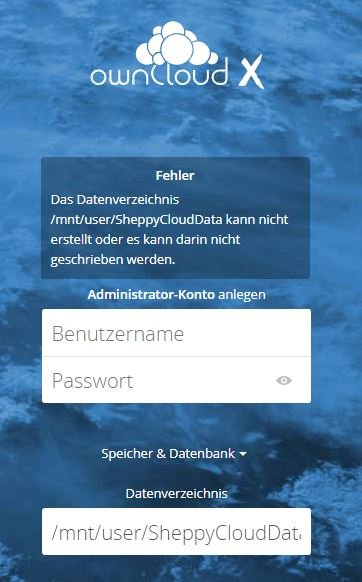
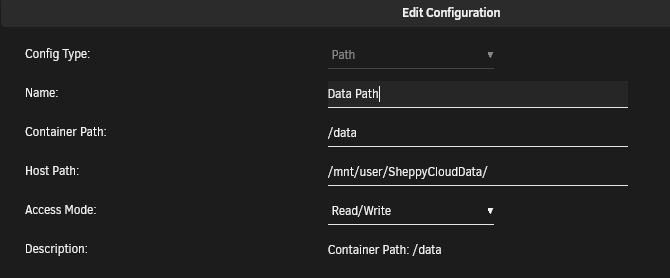
If i try to set the Data path at first login ... i get this Rights to SheppyCloudData are set to "drwxrwxrwx 1 nobody users"
-
In my eyes - if i put the config folder onto disk1 (the share via /mnt/user/share) then it means that my disk1 will be active 24/7 because owncloud is working in it. If i only put my /data folder into the share then i thought that the disk1 would spin down if nobody access any data files shared in owncloud - thats why i intended only to have the /data folder on my share and the /config folder on my SSD. You know what i mean (hope i could discribe my intentions the right way) But ill continue my tests with your advices and note back.
-
here you go ...
-
Hello there im trying out Unraid and so far im completely up for it - just works great. Also tried out your Docker of OwnCloud and managed to get it running completely behind 2 routers - also access from outside (my phone) via the OwnCloud App works great. The only thing i would love to do --> put the /data folder onto my NAS HDD instead of the Cache Drive (mnt/disk1/OwnCloud) - The Data Folder atm is on my CacheDrive (mnt/cache/appdata/owncloud/www/owncloud/data/) - i would like to have it on my array disk1 in one of my shares (mnt/disk1/OwnCloud/) What ive already tried: - reinstalling it completely, clicking "edit" to edit the host path which is atm /mnt/user/appdata/ownCloud/data (at the Docker Configuration page before installation starts) -> no matter which combination i try ---> host path to /mnt/disk1/owncloud or /mnt/disk1/owncloud/data (no matter if those folders are existing or not --> not working) ---> container path always remains /data (in my eyes its a value not to be changed - right?) -> also tried to manually edit the /config/config.php ---> data path to /mnt/disk1/owncloud or /mnt/disk1/owncloud/data --> not working - changin data folder at the initialisation page at first start of owncloud from "/config/www/owncloud/data" to ---> /mnt/disk1/owncloud or /mnt/disk1/owncloud/data --> not working - listing all users and groups via cut -d: -f1 /etc/passwd and cat /etc/group shows me that the user is "nobody" and the group is "users" - creating all those folders and giving them the same rights (via sudo chown -R nobody:users /-data path-/) as the other files/folders have --> "drwxr-xr-x 1 nobody user" --> not working - cp -ar /mnt/cache/appdata/owncloud/www/owncloud/data /mnt/disk1/owncloud --> copies the folder with all rights correctly - creating a softlink via ln -s /mnt/disk1/owncloud/data /mnt/cache/appdata/owncloud/www/owncloud (and also editing the rights matching) --> not working what i get: - editing anything at the Docker Configuration page before the installation starts - doesnt changes anything - the data folder will always be on my cache drive - editing the data folder path at the initialisation page at first start of owncloud results in "can not write or create data folder" (no matter which rights i give) - moving the data folder and using a softlink gives me a page that data folder isnt reachable and .ocdata should be in the main folder Question: - how can i get the data folder onto my disk1 ? - does owncloud accept softlinks? - was anything i already did somewhat right? (asides i learned a few things xD) Thanks for your Help! Greets SAM
