





controlol
Members
-
Joined
-
Last visited
Everything posted by controlol
-
Hi, I have been having a lot of issues with Unraid lately and it has come to the point now where it is literally unusable. I have been having kernel panics over the last couple of months, but now I can not reach the web interface after some time. This morning I was working on a Docker image in using nano and git. Then poof, I could not connect to the web interface anymore. This time no kernel panic, but it just loads forever until it times out. I was not home so I asked someone at home te hard reset the server. At this time I still thought it might be a kernel panic, eventhough the behaviour was different of course. The server became unresponsive around 09:00 and was hard reset at 09:13. I could not connect anymore around 09:30. Fortunately I could port forward my Synology box in time so I can reset the machine now via IPMI when needed. Also the command line on the display is still working so I can run commands from there if needed. Fortunately I started the syslog around a month ago because of the kernel panics. These are saved to my Synology box, they are attached to this post. I hope they are helpful to find the issue. I am using Unraid 6.9.2 I hope someone can help me, thanks in advance! All_2021-11-9-9_59_46.html
-
I transcode everything which is not smaller than 5 GB and not HEVC to HEVC. Keeping all audio (auto passthrough) and subtitle tracks. The files I usually download are between 10 - 16 GB. It's transcoded using NVENC so files could definitely be smaller if I did it with CPU. The RF is set to 20 so files are usually around 7 GB after the transcode. Although sometimes they can be as large as 18 GB. After I noticed that it still is sometimes larger I changed it to have a separate output folder so I can move them manually. I let it go over night expecting everything to be finished. But it only did 6 movies over and over. The "done" tab said the movies in my output folder had been transcoded. Not the movies where the original source was. This is probably why it kept redoing the same movies. Now I changed the RF to 22, to get smaller file size in general. Lastly, you were talking about adding aac audio. Did you mean this can be done automatically? This would be really cool if this is also possible with subtitles, adding it into the source folder with a particular name (so it will know witch language it is) and add it back to the queue so I don't have to fire up handbrake on my PC Then I have one last thing, is it normal that the transcode is only using about 60% of the CPU and GPU. I have a 1050ti in my server, but it's on pcie 2.0 and only 8 lanes. So that's essentially only 4 lanes pcie 3.0. I think this shouldn't have that much of an impact and it's almost just as fast as my 1060 6gb and ryzen 1600x (The CPU's in my server score just a bit better in cinebench). Adding a second worker does slow it down so much that it's not beneficial.
-
It didn't transcode like you said, I must have remembered it wrong from the movies library. Now there is something else. It just transcoded a movie which was just over 9.3 GB before hand and 10 GB after the transcode. It still replaced the movie, is that normal? I think it would be better to only replace/write the movies if the transcoded size is smaller than the original size, maybe even with a setting where you can set this to be at least 1 GB smaller for instance.
-
I am running into a problem with my series library, this is the second library I added. I set a plugin for only transcoding files that are between 1-100gb. In this case I let it only scan for the rick and morty season 4 folder which contains the 2 episodes that have been released. Here is the plugin setup for series library and the files it has scanned. Both files are H264, but they shouldn't be included for the transcoding list because of the file size. For my movies library I set a minimum size of 5 gb. Here it does work. What could be the cause?
-
That's what I thought I did, seems not to be the case. Shows that I should sleep earlier (it's half past 4 in the morning lol) However, it did not solve my problem, I still have the exact same log/error...
-
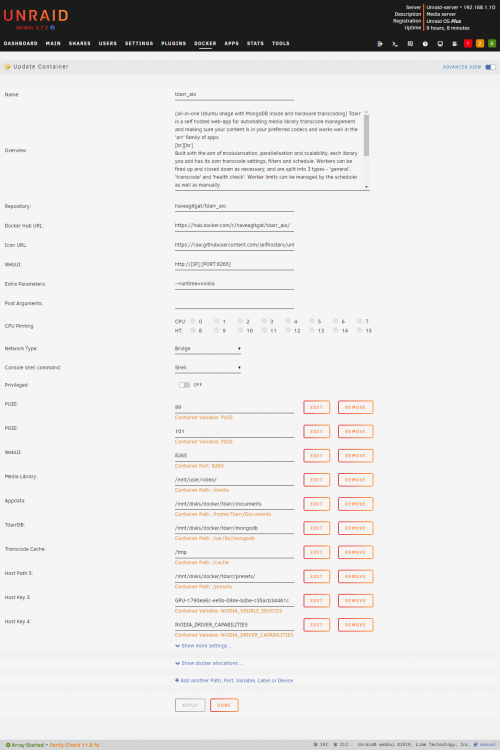
I inserted my new 1050ti today but for some reason the hw transcoding doesn't work. For plex it does work I get this error: The transcoder does work with the exact same config but with h265 cpu encoding instead of nvenc. The settings for my tdarr container is attached to this post.
-
I bought it for 60 Euro's from a buddy at work, but he didn't know which card he has. Unfortunately he didn't have pictures but I am pretty sure he has a MSI 1050ti gaming (x) because he bought it at work and my boss is a huge fan from MSI. I will have to wait untill saturday and see which one he has. And if it doesn't work in my server I can flip it and buy a less powerful version. Will do that!
-
This is something I was actually looking for! Thanks so much Just bought a 1050ti which will arrive this week. Hope I can actually can get it running because it needs the 6-pin power connector but my server doesn't support that lol. Anyways it's working like a charm on my CPU's for now. Hope I can learn some ffmpeg in the future (is it more efficient?) for now I will stick with handbrake presets. Very clean UI although, sometimes I have to look around for a bit. (For me it wasn't clear I had to add different plug-ins for codec, size and handbrake preset so it still added all movies to encoding cue). I think it took me about half an hour to set up everything up. Again thanks a lot for the hard work!
