





Xe138
Members
-
Joined
-
Last visited
-
Following up on this now that Unraid 7 is released in Beta and it's prime day. Will vdevs made of smaller devices be supported in Unraid 7?
-
From what I understand, Unraid support expansion of a ZFS pool by adding a vdev of equal width as the original vdev. I can't find documentation on exactly how this is done, so I want to ask here before I invest in the drives. I currently have 4x10TB drives in an unraid array that are nearing capacity. My plan is to install 4x16TB new drives as a new ZFS pool (RAID-Z1). After moving the data from the unraid array onto this pool, I intend to repurpose the 4x10TB drives as a ZFS vdev to expand the 4x16TB pool. Does unraid support this? What is the process in the unraid UI to perform this expansion?
-
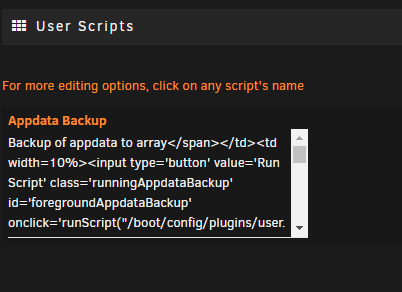
I found the problem. Somehow the description for the script was saved with an html tag in it. <textarea id="newDescdescAppdataBackup" cols="40" rows="5">Backup of appdata to array
-
So I was using User Scripts as normal, but after manually running and cancelling a script the page now seems to be broken. This is all that is shown. "Appdata Backup" was one of my scripts but the description appears to be the html for the entire page. I tried uninstalling and reinstalling the plugin without any change. I've also checked with another browser with the same result, so it doesn't appear to be a browser cache issue. How would I fix this?
-
auto update plugin is installed. I don't experience that docker update issue on any other containers anymore, which is why it's unusual that it started on this one. For all others experiencing this problem - linuxserver/calibre:v3.47.1-ls20 is the latest version that works for me. v3.48.0-ls21 seems to introduce the issue.
-
Same issue for me. Something else that's strange - after freshly installing the container, there is immediately an update available. Applying the update seems to just run the same docker command again without any new fs pull and the "update available" clears.
