Valorum
Members
-
Joined
-
Last visited
-
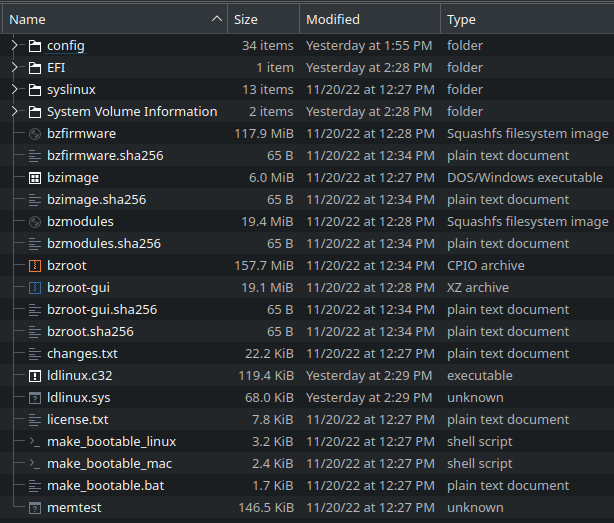
Thanks for the help, @JorgeB. I sent a small donation for your efforts. You were right about the issue being with the Dell for test booting. I tried it on a consumer Asus board and it worked fine in UEFI mode. It wouldn't boot in UEFI on the Dell Latitude, or on my Supermicro GPU server, or the Gigabyte server board I've been using for Unraid. After trying several other things, I tried the legacy USB creation tool and it defaults to leaving the folder as EFI- and on a whim I tried that, and it boots on all the platforms just fine. The part that really has me confused is I went back and checked the backup of the dead USB I made before all of this, and sure enough, the folder is just EFI, so previously my Gigabyte board did work in UEFI mode, and now it doesn't? I made the previous EFI USB on Linux manually, and was not able to reproduce that success this time with any tool. I'm not sure what changed.
-
It's EFI, I forgot to specify that, but it was why I was confused it showed up as a legacy USB device. Anything else I can check? Edit: MD5 also matched on the copy of 6.11.5 downloaded.
-
I have to admit, I'm equal parts baffled and frustrated by this one. My Unraid server has claimed another USB flash drive (this Samsung Bar lasting all of 3 months, the 4th drive in just 6 years), and for some reason I can't seem to make another bootable drive. Objective: -Install Unraid 6.11.5 (yes, it's behind, couldn't update it after my replacement USB was somehow corrupted right off the bat) on a USB DOM to hopefully be rid of this infuriating issue of USB drives dying at inopportune times. Things I've tried: -Used 2 different PCs running different flavors of Linux to configure the DOM boot device manually, following the guide on the website. All attempts result in a device that doesn't show up as a UEFI device in the bootloader menu, despite specifically enabling EFI in the install process. Selecting the "legacy USB device" results in a message about no bootable OS being found. -Used a third different PC running Windows with the USB creator tool. Used the new (to me) USB DOM (8GB ATP unit), and also tried another 32GB Samsung Bar and both attempts also resulted in devices that were only recognized as legacy USB devices with no bootable OSes to be found. -Have tried booting on my regular server and on a Dell Inspiron laptop, and it's the same result. I have to be missing something, right? I've installed probably about 20 OSes on various VMs and other bare metal systems just this year, and this has, by far, been the worst experience. Maybe it's just the fact that there's a 100TB hole crippling my homelab because of a stupid flash drive.
-
That seemed to be the trick, I now have it running the extended test. Thanks again, for everything!
-
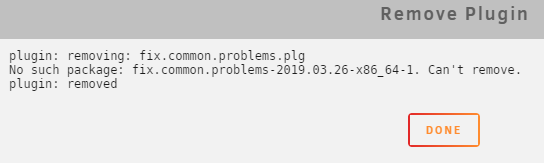
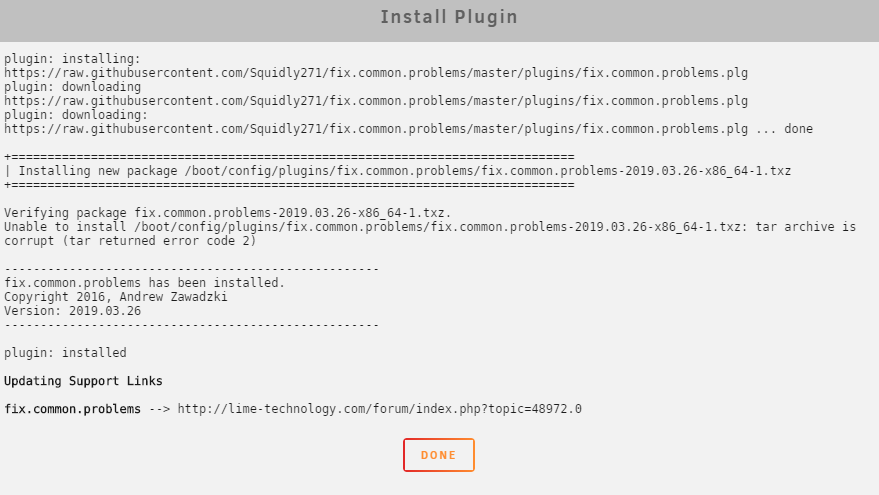
Okay, rebooted, and the FCP plugin is showing up same as before with the file-type name instead of the display name. Clicked remove, this was the feedback: Reinstalling the plugin this time I noticed a line about the tar archive being corrupt: Relevant part of log file (could the time error about the clock unsynchronized be contributing? No idea what that's about): Apr 30 12:01:21 LCARS ntpd[2510]: kernel reports TIME_ERROR: 0x41: Clock Unsynchronized Apr 30 12:01:23 LCARS emhttpd: req (3): cmd=/plugins/dynamix.plugin.manager/scripts/plugin&arg1=remove&arg2=fix.common.problems.plg&csrf_token=**************** Apr 30 12:01:23 LCARS emhttpd: cmd: /usr/local/emhttp/plugins/dynamix.plugin.manager/scripts/plugin remove fix.common.problems.plg Apr 30 12:01:23 LCARS root: plugin: running: anonymous Apr 30 12:04:10 LCARS emhttpd: req (4): cmd=/plugins/community.applications/scripts/pluginInstall.sh&arg1=install&arg2=https://raw.githubusercontent.com/Squidly271/fix.common.problems/master/plugins/fix.common.problems.plg&csrf_token=**************** Apr 30 12:04:10 LCARS emhttpd: cmd: /usr/local/emhttp/plugins/community.applications/scripts/pluginInstall.sh install https://raw.githubusercontent.com/Squidly271/fix.common.problems/master/plugins/fix.common.problems.plg Apr 30 12:04:16 LCARS root: plugin: skipping: /boot/config/plugins/fix.common.problems/fix.common.problems-2019.03.26-x86_64-1.txz already exists Apr 30 12:04:16 LCARS root: plugin: running: /boot/config/plugins/fix.common.problems/fix.common.problems-2019.03.26-x86_64-1.txz Apr 30 12:04:16 LCARS root: plugin: running: anonymous
-
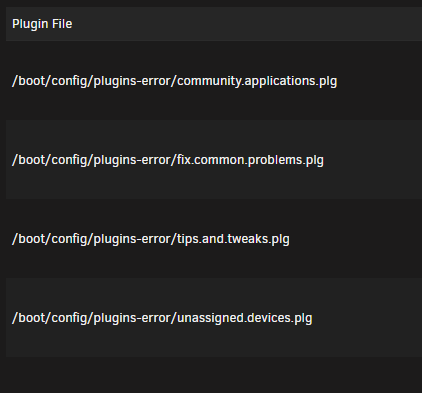
Hi, first post here. Thanks for all you do, Squid, I've been successfully using your plugins thanks to the SpaceInvader vids since I got my server up and running about 6 months ago. Just got the server back online (I'm running 6.6.7 stable) after having the USB drive die (without a backup, was able to copy the config folder, at least). It seemed that some of the plugins may have become corrupted in the USB's death, I'm not sure. I noticed my app tab was missing this morning when I went to add an app, and then saw these four plugins were missing due to errors: I was able to get Community Applications installed and running again. I went to re-add FCP, and it confirmed that it successfully installed, but it appears like this on the plugin page: Clicking on it leads to a blank page under the settings header. FCP does not appear on the settings page. From my system log, the first four entries are all red, for errors. I'm not very good at reading this sort of stuff, but I think it also shows where I tried to remove the FCP plugin around 9:03, and reinstall it around 9:04. Apr 30 09:00:48 LCARS emhttpd: req (10): cmd=/plugins/dynamix.plugin.manager/scripts/plugin_rm&arg1=/boot/config/plugins-error/community.applications.plg&csrf_token=**************** Apr 30 09:00:48 LCARS emhttpd: cmd: /usr/local/emhttp/plugins/dynamix.plugin.manager/scripts/plugin_rm /boot/config/plugins-error/community.applications.plg Apr 30 09:00:55 LCARS emhttpd: req (11): cmd=/plugins/dynamix.plugin.manager/scripts/plugin_rm&arg1=/boot/config/plugins-error/fix.common.problems.plg&csrf_token=**************** Apr 30 09:00:55 LCARS emhttpd: cmd: /usr/local/emhttp/plugins/dynamix.plugin.manager/scripts/plugin_rm /boot/config/plugins-error/fix.common.problems.plg Apr 30 09:01:42 LCARS bunker: exported 961 files from /mnt/disk7. Duration: 00:00:00 Apr 30 09:01:42 LCARS bunker: exported 2994 files from /mnt/disk5. Duration: 00:00:00 Apr 30 09:01:43 LCARS bunker: exported 2185 files from /mnt/disk6. Duration: 00:00:01 Apr 30 09:01:43 LCARS bunker: exported 4552 files from /mnt/disk2. Duration: 00:00:01 Apr 30 09:01:43 LCARS bunker: exported 5528 files from /mnt/disk4. Duration: 00:00:01 Apr 30 09:01:45 LCARS bunker: exported 11868 files from /mnt/disk1. Duration: 00:00:03 Apr 30 09:01:45 LCARS bunker: exported 8120 files from /mnt/disk3. Duration: 00:00:03 Apr 30 09:03:31 LCARS emhttpd: req (13): cmd=/plugins/dynamix.plugin.manager/scripts/plugin&arg1=remove&arg2=fix.common.problems.plg&csrf_token=**************** Apr 30 09:03:31 LCARS emhttpd: cmd: /usr/local/emhttp/plugins/dynamix.plugin.manager/scripts/plugin remove fix.common.problems.plg Apr 30 09:03:32 LCARS root: plugin: running: anonymous Apr 30 09:04:17 LCARS emhttpd: req (14): cmd=/plugins/community.applications/scripts/pluginInstall.sh&arg1=install&arg2=https://raw.githubusercontent.com/Squidly271/fix.common.problems/master/plugins/fix.common.problems.plg&csrf_token=**************** Apr 30 09:04:17 LCARS emhttpd: cmd: /usr/local/emhttp/plugins/community.applications/scripts/pluginInstall.sh install https://raw.githubusercontent.com/Squidly271/fix.common.problems/master/plugins/fix.common.problems.plg Apr 30 09:04:18 LCARS root: plugin: skipping: /boot/config/plugins/fix.common.problems/fix.common.problems-2019.03.26-x86_64-1.txz already exists Apr 30 09:04:18 LCARS root: plugin: running: /boot/config/plugins/fix.common.problems/fix.common.problems-2019.03.26-x86_64-1.txz Apr 30 09:04:18 LCARS root: plugin: running: anonymous Let me know if I can provide anymore information that would help!