



Skip to content
View in the app

A better way to browse. Learn more.

Unraid

A full-screen app on your home screen with push notifications, badges and more.

To install this app on iOS and iPadOS
  1. Tap the Share icon in Safari
  2. Scroll the menu and tap Add to Home Screen.
  3. Tap Add in the top-right corner.
To install this app on Android
  1. Tap the 3-dot menu (⋮) in the top-right corner of the browser.
  2. Tap Add to Home screen or Install app.
  3. Confirm by tapping Install.

DBurt

Members
  • Joined

  • Last visited

  1. DBurt started following Files MIssing
  2. DBurt joined the community
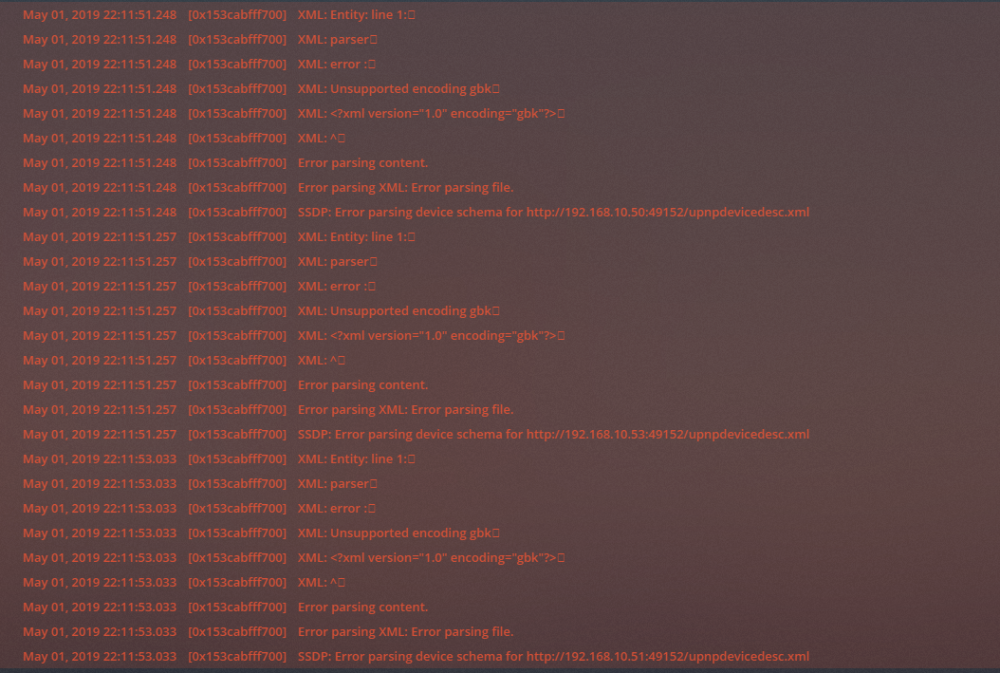
  3. Hey Guys, Been using this docker since the beginning of the year and have had no problems. Thanks for your hard work! However today im having an issue where only some Plex titles will play and the others throw up a playback issue. However when i use my pc and navigate to any file that plex isnt playing they work fine in VLC. This all of a sudden happened about 2 hours ago. I cannot think what could have caused it. The Error that im getting is "Playback Error an error occurred while loading items to play". Ive tried rebooting and even deleted the docker and reinstalled it and still nothing. Can anyone lend some help? Thanks Edit - Ive attached an error that i see even when playing abny file that it actually will.
Account

Navigation

Search

Search

Configure browser push notifications

Chrome (Android)
  1. Tap the lock icon next to the address bar.
  2. Tap Permissions → Notifications.
  3. Adjust your preference.
Chrome (Desktop)
  1. Click the padlock icon in the address bar.
  2. Select Site settings.
  3. Find Notifications and adjust your preference.