





jazzy192
Members
-
Joined
-
Last visited
Everything posted by jazzy192
-
I will check shortly but 4 are the same and possibly two different ones. I also have a SAS expander if that helps at all but I doubt it. Not sure why I have two SAS cards anyhow.
-
If you look a tad further up you will so me ask one of the guys had one of th discs moved place? I even pup a screenshot up showing had moved was told it wouldn't have on its own but does matter now. So I thought everything was fine now I could boot into Unraid etc. So I have lost everything on disk 4 then? I thought the point of having the parity pics was so here was minimal loss?!
-
Not been able to sort the use with the 2 SAS cards yet so still using two but a did the parity check after syncing the drives and it completed with no errors but as mentioned before Disk 4: Unmountable: unsupported of no file system Near the bottom it says: Unmountable disk present: Disk 4 • WDC_WD80EZAZ-11TDBA0_7SK7KX7W (sdi) and give me the option of: Format will create a file system in all Unmountable disks. with tick box of: Yes, I want to do this Shall I go ahead and do this or does disc 4 need replacing?
-
It's the backplane bit have tried a few of them as there are 4 _ 2 + ld one to choose from. It's just going through sync now but will back soon. I did specifically run one drive through them also but I think was was duty my testing part so don't remember which one it but it fired but fine.
-
Right, just a little update guys, I have no idea why or what's going on but I 100% didn't touch see or even know about was binding a SAS card to the VFIO at boot. What a random thing to want but ok and no I certainly didn't turn that on. The only software settings I changed were about the above and told it not to bind to VFIO at boot Still don't know what's going on at all as the only way I can get it going with all the drives was by adding a second LSI SAS card (YesI had tried this instead of the one used before updated the brand before anything self before this bo, but I the same specs (supports 8 drives etc) and using 4 connected to Port 0/A and 4 connected to posts 2/B with the same power cable which only has 3 outputs so just 3 of the backplanes work and it lets me pick and choose which 4 are connected into each backplane. If I plug 1 more into one of the other cards it does boot. Like 5 drives into the LSI and the other 3 drives into the other LSI, it doesn't boot. I tried several different combinations and switched PCI-E Slots and cables but it's always the same cards have to be any 4 into 1 and the other 4 into other. I might have missed one or two combinations but I think I have tried them. I cannot be bothered to check more so just want to check it won't be running slower due to using two diff LSI cards? Will it cause problems if I just look for a 4 port (16 cards) and use this for now?
-
Just going to go back to original now and hope it works. Regarding the M.2s I want to use the bigger capacity ones so should I just to that later then I hopefully get this going? Also, it it fails again, do you think it might be a PSU problem? It's strange as the Sata Drives are all show in Unraid. I have tried all 4 rows of backplanes (well 2 at a time) so I guess it could be them I suppose. My case os foobared anyhow as all the ball bearing fell out so need to order a new one. I know this isnt property at the the moment but I have 3 decent M.2 cards but only 2 slots, is it worth picking up one of the PCIe m.2 adapters? One of the M.2's is PCI-E 4 but wont work with my CPU/motherboard. Lastly, my cache are a miserable matching 500gb SSD, dont suppose you know of any links to some 1TB SSD's? It almost cheaper to just run one M.2 for cache but I need one for Docker/appdata really, one for windows pf and I guess I have a spare if I pick up one of them m.2 adapters... Thing is though, the motherboard id quite old, GFX card if taking up the 16 slot, SAS the 8 and the M.2 would use up the 4, well they wouldn't run at full speed anyhow. I always want more PCIe lanes for as I have a 10gbe switch etc. If I was to go Ryzen again and use an Intel Arc 380 for Plex and Nvidia 4080 for Windows, do you know of any motherboards that can fit that much? Also will want to use 10gbe card if it doesnt have onboard and also 4 port SAS instead os using 2 x 2 port or 1 x 2 port and expander. Im starting to think that this server has had a good innings but I really dont want to lose the data ideally. So im focusing on that and then onto CPU (Ryzen if Arc works) Motherboard, GFX card
-
Ahh I see, well I will just pop the original back on. If there is such a possibility to fry them wouldn't they make the ends only work with their own cables so only the correct ones fit/goes in, if you follow? Just sounds bloody dumb if off you can put the wrong cable in when there is zero writing on the cables etc to identify its for the PSU.
-
Hi guys, Well, I reseated the drives and swapped the SAS card which BIOS picks up both. The only thing I can think of is that I when all this happened I swapped the backplane power cables to the PSU (Silverstone 750w). The reason was that it would not boot with the cables that used to work and were plugged in. If I disconnected them if fired up so I swapped to different Power cables and it boots fine. I was just thinking though, maybe the ones I swapped too don't actually work hence the booting up and not showing the drives in Unraid? I don't understand why the power cables stopped working but I will switch them back to the original which I used for 2-3 years and have a play with them. So it could be a PSU issue maybe? Im not sure what the warranty is on the Silverstone but under UK law if anything breaks upto 3 years you can challenged them even if its out of warranty, not many people know this but I have waived my rights to this multiple times with this, examples being: a Smeg toaster worth £160 (2 year old, 1 year warranty), Miele Washing Machine (2+ years, insure of warranty length). So I don't even look at the warranty length as I know I'm covered for three years (it is technically 5 I think but after 3 they can claim to wear and tear and its harder but anything under 3 years I just mentioned the 'Sales Of Goods Act 19XX' (forgotten the date) and 90% of the time im passed onto a manager to sort a replacement or it's done via the person im speaking too so I will check the age of the Silverstone PSU as that could be the fault. Just remember though, for any product under 5 years you can quote the 'Sales Of Goods Act' for a replacement, under 3 years and it's pretty much done there and then. If its something expensive like a TV (I have done this with a 65" £1,700 LG TV that was just over 3 years old and I got an instant replacement, they picked up the old one and was given a new one that was at least the same spec (top of the line but newer) so don't worry about warranties in the UK unless they are something stop like 7 years. Sorry for all that, just thought it might be useful for other forum members, that's all. So If I change the power cables back (the lights on the hot swap bays do light up mind you). I try some different power outputs from the PSU. This is probably a silly question but you can use any PSU cable, right? It doesn't have to be by the same manufacturer? Just wondering as the one's im using are not Silverstone but the 4 x SSDs are showing up in BIOS and Unraid so im not sure it's a power issue, I could try with just 4 drivers connected instead of 8 and see if it boots with the old cable (it should work with the ones I swapped to though as the SSD's word fine. Remember I have tried 2 different SAS cards and 4 different sets of SAS to backplane cables. Whats the next step if it's still not seeing the disks with the other power cable? Change case with new backplanes? I do have 16 hot swap bays so I can move them all up to different rows to see if that makes a difference bt like I said, the power lights on the bays are coming on and I can hear the disks spin up. Tried 2 different SAS cards which are both in IT mode (or whatever they needed to be to work in Unraid). One is a Dell PERC something and the other which was always used I cannot remember. I do also have a SAS expander for when I ran 10 drives (2 for CCTV) but then I bought the extra SAS card. In hindsight, I should have just bought a 4 port SAS card. Lastly, as I'm kinda starting fresh, Im I ok to swap the Cache SSD drives to bigger ones? Or would I need to clone the data? Just my understanding is that as it would need a rebuild etc there wouldn't be anything on the SSDsw as the Docker Image etc and App data are on M.2 cards. Talking of which, how do I go about swapping M.2 with Docker Image and Appdata? I know it's off-topic but I might as well do all this while it's not working. Is it just a case of booting up Unraid, moving the Docker and things off the M.2 onto an SSD installed then swap the M.2 to a larger one? I only had diddy 2 x 256GB M.2s at the moment but I have a 1TB Samsung Evo 970 and a 500GB PCIE 4.0 which was in my PS5 before I upped that to 2TB. I know my 8th gen Motherboard cannot use PCIE 4.0 so I would have to upgrade to at least a 10th Gen I think which is something I was planning on anyhow.
-
I didn’t noticed them before but will check again.
-
Well it’s all gone a little strange. I changes then moles and sata power cables I then change SAS card to backplane cables (have used the before and they work fine). First it would start at all then noticed the the sata and moles power cables used were not the Silverstone ones (I thought they were universal all my life, oops!) so swapped them and it fired up fine. Fired it up and one of the parity discs was missing. I shutdown and reseated all the array drives in there hot swap bays, checked for damage on the party one but looked fine. Started up again and now none of them are showing. Cables look fine. Any ideas?
-
Sorry for the late reply, I have not been well for quite some time. I wasn't being rude. Could you job my memory and replace which ones? Also was there not a problem with one of the cashe drive? I have two 500gb cache at the moment but I have found a new Samsung Eco 970 1TB, thinks its 970. Also I may be wrong but I bought a 500gb I thinks its Phizon or something and came with a huge heatsink. I think it has to be a certain spec to the PS5, would it be worth popping in the server or would I add to up upgrade the mb/cpu etc fist? Sorry I am still not 100% but could really do with getting this running as and may may to resort to getting some physical help going it or is that unwise?
-
Hello, My server had no hardware problems for nearly 5 years till last week when there was some CRC errors etc. I was planning on upgrading my aging SSD's anyhow so just trying to work out the best combination? My motherboard is a Gigabyte 10th Gen (forgot the model) with 2 x M.2, 6 SATA Ports and a couple of PCIe slots. At the moment Im using both M.2 (250gb and 500gb), one for my appdata and the other a Windows VM. Cache is split between two old 500gb drives with 500gb total free. My Array runs off a PCIe SAS to backplane so all 8 x 8TB WD REDs are going to the SAS controller with no problems. I can add 8 more drives if I want at a latter date as the SAS Controller has 4 ports so one for each 4 drive backplane. I was thinking of getting two matching 1gb SSD's for the Cache and also upgrading the M.2's from 250gb to 1TB each. I have a lose 970 EVO NVMe M.2 this hardly used so was thinking of getting a second one but I dont now what to do about the Cache, is it worth getting a M.2 PCIe card?
-
Im not sure what it's doing, it keeps stopping and pausing. I have attached logs. tower-diagnostics-20230322-2201.zip
-
Honesty Jorge, I have no reason to mix them up! It Paused rebuilding to do a read check, shall I let that complete or rebuild firsT?
-
I didn't swap them and no one else apart from my partner has access?
-
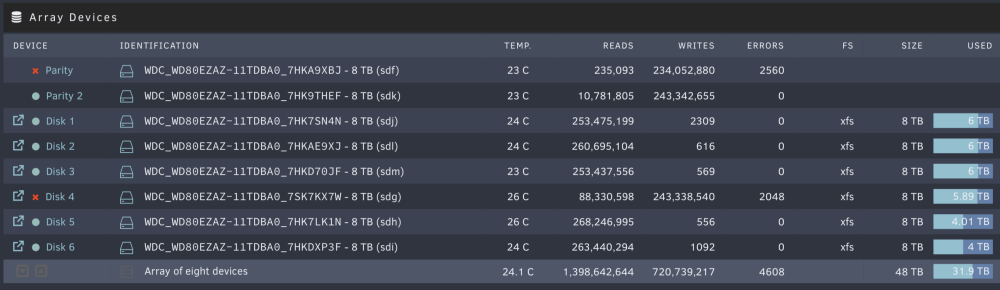
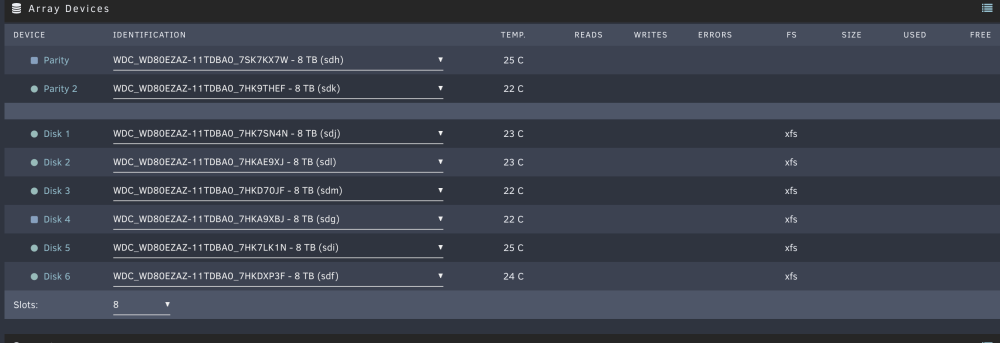
This is two days ago and just now attached.
-
Cheers, I was just finishing that when noticed my array discs have moved around. Is that normal? I cannot put the same disk back in Parity one as the only one unassigned after assigning the other back is already in the array compared to my last screenshot?!
-
Right, all done now and deleted and have run scrub with no errors. Next up is the Parity disc right? Rebuild which first? The Parity or the Array Disk? UUID: 7de0f47c-9d8a-4d24-b8c2-aab8c2c616f9 Scrub started: Wed Mar 22 14:32:01 2023 Status: finished Duration: 0:00:19 Total to scrub: 2.00GiB Rate: 1.06GiB/s Error summary: no errors found
-
Attached are the logs, going to have a read through myself also. Yes, there is nothing on the cache I want to keep I dont think, docker, appdata etc are all on a separate SSDs or M.2. tower-diagnostics-20230322-1416.zip
-
Hey, I ended up leaving it running till this morning and no errors. It's just running Scrub now on the Cache Pool and picked up some errors already: UUID: 7de0f47c-9d8a-4d24-b8c2-aab8c2c616f9 Scrub started: Wed Mar 22 13:22:48 2023 Status: running Duration: 0:01:50 Time left: 0:03:48 ETA: Wed Mar 22 13:28:26 2023 Total to scrub: 347.74GiB Bytes scrubbed: 112.94GiB (32.48%) Rate: 1.03GiB/s Error summary: csum=6 Corrected: 0 Uncorrectable: 6 Unverified: 0
-
I checked it over and reseated the RAM, checked the cables etc and nothing looked out of place. It's been running for about 7 hours now after using the UEFI version without any errors. Shall I keep it going overnight or boot it into Unraid now and see the logs?
-
Ok, well soon as I'm back in an hour or so I will check that then and leave it running a good while. I've not touched the server or anything. It's been in its rack happy as Larry so I thought.
-
I just didn't know what the steps were to do after checking the cable etc and after memtest, like how do I find out if it's okay or not? There were some CRC error errors on one of my cache drives that started about a year ago. Nothing changed so carried on as normal (probably not a wise move). It's only now that problems happened. I doubt this would have caused it but. deleted a couple of files (ISO's) off the cache before pressing mover last night when the error occurred.
-
Sorry, I haven't been in this situation before. How will I know if it's fixed? Will the errors still be there?
-
Thought so, will check everything and get back to you. After checking would it be best to run a read test after or both read and smart?

