Sephron
Members
-
Joined
-
Thank you for the quick fix! It is working as intended now. I very much appreciate the work you do
-
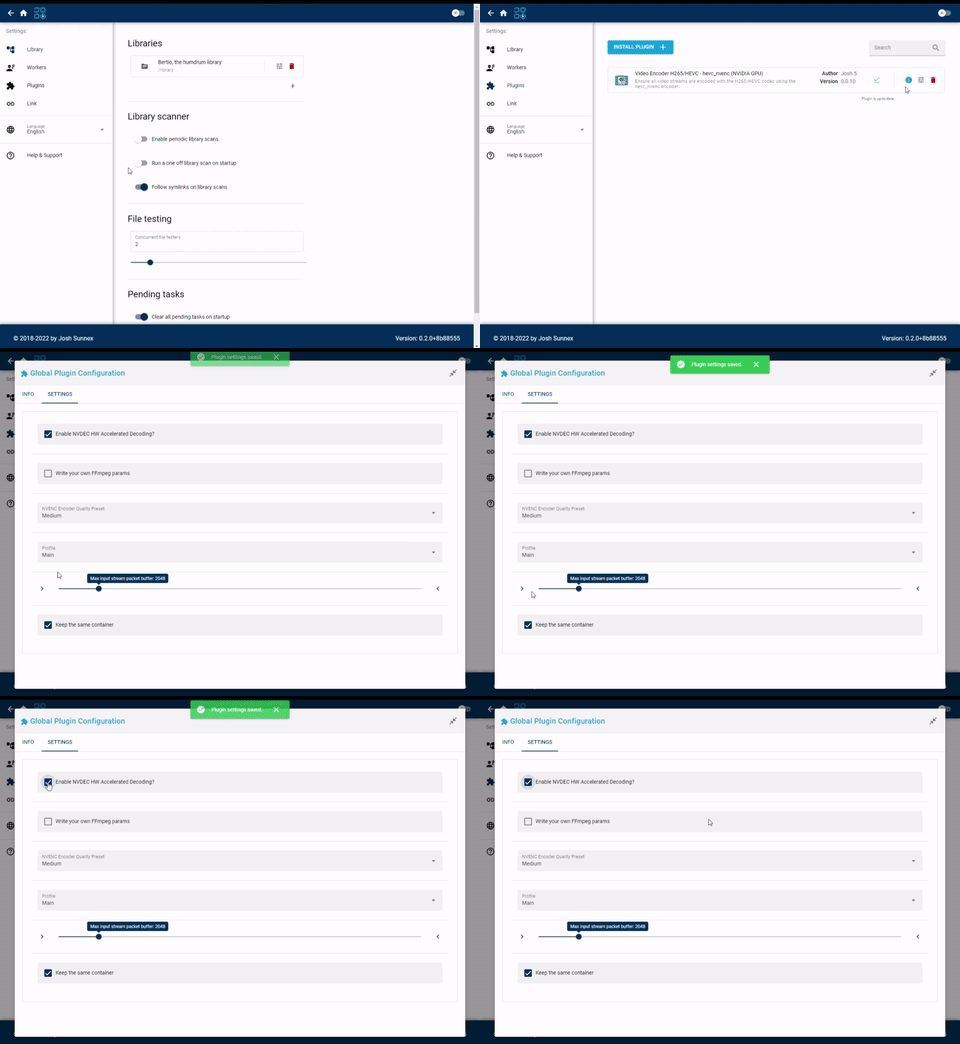
Having the same issue unfortunately. I have the docker image tag set to latest. On Unmanic Version: 0.1.4~655b18b encoding settings save fine but after upgrading to Unmanic Version: 0.2.0+8b88555 I could no longer change any video encoder plugin settings (I am using the nvidia H265 encoder plugin). I pick the options and the option flashes, says saved but never changes from the stock settings. I have tried completely deleting the app data folder, docker image and re-installing from scratch but it will still not change the settings. Just tried installing other plugins as well such as Remux Video Files, Video Encoder H265/HEVC - libx265 (CPU) and it is not allowing me to change or save any settings either. It does the same thing. Screen flashes, says saved but stays with the previous setting. Unraid Version: 6.9.2 Unmanic Version: 0.2.0+8b88555 Video Encoder H265/HEVC - hevc_nvenc (NVIDIA GPU) Version: 0.0.10