





Kaldek
Members
-
Joined
-
Last visited
-
Can someone tell me what the status is of snapshots on 7.3? I have a VM we tried to take a snapshot of today and it offered me the FS Native snapshot using ZFS. A snapshot was created and listed. We tried to revert it, and sure enough it disappeared. But the VM did not revert and no changes were rolled back. What gives? The Domains share is on the ZFS pool. It's a VM using qcow2. Is this not supported and just...silently breaks?
-
OK the logic was flawed. I kept going and found the actual root cause. I have some file backup trimming scripts that were still running on non-existent directories with poor logic. The directories didn't exist, and the file deletion runs in whatever directory cron is running from. You can see where this is going.
-
Currently running 7.3.0-rc1 but I loaded this to see if it fixed the issue. Was also occurring on 7.2. Error 404 when accessing the web GUI, happens every week or so. I let Claude have at this and it resolved the issue, but I can't speak for all of its logic. However, I did manage to get the web interface up again. After that, I ran diagnostics but I'm not sure what evidence it will have in it. Claude's summary below of what it found and how it got the GUI running again. SynptomsWeb GUI returns 404 SSH works fine diagnostics command exits silently with no output Array, Docker, and VMs keep running normally Syslog shows monitor cron failing every minute with exit status 255 CauseThe /usr/local/emhttp/webGui/ directory had been deleted from the /usr overlayfs (with lots of *- backup files left lying around in the plugins tree). PHP's auto-prepend file lives in webGui, so every PHP page failed to render → nginx serves 404/500. A reboot fixes access. Fix (no reboot)Mount the squashfs (/boot/bzmodules) to get pristine webGui files, copy them into the overlay's upper layer at /var/local/overlay/usr/local/emhttp/webGui/, then mount -o remount /usr so the kernel picks up the change. unraid-diagnostics-20260501-0945.zip
-
The "rebuild" has completed. This time when I asked it to format the disk it started and completed successfully. What a weird sequence of events.
-
Hi folks I am running unRAID 7.1.2 and have a 34TB array with 5 disks. I went to add a sixth disk today, one which had previously been precleared. I stopped the array and added the disk to the array, then restarted the array. unRAID reported the disk as ""unmountable: unsupported or No File System". The format option was available on the Main page, at the bottom, where the Start Array command is. Formatting failed, or more to the point it never even tried? Each time I refreshed the page, it would just offer the Format option again. So, I stopped the array and rebooted the server. Same problem. Stopped the array and tried adding a different disk to the array. The array just said "wrong" then, as if the first disk had already been successfully added to the array, even though it never formatted. So, array stopped again, then added the different disk. This time, it is now doing a complete flipping "rebuild" of a drive that was never formatted in the first place and never had any data on it! What the heck is going on here. unraid-diagnostics-20250519-1348.zip
-
I cannot reboot my unRAID server without terminating the diagnostics process, nor can I run diagnostics. This is because I have a share used by Frigate NVR called "cctv" with 53,000 small MP4 files inside it and 3,400 of these are on the cache right now. The diagnostics process tries to collect data on all of these files and when running diagnostics via the GUI the web interface hangs after a few minutes of reporting the logging of all these file names. At reboot time, all I see is "starting diagnostics collection". How do I stop collection of data on all these files so that diagnostics completes?
-
Unfortunately I do not have any diagnostics files from during this issue as the system insta-reboots when this issue occurs and leaves no logs at all. I recently enabled link bonding (active/backup) on unRAID 6.12.6 between a dual port Intel 10Gb/s XFP module (ixgbe driver) using eth0, and the onboard gigabit Intel NIC (igb driver) at eth2. My server started rebooting every few days, with no pause for kernel dumps or anything. The issue did not go away until I removed the active/backup link bond and shut down the eth2 NIC again. Some additional useful information is that, whilst in the same Layer-2 broadcast domain, eth0 and eth2 are connected to different switches. Diagnostics file attached but note that it does not have the active/backup config in it. unraid-diagnostics-20240110-1155.zip
-
Was this plugin never updated? Is it now an orphaned plugin?
-
Support had to do a manual key replacement to fix this issue. I literally just listened to the unRAID podcast where the support guys were saying license key management was a major headache. Guess there's still a lot of work to do at the back end.
-
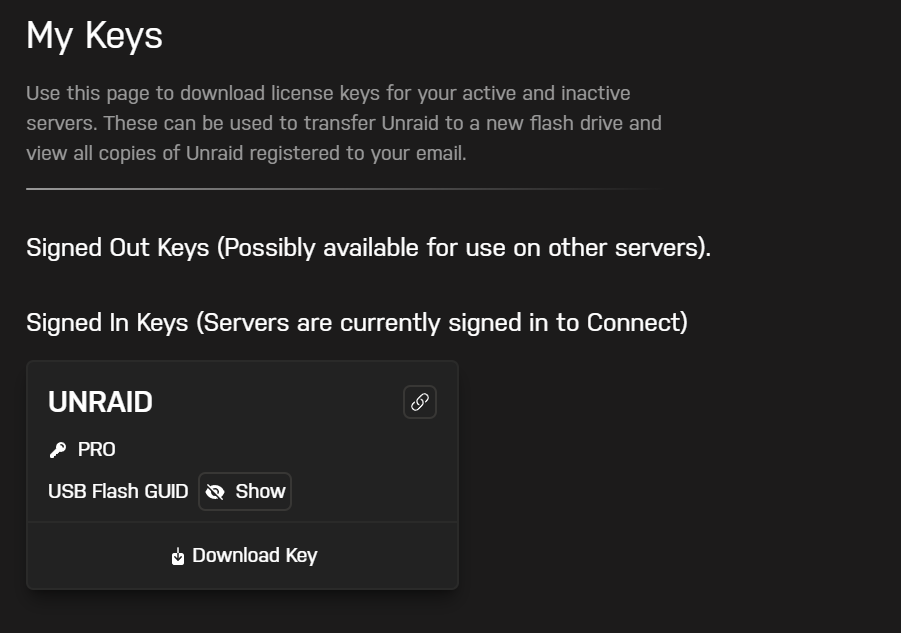
I have access to all that, and it looks like the image below. Unfortunately there appears to be no documentation on "Signing Out" a key and what that all means. It drives me up the freaking wall when I find this lack of documentation update. Documentation must never be delayed and must be part of the release process! It keeps a high workload on the tech support folks when there's just no need if the damned documentation would be updated.
-
I bit the bullet and did it. I confirmed that keeping Pool Slot assignments also keeps ZFS pools.
-
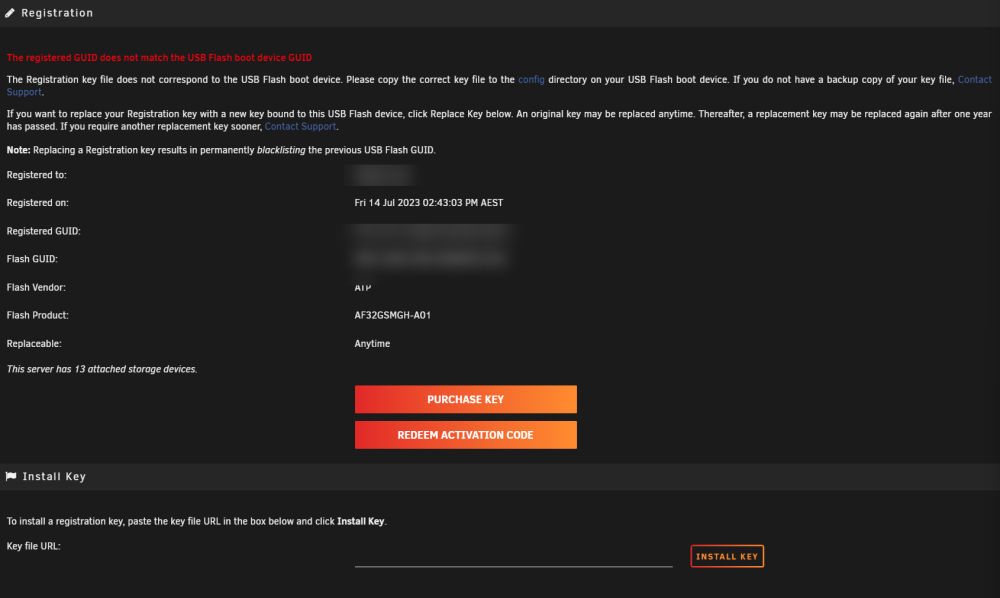
I just installed a new DOM-based USB key for my server, following all of the instructions located at https://docs.unraid.net/unraid-os/manual/changing-the-flash-device. There is NO "Replace USB key" option, and it appears this is because I upgraded my license on the 14th of July. I have had this USB key for over four years. This is ridiculous, why is a license upgrade classed as a "key replacement"?
-
Folks it's a bit of a worry that I'm getting zero response to this question, and makes me scared to use ZFS on unRAID at all. Can *somebody* reply?
-
I will admit that my current flash drive - a SanDisk Cruzer Fit 32GB has lasted me a very long time without issue, when connected to a USB2 port.
-
Ah, I seem to have missed the part where you wrote you're running unRAID on a QNAS box.
