






MarkRMonaco
Members
-
Joined
-
Last visited
-
MarkRMonaco changed their profile photo
-
I'm having the same issue on my server (v6.12.11). However, I can't recall if it was present in the previous version though. -- On a possibly unrelated note, I did have to remove and re-add a lot of my Docker containers about a month or so ago when many of them failed to work/start after power cycling the server. In addition to that, I had to rebuild my br0 network in the Docker settings (can't recall if I rebuilt the Docker IMG file or not). Thankfully, I did not have to delete/restore the app data for any of the containers. Almost all of my Docker containers are on br0 with static IPv4 addresses, except for a few that are in bridge mode. However, about half are completely blank in the "Port Mappings" column of the status page and are unable to load the "WebUI" option. Like @Andrew Piper said, the URLs are still accessible if you manually enter them in your browser. I also would rather not hard code them in the Docker config in the event that I want to change the IP addresses in the future (would just be one more step to worry about). Also, just like @Andrew Pipermentioned on his system, all of my affected ones are @binhex images.
-
@hku2, I'm very happy to report that this still works under v6.12.10. I just wish I saw the post back in 2022.
-
I don't know how I missed this reply nearly two years ago, but I'm hoping that it will still work for v6.12.10. I will add it now to my GO file, reboot, and report back with the results...
-
I hear that. Thankfully, my kids are older. Even though the power button is flush on the top of my case, I still occasionally manage to press it on accident (briefly, but is enough to invoke the safe shutdown process in Unraid). Especially, if I am wiping it down from dust...
-
Unfortunately, I'm running an older MSI X470 board and it doesn't have that as an option (unless somehow I've missed it). I'll just have to deal with it for now since I don't want to relocate the button.
-
I just got around to testing this under the 6.11.2 & 6.11.3 releases by running the "killall acpid" command from the terminal, and then running it a 2nd time to make sure it was still not running). However, in both cases (versions), it still allowed the system to shutdown when the physical button was pressed (single press and not held down).
-
Thanks. I'll give that a shot when I get a chance and will let you know.
-
Just as a test, I also tried to implement the solution that was previously mentioned in that thread by commenting out my CP command and replacing it with the MV. This has resulted the same way, once the external power button is pressed on the chassis, it will initiate a shutdown command of the server. So, it appears that this file is not even utilized at all under this release.
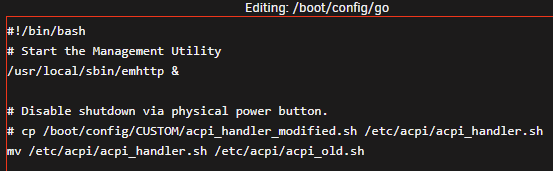
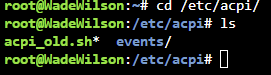
-
I had a similar solution to this thread where I have modified version of the acpi_handler.sh file copy at boot (via a command in the GO file) where the majority of the lines have been commented out. This was working great up until I upgraded to 6.10 stable from 6.09 (this issue exists in 6.10.1 as well). I was cleaning my Unraid server chassis, which is a mid-tower enclosure with a flush-mount power button on the top, and accidentally pressed it (briefly and not a long press). To my surprise, this initiated a shutdown of the server instead of being ignored. I confirmed that the CP command is still working and the acpi_handler.sh remains commented-out (see screenshot below). However, it is no longer functioning as intended. Therefore, I wanted to see if the external power button (ACPI event) is being handled differently under this new release and if I have to implement a new workaround/fix for it. Any/all help is appreciated. Thanks in advance.
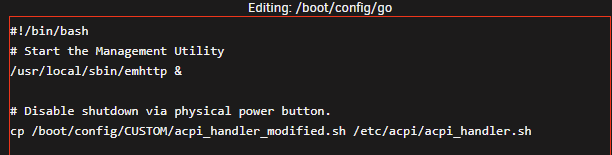
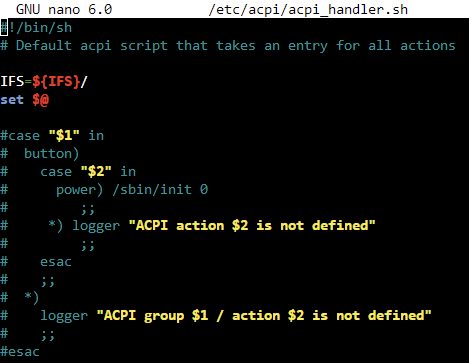
-
Just an update. Not sure if stopping the Docker service and toggling "IPv4 custom network on interface br0" (unchecking, applying, rechecking, and applying again) fixed the problem. However, once I re-enabled the Docker service and restarted the Unraid server again, I found that my containers were automatically starting again. The only thing that was tipping me off were that the majority of the containers that were failing to start were all on the br0 interface with a custom IP. I only had one container using "bridge" which had no issues starting automatically. The rest of the containers I keep turned off (no automatic start). So, I guess we can mark this as "Solved" unless someone sees anything else that needs to be changed/corrected in my logs. wadewilson-diagnostics-20211126-1504.zip
-
Hi, I had a brief power outage which caused my Unraid server to shutdown improperly (yes, I know that I need to get a UPS). Once it came back online, I noticed that my Docker containers were not automatically starting. Trying to manually start them resulted in Execution Errors (Bad Parameter). I found that stopping and starting the Docker service allowed the containers to automatically start as expected. However, rebooting the server as a whole would result in the containers to fail to start automatically again. Therefore, I proceeded to rebuild my Docker image and restore all of my containers via saved templates. From there, I proceeded to reboot the server again to see if the behavior would go away or if they continued to fail to automatically start. Unfortunately, the issue continued. Logs attached. wadewilson-diagnostics-20211126-1437.zip
-
@Linus, glad to hear it worked out for you. I got lucky on my end and my system stabilized on 6.9.1.
-
About 52hrs uptime... Marking the as solved.
-
Update, I'm just shy of 28hrs of uptime... I'm leaning towards this issue being resolved.
-
Not that I'm trying to jinx myself, but the system has been online for about 13hrs now. We'll see if it remains online while I'm at work...


