





PZ303
Members
-
Joined
-
Last visited
-
@cpu @ZappyZap Thanks! 777 my the folder inside appdata fixed it.
-
@ZappyZap i just installed it for the first time and have having a similar issue. Can't load the app at all. I've not changed anything in the setup except port. All stock. syscall: 'open', path: '/app/data/.env' } [10:54:22 AM] [ERROR] [] Failed to initialize JWT secret [op:jwt_init_failed] Error: EACCES: permission denied, open '/app/data/.env' at async open (node:internal/fs/promises:641:25) at async Object.writeFile (node:internal/fs/promises:1215:14) at async SystemCrypto.updateEnvFile (file:///app/dist/backend/backend/utils/system-crypto.js:285:13) at async SystemCrypto.generateAndGuideUser (file:///app/dist/backend/backend/utils/system-crypto.js:184:9) at async SystemCrypto.initializeJWTSecret (file:///app/dist/backend/backend/utils/system-crypto.js:49:13) at async file:///app/dist/backend/backend/starter.js:76:9 { errno: -13, code: 'EACCES', syscall: 'open', path: '/app/data/.env' } [10:54:22 AM] [ERROR] [] Failed to initialize backend services [op:startup_failed] Error: JWT secret initialization failed at SystemCrypto.initializeJWTSecret (file:///app/dist/backend/backend/utils/system-crypto.js:55:19) at async file:///app/dist/backend/backend/starter.js:76:9 [10:54:24 AM] [ERROR] [] Failed to update .env file with JWT_SECRET [op:env_file_update_failed] Error: EACCES: permission denied, open '/app/data/.env' at async open (node:internal/fs/promises:641:25) at async Object.writeFile (node:internal/fs/promises:1215:14) at async SystemCrypto.updateEnvFile (file:///app/dist/backend/backend/utils/system-crypto.js:285:13) at async SystemCrypto.generateAndGuideUser (file:///app/dist/backend/backend/utils/system-crypto.js:184:9) at async SystemCrypto.initializeJWTSecret (file:///app/dist/backend/backend/utils/system-crypto.js:49:13) at async file:///app/dist/backend/backend/starter.js:76:9 { errno: -13, code: 'EACCES', syscall: 'open', path: '/app/data/.env' } [10:54:24 AM] [ERROR] [] Failed to initialize JWT secret [op:jwt_init_failed] Error: EACCES: permission denied, open '/app/data/.env' at async open (node:internal/fs/promises:641:25) at async Object.writeFile (node:internal/fs/promises:1215:14) at async SystemCrypto.updateEnvFile (file:///app/dist/backend/backend/utils/system-crypto.js:285:13) at async SystemCrypto.generateAndGuideUser (file:///app/dist/backend/backend/utils/system-crypto.js:184:9) at async SystemCrypto.initializeJWTSecret (file:///app/dist/backend/backend/utils/system-crypto.js:49:13) at async file:///app/dist/backend/backend/starter.js:76:9 { errno: -13, code: 'EACCES', syscall: 'open', path: '/app/data/.env' } [10:54:24 AM] [ERROR] [] Failed to initialize backend services [op:startup_failed] Error: JWT secret initialization failed at SystemCrypto.initializeJWTSecret (file:///app/dist/backend/backend/utils/system-crypto.js:55:19) at async file:///app/dist/backend/backend/starter.js:76:9 [10:54:28 AM] [ERROR] [] Failed to update .env file with JWT_SECRET [op:env_file_update_failed] Error: EACCES: permission denied, open '/app/data/.env' at async open (node:internal/fs/promises:641:25) at async Object.writeFile (node:internal/fs/promises:1215:14) at async SystemCrypto.updateEnvFile (file:///app/dist/backend/backend/utils/system-crypto.js:285:13) at async SystemCrypto.generateAndGuideUser (file:///app/dist/backend/backend/utils/system-crypto.js:184:9) at async SystemCrypto.initializeJWTSecret (file:///app/dist/backend/backend/utils/system-crypto.js:49:13) at async file:///app/dist/backend/backend/starter.js:76:9 { errno: -13, code: 'EACCES', syscall: 'open', path: '/app/data/.env' } [10:54:28 AM] [ERROR] [] Failed to initialize JWT secret [op:jwt_init_failed] Error: EACCES: permission denied, open '/app/data/.env' at async open (node:internal/fs/promises:641:25) at async Object.writeFile (node:internal/fs/promises:1215:14) at async SystemCrypto.updateEnvFile (file:///app/dist/backend/backend/utils/system-crypto.js:285:13) at async SystemCrypto.generateAndGuideUser (file:///app/dist/backend/backend/utils/system-crypto.js:184:9) at async SystemCrypto.initializeJWTSecret (file:///app/dist/backend/backend/utils/system-crypto.js:49:13) at async file:///app/dist/backend/backend/starter.js:76:9 { errno: -13, code: 'EACCES', syscall: 'open', path: '/app/data/.env' } [10:54:28 AM] [ERROR] [] Failed to initialize backend services [op:startup_failed] Error: JWT secret initialization failed at SystemCrypto.initializeJWTSecret (file:///app/dist/backend/backend/utils/system-crypto.js:55:19) at async file:///app/dist/backend/backend/starter.js:76:9 Configuring web UI to run on port: 8080 SSL disabled - using HTTP-only configuration (default) Starting nginx... Starting backend services... [10:54:24 AM] [INFO] [] Termix Backend starting - Version: 1.10.0 [op:startup] Configuring web UI to run on port: 8080 SSL disabled - using HTTP-only configuration (default) Starting nginx... Starting backend services...
-
Thanks. Commenting out required_zones: [] got it to strart.
-
I'm having the exact same error. It updated overnight. Have not had a chance to review things yet but wanted to let you know you're not alone here.
-
Did you figure this out? I'm running into a similar issue.
-
@JorgeB @trurl - thanks for all the help. After replacing every component, it seems that aside from an initial bad drive, I also had a bad brand new CPU. A 13700k bad out of box. I replaced it and now it runs like a top.
-
Makes sense. I'll start tinkering with the ram. Is all hardware possible? Psu, mobo, CPU, ram, hba, backplane, Gfx, hhds?
-
I'm not sure of anything at this point. But I have a dual power supply supermicro case, both plugged in. It's new to me but obviously used. Not sure how to really test these 2 power supplies.
-
Here is the diag when I try the rebuild on 6.10.3 silentcricket-diagnostics-20230127-2037.zip
-
So i just downgraded to 6.10.3 and the issue persists. The rebuild got unstable and stopped within 5 minutes. I'll wait for the (now third) replacement drive from a different manufacturer and vendor and see if that solves the problem. 2 bad drives, while wildly bad luck, seems to be the most likely scenario here.
-
Thanks. I'll try that next. I had seen that option, but the in-gui downgrade was a bit quicker and i'm going to be too busy with work today to mess with the flash. I'll presume the minor version downgrade won't really change things, but i figured why not while i'm busy today.
-
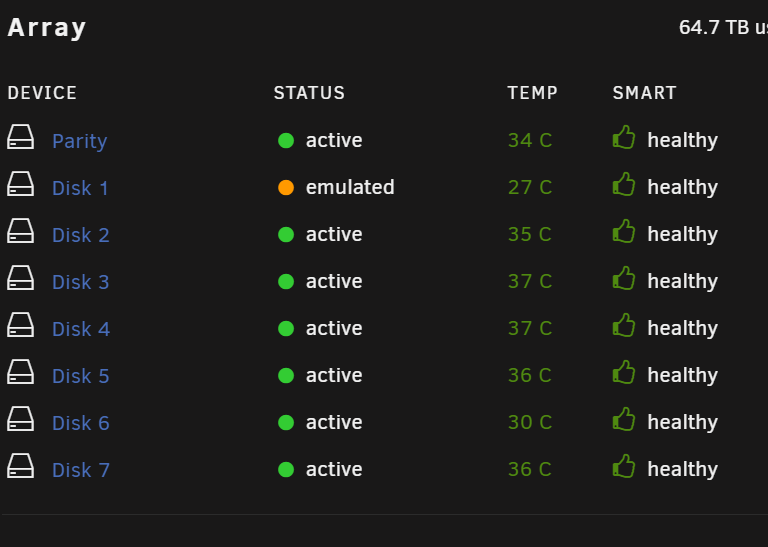
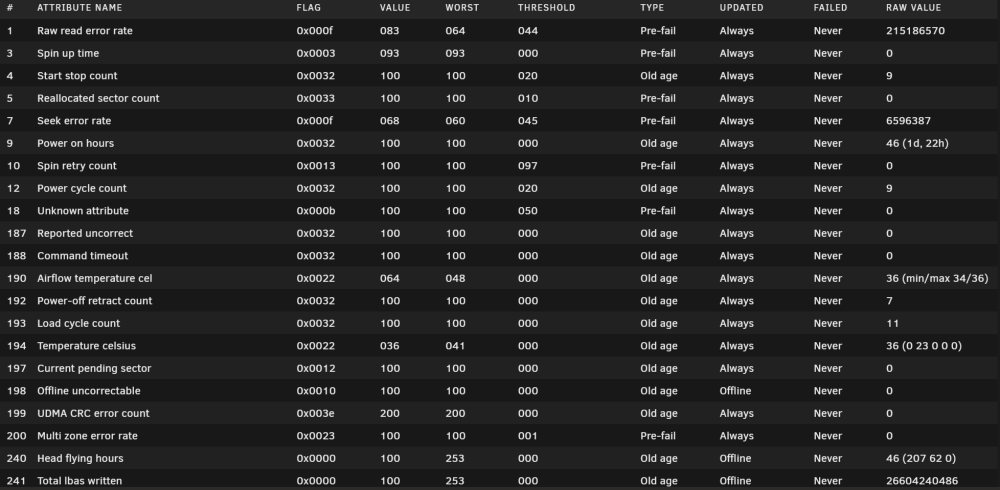
@trurl - correct. All green checks. I was confusing the Emulated orange dot with the green check, but it doesn't report as failed and when i ran the smart test it was, and is still saying passed. Despite that, the drive is getting a lot of Raw read error rates and seek error rates. The other drives all show zero while the number on this drive is climbing. @JorgeB i was on 6.11.5 and it gives me a downgrade path to 6.11.4 so i'll start there. This is an upgraded build with a new 13700k and ASRock Z690 Steel Legend with latest bios to support the new 13gen chips. 128gb of RAM memtested with zero errors on just one pass. These drives are both Seagate Exos from 2018 so i doubt those are not supported. I've ordered other drives to replace these so in a few days i'll be able to tell if i just had 2 bad renewed drives. I guess one question is could there be data corruption causing this issue on rebuild?

-
Yeah sorry. I hadn't seen these errors and the dashboard shows it as passed smart. It doesn't show the drive as healthy because it shows it as emulated. Are you also thinking it's also just a bad drive?
-
One more thing worth mentioning is that both of these drives, the failed one and it's replacement, are Renewaed drives from Amazon. https://www.amazon.com/gp/product/B0BLJVKQKJ/ref=ppx_yo_dt_b_asin_title_o00_s00?ie=UTF8&psc=1 The first one failed Smart the second I installed it but i foolishly continued with it and within a month, the system got completely unstable with it just being present. It';s the one with the SMART errors i posted. The replacement is the warranty replacement, still renewed, but it's passing SMART. It is throwing some errors though. I'm starting to wonder if I just got double unlucky with renewed drives.
-
I just shut down, checked / reseated the LSI (correct there is only 1) and rebooted. But like you mentioned, all other disks have been fine and Disk 1 has moved to 2 or 3 locations on the backplane to validate that wasn't the issue. I did run a memtest as a part of this a few days ago. I only let it do 1 full pass because there were zero errors. And it wasn't the included memtest, i downloaded memtest onto a new USB and ran it that way.


