





Leverz
Members
-
Joined
-
Last visited
Everything posted by Leverz
-
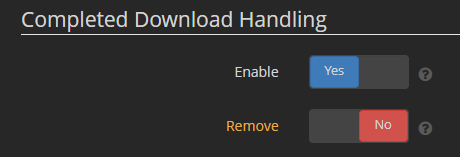
I have this at no already, I'm sorry I was tired last when I posed, I thought I had added that I had already set that to no.
-
Firstly, thanks for getting back to me. I do have a little follow up. I have tried removing the docker, removing the folder and then installing, with the same problem. I have also removed the config file, and restarted, only to have the same problem. Going through the forums here I'm not the only person to encounter this problem, only none list a fix. An example is lexcomman above me who even refers to others he has seen. Is the config file copied elsewhere and being retained through fresh installs? When opening the WebUI via the docker control interface, I get a "This page isn't working" (HTTP ERROR 401). If I click into the address bar and hit return the login page will open. I have already set chrome to allow popups and redirects for the address and port to get this far. (Update, the same problem is being experienced in Firefox, the address must be manually confirmed in the address bar there too.) This may be fixed when I can finally login then.
-
Small problem, when download completes, Sonarr moves the file(s), and it deletes the file at the download location. Is there someway to stop the deletion, as I did not have this on my last setup, as I move the downloads for other use, I know that this will leave me with two copies.
-
After installing the docker, Invalid Username and Password (admin/adminadmin). Chrome (with popup enabled), unable to open, unless using incognito or manually hit enter in address bar. Unable to change the port, as it keeps resetting to 8080. I have tried a few things, clearing cache, removing the config file, nothing changes. Any fixes for these?

