





gadreel
Members
-
Joined
-
Last visited
Everything posted by gadreel
-
Installed Fix Common Problems, nothing stands out. Removed those line also from the Go file and still does not work. This started back in the day when I had an Nvidia GPU, it started doing that when we used to have those Unraid-Nvidia versions... I do not know if that helps.
-
Attached. unraid-diagnostics-20230125-2333.zip
-
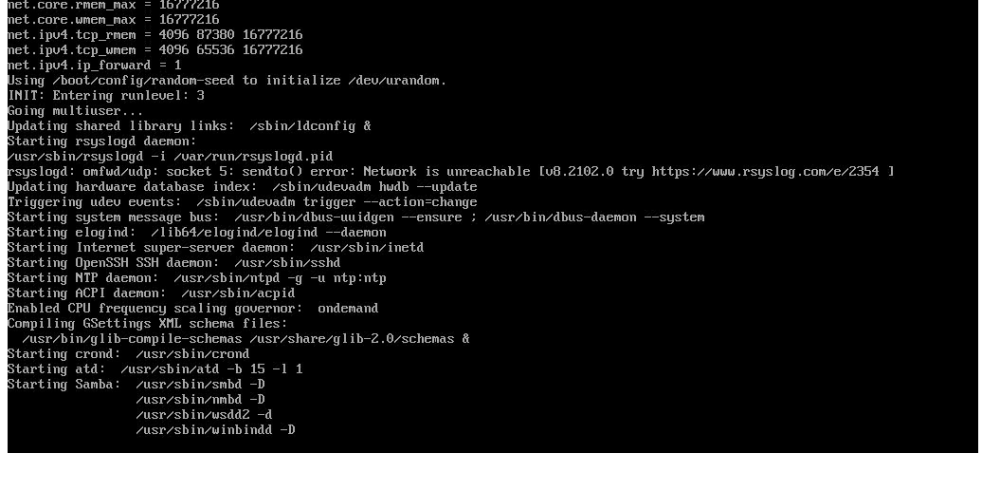
Hi, After a successful boot at the end you are prompt to login. For a year or so this has disappeared for me. The server boots just fine but why I do not see the login prompt. Anyone knows why?
-
Every time I am loading the VM page I am getting this error. This started happening on Unraid 6.10.0. I am on 6.10.3 and is still there. Please help. 2022-06-19 13:24:58.043+0000: 5766: info : libvirt version: 8.2.0 2022-06-19 13:24:58.043+0000: 5766: info : hostname: Unraid 2022-06-19 13:24:58.043+0000: 5766: error : qemuDomainAgentAvailable:8610 : Guest agent is not responding: QEMU guest agent is not connected 2022-06-19 13:25:41.603+0000: 5763: error : qemuDomainAgentAvailable:8610 : Guest agent is not responding: QEMU guest agent is not connected 2022-06-19 13:25:41.718+0000: 5762: error : qemuDomainAgentAvailable:8610 : Guest agent is not responding: QEMU guest agent is not connected 2022-06-19 13:25:41.749+0000: 5762: error : qemuDomainAgentAvailable:8610 : Guest agent is not responding: QEMU guest agent is not connected 2022-06-19 13:27:46.930+0000: 5763: error : qemuDomainAgentAvailable:8610 : Guest agent is not responding: QEMU guest agent is not connected 2022-06-19 13:28:33.862+0000: 5765: error : qemuDomainAgentAvailable:8610 : Guest agent is not responding: QEMU guest agent is not connected 2022-06-19 13:28:33.975+0000: 5764: error : qemuDomainAgentAvailable:8610 : Guest agent is not responding: QEMU guest agent is not connected 2022-06-19 13:28:34.007+0000: 5764: error : qemuDomainAgentAvailable:8610 : Guest agent is not responding: QEMU guest agent is not connected 2022-06-19 13:31:51.322+0000: 5765: error : qemuDomainAgentAvailable:8610 : Guest agent is not responding: QEMU guest agent is not connected 2022-06-19 13:32:27.709+0000: 5762: error : qemuDomainAgentAvailable:8610 : Guest agent is not responding: QEMU guest agent is not connected 2022-06-19 13:32:27.824+0000: 5766: error : qemuDomainAgentAvailable:8610 : Guest agent is not responding: QEMU guest agent is not connected 2022-06-19 13:32:27.855+0000: 5766: error : qemuDomainAgentAvailable:8610 : Guest agent is not responding: QEMU guest agent is not connected 2022-06-19 13:36:47.359+0000: 5763: error : qemuDomainAgentAvailable:8610 : Guest agent is not responding: QEMU guest agent is not connected unraid-diagnostics-20220619-1647.zip
-
After upgrading from 6.9.2 to 6.10.2 going to the VM page takes 1min and 40secons to load. This happens only to the VM page. If I try to visit any other page, while the VM is loading will not load until the VM page is done loading. Going back to 6.9.2 resolves the issue. Any suggestions? unraid-diagnostics-20220606-1757.zip
