RBB87
Members
-
Joined
-
Last visited
-
ow wait i see it now, i can not do that for a usb disk?
-
Completed without error (short self-test)
-
like a SMART self test?
-
I will check another usb Sata reader, can that cause the issues? Another 8TB disk copied everything open just fine..
-
nuc-diagnostics-20230817-1702.zip
-
@JorgeBI'm now trying to get data from the disk mounted via usb to a unraid nuc. some dirs list as follows /bin/ls: reading directory '/mnt/disks/WDC_WD40_EFRX-68WT0N0/media/movies-hd': Input/output error i tried xfs_repair. but no luck afterwards. Now what? any help is really appreciated!
-
SATA bay worked fine at a friend's house, tomorrow getting a new one myself. So should be good! Keep you posted
-
SATA bay worked fine at a friend's house, tomorrow getting a new one myself. So should be good!
-
I'm going to try a different SATA to USB device, as this one is very old it may cause some issues.
-
e.g. https://www.megekko.nl/product/6202/1031641/USB-SATA-HDD-SSD-docking-station/ACT-AC1500-2-5-3-5-SATA-harde-schijf-docking-station-USB-3-2-Gen1 or similar? I now have a usb Samsung g3 chip i pulled out of an old usb enclosure.. that may be the issue?
-
Yes USB indeed, so what do i need to do to read the data from outside of the unraid env where the system crashed? I thought USB was they way to go
-
Diagnostic found here: I want to read the array on another unraid machine but UD plugin only shows the format option. The filesystem may be unknown (should be XFS) How should I continue? I only see /dev/sdb, no partitions. Edit: connected via USB
-
thanks for sticking with me. i can consider the tower being lost from a hardware perspective. I took the disks out to check the data in another unraid system (nuc), Unassigned Devices says it can only format the disk instead of mounting. xfs_repair does not work as there are no partitions found (at least on 2 disks, havent checked the others yet), I do see /dev/sdb, biut no way to mount it? Any tips?
-
Thanks really appreciated! How did you know thats parity and disk3? I will replace those cables and run the parity check again, if it fails I may need to check the power supply as suggested in other topics, would you agree?
-
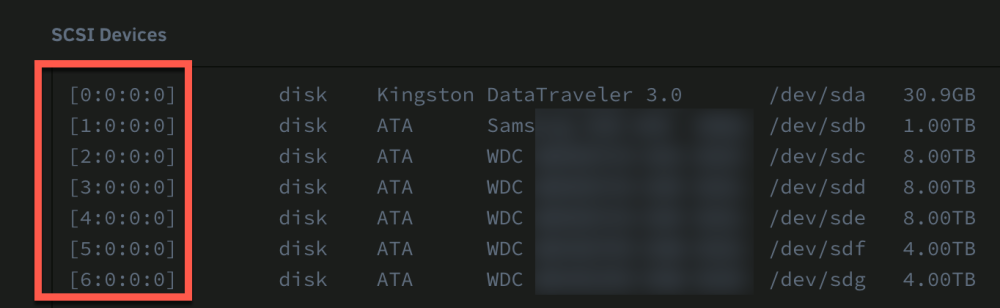
attached the diagnostic file As soon as the monthly parity check started I get errors like these (until I stop the parity check) I have a hard time figuring out which disk is attached to ata2 (i see ata3 sometime as well), may be a bad cable (first to swap) or maybe the disk. Checked SMART self tests (short) and no worries there. help is much appreciated! thanks ps. it may be the SCSI number as shown in the screenshot? not sure tower-diagnostics-20230801-1936.zip