





talonserver
Members
-
Joined
-
Last visited
Everything posted by talonserver
-
Thought so. Thanks.
-
Yes, I know. I've had issues with SATA controllers supporting TRIM so I wanted to be sure. Does NVMe have its own controller on the drive itself that does these operations?
-
Hello. I have added a couple of NVMe drives (970 EVOs) and I want to check to make sure they support trim on my configuration. Is there a similar command to "hdparm -I /dev/UID | grep TRIM" for NVMe drives? The normal command works on SATA SSDs but not on NVMe as I get a "HDIO_DRIVE_CMD(identify) failed: Inappropriate ioctl for device" error when running the command against the NVMe drives. Thanks!
-
It was my only choice, as the GUI didn't work. I know enough about command line to not select the wrong disk. Unless you have another solution that didn't involve the GUI, I don't think that your solution is helpful because it would have meant the drive was useless to me (or anyone else for that matter), as again, the GUI didn't work.
-
I feel like running the command was a better solution.
-
Not in my case. I did that for every partition and the Format button never came up.
-
Just found the command. Open terminal > type: wipefs -af /dev/### (where ### is the ID of the drive as it appears in the GUI. The format button then appears.
-
Any help on this? Thanks!

-
Hello. I just added a 500GB SATA SSD to UD, and cannot format it. I turned Destructive mode on, and the only button available is Mount. It does successfully mount, but I can't seem to format it as the Format button never shows up. I initially tried Preclearing it (I knew I should try that with SSDs, but I couldn't think of anything else to try). I then thought it was because it has a bunch of Proxmox partitions on it, so I tried deleting those. That didn't work, and after I did that it wouldn't even mount. So then I pulled it from the server and hooked it up to another machine and formatted it NTFS, and that's where I'm at now. I'd like to format it as XFS, but can't figure out how to do that. It's an older generation drive, that supports TRIM, but not "Deterministic read" if that helps. Any help would be appreciated.
-
So, this is weird. Downloaded the docker, and it took some time to configure. Came to the registration page, entered my email, and then I entered the activation code I was sent. I tried one of the scanners, and then it kicked me out, can't remember the error I got, but anyway, I can't log back in. I've restarted the docker a couple times. It keeps giving me invalid login credentials, and I'm not sure how to get back into the docker with the address I used as no matter how I try, it won't send me a "forgot password email." How do I reset the password for the Nessus Essentials account I created? I've tried this page to get a new password, but it's been 30 minute and I haven't received a password reset link: https://login.tenable.com
-
This motherboard has a different Asmedia controller.
-
So I did everything like you directed and this is what I get (still doesn't work😞
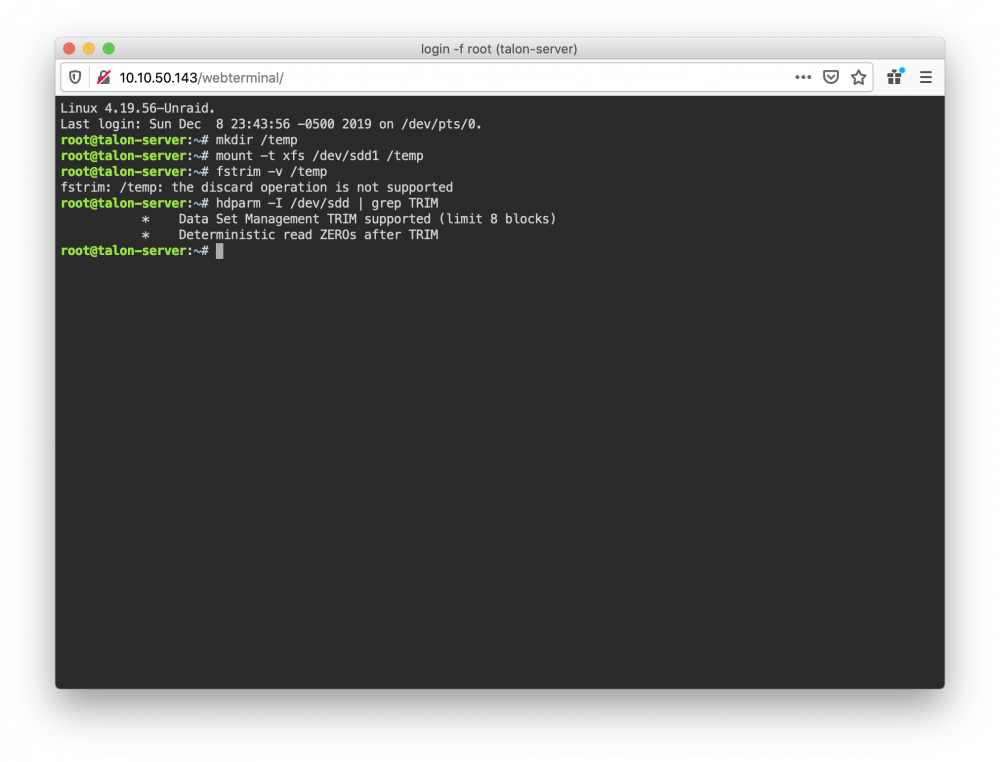
-
Will that mkdir command leave a /temp directly sitting around on the server? I'd like to delete if afterwards (sorry, I'm more familiar with Unix commands).
-
Is this non-destructive? I imagine "unmount" is what I'd use to unmount it after I'm done?
-
So, when I ran the command I used what I'd call the share name. I first tried using the disk ID. Can you give me an example of the command? Where do I find the UD path?
-
No, it's plugged into the Asmedia SATA ports. Yes, both variables for TRIM support when I Grepped it.
-
This is what I get when I try to run that against the disk: root@servername:~# fstrim -v /mnt/disks/1TB-SSD-Games fstrim: /mnt/disks/1TB-SSD-Games: the discard operation is not supported
-
So, I moved things to the onboard SATA and it took longer to TRIM which I think means it did more than it was doing before, but it didn't even try to TRIM the non-Cache drive. How do I trim a disk from terminal that's not part of the array?
-
Right you are. I guess I could give those a try.
-
Hmm, looks like I was plugging things into the ASMedia ports and not the Intel ports. The reason I was doing that is that they are SATA2 ports which would hobble the SSDs. I plan on replacing this in the next year and I'd planned to get another HBA anyway so I think I'll stick with that. Off to Ebay I go.
-
I have a newer 500GB Crucial SSD that should support both of those functions (I don't trust this board's onboard SATA as when I was using it as a workstation if I hooked more than 2 SSDs up to it the computer would bluescreen, it's an ASUS Rampage IV Extreme which should have supported it). I think I'll remove the 850 Evo from the equation and use it later to expand my Steam Library as it's so old, I was just using it until it died and I don't care if I lose a Steam library. So it sounds like I need to get a newer SAS HBA for the SSD's. What are the LSI chips called that you mentioned? Are they like the LSI SAS 3008 mentioned here: https://www.servethehome.com/flash-lsi-sas-3008-hba-e-g-ibm-m1215-mode/
-
Ah. Okay, so the Samsung 850 SSD won't work on the controller. But I could hook it up to the onboard SATA and it would TRIM? It's part of the cache pool and I'm not sure if that would be a good idea to have one part of the cache using a different controller?
-
I'd read mixed reports on that, and assumed since it was working on cache that the issue had since been resolved. I need to get another HBA anyway because I need more drives. Can I mix different model HBA's with Unraid? If so, what used models can I get that will support TRIM so I can plug the SSDs into it?
-
That doesn't make sense as my two other SSDs are on the same LSI 9211-8i. The output of terminal: /etc/libvirt: 920.5 MiB (965246976 bytes) trimmed on /dev/loop3 /var/lib/docker: 13.2 GiB (14156746752 bytes) trimmed on /dev/loop2 fstrim: /mnt/disks/1TB-SSD-Games: FITRIM ioctl failed: Remote I/O error /mnt/cache: 409 GiB (439094415360 bytes) trimmed on /dev/sdb1 But here's the diagnostics: diagnostics-20191207-0952.zip Thanks for the help.
-
What would you like me to post? The output of fstrim -a -v in terminal? It's doing the same thing I originally reported.

