





djcartledge
Members
-
Joined
-
Last visited
-
I have a system which has a small unraid server. been working fine. We use Zerotier to connect to it externally. Since the upgrade from 6 to 7, we have lost access remotely. We can ping the IP of the zerotier host externally, but can not ssh or open the GUI or have our shares reconnected. It just cant find it, despite it being right there. Internally on the network, everything works fine. responds to webgui and mapped network devices I have struggled to find any issue, no errors I can see. Has anyone else had this kind of issue since upgrading to v7. I mean it was instant. as soon as the server rebooted after upgrade, we lost connect. It is like a firewall was enabled. but I can not see one
-
all sorted . seems a fault in the motherboard is causing it. replaced and fixed
-
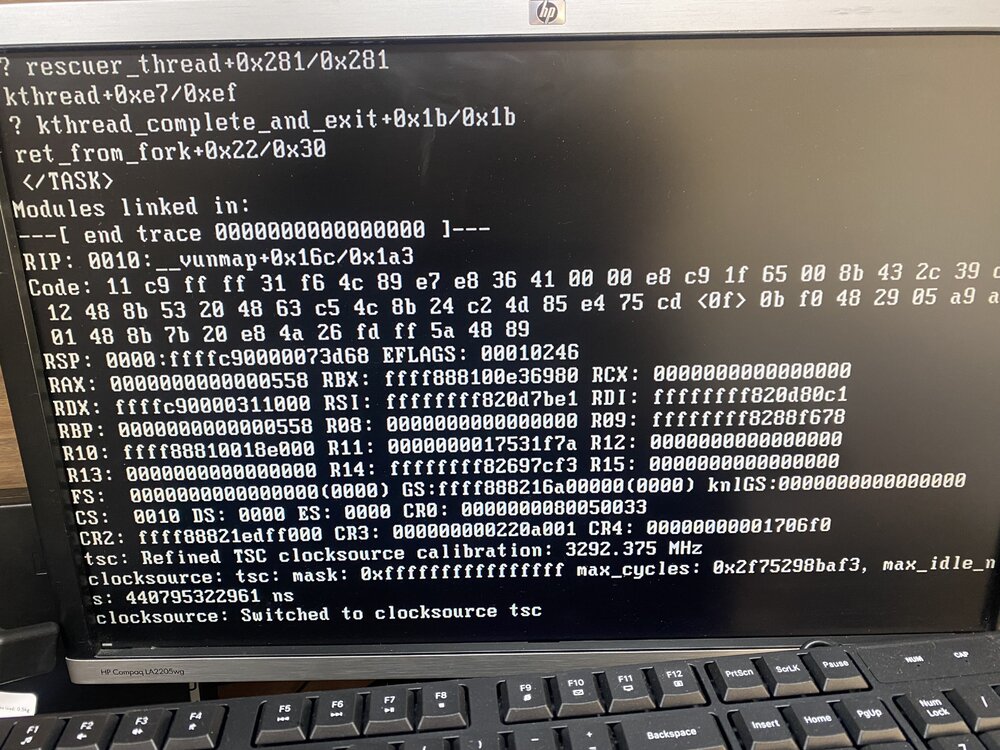
ok now I have server onsite. booted with new USB stick and it wont boot. tested stick in another machine. boots fine. now getting to area doing module trace and then stops with clocksource :switched to clocksource tsc and sts there.
-
Hello, I have an unraid system that has been working well until 2 days ago, when it just stopped and when restarted comes up with the following screen display. It does get to the blue screen of boot selections of unraid, but after a few seconds it ends up with: kworker/u8:B[9] exited with preempt_count 1 tried a few shutowns and restarts. I can't see much online about this error. Would anyone have an idea of what may be wrong looking at this video. sorry for not best quality. Client took the video. dfad1b0c-3270-4ed3-b6f5-6f23a8e4504e.mp4
-
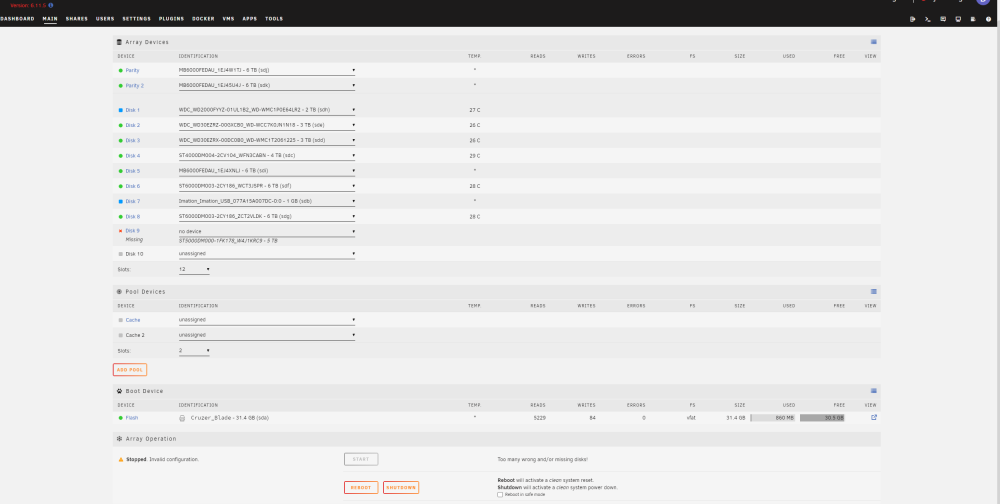
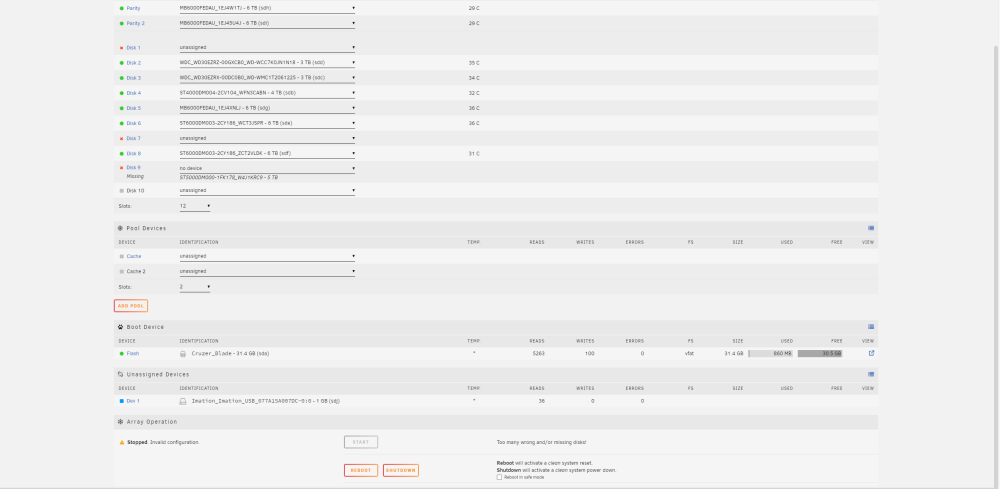
ok thats fair and not known to me. originally I had a controller failure and had to change the ports. This did not allow me to re attach the same drives to the same assignments, I had to add the drives to available slots. that left 2 missing drives. and has run like that for months. not knowing that I really had no protection. now a drive has actually failed, drive 9. I dont have a 5TB to replace it with. and you cant put anything else in its place. I have now added 2 new drives to the missing drive slots, but there is still no option to start the array. and still says invalid or missing configuration. Unraid . Why can't I just start it up and retrieve the data.
-
Hi all. Attached diagnostics and screenshot. Shows no array start tick box.. asgard-diagnostics-20231014-1317.zip
-
yes once I get back to the workshop tomorrow I will post a screenshot etc diagnostic file.
-
Hi. yes the drive is confirmed dead. put it on a test in another machine. complete failure There is no check box next to the start button for some reason. I have used that before. but there does not appear to be any way to do this. I was sure I could strt the array with the disk missing and do exactly wht you suggested. but nope.
-
Hello, this may have been asked before, but I did search and wasn't able to find a clear answer. I have an Unraid system with 9 drives in it. 2 x parity and 7 drives- different sizes today 1 of the 7 drives a 5TB seage has dropped its bundle completely and is a bad disk. The array won't start obviously. I have removed the dead drive but can't start the array with missing disk. - invalid confiuration. I do not have another 5TB drive to replace it at the moment. Can I force start the array somehow to get it up so I can remove files onto another array elsewhere while this unit is waiting for another 5TB drive?
-
I currently have a client with 2 unraid servers. one located at home and 1 at work. They want to be able to access the shared drives on each one, whether they are in the offices or out on the road. Currently I have Zerotier setup on both machines. and yes I can access the shared drives remotely. mapped through explorer. z y x etc. But when they go back home, of course the system jumps onto their local network and cant resolve the IP. As it would have an external ip through zerotier of 10.240.10.240. but on local network, it is 192.168.1.10 and then of course the mapped drives don't work as they refer to an external IP on zerotier. If we map it to the internal network and shared drives. then they dont work outside on zerotier. Then also if you have a dns entry for the unraid box called tower.local, it only seems to resolve on internal, not the external. That would be the simplest. if the DNS name resolved to either IP and the netbios name did the same. mapping shared drives with the netbios name is the ideal solution. which resolves to either internal or external. Can any one shed soe light on this for me. Currently my poor client is pulling their hair out whenever they lose their mappings
-
well i wouldnt believe it. I had a rogue ESP smart device that took the address the unraid server was on. I hadn't moved the dhcp range upwards far enough. no idea how it got onto the same ip when the server was a;ready there ok it is all up and running again it seems. I will let you know if it has other issues many thanks
-
So I cant get to contents z web access doesnt seem to work. it connects and then fails page only way i can access gui is to start server with gui and access it from there it doesnt seem to be starting the array properly. ie says config stale array stopped.
-
Hi Jorge finally got it to transfer to usb stick. cant access it via network or SSH etc. here is diags many thanks David asgard-diagnostics-20230103-1035.zip
-
ok then so can someone please share what I need to do. Why wont a rebuild of drive 1 help or why doesn't the parity drives automatically fix these issues. Makes absolutely no sense to me to havea problem like this and not be repairable with parity drives . after all, isn't that what they are there for? to make failures fixable easily?
-
am i just better off replacing drive 1 and letting parity rebuild it?



