war1000
Members
-
Joined
-
Last visited
Everything posted by war1000
-
Thanks for the reply. No I am testing from within my network. I will test it via the phone tonight. My network setup is pretty standard, 5 computers behind the router. 3 plugged into the router and 2 laptops (there are also phones). 1 server (UnRaid), 1 pc (Windows 10), 1 raspberry pi (Hassio), 2 laptops (Windows 10). I have a laptop that I can use to tether with the phone. Before I do this, I have disconnected hassio so it doesn't ping out when I test. I am also going to redo the nextcloud configs to make it match the spaceinvader setup. I will post the setting here for review.
-
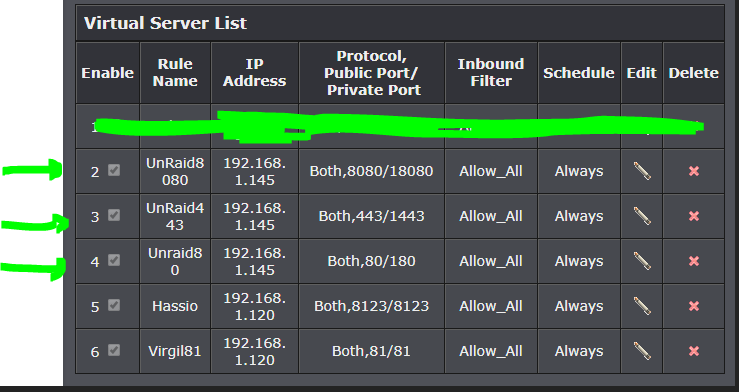
Ok setting the cloudflare to dns more returns the right ip if I ping sonarr.irisnet.ga for example. I am pretty sure something is not converting at the router. Since I have my port 443 redirected to the UnRaid server port 1443, is there anyway I could test if a service is available on port 443 directly from the internet? i.e. If I turn off Letsencrypt, then change the port for Sonarr to 443? I am just want to confirm that I can access a service directly on the port. Right now when Letsencrypt is running, I can see the port open using and online port checker.

-
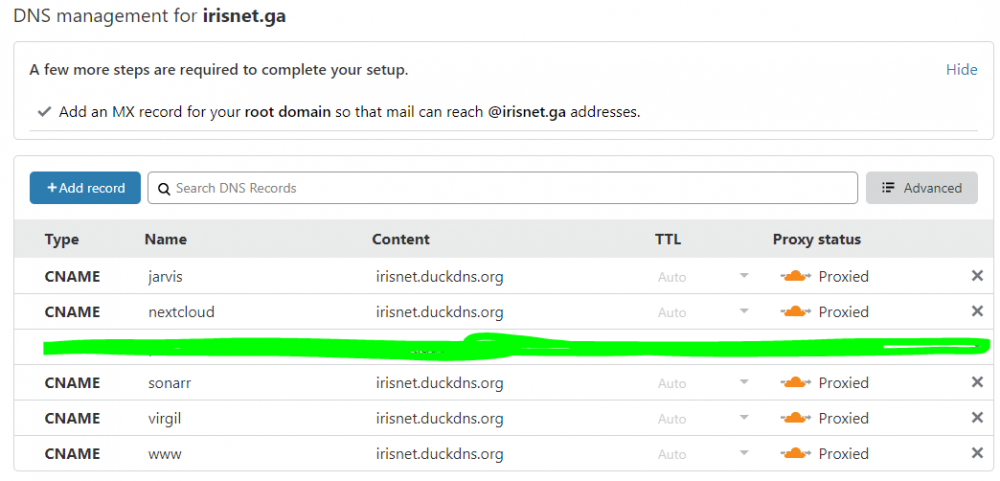
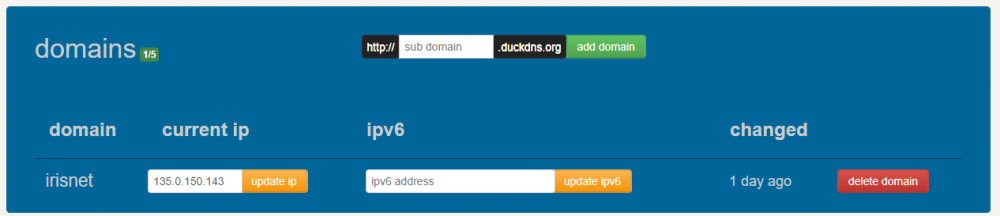
Thank you very much for your reply. I am going to try your recommendation. The made the following change to keep things clean. Cloudflare: DuckDNS: I am not sure about the enabling strict https setting but I will research. I think you are right about the proxy part. Because the DuckDNS on the hassio works as it goes to duckdns only and not through cloudflare. I will keep monitoring and report back tonight. Thank you for the direction here.
-
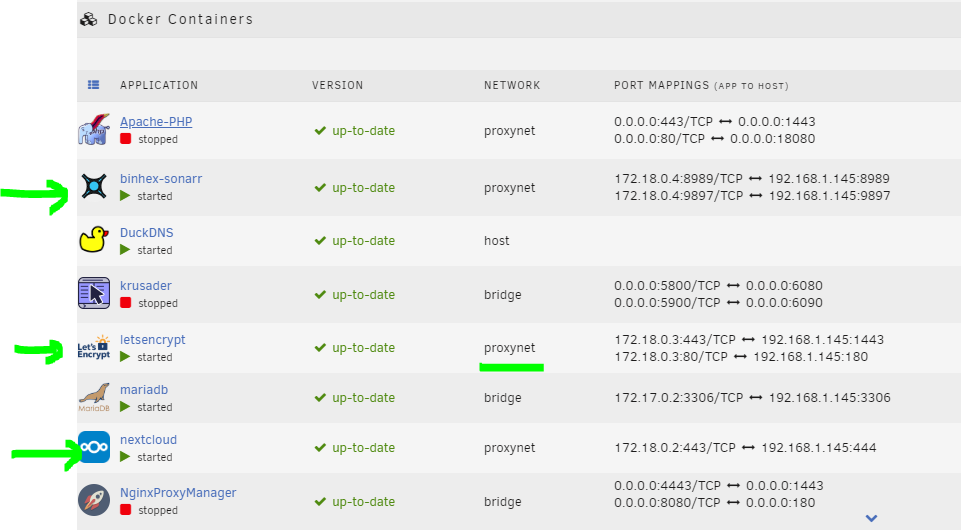
Hi Everyone, I have tried to fix this myself for a few days and I have failed. So looking for some guidance. If this is not the right forum, please let me know and I will go to the UnRaid forum and ask there. 1. So I use UnRaid 6.7.2 and I installed the Letsencrypt docker app. I also installed nextcloud and sonarr. 2. I bought a domain irisnet.ga and I have put two CNAME in there. sonarr.irisnet.ga and nextcloud.irisnet.ga 3. I used dns certificate method in the Letsencrypt to generate the certificate and it generates for the two subdomains. http method doesn't work as the challenge fails. My port 80 might be blocked. Not sure about this one. 4. I followed spaceinvaders youtube videos to setup the reverse proxy for both of the nextcloud and sonarr. However, seems like in cloudflare is not able to reach my server when I type in https://nextcloud.irisnet.ga for example. I get a 522 error. Router Setup Cloudflare Setup Docker Setup Letsencrypt Output [s6-init] making user provided files available at /var/run/s6/etc…exited 0. [s6-init] ensuring user provided files have correct perms…exited 0. [fix-attrs.d] applying ownership & permissions fixes… [fix-attrs.d] done. [cont-init.d] executing container initialization scripts… [cont-init.d] 10-adduser: executing… _ () | | ___ _ __ | | / | | | / | | _ \ | | | () | || |/ || __/ Brought to you by linuxserver.io We gratefully accept donations at: https://www.linuxserver.io/donate/ GID/UID User uid: 99 User gid: 100 [cont-init.d] 10-adduser: exited 0. [cont-init.d] 20-config: executing… [cont-init.d] 20-config: exited 0. [cont-init.d] 30-keygen: executing… using keys found in /config/keys [cont-init.d] 30-keygen: exited 0. [cont-init.d] 50-config: executing… Variables set: PUID=99 PGID=100 TZ=America/New_York URL=irisnet.ga SUBDOMAINS=sonarr,nextcloud EXTRA_DOMAINS= ONLY_SUBDOMAINS=true DHLEVEL=2048 VALIDATION=dns DNSPLUGIN=cloudflare [email protected] STAGING= 2048 bit DH parameters present SUBDOMAINS entered, processing SUBDOMAINS entered, processing Only subdomains, no URL in cert Sub-domains processed are: -d sonarr.irisnet.ga -d nextcloud.irisnet.ga E-mail address entered: @.com dns validation via cloudflare plugin is selected Certificate exists; parameters unchanged; starting nginx [cont-init.d] 50-config: exited 0. [cont-init.d] 99-custom-files: executing… [custom-init] no custom files found exiting… [cont-init.d] 99-custom-files: exited 0. [cont-init.d] done. [services.d] starting services [services.d] done. nginx: [alert] detected a LuaJIT version which is not OpenResty’s; many optimizations will be disabled and performance will be compromised (see https://github.com/openresty/luajit2 for OpenResty’s LuaJIT or, even better, consider using the OpenResty releases from https://openresty.org/en/download.html) nginx: [error] lua_load_resty_core failed to load the resty.core module from https://github.com/openresty/lua-resty-core; ensure you are using an OpenResty release from https://openresty.org/en/download.html (rc: 2, reason: module ‘resty.core’ not found: no field package.preload[‘resty.core’] no file ‘./resty/core.lua’ no file ‘/usr/share/luajit-2.1.0-beta3/resty/core.lua’ no file ‘/usr/local/share/lua/5.1/resty/core.lua’ no file ‘/usr/local/share/lua/5.1/resty/core/init.lua’ no file ‘/usr/share/lua/5.1/resty/core.lua’ no file ‘/usr/share/lua/5.1/resty/core/init.lua’ no file ‘/usr/share/lua/common/resty/core.lua’ no file ‘/usr/share/lua/common/resty/core/init.lua’ no file ‘./resty/core.so’ no file ‘/usr/local/lib/lua/5.1/resty/core.so’ no file ‘/usr/lib/lua/5.1/resty/core.so’ no file ‘/usr/local/lib/lua/5.1/loadall.so’ no file ‘./resty.so’ no file ‘/usr/local/lib/lua/5.1/resty.so’ no file ‘/usr/lib/lua/5.1/resty.so’ no file ‘/usr/local/lib/lua/5.1/loadall.so’) Server ready ===================================================== I am a bit lost at this point. Would anyone please point me in the right direction? Thank you! Update: I requested help on the Letsencrypt forum and confirmed that the certificates are getting generated. Cloudflare not able to reach my ip. or I am not able to get past my router. Because for example if I type in http://192.168.1.145:8989/ i can hit sonarr. But if I type in https://irisnet.duckdns.org:8989 or https://sonarr.irisnet.ga or https://sonarr.irisnet.ga:8989 it doesn’t go anywhere. Same with the nextcloud. I can reach with the internal ip. So if the certificates are working, the issue is either the router port is not redirecting traffic on 443 to 1443 or Letsencrypt is not forwarding to the right docker. If anyone has any troubleshooting tips, please let me know. On another note, the virgil (hassio on raspberry pi) when I tried DuckDNS with Letsencrypt, I am able to reach it using https://irisnet.duckdns.org:8123