vmax5000
Members
-
Joined
-
Last visited
-
I noticed that my pihole docker container refuses to start and give me this error: Error response from daemon: driver failed programming external connectivity on endpoint binhex-official-pihole (55b818ccb4296f7661629d281d45b135c041a48fde8b507860190bede1b8e7d0): failed to bind port 0.0.0.0:53/tcp: Error starting userland proxy: listen tcp4 0.0.0.0:53: bind: address already in use. I am running unraid 7.2.0ultimate-diagnostics-20251112-1103.zip
-
Sorry not an Asus board it's a Gigabyte board
-
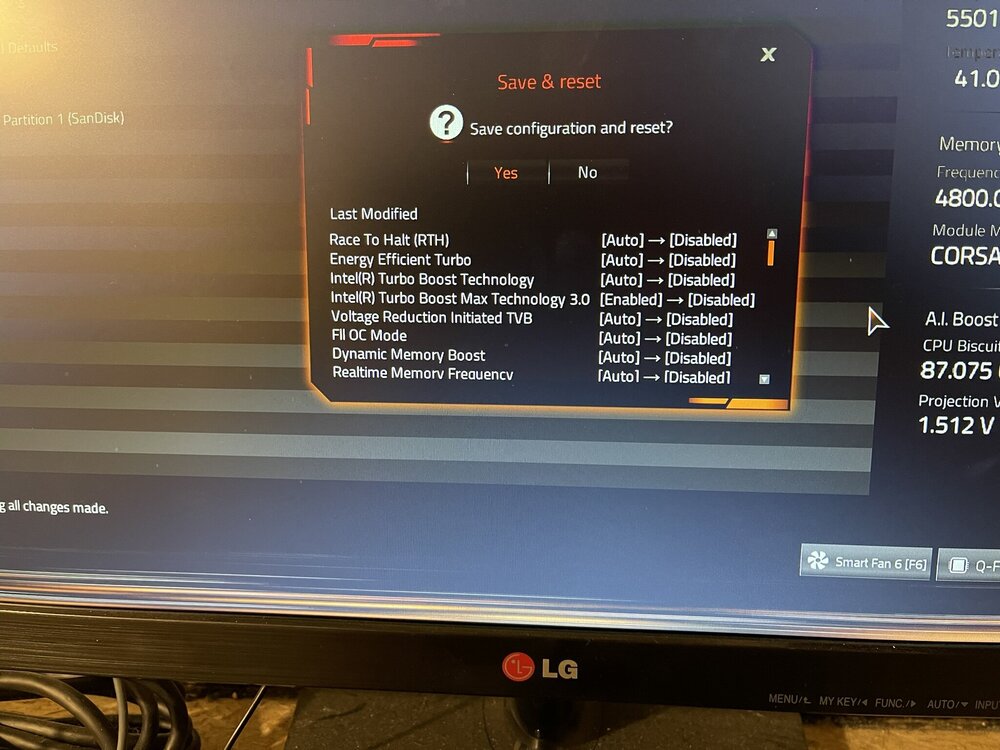
I just thought I would give you an update on my system. After doing this I still had random reboots so I went back into the bios and made all the changes shown below and my server has been completely stable now for over 23 days. I went back in and set my memory profile back to xmp 1 and my server has been stable as well so you can run with the xmp profile. I don't know which of these settings fixed the issue. I know there is a problem with intel 13th and 14th gen cpu's, so I'm guessing that has something to do with the issue. I am currently running a beta version of the bios F11b, but since my server is completely stable I will wait for the final version to come out before updating. I hope this helps if someone is having the same issues I was having. My motherboard is an Asus z790 UD AC with a 14700K core i7.
-
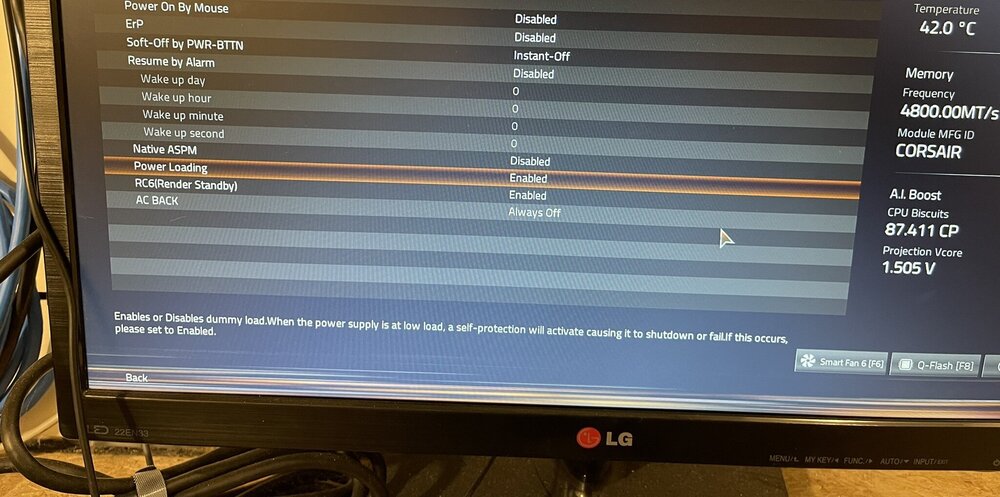
I found the issue! I didn't want to pose until I tested the fix. My server has been running without issue for over a week, the fix came in a new beta bios for my motherboard, see the attachment. I'm still having some hard drive issues, but those issues are caused by my server. I am getting read errors on a drive and it keeps disabling. I took out the drive and ran a test on the drive and it has no issues so the connection in the server is going, this is the second drive that this is happening with. I got an external drive cage and put the "bad drive" in the cage and no more drive issues. So I am replacing this old server which will fix the drive issues. Anyway the solution for my original problem is the bios setting. Thanks for all the help
-
Well all the hardware is brand new so I don't know what I can do. I can't really go back to the motherboard manufacture with no way to show a problem and the psu is attached to a ups. The only thing that really changed since the lockup issue is a bios update. Maybe I can roll back the bios and try again. Anyway, there doesn't seem to be any issues with unraid according to the logs. I will keep working on the issue and if I come up with an solution I will post. Thanks for your help.
-
New problem. When I started up the system on June 19 around 4pm it went into a parity sync so I let it finish and it ran with no errors (both ram sticks) so I thought I would let it run with both ram sticks since I updated the bios to bring it up to current. Then for no reason that I can see in the syslog the system just powered off, no lockup just powered down. Log shows nothing, so I removed one ram stick and powered back up at 7:47 and everything came up but I cancelled the parity sync and let the system run. The system powered down again at 7:56, I didn't notice until around 10 pm, so at 10:47 I powered up the system again and stopped the parity sync. At 2 PM on June 20 I powered up the system again and the last entry for June 20 is a t 10:30 pm when I logged it to see if the system was running and it was. When I got up in the morning the system was powered off again. So I powered up and went into the bios and set defaults just in case I had something configured wrong ( I made one other change, I set the OS from Windows to Other OS). So I powered up again and now it's running I stopped the parity sync again. I can't see anything in the logs that would make the system power down. Here are the logs Thanks syslog-127.0.0.1.log ultimate-diagnostics-20240621-0828.zip
-
I meant to say that I will run unraid with one stick as you suggested
-
Sorry, that's what I am going to do, I just got a pass from both sticks, now I'm going to test with one stick. I updated the bios, it was down by 3 versions so now it's up to date. After all of the testing is done I will post a new syslog when or if it crashes again. Thanks again
-
I have run the memtest with one stick over and over and it passes so I put both sticks back and ran the memtest again and it passed again. It seems to be getting worse, it crashed again last night and I did disable the email. Again I got constant worker errors just before it crashed. Ok, I will run the memtest again with one stick and if it passes again I will try running in safe mode as you suggest. I'm going to update the bios today as well. Thanks Just in case here is another syslog from last night. syslog-127.0.0.1.log.1
-
After looking into it a bit closer, it looks like the worker error is a gmail error, it could not do the 2 factor. But I am still stumped as to why the server keeps locking up. When it halts all of the fans on the cpu, hard drives and gpu just ramp up and stay there, I tried pushing the power button once to do a proper shut down, but it doesn't work, the system is completely halted. I have run the ram test several times and it always passes. The only thing I haven't done yet is install the latest bios update, so tomorrow I will try and install it and then see what happens. Thanks
-
Well, I thought everything was good now, but it has locked up several times again, this last one after only 7 hours of up time. I set the syslog back on and this time I got some data pertaining to ngenx. I don't understand the error but maybe you could see something that will point to an issue? syslog-127.0.0.1.log ultimate-diagnostics-20240618-2046.zip
-
I don't know how I missed that! Thanks to all the help from everyone, I'm pretty sure my server is stable again!
-
I not quite sure I understand, when the array is stopped, what slot number do I click to increase it? I only see the 10 array slots when I stop the array. Thanks
-
Ok, I was trying to assign them to shares. How do I add to the number of array slots? Thanks
-
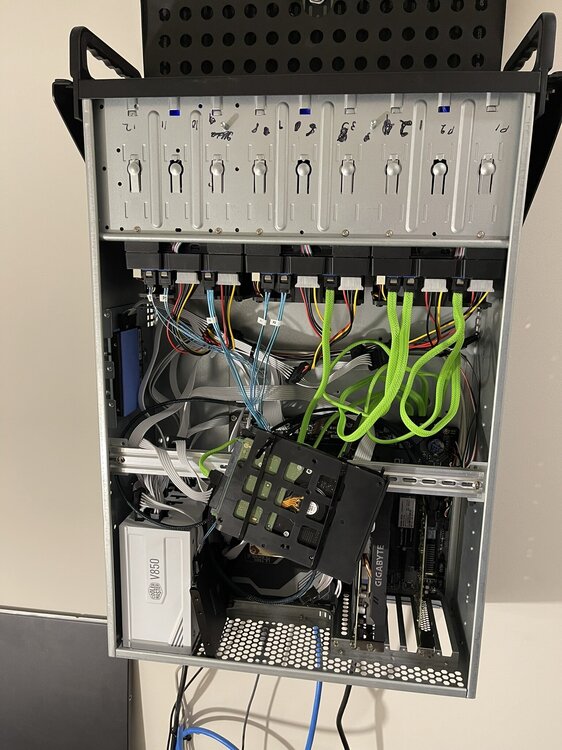
Just to update this issue. I tested ram extensively and it passed without issue. What I noticed was that everytime the system locked up drive 3 had contentious sata resets, that was always the last shown message in syslog. So I took drive 3 out of the server and rigged a temporary setup to test with, I plugged the drive directly into the motherboard instead of using the drive tray in the server and since then the server has run without issue and the drive does not have any resets. So I am pretty sure I have a bad sata connector in the server and for whatever reason all of the sata resets would halt unraid. So just for laughs here is my temp setup for testing! LOL I have since setup a better option with an external drive cage. Now I am able to add an additional 3 drives to my array, I added the drives and they show up in unraid but I can't find a way to add them to the array. When I look at Global Share Setttings it only shows the current 10 drives, I can't see any setting that lets me add the extra 3 drives to the array, am I missing something? Thanks ultimate-diagnostics-20240612-0956.zip