





Drogon
Members
-
Joined
-
Last visited
Everything posted by Drogon
-
I received a warning that said I had some disk errors. I ran a SMART test on the disk but I don't know how to read the report to diagnose the problem. I've attached the SMART report and diagnostics and would really appreciate some help determining what my next steps are.
-
I ran the scrub, deleting files until it didn't find any errors then ran a full balance again. This is my output for btrfs fi df /mnt/cache: Data, RAID1: total=571.00GiB, used=354.41GiB System, RAID1: total=32.00MiB, used=112.00KiB Metadata, RAID1: total=5.00GiB, used=889.78MiB GlobalReserve, single: total=410.64MiB, used=0.00B Looks like I'm good to go! Thank you so much for all your help.
-
Here's the syslog: Jun 2 09:46:30 TrueSource kernel: ata11.00: failed command: READ FPDMA QUEUED Jun 2 09:46:30 TrueSource kernel: ata11.00: cmd 60/00:d0:40:5e:fe/05:00:58:00:00/40 tag 26 ncq dma 655360 in Jun 2 09:46:30 TrueSource kernel: res 41/04:00:00:00:00/00:00:00:00:00/00 Emask 0x1 (device error) Jun 2 09:46:30 TrueSource kernel: ata11.00: status: { DRDY ERR } Jun 2 09:46:30 TrueSource kernel: ata11.00: error: { ABRT } Jun 2 09:46:30 TrueSource kernel: ata11.00: revalidation failed (errno=-2) Jun 2 09:46:30 TrueSource kernel: ata11: hard resetting link Jun 2 09:46:30 TrueSource kernel: ata11: SATA link up 6.0 Gbps (SStatus 133 SControl 300) Jun 2 09:46:30 TrueSource kernel: ata11.00: configured for UDMA/133 Jun 2 09:46:30 TrueSource kernel: ata11: EH complete Jun 2 09:46:30 TrueSource kernel: ata11.00: exception Emask 0x0 SAct 0x9800f1ff SErr 0x0 action 0x0 Jun 2 09:46:30 TrueSource kernel: ata11.00: irq_stat 0x40000008 Jun 2 09:46:30 TrueSource kernel: ata11.00: failed command: READ FPDMA QUEUED Jun 2 09:46:30 TrueSource kernel: ata11.00: cmd 60/00:60:40:22:fe/05:00:58:00:00/40 tag 12 ncq dma 655360 in Jun 2 09:46:30 TrueSource kernel: res 41/40:00:c0:23:fe/00:00:58:00:00/00 Emask 0x409 (media error) <F> Jun 2 09:46:30 TrueSource kernel: ata11.00: status: { DRDY ERR } Jun 2 09:46:30 TrueSource kernel: ata11.00: error: { UNC } Jun 2 09:46:30 TrueSource kernel: ata11.00: configured for UDMA/133 Jun 2 09:46:30 TrueSource kernel: sd 11:0:0:0: [sds] tag#12 UNKNOWN(0x2003) Result: hostbyte=0x00 driverbyte=DRIVER_OK cmd_age=0s Jun 2 09:46:30 TrueSource kernel: sd 11:0:0:0: [sds] tag#12 Sense Key : 0x3 [current] Jun 2 09:46:30 TrueSource kernel: sd 11:0:0:0: [sds] tag#12 ASC=0x11 ASCQ=0x4 Jun 2 09:46:30 TrueSource kernel: sd 11:0:0:0: [sds] tag#12 CDB: opcode=0x28 28 00 58 fe 22 40 00 05 00 00 Jun 2 09:46:30 TrueSource kernel: I/O error, dev sds, sector 1493050304 op 0x0:(READ) flags 0x0 phys_seg 60 prio class 0 Jun 2 09:46:30 TrueSource kernel: ata11: EH complete Jun 2 09:46:30 TrueSource kernel: ata11.00: exception Emask 0x0 SAct 0x1e000 SErr 0x0 action 0x0 Jun 2 09:46:30 TrueSource kernel: ata11.00: irq_stat 0x40000008 Jun 2 09:46:30 TrueSource kernel: ata11.00: failed command: READ FPDMA QUEUED Jun 2 09:46:30 TrueSource kernel: ata11.00: cmd 60/08:68:c0:23:fe/00:00:58:00:00/40 tag 13 ncq dma 4096 in Jun 2 09:46:30 TrueSource kernel: res 41/40:00:c0:23:fe/00:00:58:00:00/00 Emask 0x409 (media error) <F> Jun 2 09:46:30 TrueSource kernel: ata11.00: status: { DRDY ERR } Jun 2 09:46:30 TrueSource kernel: ata11.00: error: { UNC } Jun 2 09:46:30 TrueSource kernel: ata11.00: configured for UDMA/133 Jun 2 09:46:30 TrueSource kernel: sd 11:0:0:0: [sds] tag#13 UNKNOWN(0x2003) Result: hostbyte=0x00 driverbyte=DRIVER_OK cmd_age=0s Jun 2 09:46:30 TrueSource kernel: sd 11:0:0:0: [sds] tag#13 Sense Key : 0x3 [current] Jun 2 09:46:30 TrueSource kernel: sd 11:0:0:0: [sds] tag#13 ASC=0x11 ASCQ=0x4 Jun 2 09:46:30 TrueSource kernel: sd 11:0:0:0: [sds] tag#13 CDB: opcode=0x28 28 00 58 fe 23 c0 00 00 08 00 Jun 2 09:46:30 TrueSource kernel: I/O error, dev sds, sector 1493050304 op 0x0:(READ) flags 0x800 phys_seg 1 prio class 0 Jun 2 09:46:30 TrueSource kernel: ata11: EH complete Jun 2 09:46:30 TrueSource kernel: BTRFS warning (device sds1): i/o error at logical 948051574784 on dev /dev/sds1, physical 764441722880, root 5, inode 1743206, offset 4096, length 4096, links 1 (path: appdata/binhex-plexpass/Plex Media Server/Media/localhost/4/9f039f37fba33515b55d6ee026a5393694611dd.bundle/Contents/Chapters/chapter2.jpg) Jun 2 09:46:30 TrueSource kernel: BTRFS error (device sds1): bdev /dev/sds1 errs: wr 0, rd 4546, flush 0, corrupt 6445, gen 0 Jun 2 09:46:30 TrueSource kernel: BTRFS error (device sds1): unable to fixup (regular) error at logical 948051574784 on dev /dev/sds1 Jun 2 09:48:18 TrueSource kernel: ata11.00: exception Emask 0x0 SAct 0xbfffc01f SErr 0x0 action 0x0 Jun 2 09:48:18 TrueSource kernel: ata11.00: irq_stat 0x40000008 Jun 2 09:48:18 TrueSource kernel: ata11.00: failed command: READ FPDMA QUEUED Jun 2 09:48:18 TrueSource kernel: ata11.00: cmd 60/00:70:08:c4:be/05:00:64:00:00/40 tag 14 ncq dma 655360 in Jun 2 09:48:18 TrueSource kernel: res 41/40:00:e8:c4:be/00:00:64:00:00/00 Emask 0x409 (media error) <F> Jun 2 09:48:18 TrueSource kernel: ata11.00: status: { DRDY ERR } Jun 2 09:48:18 TrueSource kernel: ata11.00: error: { UNC } Jun 2 09:48:18 TrueSource kernel: ata11.00: configured for UDMA/133 Jun 2 09:48:18 TrueSource kernel: sd 11:0:0:0: [sds] tag#14 UNKNOWN(0x2003) Result: hostbyte=0x00 driverbyte=DRIVER_OK cmd_age=0s Jun 2 09:48:18 TrueSource kernel: sd 11:0:0:0: [sds] tag#14 Sense Key : 0x3 [current] Jun 2 09:48:18 TrueSource kernel: sd 11:0:0:0: [sds] tag#14 ASC=0x11 ASCQ=0x4 Jun 2 09:48:18 TrueSource kernel: sd 11:0:0:0: [sds] tag#14 CDB: opcode=0x28 28 00 64 be c4 08 00 05 00 00 Jun 2 09:48:18 TrueSource kernel: I/O error, dev sds, sector 1690223848 op 0x0:(READ) flags 0x0 phys_seg 55 prio class 0 Jun 2 09:48:18 TrueSource kernel: ata11: EH complete Jun 2 09:48:18 TrueSource kernel: ata11.00: exception Emask 0x0 SAct 0xb0004020 SErr 0x0 action 0x0 Jun 2 09:48:18 TrueSource kernel: ata11.00: irq_stat 0x40000008 Jun 2 09:48:18 TrueSource kernel: ata11.00: failed command: READ FPDMA QUEUED Jun 2 09:48:18 TrueSource kernel: ata11.00: cmd 60/08:70:e8:c4:be/00:00:64:00:00/40 tag 14 ncq dma 4096 in Jun 2 09:48:18 TrueSource kernel: res 41/40:00:e8:c4:be/00:00:64:00:00/00 Emask 0x409 (media error) <F> Jun 2 09:48:18 TrueSource kernel: ata11.00: status: { DRDY ERR } Jun 2 09:48:18 TrueSource kernel: ata11.00: error: { UNC } Jun 2 09:48:18 TrueSource kernel: ata11.00: configured for UDMA/133 Jun 2 09:48:18 TrueSource kernel: sd 11:0:0:0: [sds] tag#14 UNKNOWN(0x2003) Result: hostbyte=0x00 driverbyte=DRIVER_OK cmd_age=0s Jun 2 09:48:18 TrueSource kernel: sd 11:0:0:0: [sds] tag#14 Sense Key : 0x3 [current] Jun 2 09:48:18 TrueSource kernel: sd 11:0:0:0: [sds] tag#14 ASC=0x11 ASCQ=0x4 Jun 2 09:48:18 TrueSource kernel: sd 11:0:0:0: [sds] tag#14 CDB: opcode=0x28 28 00 64 be c4 e8 00 00 08 00 Jun 2 09:48:18 TrueSource kernel: I/O error, dev sds, sector 1690223848 op 0x0:(READ) flags 0x800 phys_seg 1 prio class 0 Jun 2 09:48:18 TrueSource kernel: ata11: EH complete Jun 2 09:48:18 TrueSource kernel: BTRFS warning (device sds1): i/o error at logical 1049004429312 on dev /dev/sds1, physical 865394577408, root 5, inode 56279372, offset 61440, length 4096, links 1 (path: appdata/binhex-plexpass/Plex Media Server/Media/localhost/3/f834462a816ab07a7e37c4b3e2d05b47307e64e.bundle/Contents/Chapters/chapter10.jpg) Jun 2 09:48:18 TrueSource kernel: BTRFS error (device sds1): bdev /dev/sds1 errs: wr 0, rd 4547, flush 0, corrupt 6445, gen 0 Jun 2 09:48:18 TrueSource kernel: BTRFS error (device sds1): unable to fixup (regular) error at logical 1049004429312 on dev /dev/sds1 Jun 2 09:48:18 TrueSource kernel: ata11.00: exception Emask 0x0 SAct 0x800b0 SErr 0x0 action 0x0 Jun 2 09:48:18 TrueSource kernel: ata11.00: irq_stat 0x40000008 Jun 2 09:48:18 TrueSource kernel: ata11.00: failed command: READ FPDMA QUEUED Jun 2 09:48:18 TrueSource kernel: ata11.00: cmd 60/08:98:f0:c4:be/00:00:64:00:00/40 tag 19 ncq dma 4096 in Jun 2 09:48:18 TrueSource kernel: res 41/40:00:f0:c4:be/00:00:64:00:00/00 Emask 0x409 (media error) <F> Jun 2 09:48:18 TrueSource kernel: ata11.00: status: { DRDY ERR } Jun 2 09:48:18 TrueSource kernel: ata11.00: error: { UNC } Jun 2 09:48:18 TrueSource kernel: ata11.00: configured for UDMA/133 Jun 2 09:48:18 TrueSource kernel: sd 11:0:0:0: [sds] tag#19 UNKNOWN(0x2003) Result: hostbyte=0x00 driverbyte=DRIVER_OK cmd_age=0s Jun 2 09:48:18 TrueSource kernel: sd 11:0:0:0: [sds] tag#19 Sense Key : 0x3 [current] Jun 2 09:48:18 TrueSource kernel: sd 11:0:0:0: [sds] tag#19 ASC=0x11 ASCQ=0x4 Jun 2 09:48:18 TrueSource kernel: sd 11:0:0:0: [sds] tag#19 CDB: opcode=0x28 28 00 64 be c4 f0 00 00 08 00 Jun 2 09:48:18 TrueSource kernel: I/O error, dev sds, sector 1690223856 op 0x0:(READ) flags 0x800 phys_seg 1 prio class 0 Jun 2 09:48:18 TrueSource kernel: ata11: EH complete Jun 2 09:48:18 TrueSource kernel: BTRFS warning (device sds1): i/o error at logical 1049004433408 on dev /dev/sds1, physical 865394581504, root 5, inode 56279372, offset 65536, length 4096, links 1 (path: appdata/binhex-plexpass/Plex Media Server/Media/localhost/3/f834462a816ab07a7e37c4b3e2d05b47307e64e.bundle/Contents/Chapters/chapter10.jpg) Jun 2 09:48:18 TrueSource kernel: BTRFS error (device sds1): bdev /dev/sds1 errs: wr 0, rd 4548, flush 0, corrupt 6445, gen 0 Jun 2 09:48:18 TrueSource kernel: BTRFS error (device sds1): unable to fixup (regular) error at logical 1049004433408 on dev /dev/sds1 Jun 2 09:48:59 TrueSource kernel: BTRFS info (device sds1): scrub: finished on devid 1 with status: 0 If I understand you correctly, I need to delete "...chapter2.jpg" and "...chapter10.jpg." Then I can rerun the scrub, deleting the flagged files until there are none; at which point I can then run btrfs fi df /mnt/cache for the final time and I should have 1 profile when it finishes. Is that right?
-
I already ran a scrub with "repair corrupted blocks" checked. Is that a correcting scrub? This is what my scrub status says now: UUID: 111b1f78-5398-4386-889e-e15cd660b0d3 Scrub started: Thu Jun 1 17:33:43 2023 Status: finished Duration: 0:22:10 Total to scrub: 416.53GiB Rate: 653.80MiB/s Error summary: read=13 csum=7 Corrected: 0 Uncorrectable: 20 Unverified: 0 If this context helps, the existing ssd has a ton of smart errors and has been failing for a while now, which is why I've added a 2nd one. Do I need to run a different type of scrub?
-
Unraid 6.11.5 I recently added a new ssd to my cache and it doesn't seem like it was added correctly (I'm having some odd problems with Plex). All of the posts that I found online said that I just need to disable the array, add the new drive to the cache pool, start the array, and then Unraid will take care of the rest so that's how I added the 2nd drive to my cache. I think I must have missed something though because after a lot of searching, my cache output doesn't match what everyone else appears to be seeing. I ran this command (btrfs fi df /mnt/cache) and this was my output: Data, single: total=548.01GiB, used=349.18GiB Data, RAID1: total=252.00GiB, used=240.87GiB System, single: total=4.00MiB, used=32.00KiB System, RAID1: total=32.00MiB, used=80.00KiB Metadata, single: total=3.01GiB, used=709.20MiB Metadata, RAID1: total=1.00GiB, used=570.14MiB GlobalReserve, single: total=512.00MiB, used=0.00B WARNING: Multiple block group profiles detected, see 'man btrfs(5)' WARNING: Data: single, raid1 WARNING: Metadata: single, raid1 WARNING: System: single, raid1 I went to my cache and ran Balance "Perform full balance" and also did a scrub, but when I ran btfrs fi df /mnt/cache again I had the same output. The threads I'm seeing online only have 1 profile after running the command. If I go into my cache I see where I can "convert to single, raid0 or raid1..." but since I have data on both single and raid1 already this doesn't seem like a good idea. This is my syslog with the relevant errors: Jun 1 20:07:53 TrueSource kernel: BTRFS info (device sds1): found 4 extents, stage: move data extents Jun 1 20:07:54 TrueSource kernel: BTRFS info (device sds1): found 4 extents, stage: update data pointers Jun 1 20:07:54 TrueSource kernel: BTRFS info (device sds1): relocating block group 10722962374656 flags data|raid1 Jun 1 20:08:11 TrueSource kernel: BTRFS info (device sds1): found 116 extents, stage: move data extents Jun 1 20:08:12 TrueSource kernel: BTRFS info (device sds1): found 116 extents, stage: update data pointers Jun 1 20:08:12 TrueSource kernel: BTRFS info (device sds1): relocating block group 10721888632832 flags data|raid1 Jun 1 20:08:29 TrueSource kernel: BTRFS info (device sds1): found 4 extents, stage: move data extents Jun 1 20:08:30 TrueSource kernel: BTRFS info (device sds1): found 4 extents, stage: update data pointers Jun 1 20:08:31 TrueSource kernel: BTRFS info (device sds1): relocating block group 10720814891008 flags data|raid1 Jun 1 20:08:48 TrueSource kernel: BTRFS info (device sds1): found 4 extents, stage: move data extents Jun 1 20:08:48 TrueSource kernel: BTRFS info (device sds1): found 4 extents, stage: update data pointers Jun 1 20:08:48 TrueSource kernel: BTRFS info (device sds1): relocating block group 10719741149184 flags data|raid1 Jun 1 20:09:06 TrueSource kernel: BTRFS info (device sds1): found 4 extents, stage: move data extents Jun 1 20:09:06 TrueSource kernel: BTRFS info (device sds1): found 4 extents, stage: update data pointers Jun 1 20:09:06 TrueSource kernel: BTRFS info (device sds1): relocating block group 10718667407360 flags data|raid1 Jun 1 20:09:26 TrueSource kernel: BTRFS info (device sds1): found 4 extents, stage: move data extents Jun 1 20:09:28 TrueSource kernel: BTRFS info (device sds1): found 4 extents, stage: update data pointers Jun 1 20:09:28 TrueSource kernel: BTRFS info (device sds1): relocating block group 10717593665536 flags data|raid1 Jun 1 20:09:48 TrueSource kernel: BTRFS info (device sds1): found 124 extents, stage: move data extents Jun 1 20:09:49 TrueSource kernel: BTRFS info (device sds1): found 124 extents, stage: update data pointers Jun 1 20:09:49 TrueSource kernel: BTRFS info (device sds1): relocating block group 10716519923712 flags data|raid1 Jun 1 20:10:06 TrueSource kernel: BTRFS info (device sds1): found 9 extents, stage: move data extents Jun 1 20:10:07 TrueSource kernel: BTRFS info (device sds1): found 9 extents, stage: update data pointers Jun 1 20:10:07 TrueSource kernel: BTRFS info (device sds1): relocating block group 10436273307648 flags data|raid1 Jun 1 20:10:09 TrueSource kernel: BTRFS warning (device sds1): csum failed root -9 ino 636 off 1018343424 csum 0xceef2029 expected csum 0xa3bbfb1b mirror 1 Jun 1 20:10:09 TrueSource kernel: BTRFS error (device sds1): bdev /dev/sdo1 errs: wr 0, rd 0, flush 0, corrupt 197, gen 0 Jun 1 20:10:09 TrueSource kernel: BTRFS warning (device sds1): csum failed root -9 ino 636 off 1018343424 csum 0xceef2029 expected csum 0xa3bbfb1b mirror 2 Jun 1 20:10:09 TrueSource kernel: BTRFS error (device sds1): bdev /dev/sds1 errs: wr 0, rd 4537, flush 0, corrupt 6404, gen 0 Jun 1 20:10:09 TrueSource kernel: BTRFS warning (device sds1): csum failed root -9 ino 636 off 1018343424 csum 0xceef2029 expected csum 0xa3bbfb1b mirror 1 Jun 1 20:10:09 TrueSource kernel: BTRFS error (device sds1): bdev /dev/sdo1 errs: wr 0, rd 0, flush 0, corrupt 198, gen 0 Jun 1 20:10:09 TrueSource kernel: BTRFS warning (device sds1): csum failed root -9 ino 636 off 1018343424 csum 0xceef2029 expected csum 0xa3bbfb1b mirror 2 Jun 1 20:10:09 TrueSource kernel: BTRFS error (device sds1): bdev /dev/sds1 errs: wr 0, rd 4537, flush 0, corrupt 6405, gen 0 Jun 1 20:10:24 TrueSource kernel: BTRFS info (device sds1): balance: ended with status: -5 How do I get all of my data merged into 1 profile? truesource-diagnostics-20230601-2027.zip
-
Has something changed recently? I'm using Deluge 2.0.4.dev38 (according to the info button on the client) but all of my torrents are not connecting because "your client is not on the whitelist." The thing is, this version is on the whitelist for all of the trackers I'm now unable to connect to. Given that this just started happening and that it's an issue across multiple sites, I'm confident that this issue is on my end but I don't know how to troubleshoot because my version IS on the whitelist. I've tried restarting and updating but nothing seems to work. I thought maybe the issue would resolve itself in a day or so but it hasn't. Does anyone know how I can get this corrected?
-
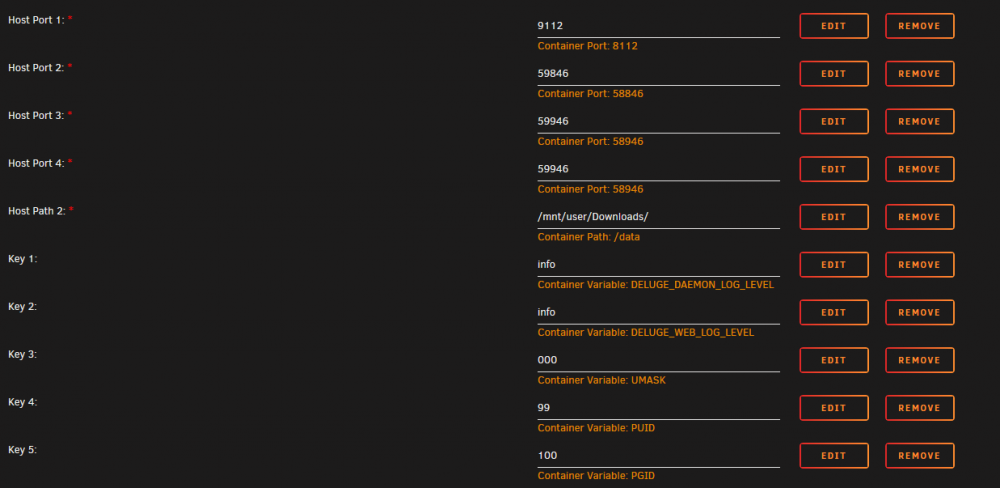
A little more information about what's happening here: Has anyone else experienced this? I'm not sure how to proceed. EDIT: I was able to access the web UI on the regular version by changing my settings as follows: I don't know if it will work properly with these settings though and changing the settings on the VPN docker to match this doesn't give me access to the web UI. If these settings are OK to use, where do I find my torrent info to copy from the VPN to the regular docker? I don't mind using the regular docker but I don't want to lose my torrents... While looking for torrents I came across a file named deluge-web which might have some relevant info: 11:29:25.778 [INFO ][deluge.configmanager:52 ] Setting config directory to: /config 11:29:25.782 [INFO ][deluge.ui.ui:70 ] Deluge ui 2.0.4.dev23 11:29:25.782 [INFO ][deluge.ui.ui:72 ] Starting web ui.. 11:29:25.931 [WARNING ][deluge.i18n.util :83 ] IOError when loading translations: [Errno 2] No translation file found for domain: 'deluge' 11:29:25.937 [INFO ][deluge.i18n.util :102 ] Setting up translations from /usr/lib/python3.8/site-packages/deluge/i18n 11:29:25.946 [INFO ][deluge.ui.web.server :735 ] Starting webui server at PID 148 11:29:25.946 [ERROR ][deluge.ui.web.web :81 ] Couldn't listen on 0.0.0.0:8112: [Errno 98] Address already in use. Check that deluge-web or webui plugin is not already running. It looks like the problem is related to the address already being used. I'm not sure what's using it though or how to find out.
-
I'm no longer able to access the Web UI. Looking at the log, I have the following error repeating over and over: 2020-05-29 11:31:03,248 DEBG 'watchdog-script' stdout output: [info] Starting Deluge Web UI... 2020-05-29 11:31:03,248 DEBG 'watchdog-script' stdout output: [info] Deluge Web UI started 2020-05-29 11:31:33,262 DEBG 'watchdog-script' stdout output: [info] Deluge Web UI not running 2020-05-29 11:31:33,629 DEBG 'watchdog-script' stderr output: usage: Usage: config [--set <key> <value>] [<key> [<key>...] ] config: error: the following arguments are required: <value>, <keys> 2020-05-29 11:31:33,262 DEBG 'watchdog-script' stdout output: [info] Deluge Web UI not running 2020-05-29 11:31:33,629 DEBG 'watchdog-script' stderr output: usage: Usage: config [--set <key> <value>] [<key> [<key>...] ] config: error: the following arguments are required: <value>, <keys> 2020-05-29 11:31:35,958 DEBG 'watchdog-script' stdout output: [info] No torrents with state 'Error' found 2020-05-29 11:31:35,958 DEBG 'watchdog-script' stdout output: [info] Starting Deluge Web UI... 2020-05-29 11:31:35,959 DEBG 'watchdog-script' stdout output: [info] Deluge Web UI started How do I correct this?

