





Drogon
Members
-
Joined
-
Last visited
-
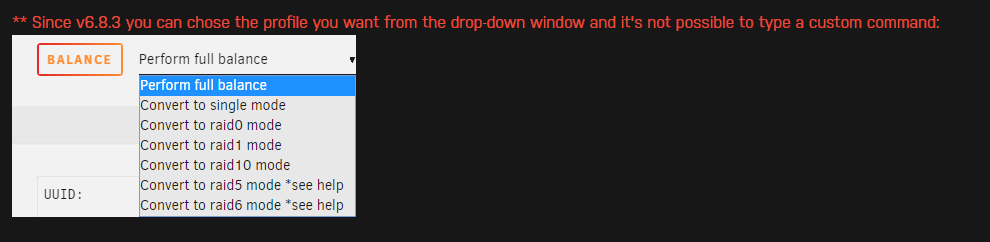
Yep. I removed the appdata folder for one of the dockers, reinstalled, and I'm now able to access the docker. Is there a way to backup my data and somehow bring it over to the new docker or am I going to have to set up everything from scratch? Something probably of note: In my appdata folder, there were changes to the owner and permission fields with the new image. Owner changed from root to nobody and permission went from drwx------ to drwxrwxr-x. EDIT: Most of the dockers that aren't working match the old root / drwx------ and changing this (then restarting the docker) does allow access to the docker so I'm all set. Except for my Plex docker... which is already set to nobody / drwxrwxr-x. Not sure what to do about this one? EDIT: Something in the folder must have had different owner/permissions because I went ahead and "changed" it to nobody / drwxrwxr-x and after restarting it's working. Thanks for all of your help! While I've got you here... why don't I have the drop down options on my cache to convert it back to single mode? This is what started all of my problems: EDIT: For anyone that comes across this, I couldn't convert to single mode because I had already removed a disk from the pool. I added the disk back, balanced again, and then I was able to convert to single mode.
-
5/10. If I had to guess it happens with the dockers that had data moved off of the cache drive before I noticed.
-
This is what I see when I try to access the affected dockers:

-
Just tried that and no luck. I scrubbed the cache again and restarted. Still no luck accessing the dockers. I've attached the updated diagnostics file which hopefully contains something useful. truesource-diagnostics-20240621-2132.zip
-
I tried that yesterday on my docker settings but I found another scrub in the cache settings, which is probably the one you're referring to? Here are the results: DOCKER UUID: 94b3c8f9-211d-4688-bde6-d0e34d3e0704 Scrub started: Thu Jun 20 17:51:40 2024 Status: finished Duration: 0:00:04 Total to scrub: 12.43GiB Rate: 3.14GiB/s Error summary: no errors found CACHE UUID: 111b1f78-5398-4386-889e-e15cd660b0d3 Scrub started: Fri Jun 21 11:11:05 2024 Status: finished Duration: 0:11:55 Total to scrub: 370.45GiB Rate: 530.54MiB/s Error summary: no errors found
-
Diagnostics attached. I've tried force updating and removing/reinstalling the dockers that don't work but that hasn't helped. truesource-diagnostics-20240621-0918.zip
-
I'm trying to get my cache pool removed and, in preparation of this, I was moving everything off of my cache drive. Apparently this is a no-no and I only saw the error alert after it was too late and some of my appdata files had been moved. I moved them back to my cache but now I can't connect to any of the dockers. What's the fix for this?
-
My USB recently died and I was fortunate enough to have made a backup... so I'm back up and running. My problem now though is that the backup is from 6 months ago and in that time I've added a new HDD and made changes to docker containers. When I rebooted the server, it loaded the "new" drive as an unassigned device and I want to get it added back the array with the data intact. Parity is currently valid though so adding it will just erase what's on there and it seems that the existing dockers don't have any of the changes that I've made over the last 6 months. I assume that this process is in the FAQ but I can't find it. How do I get my server "current?" I'd like for the changes from the last 6 months to be added to the server. EDIT: Just to confirm, I do still have access to the old USB and it seems to work. I'm just not sure which files to copy where since everything seems to be working. It seems that all of my recent torrents/prowlarr requests/etc. are current, which doesn't make sense to me... seems like maybe the only thing I need to bring current is the HDD configuration? EDIT2: I thought I was running automatic backups but I can't find anything. Where would these be stored? EDIT3: Stream of consciousness I guess.. I tried copying the old config folder to the new USB and ofc there are license issues. No problem. I tried to copy the disk.cfg files to the new USB in lieu of the entire config folder but that doesn't help. Which files do I need to copy to get my old disc config back? I've tried the following but Unraid still loads with the 6 month old set up. I'm not sure what will happen why I try to run a parity check... disk.cfg disk.cfg.bak disk DISK_ASSIGNMENTS docker.cfg EDIT4: disk config is stored in super.dat. Got this working.
-
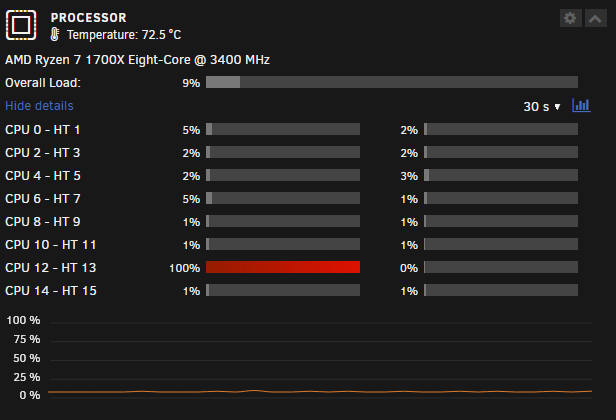
I tried to turn off the server to replace my RAM and it's stuck at "System is going down... XX" I can't get to the log file itself so I copied what I could see. Does anyone know what the deal is? This is what the log says: Jan 6 10:34:54 TrueSource root: root 27108 .r..m php-fpm Jan 6 10:34:54 TrueSource root: root 27143 .rc.. kworker/u32:6-bond0 Jan 6 10:34:54 TrueSource root: root 27144 .rc.. kworker/u32:10-btrfs-endio-meta Jan 6 10:34:54 TrueSource root: root 27237 .rc.. kworker/12:1-rcu_gp Jan 6 10:34:54 TrueSource root: root 28907 .rc.. kworker/u32:20-poll_mpt2sas0_statu Jan 6 10:34:54 TrueSource root: root 28908 .rc.. kworker/u32:23-btrfs-endio Jan 6 10:34:54 TrueSource root: root 28909 .rc.. kworker/u32:25-btrfs-endio Jan 6 10:34:54 TrueSource root: root 28911 .rc.. kworker/u32:30-btrfs-endio Jan 6 10:34:54 TrueSource root: root 28912 .rc.. kworker/u32:32-btrfs-endio Jan 6 10:34:54 TrueSource root: root 28913 .rc.. kworker/u32:33-btrfs-endio-meta Jan 6 10:34:54 TrueSource root: root 28914 .rc.. kworker/u32:34-btrfs-endio Jan 6 10:34:54 TrueSource root: root 28915 .rc.. kworker/u32:37-kcryptd/254:14 Jan 6 10:34:54 TrueSource root: root 28917 .rc.. kworker/u32:39-kcryptd/254:14 Jan 6 10:34:54 TrueSource root: root 28918 .rc.. kworker/u32:40-kcryptd/254:14 Jan 6 10:34:54 TrueSource root: root 29301 .rc.. kworker/4:2-events Jan 6 10:34:54 TrueSource root: root 29484 .rc.. kworker/5:1-cgroup_destroy Jan 6 10:34:54 TrueSource root: root 29522 .rc.. kworker/12:2-events Jan 6 10:34:54 TrueSource root: root 30590 .rc.. kworker/5:0-events Jan 6 10:34:54 TrueSource root: root 31038 .rc.. kworker/8:2-events Jan 6 10:34:54 TrueSource root: root 31167 .r..m php-fpm Jan 6 10:34:54 TrueSource root: root 31294 .rc.. kworker/0:0-events Jan 6 10:34:54 TrueSource root: root 31557 .rc.. kworker/u32:12-events_power_efficient Jan 6 10:34:54 TrueSource root: root 31947 Fr..m tmux: server Jan 6 10:34:54 TrueSource root: root 31951 .rce. bash Jan 6 10:34:54 TrueSource root: root 32223 .rc.. kworker/u32:15-bond0 Jan 6 10:34:54 TrueSource root: root 32226 .rc.. kworker/u32:27-btrfs-endio-meta Jan 6 10:34:54 TrueSource root: root 32234 .rc.. kworker/0:1-events Jan 6 10:34:54 TrueSource root: /mnt/disk14: root kernel mount /mnt/disk14 Jan 6 10:34:54 TrueSource root: /mnt/disk15: root kernel mount /mnt/disk15 Jan 6 10:34:54 TrueSource root: /mnt/disk16: root kernel mount /mnt/disk16 Jan 6 10:34:54 TrueSource root: /mnt/disks: root kernel mount /mnt/disks Jan 6 10:34:54 TrueSource root: /mnt/remotes: root kernel mount /mnt/remotes Jan 6 10:34:54 TrueSource root: /mnt/rootshare: root kernel mount /mnt/rootshare Jan 6 10:34:54 TrueSource root: Active pids left on /dev/md* Jan 6 10:34:54 TrueSource root: Generating diagnostics... Jan 6 10:34:59 TrueSource kernel: rcu: INFO: rcu_preempt self-detected stall on CPU Jan 6 10:34:59 TrueSource kernel: rcu: 12-....: (59999 ticks this GP) idle=49ac/1/0x4000000000000000 softirq=110945897/110945897 fqs=13317 Jan 6 10:34:59 TrueSource kernel: (t=60001 jiffies g=198847037 q=41532 ncpus=16) Jan 6 10:34:59 TrueSource kernel: CPU: 12 PID: 9340 Comm: umount Tainted: P O 6.1.64-Unraid #1 Jan 6 10:34:59 TrueSource kernel: Hardware name: System manufacturer System Product Name/PRIME B450M-A, BIOS 0409 08/24/2018 Jan 6 10:34:59 TrueSource kernel: RIP: 0010:preempt_count_sub+0x87/0x93 Jan 6 10:34:59 TrueSource kernel: Code: 00 85 c0 74 2c 83 3d e8 a5 31 01 00 75 23 48 c7 c6 c3 43 0c 82 48 c7 c7 24 24 0b 82 e8 5c 79 fd ff 0f 0b e9 64 c3 b6 00 f7 df <65> 01 3d 1b 6e f8 7e e9 56 c3 b6 00 0f 1f 44 00 00 85 ff 74 05 e9 Jan 6 10:34:59 TrueSource kernel: RSP: 0018:ffffc90003887e18 EFLAGS: 00000297 Jan 6 10:34:59 TrueSource kernel: RAX: 0000000000000002 RBX: ffff88802ae42538 RCX: ffff8881663cc238 Jan 6 10:34:59 TrueSource kernel: RDX: 0000000000000002 RSI: ffff8881663cce38 RDI: 00000000ffffffff Jan 6 10:34:59 TrueSource kernel: RBP: ffff888105add000 R08: ffffffff8125be65 R09: ffff88816c4a48c0 Jan 6 10:34:59 TrueSource kernel: R10: 00000000003a38a5 R11: ffff8881353aeb90 R12: ffff88802ae42538 Jan 6 10:34:59 TrueSource kernel: R13: ffff888105add540 R14: ffff88802ae425b8 R15: ffff8880ddb9af40 Jan 6 10:34:59 TrueSource kernel: FS: 0000149f302aeb80(0000) GS:ffff888216f00000(0000) knlGS:0000000000000000 Jan 6 10:34:59 TrueSource kernel: CS: 0010 DS: 0000 ES: 0000 CR0: 0000000080050033 Jan 6 10:34:59 TrueSource kernel: CR2: 0000149f3044f213 CR3: 000000010309e000 CR4: 00000000003506e0 Jan 6 10:34:59 TrueSource kernel: Call Trace: Jan 6 10:34:59 TrueSource kernel: <IRQ> Jan 6 10:34:59 TrueSource kernel: ? rcu_dump_cpu_stacks+0x95/0xb9 Jan 6 10:34:59 TrueSource kernel: ? rcu_sched_clock_irq+0x345/0xa45 Jan 6 10:34:59 TrueSource kernel: ? perf_event_task_tick+0x5e/0x1e3 Jan 6 10:34:59 TrueSource kernel: ? __default_send_IPI_dest_field+0x32/0x50 Jan 6 10:34:59 TrueSource kernel: ? tick_init_jiffy_update+0x7c/0x7c Jan 6 10:34:59 TrueSource kernel: ? update_process_times+0x62/0x81 Jan 6 10:34:59 TrueSource kernel: ? tick_sched_timer+0x43/0x71 Jan 6 10:34:59 TrueSource kernel: ? __hrtimer_run_queues+0xeb/0x190 Jan 6 10:34:59 TrueSource kernel: ? hrtimer_interrupt+0x9c/0x16e Jan 6 10:34:59 TrueSource kernel: ? __sysvec_apic_timer_interrupt+0xc5/0x12f Jan 6 10:34:59 TrueSource kernel: ? sysvec_apic_timer_interrupt+0x80/0xa6 Jan 6 10:34:59 TrueSource kernel: </IRQ> Jan 6 10:34:59 TrueSource kernel: <TASK> Jan 6 10:34:59 TrueSource kernel: ? asm_sysvec_apic_timer_interrupt+0x16/0x20 Jan 6 10:34:59 TrueSource kernel: ? destroy_inode+0x5d/0x6b Jan 6 10:34:59 TrueSource kernel: ? preempt_count_sub+0x87/0x93 Jan 6 10:34:59 TrueSource kernel: ? _raw_spin_lock+0x13/0x1c Jan 6 10:34:59 TrueSource kernel: _raw_spin_unlock+0x14/0x29 Jan 6 10:34:59 TrueSource kernel: evict_inodes+0xa6/0x159 Jan 6 10:34:59 TrueSource kernel: generic_shutdown_super+0x3d/0x17f Jan 6 10:34:59 TrueSource kernel: kill_block_super+0x1f/0x3e Jan 6 10:34:59 TrueSource kernel: deactivate_locked_super+0x2f/0x61 Jan 6 10:34:59 TrueSource kernel: cleanup_mnt+0xab/0xd3 Jan 6 10:34:59 TrueSource kernel: task_work_run+0x6b/0x80 Jan 6 10:34:59 TrueSource kernel: exit_to_user_mode_prepare+0x75/0x112 Jan 6 10:34:59 TrueSource kernel: syscall_exit_to_user_mode+0x18/0x2c Jan 6 10:34:59 TrueSource kernel: do_syscall_64+0x77/0x81 Jan 6 10:34:59 TrueSource kernel: entry_SYSCALL_64_after_hwframe+0x64/0xce Jan 6 10:34:59 TrueSource kernel: RIP: 0033:0x149f303c59e7 Jan 6 10:34:59 TrueSource kernel: Code: 0d 00 f7 d8 64 89 02 b8 ff ff ff ff c3 66 0f 1f 44 00 00 31 f6 e9 09 00 00 00 66 0f 1f 84 00 00 00 00 00 b8 a6 00 00 00 0f 05 <48> 3d 00 f0 ff ff 77 01 c3 48 8b 15 01 24 0d 00 f7 d8 64 89 02 b8 Jan 6 10:34:59 TrueSource kernel: RSP: 002b:00007ffe662a6fe8 EFLAGS: 00000246 ORIG_RAX: 00000000000000a6 Jan 6 10:34:59 TrueSource kernel: RAX: 0000000000000000 RBX: 000000000040a498 RCX: 0000149f303c59e7 Jan 6 10:34:59 TrueSource kernel: RDX: 0000000000000000 RSI: 0000000000000000 RDI: 000000000040a5b0 Jan 6 10:34:59 TrueSource kernel: RBP: 0000000000000000 R08: 0000000000000073 R09: 000000000040a5d0 Jan 6 10:34:59 TrueSource kernel: R10: 0000149f302c2410 R11: 0000000000000246 R12: 0000149f3055afa4 Jan 6 10:34:59 TrueSource kernel: R13: 000000000040a5b0 R14: 000000000040a380 R15: 0000000000000000 Jan 6 10:34:59 TrueSource kernel: </TASK> Jan 6 10:37:59 TrueSource kernel: rcu: INFO: rcu_preempt self-detected stall on CPU Jan 6 10:37:59 TrueSource kernel: rcu: 12-....: (240003 ticks this GP) idle=49ac/1/0x4000000000000000 softirq=110945897/110945897 fqs=66179 Jan 6 10:37:59 TrueSource kernel: (t=240005 jiffies g=198847037 q=437916 ncpus=16) Jan 6 10:37:59 TrueSource kernel: CPU: 12 PID: 9340 Comm: umount Tainted: P O 6.1.64-Unraid #1 Jan 6 10:37:59 TrueSource kernel: Hardware name: System manufacturer System Product Name/PRIME B450M-A, BIOS 0409 08/24/2018 Jan 6 10:37:59 TrueSource kernel: RIP: 0010:evict_inodes+0x5f/0x159 Jan 6 10:37:59 TrueSource kernel: Code: cb 01 00 4c 8d ad 40 05 00 00 4c 89 ef e8 8d 36 62 00 48 8b 85 48 05 00 00 4c 8b 20 48 8d 98 f0 fe ff ff 49 81 ec 10 01 00 00 <48> 8d 93 10 01 00 00 48 8d 85 48 05 00 00 48 39 c2 0f 84 ab 00 00 Jan 6 10:37:59 TrueSource kernel: RSP: 0018:ffffc90003887e28 EFLAGS: 00000202 Jan 6 10:37:59 TrueSource kernel: RAX: ffff88802ae42648 RBX: ffff88802ae42538 RCX: ffff8881663cc238 Jan 6 10:37:59 TrueSource kernel: RDX: 0000000000000002 RSI: ffff8881663cce38 RDI: 00000000ffffffff Jan 6 10:37:59 TrueSource kernel: RBP: ffff888105add000 R08: ffffffff8125be65 R09: ffff88816c4a48c0 Jan 6 10:37:59 TrueSource kernel: R10: 00000000003a38a5 R11: ffff8881353aeb90 R12: ffff88802ae42538 Jan 6 10:37:59 TrueSource kernel: R13: ffff888105add540 R14: ffff88802ae425b8 R15: ffff8880ddb9af40 Jan 6 10:37:59 TrueSource kernel: FS: 0000149f302aeb80(0000) GS:ffff888216f00000(0000) knlGS:0000000000000000 Jan 6 10:37:59 TrueSource kernel: CS: 0010 DS: 0000 ES: 0000 CR0: 0000000080050033 Jan 6 10:37:59 TrueSource kernel: CR2: 0000149f3044f213 CR3: 000000010309e000 CR4: 00000000003506e0 Jan 6 10:37:59 TrueSource kernel: Call Trace: Jan 6 10:37:59 TrueSource kernel: <IRQ> Jan 6 10:37:59 TrueSource kernel: ? rcu_dump_cpu_stacks+0x95/0xb9 Jan 6 10:37:59 TrueSource kernel: ? rcu_sched_clock_irq+0x345/0xa45 Jan 6 10:37:59 TrueSource kernel: ? perf_event_task_tick+0x5e/0x1e3 Jan 6 10:37:59 TrueSource kernel: ? tick_init_jiffy_update+0x7c/0x7c Jan 6 10:37:59 TrueSource kernel: ? update_process_times+0x62/0x81 Jan 6 10:37:59 TrueSource kernel: ? tick_sched_timer+0x43/0x71 Jan 6 10:37:59 TrueSource kernel: ? __hrtimer_run_queues+0xeb/0x190 Jan 6 10:37:59 TrueSource kernel: ? hrtimer_interrupt+0x9c/0x16e Jan 6 10:37:59 TrueSource kernel: ? __sysvec_apic_timer_interrupt+0xc5/0x12f Jan 6 10:37:59 TrueSource kernel: ? sysvec_apic_timer_interrupt+0x80/0xa6 Jan 6 10:37:59 TrueSource kernel: </IRQ> Jan 6 10:37:59 TrueSource kernel: <TASK> Jan 6 10:37:59 TrueSource kernel: ? asm_sysvec_apic_timer_interrupt+0x16/0x20 Jan 6 10:37:59 TrueSource kernel: ? destroy_inode+0x5d/0x6b Jan 6 10:37:59 TrueSource kernel: ? evict_inodes+0x5f/0x159 Jan 6 10:37:59 TrueSource kernel: ? evict_inodes+0xa6/0x159 Jan 6 10:37:59 TrueSource kernel: generic_shutdown_super+0x3d/0x17f Jan 6 10:37:59 TrueSource kernel: kill_block_super+0x1f/0x3e Jan 6 10:37:59 TrueSource kernel: deactivate_locked_super+0x2f/0x61 Jan 6 10:37:59 TrueSource kernel: cleanup_mnt+0xab/0xd3 Jan 6 10:37:59 TrueSource kernel: task_work_run+0x6b/0x80 Jan 6 10:37:59 TrueSource kernel: exit_to_user_mode_prepare+0x75/0x112 Jan 6 10:37:59 TrueSource kernel: syscall_exit_to_user_mode+0x18/0x2c Jan 6 10:37:59 TrueSource kernel: do_syscall_64+0x77/0x81 Jan 6 10:37:59 TrueSource kernel: entry_SYSCALL_64_after_hwframe+0x64/0xce Jan 6 10:37:59 TrueSource kernel: RIP: 0033:0x149f303c59e7 Jan 6 10:37:59 TrueSource kernel: Code: 0d 00 f7 d8 64 89 02 b8 ff ff ff ff c3 66 0f 1f 44 00 00 31 f6 e9 09 00 00 00 66 0f 1f 84 00 00 00 00 00 b8 a6 00 00 00 0f 05 <48> 3d 00 f0 ff ff 77 01 c3 48 8b 15 01 24 0d 00 f7 d8 64 89 02 b8 Jan 6 10:37:59 TrueSource kernel: RSP: 002b:00007ffe662a6fe8 EFLAGS: 00000246 ORIG_RAX: 00000000000000a6 Jan 6 10:37:59 TrueSource kernel: RAX: 0000000000000000 RBX: 000000000040a498 RCX: 0000149f303c59e7 Jan 6 10:37:59 TrueSource kernel: RDX: 0000000000000000 RSI: 0000000000000000 RDI: 000000000040a5b0 Jan 6 10:37:59 TrueSource kernel: RBP: 0000000000000000 R08: 0000000000000073 R09: 000000000040a5d0 Jan 6 10:37:59 TrueSource kernel: R10: 0000149f302c2410 R11: 0000000000000246 R12: 0000149f3055afa4 Jan 6 10:37:59 TrueSource kernel: R13: 000000000040a5b0 R14: 000000000040a380 R15: 0000000000000000 Jan 6 10:37:59 TrueSource kernel: </TASK> an 6 10:40:59 TrueSource kernel: task_work_run+0x6b/0x80 Jan 6 10:40:59 TrueSource kernel: exit_to_user_mode_prepare+0x75/0x112 Jan 6 10:40:59 TrueSource kernel: syscall_exit_to_user_mode+0x18/0x2c Jan 6 10:40:59 TrueSource kernel: do_syscall_64+0x77/0x81 Jan 6 10:40:59 TrueSource kernel: entry_SYSCALL_64_after_hwframe+0x64/0xce Jan 6 10:40:59 TrueSource kernel: RIP: 0033:0x149f303c59e7 Jan 6 10:40:59 TrueSource kernel: Code: 0d 00 f7 d8 64 89 02 b8 ff ff ff ff c3 66 0f 1f 44 00 00 31 f6 e9 09 00 00 00 66 0f 1f 84 00 00 00 00 00 b8 a6 00 00 00 0f 05 <48> 3d 00 f0 ff ff 77 01 c3 48 8b 15 01 24 0d 00 f7 d8 64 89 02 b8 Jan 6 10:40:59 TrueSource kernel: RSP: 002b:00007ffe662a6fe8 EFLAGS: 00000246 ORIG_RAX: 00000000000000a6 Jan 6 10:40:59 TrueSource kernel: RAX: 0000000000000000 RBX: 000000000040a498 RCX: 0000149f303c59e7 Jan 6 10:40:59 TrueSource kernel: RDX: 0000000000000000 RSI: 0000000000000000 RDI: 000000000040a5b0 Jan 6 10:40:59 TrueSource kernel: RBP: 0000000000000000 R08: 0000000000000073 R09: 000000000040a5d0 Jan 6 10:40:59 TrueSource kernel: R10: 0000149f302c2410 R11: 0000000000000246 R12: 0000149f3055afa4 Jan 6 10:40:59 TrueSource kernel: R13: 000000000040a5b0 R14: 000000000040a380 R15: 0000000000000000 Jan 6 10:40:59 TrueSource kernel: </TASK> Jan 6 10:41:00 TrueSource nginx: 2024/01/06 10:41:00 [error] 11302#11302: *3667102 limiting requests, excess: 20.116 by zone "authlimit", client: 10.0.0.54, server: , request: "PROPFIND /login HTTP/1.1", host: "truesource" Jan 6 10:41:03 TrueSource nginx: 2024/01/06 10:41:03 [error] 11302#11302: *3667146 limiting requests, excess: 20.291 by zone "authlimit", client: 10.0.0.54, server: , request: "PROPFIND /login HTTP/1.1", host: "truesource" Jan 6 10:41:06 TrueSource nginx: 2024/01/06 10:41:06 [error] 11302#11302: *3667178 limiting requests, excess: 20.027 by zone "authlimit", client: 10.0.0.54, server: , request: "PROPFIND /login HTTP/1.1", host: "truesource" Jan 6 10:41:10 TrueSource nginx: 2024/01/06 10:41:10 [error] 11302#11302: *3667218 limiting requests, excess: 20.182 by zone "authlimit", client: 10.0.0.54, server: , request: "PROPFIND /login HTTP/1.1", host: "truesource" Jan 6 10:41:21 TrueSource nginx: 2024/01/06 10:41:21 [error] 11302#11302: *3667358 limiting requests, excess: 20.223 by zone "authlimit", client: 10.0.0.54, server: , request: "PROPFIND /login HTTP/1.1", host: "truesource" Jan 6 10:41:25 TrueSource nginx: 2024/01/06 10:41:25 [error] 11302#11302: *3667404 limiting requests, excess: 20.345 by zone "authlimit", client: 10.0.0.54, server: , request: "PROPFIND /login HTTP/1.1", host: "truesource" Jan 6 10:41:28 TrueSource nginx: 2024/01/06 10:41:28 [error] 11302#11302: *3667431 limiting requests, excess: 20.122 by zone "authlimit", client: 10.0.0.54, server: , request: "PROPFIND /login HTTP/1.1", host: "truesource" Jan 6 10:41:31 TrueSource nginx: 2024/01/06 10:41:31 [error] 11302#11302: *3667477 limiting requests, excess: 20.238 by zone "authlimit", client: 10.0.0.54, server: , request: "PROPFIND /login HTTP/1.1", host: "truesource" Jan 6 10:41:35 TrueSource nginx: 2024/01/06 10:41:35 [error] 11302#11302: *3667525 limiting requests, excess: 20.353 by zone "authlimit", client: 10.0.0.54, server: , request: "PROPFIND /login HTTP/1.1", host: "truesource" Jan 6 10:41:38 TrueSource nginx: 2024/01/06 10:41:38 [error] 11302#11302: *3667553 limiting requests, excess: 20.051 by zone "authlimit", client: 10.0.0.54, server: , request: "PROPFIND /login HTTP/1.1", host: "truesource" Probably relevant but also probably obvious (?), but one of the cores is maxed out. I assume I could just (and will probably have to) do an unclean shutdown but I'd like to know what caused this so it doesn't happen again.
-
When you say open to the GUI, do you mean the unraid GUI specifically? Would leaving something like a Homarr tab open contribute to the problem?
-
Thanks. Any idea what's going on with these errors? 12:04:50 TrueSource php-fpm[8840]: [WARNING] [pool www] child 5041 exited on signal 9 (SIGKILL) after 12.901833 seconds from start
-
Thanks! I didn't know they needed to be changed. I'll try that and see how it goes.
-
I've had quite a bit of trouble accessing my server since adding a dedicated router. Most problems seem to be user error but recently I was unable to access my server at all. I posted about this and wasn't able to find an answer. Ultimately I had to power the server down with the power button on my tower... Everything was OK after the unclean shutdown and I was able to access my server again. Today I started getting error 500 and wasn't really able to ssh in either. I finally loaded ssh and was able to get diagnostics and reboot. It was another unclean shutdown but I can access the server now. I've attached logs and am really hoping someone can tell me what happened so I can prevent this issue from repeating. EDIT: I tried looking through the logs myself and it looks like I'm having the same problem that a lot of others have experienced. This is the error I'm referring to, repeating over and over (there might be more, I don't really know what I'm looking for): 12:04:50 TrueSource php-fpm[8840]: [WARNING] [pool www] child 5041 exited on signal 9 (SIGKILL) after 12.901833 seconds from start I found a bunch of threads related to this but no fixes. It also looks like there is something wrong with disk 7. I'm running a SMART short self-test and I have no idea when it's going to finish. I've attached the existing SMART report which should have relevant info. Pretty sure that this drive needs to be replaced but I'd like to know if it's also contributing to my access issues. truesource-diagnostics-20231207-1149.zip truesource-diagnostics-20231207-1148.zip truesource-smart-20231207-1539.zip
-
Bummer... I do have it set up on Unraid. I don't think it was set to strict based on the behaviors listed but this gives me something to go on though. I'll see what I can find. Thanks. EDIT: The initial problem is resolved. See this thread for the secondary issue.
-
How do I do this without access to the server?

