Teza
Members
-
Joined
-
Last visited
-
It seems like there is several peoples that have problems with dvd hardware and unraid/makemkv. I barely know anything about unraid/linux, but linux finds the drive when I use the command line. The drive is also found inside unraid, and it seems like the container finds it as well. If I remember it correctly, back in 1998-2000 it could be difficult to find CD burner hardware and software that worked well with each other, and many cd burners was not working in some of the programs but worked just fine in other. Is it correct that it is different types of containers in unraid? If so can the problem might be in the container setup or that makemkv is selective regarding to hardware support? Or might it be as simple as a new linux driver is needed for the dvd burner? Linux find it but can't use it?
-
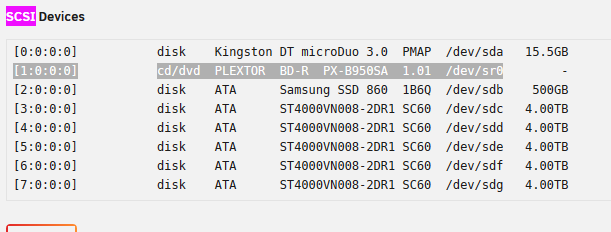
I am sorry if there is something basic I should have understood, but have not, but I am trying I have installed the binhex-makemkv app. But what ever I try I get "The program can't find any usable optical drives." message. This is the drive I try to include: Setup: Repository: binhex/arch-makemkv Network Type: Bridge Console shell command: Shell Privileged: ON Host port 1: 6080 Host Path 2: /mnt/user/Multimedia/ Key 1: Tower Key 2: Key 3: 000 Key 4: 99 Key 5: 100 AppData Config Path: /mnt/user/appdata/binhex-makemkv Have also tried to add all of the devices I could find related to the internal blue-ray /dev/disk/by-id/ata-PLEXTOR_BD-R_PX-B950SA_2512075_216201500042 /dev/sr0 (listed in scsi devices) /dev/dvd /dev/dvd0 /dev/dvdr /dev/dvdr0 /dev/dvdrw /dev/dvdrw0 /dev/dvdwriter /dev/dvdwriter0 /dev/sg8 /dev/cdr /dev/cdr0 /dev/cdrom /dev/cdrom0 /dev/cdrw /dev/cdwriter /dev/cdwriter0 Have also tried these, but I then get an error: --device/dev/sr0 is not an absolute path --device=/dev/sr0 is not an absolute path --device /dev/sr0 is not an absolute path Edit: found the advanced view. Have tried to add: --device=/dev/sr0 and --device=/dev/sr0 --device=/dev/sg0 But still with no luck. Edit 2: Have logged in on the terminal (?) for the first time and ran: lsscsi -g [1:0:0:0] cd/dvd PLEXTOR BD-R PX-B950SA 1.01 /dev/sr0 /dev/sg8 lsscsi -l state=running queue_dept=1 scsi_level=6 type=5 device_blocked=0 timeout=30 lsscsi -v [1:0:0:0] cd/dvd PLEXTOR BD-R PX-B950SA 1.01 /dev/sr0 dir: /sys/bus/scsi/devices/1:0:0:0 [/sys/devices/pci0000:00/0000:00::11.0/0000:07:00.0/host1/port-1:0/end_device-1:0target1:0:0/1:0:0:0] Have tried the following under the advanced tab: Extra Parameters: --device=/dev/sr0 --device=/dev/sg8 --device=/dev/sg8 --device=/dev/sr0 --device /dev/sg8 --device /dev/sr0 --device /dev/sr0 --device /dev/sg8 What am I missing?