





AlexKoh
Members
-
Joined
-
Last visited
-
I am going to turn off the vm settings off and see if crashes. If it does I am going to turn the virtualization off in the bios. But I am thinking virtualisation is a big part for my build so if it is the culprit not sure what to do to deal with it
-
Still crashes with VM machine turned off however I did not turn the VM in settings off.
-
Hi Jorge thanks for the guide. I manage to get the diagnostics and also the latest syslog my system as i just found out it crashed again at about 4pm while i was away. unraidhserver-diagnostics-20240617-2134.zipsyslog Will test by turning off virtualization from my bios to see if it crashed again. While i was troubleshooting i realised the error message was lessen when i remove USB device like the Sonnoff dongle and my bluetooth dongle. These devices are also pass-through to my Home Assistant VM. My guess was that my home assistant was the problem. Stop the VM since yesterday and it crashed again today. not too sure what is causing it.
-
hi i am not sure if i am doing this correctly but here is the syslog dump onto my flash syslog
-
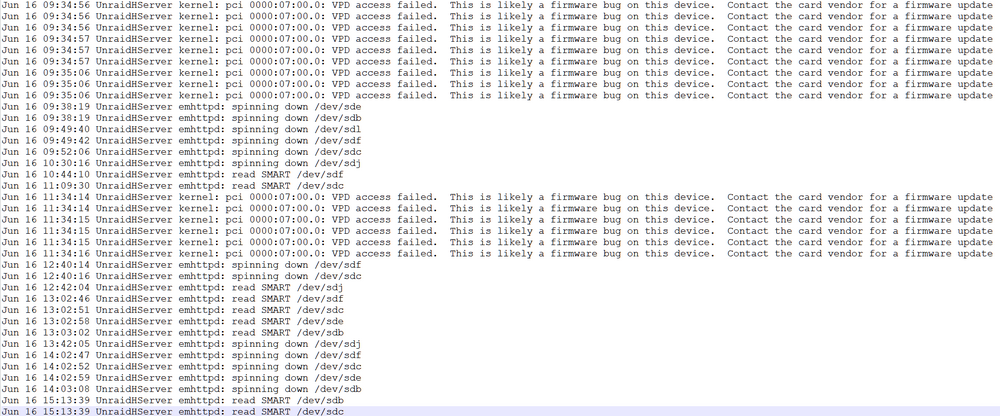
Hi guys, need some help to see if anyone has encounter this before and if there are solutions available the last line is always Jun 16 15:13:39 UnraidHServer emhttpd: read SMART /dev/sdc but the device sdc is different each time. Not sure what this entails. thanks for the help in advance
-
Just to update and summarize. Realised that my mother board's sata port is throwing random errors. Hence decided to swap it this year with ASUS work station pro motherboard. So far disk did not throw any errors and hope that it stays this way. And as suggested will continue to monitor SMART stats
-
Right! And my question is, is this disk advisable to be used for the long term?
-
Thanks managed to get it done. Here are the extended test logs. Seeking help if possible. Thanks in advance. unraidhserver-smart-20211223-1022.zip
-
@ChatNoir No wonder my extended test keeps failing. Let me go find out how to disable spin down thank you very much. Will share my logs again once i have acquired it
-
Brand: Seagate IronWolf Model: ST4000VN008-2DR166 Approximate age at failure: 0.5 years Drive in warranty: Yes Drive just dropped offline without signs and unable to redrive smart report then. This report was generated after i had the disk removed, rebuild my array with another drive and reconnected the bad drive again into the server as an unassigned drive in order to get the report. Is my drive dead? Need some advise what to do with the drive. Can i continue to use it or should i just replace it? unraidhserver-smart-20211222-0941.zip
-
Hi itimpi, Apologies for the late reply was away serving my nation. Thanks for the sharing. Yes i realised it and i made a switch no idea why harddisk dropped offline. Is it possible for me to reuse the disk by adding it as a new disk into the array? Recent months i have this harddisk and the ones next to it with some read error. My guess is my motherboard's sata port giving issue. I had just switch over all my connection to my HBA card. If this issues dont happen again then i guess i might want to change my motherboard. Currently usinng MAG B550 TOMAHAWK. Looking to change to a Asus WS motherboard what do you guys think? regards Alex
-
Thanks for replying, I couldn't manage to get the diagnostics just now. However after a reboot Disk2 was reinstated with no errors. I manage to swap my disk1 and now it being rebuilt.
-
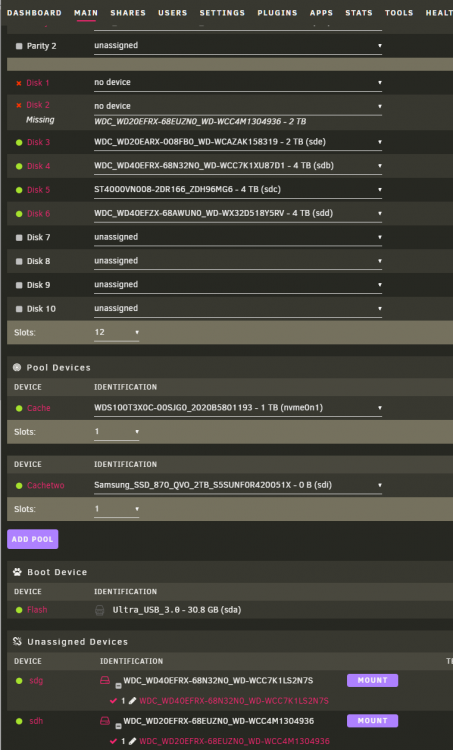
Hi Guys, I am in need of some guidance about my disabled drive. Sequence of events. 1. Woke up in the morning to the notification of my Disk1 being disabled. (happened before about 1 month ago and reinstated the drive with no issue). Disk2 and Disk 5 has some read error. 2. Went out to get a new drive to replace the disabled drive1 (Drive1 is being emulated). 3. Got home to start the replacement and disabled docker and vm. 4. Stop the array, then assign Disk1 to 'No Disk' at this moment disk2 is shown as missing. 5. Realised Disk2 is also automatically unassigned. 6. Found the 2 disk appearead in the 'Unassigned Devices' 7. Now i am unable to reassign my Disk2 and its being marked as 'missing'. I have only one parity drive. And i do not want wish to lose any data. Can I clone my disk2 into a spare drive using a cloning device and reinsert it? Any help is much appreciated. I have on hand 2 spare 4tb drive. regards Alex
-
Thank you for the great support finally manage to get my files compressed! Yeah! Cheers~!
-
ah i see will use matroska. I was assuming the MKV extension would be also name MKV container like how the MP4 was. Sorry about that will try again thanks for helping.

