





Healadin
Members
-
Joined
-
Last visited
-
Hello, I have seen couple guides that make it possible to mirror just USB sticks and use those as internal boot. I have plugged in second USB, used wizard to migrate to internal boot drive on new USB and then fixed boot order. Then I have formatted original USB and got some licensing error, so I had to migrate it to TPM. Now I added old usb stick into the pool, but it is only 16 GB (new one is 64GB). So how do I swap pool to the old smaller stick? I guess thats the way to have it mirrored right? To have smaller one as device 1 and bigger one as device 2. Used space is 2,21 GB, so that should not be a problem. I just dont want to buy another usb stick, when the original one is still working.

-
sleep button works for me, so I think routine for checking drives inactivity when you set autosleep is broken and that fix from darkside40 should solve it (I didn't have time to try it once more today)
-
I should go into /config/plugins/dynamix.s3.sleep on flash drive and copy dynamix.s3.sleep.txz into my local machine right? Extract it and go into dynamix.s3.sleep/usr/local/emhttp/plugins/dynamix.s3.sleep/scripts/ modify s3_sleep file (comment out 3 lines and add condition (lines 232-236) and modify version at the top then compress top dynamix.s3.sleep folder and put it back into /config/plugins/dynamix.s3.sleep on flash drive and modify checksum that i get from "md5sum dynamix.s3.sleep.txz" and change it in header of /config/plugins/dynamix.s3.sleep.plg file and that is all? I just written what I did. Hopefully I didnþt missed any step? Thanks for lot of feedback, I will give it another try tomorrow.
-
ok, now there is no longer even sleep button... so I guess it is safe to assume, it would not work for me right?
-
oh its just md5sum command on linux? that should be easy then
-
maybe noob question but how do I calculate it?
-
Hi, firstly sorry, I thought I answered you already. Thanks for response. I tried to comment out those three lines and change the condition, then put it back into .txz file (zipped it and then with xz I turned it into .txz). Sadly, I haven't found what to change in that .plg file and it doesn't show version 3.0.6.1. (added it into commentaries at the top of s3_sleep file). File that you attached to that post is no longer available, so if you could upload it for me again it would be great . Thanks once again for respoding, I already though it wouldn't get answer.
-
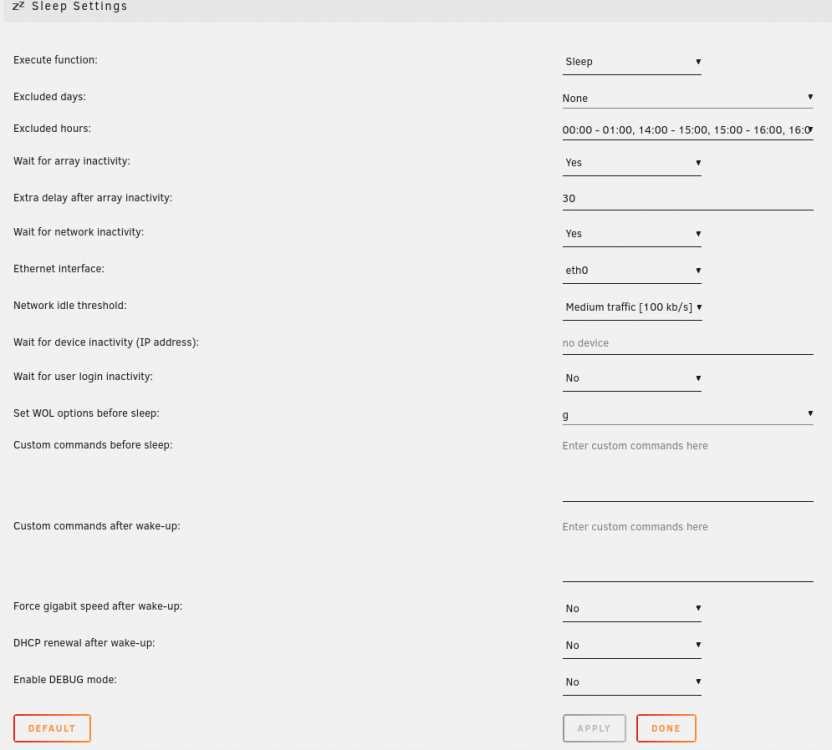
Hello, I have installed S3 Sleep a while ago (almost 2 months now) and my Unraid never went to sleep as far as I know. My config plugin config is in the attached screen. I also have running duckdns and OpenVPN docker container (I think that might be the problem?). No idea, to be honest, but I would like to use the sleep mode (it consumes around 75 Watts). Also I am wondering if its possible to wake it up over VPN or at all? But I doubt it.
-
ah, thx... I wasnt sure what to do, coz when I consoled into unraid with putty/webconsole "ls" showed nothing... but when I did "cd /mnt/cache/appdata" I managed to find config file
-
I still have problem - to be exact with 4th step. I opened containers console, went to config/etc, but now I cannot edit that file (or have no idea how to do it since there is no nano or vim).
.thumb.png.17d2f462506ca42f1051ea7053962d3b.png)
-
ye found it there, thx The "admin" account is a system (PAM) account and after container update or recreation, its password reverts back to the default. It is highly recommended to block this user's access for security reasons: 1. Create another user and set as an admin, 2. Log in as the new user, 3. Delete the "admin" user in the gui, 4. Modify the as.conf file under config/etc and replace the line boot_pam_users.0=admin with #boot_pam_users.0=admin boot_pam_users.0=kjhvkhv (this only has to be done once and will survive container recreation) IMPORTANT NOTE: Commenting out the first pam user in as.conf creates issues in 2.7.5. To make it work while still blocking pam user access, uncomment that line and change admin to a random nonexistent user as described above.
-
I followed this video, and there he only sets up user password but not changing admin
-
Hello, I managed to set it up correctly, but I am wondering if there is a way to change admin password. I tried it from web gui -> user management, but password never changed. Is there any way to change it? Or should I change it at all?


.png.e3b824be0b994c83e3a65e44f70fd00f.png)