





Unraiding
Members
-
Joined
-
Last visited
-
I was coming from 6.x but also had to reboot to get past this.
-
I had the same question. Appreciate the tip
-
Thanks. It ended up falling apart completely when I stopped it and got stuck in a 'dead' status. I had to delete my docker image and reinstall everything to get it running again. I decided not to reinstall PiHole for now...
-
It did fill up a couple nights ago, but the scheduled transfer cleared it that same night. It is a 1TB Samsung 860 Evo, so normally room isn't a problem, but I queued a lot of downloads that day apparently. Time wise that does seem to line up with when things started going wrong. Could that be related?
-
I have been running Plex for months without a problem, but in troubleshooting another issue I ended up rebooting the server. After the reboot Plex would not start. The log is showing the following: [s6-init] making user provided files available at /var/run/s6/etc...exited 0. [s6-init] ensuring user provided files have correct perms...exited 0. [fix-attrs.d] applying ownership & permissions fixes... [fix-attrs.d] done. [cont-init.d] executing container initialization scripts... [cont-init.d] 01-envfile: executing... [cont-init.d] 01-envfile: exited 0. [cont-init.d] 10-adduser: executing... ------------------------------------- _ () | | ___ _ __ | | / __| | | / \ | | \__ \ | | | () | |_| |___/ |_| \__/ Brought to you by linuxserver.io ------------------------------------- To support LSIO projects visit: https://www.linuxserver.io/donate/ ------------------------------------- GID/UID ------------------------------------- User uid: 99 User gid: 100 ------------------------------------- [cont-init.d] 10-adduser: exited 0. [cont-init.d] 40-chown-files: executing... [cont-init.d] 40-chown-files: exited 0. [cont-init.d] 45-plex-claim: executing... [cont-init.d] 45-plex-claim: exited 0. [cont-init.d] 50-gid-video: executing... [cont-init.d] 50-gid-video: exited 0. [cont-init.d] 60-plex-update: executing... Docker is used for versioning skip update check [cont-init.d] 60-plex-update: exited 0. [cont-init.d] 99-custom-scripts: executing... [custom-init] no custom files found exiting... [cont-init.d] 99-custom-scripts: exited 0. [cont-init.d] done. [services.d] starting services Starting Plex Media Server. [services.d] done. Connection to 162.216.19.157 closed by remote host. Dolby, Dolby Digital, Dolby Digital Plus, Dolby TrueHD and the double D symbol are trademarks of Dolby Laboratories. decoder information: 102 decoder information: 102 decoder information: 102 Connection to 45.79.129.106 closed by remote host. Connection to 172.104.29.70 closed by remote host. Connection to 50.116.52.102 closed by remote host. Connection to 50.116.52.102 closed by remote host. Connection to 50.116.52.102 closed by remote host. Connection to 104.200.30.183 closed by remote host. Connection to 96.126.104.168 closed by remote host. Connection to 104.200.30.183 closed by remote host. Connection to 96.126.104.168 closed by remote host. Connection to 66.175.212.202 closed by remote host. Connection to 172.104.29.70 closed by remote host. Connection to 50.116.59.145 closed by remote host. Connection to 50.116.59.145 closed by remote host. Connection to 50.116.59.145 closed by remote host. Connection to 50.116.59.145 closed by remote host. Connection to 50.116.59.145 closed by remote host. Connection to 50.116.59.145 closed by remote host. Connection to 50.116.59.145 closed by remote host. Connection to 50.116.59.145 closed by remote host. Connection to 50.116.59.145 closed by remote host. Connection to 50.116.59.145 closed by remote host. Connection to 50.116.59.145 closed by remote host. [cont-finish.d] executing container finish scripts... [cont-finish.d] done. [s6-finish] waiting for services. Critical: libusb_init failed [s6-finish] sending all processes the TERM signal. [s6-finish] sending all processes the KILL signal and exiting. [s6-init] making user provided files available at /var/run/s6/etc...exited 0. [s6-init] ensuring user provided files have correct perms...exited 0. [fix-attrs.d] applying ownership & permissions fixes... [fix-attrs.d] done. [cont-init.d] executing container initialization scripts... [cont-init.d] 01-envfile: executing... [cont-init.d] 01-envfile: exited 0. [cont-init.d] 10-adduser: executing... usermod: no changes ------------------------------------- _ () | | ___ _ __ | | / __| | | / \ | | \__ \ | | | () | |_| |___/ |_| \__/ Brought to you by linuxserver.io ------------------------------------- To support LSIO projects visit: https://www.linuxserver.io/donate/ ------------------------------------- GID/UID ------------------------------------- User uid: 99 User gid: 100 ------------------------------------- [cont-init.d] 10-adduser: exited 0. [cont-init.d] 40-chown-files: executing... [cont-init.d] 40-chown-files: exited 0. [cont-init.d] 45-plex-claim: executing... [cont-init.d] 45-plex-claim: exited 0. [cont-init.d] 50-gid-video: executing... [cont-init.d] 50-gid-video: exited 0. [cont-init.d] 60-plex-update: executing... Docker is used for versioning skip update check [cont-init.d] 60-plex-update: exited 0. [cont-init.d] 99-custom-scripts: executing... [custom-init] no custom files found exiting... [cont-init.d] 99-custom-scripts: exited 0. [cont-init.d] done. [services.d] starting services [services.d] done. Starting Plex Media Server. Connection to 45.56.104.126 closed by remote host. Dolby, Dolby Digital, Dolby Digital Plus, Dolby TrueHD and the double D symbol are trademarks of Dolby Laboratories. connect: Connection timed out s6-rmrf: fatal: unable to remove /var/run/s6/services: I/O error s6-rmrf: fatal: unable to remove /var/run/s6/services: I/O error s6-rmrf: fatal: unable to remove /var/run/s6/services: I/O error s6-rmrf: fatal: unable to remove /var/run/s6/services: I/O error s6-rmrf: fatal: unable to remove /var/run/s6/services: I/O error s6-rmrf: fatal: unable to remove /var/run/s6/services: I/O error s6-rmrf: fatal: unable to remove /var/run/s6/services: I/O error s6-rmrf: fatal: unable to remove /var/run/s6/services: I/O error s6-rmrf: fatal: unable to remove /var/run/s6/services: I/O error s6-rmrf: fatal: unable to remove /var/run/s6/services: I/O error
-
I installed this a few weeks ago and it has been running well as far as I know, but in troubleshooting another issue I noticed that under the Docker tab > Log it was showing 'unhealthy'. In the log it was showing the following messages over and over until I stopped it: Stopping lighttpd lighttpd: no process found Starting pihole-FTL (no-daemon) as root Starting lighttpd Stopping pihole-FTL Stopping lighttpd kill: usage: kill [-s sigspec | -n signum | -sigspec] pid | jobspec ... or kill -l [sigspec] lighttpd: no process found Starting pihole-FTL (no-daemon) as root Starting lighttpd Stopping pihole-FTL Stopping lighttpd kill: usage: kill [-s sigspec | -n signum | -sigspec] pid | jobspec ... or kill -l [sigspec] lighttpd: no process found Starting lighttpd Starting pihole-FTL (no-daemon) as root Stopping pihole-FTL Stopping lighttpd kill: usage: kill [-s sigspec | -n signum | -sigspec] pid | jobspec ... or kill -l [sigspec] lighttpd: no process found Starting lighttpd Starting pihole-FTL (no-daemon) as root Stopping pihole-FTL kill: usage: kill [-s sigspec | -n signum | -sigspec] pid | jobspec ... or kill -l [sigspec] Stopping lighttpd lighttpd: no process found Starting lighttpd Starting pihole-FTL (no-daemon) as root Stopping pihole-FTL Stopping lighttpd kill: usage: kill [-s sigspec | -n signum | -sigspec] pid | jobspec ... or kill -l [sigspec] lighttpd: no process found Starting lighttpd Starting pihole-FTL (no-daemon) as root Stopping pihole-FTL Stopping lighttpd kill: usage: kill [-s sigspec | -n signum | -sigspec] pid | jobspec ... or kill -l [sigspec] lighttpd: no process found Starting lighttpd Starting pihole-FTL (no-daemon) as root Stopping pihole-FTL kill: usage: kill [-s sigspec | -n signum | -sigspec] pid | jobspec ... or kill -l [sigspec] Stopping lighttpd lighttpd: no process found Starting pihole-FTL (no-daemon) as root Starting lighttpd Stopping pihole-FTL kill: usage: kill [-s sigspec | -n signum | -sigspec] pid | jobspec ... or kill -l [sigspec] Stopping lighttpd lighttpd: no process found Stopping cron [cont-finish.d] executing container finish scripts... [cont-finish.d] done. [s6-finish] waiting for services. [s6-finish] sending all processes the TERM signal. [s6-finish] sending all processes the KILL signal and exiting.
-
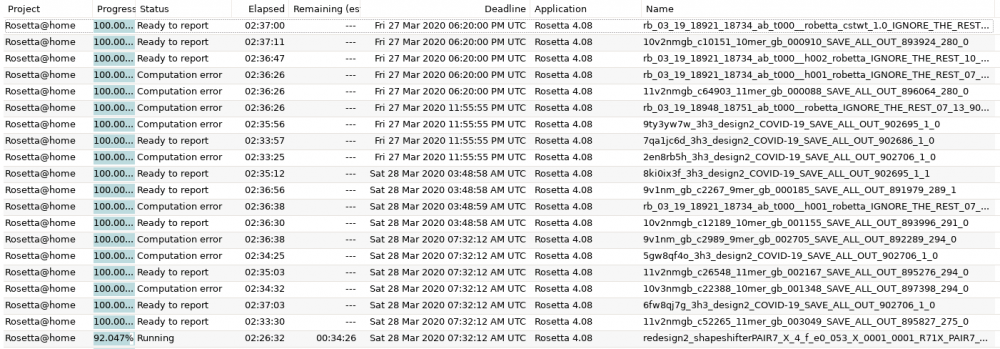
Any idea why a substantial percentage of my tasks are getting a computation error? I thought it was related to stopping and starting the docker a few times as I dialed in the CPU throttling, but it's been up solid for the last ~18 hours and still throwing errors.
-
I'm not having any problems, but as a reference point I am hovering around 20GB used for the BOINC docker. Edit - recently is has been more like 40-50GB.
-
I am in a similar place here, but on a fresh install. It takes a few minutes to get connected, but lands on an empty window.
-
Any idea why my search results are slow? It's not terrible, but averages about 5 seconds per search. I would just assume it's part of not accessing the server directly anymore, but I am seeing results from other shared servers I am connected to (via the internet) before my own.
-
Unraiding changed their profile photo
-
I recently migrated my Plex database from Windows over to a new Unraid build using the Linuxserver.io docker. For some reason, newly added movies correctly pull the metadata, but do not add the poster. When I edit the movie entry I see all of the poster options I normally would and am able to choose one with no problems. I've been searching, but haven't found anything that helped. Any suggestions?


