





GTP
Members
-
Joined
-
Last visited
Everything posted by GTP
-
I was running a parity check when Unraid found errors on disk 5 and 6. I cancelled the parity check and stopped the array. I ran a check and repair on disks 5 and 6 but no errors were found. I also conducted smart checks on disk 5 but that also completed with no error. I restarted the array but Disk 5 is still disabled. I realize I have a lot of disks so please know that the errors I am seeing are coming from disks 5 and 6 only. I have attached diagnostics. All disks Smart checks as healthy on the dashboard even the disabled disk. Thank you for your help, GTP tower-diagnostics-20211009-2251.zip
-
Everything looks great, I don't see any issues at all thank you so much for all your help! You Rock!! @trurl
-
@trurl Alright I am going to install those then, is there anything else I need to do or did you just help me clean-up my entire system? Thank you, GTP
-
@trurl I have re-created the docker image at 20GB and posted the new diagnostics. I don't think I want all those dockers I had before. I think I just want binhex-plexpass, GAPS, Tautulli and OMBI for now. Thank you for all you help! Please let me know what the next steps are? Thank you, GTP tower-diagnostics-20210922-1724.zip
-
@trurl Yes, all my disks are enabled and mounted except for sdf which is a 12tb drive I was planning on adding once I got the rig up and working again. It has not been pre-cleared or formatted. I am waiting to do that until after we have resolved all my other issues. The good news is I am no longer receiving that warning message I was receiving yesterday preventing me from formatting the disk. I believe it had to do with the plugin. After I updated all my plugins the error disappeared. So after we fix everything else and it is running a little while I will pre-clear and format the new disk with no errors hopefully. On the dashboard all my disks are healthy and contain no smart warnings. I just checked the contents of the lost and found drive and it has files from Disk 6,8,9, and 11 on it but I am fine with losing it, I can always re-download. I have installed the Fix common problems plugin and will resolve all issues found. I want my ISO's on my Array, I guess instead of the cache right? What would I need to do to move the files? I ran Mover again but I am still seeing the files from Appdata on my array in Disk 21(just the lets encrypt folder that I don't use any longer)? I have attached Diagnostics. Thank you, GTP tower-diagnostics-20210922-1441.zip
-
@trurlI have posted my diagnostics after following the steps correctly. I have not reinstalled docker and will wait for your reply. Thank you for your help! Thank you, GTP tower-diagnostics-20210922-1215.zip
-
I'm sorry I misunderstood. I will complete the steps correctly and get you the diagnostic file before reinstalling docker. I incorrectly assumed that once Mover had completed it would correct the issue, my apologies. I will post the diagnostic tomorrow morning. Thank you for your help Thank you, GTP
-
I am not using letsencrypt. I don't need it anymore. I haven't worked on the server in several months so many things could be out of date.
-
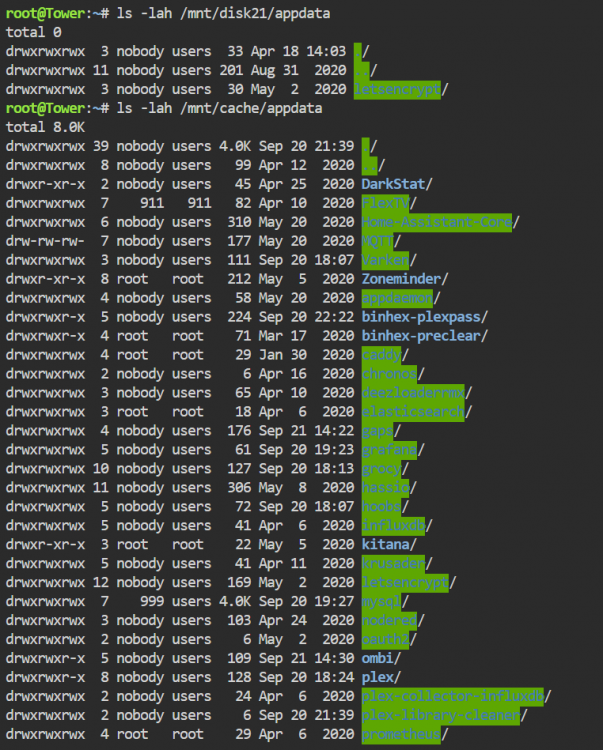
@trurl I am using Brave but I turned off all shields. I switched to chrome and I managed to get the terminal window to chow up but the error in the screenshot from before persists. I have also attached a screenshot of what was displayed when I ran the commands you requested. It looks like some leftover containers from the old docker image that didn't get deleted for some reason? Thank you for your help, GTP
-
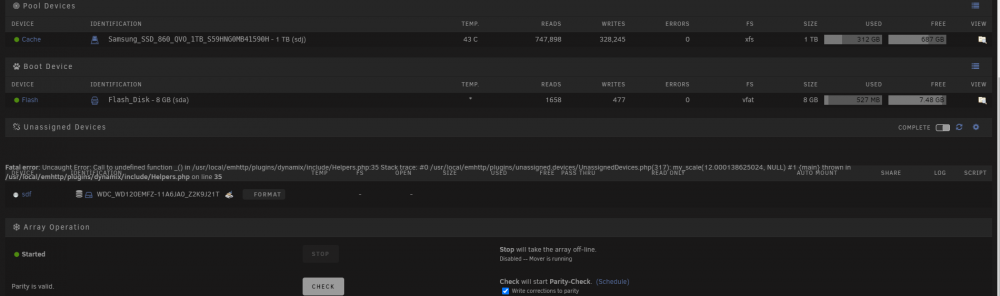
@ChatNoir I just left it open for a minute and nothing happened. Thank you for the advice though, it was worth a shot! I am also seeing this weird error in the screenshot below. Thank you, GTP
-
@trurl Do I have to enable terminal or bash in 6.9.2? When I click on the terminal icon in the upper right hand corner, the terminal window pops up but I cannot type anything and there is no ">"? So I cannot type the command you requested. What should I do? Thank you, GTP tower-diagnostics-20210921-1237.zip
-
@trurl I have ran the steps posted above and attached the new diagnostics. What would you like me to do as the next step? Thank you, GTP tower-diagnostics-20210920-2044.zip
-
@trurlThe Parity Rebuild completed successfully!!!! I have attached the Diagnostic file after the rebuild completed. Please let me know what I should do next to clean-up my system or if I should start a new thread? Thank you, GTP tower-diagnostics-20210920-1755.zip
-
@trurlI am only a few hours away from a successful rebuild. What steps do you recommend taking next? I know I have issues with my cache and docker images as well as my version, would you mind telling me where I should start? Thank you for all your help. I will send you a fresh diagnostic once the rebuild finishes. Thank you, GTP
-
That is normal for my system an 8 tb rebuild has always taken about 2 and a half days and about 3 for a 12tb. I must have port multipliers. I have four drives plugged directly into the motherboard and the rest using pci SATA expansion cards. I absolutely will not use the system during the rebuild and I will disable docker now. Thank you for the advice. Have a great weekend! Thank you, GTP
-
@trurl I have started the disk rebuild and everything is going well so far! No other disk errors at all and the parity rebuild has 2 days 10 hours left. I will reach back out after that is complete if that's ok. I really need your help with optimizing my system. You have told me before about my appdata folder and my docker image. What do I need to do to resolve those issues? I also am wondering about upgrading Unraid from 6.8.3 to the latest version and want to make sure I do everything in the proper order. Thank you for helping me diagnose stupid drive issues again. Thank you, GTP
-
@trurl I have installed the new 600 watt power supply so now I have dual PSU 750W and 600W. All the disks mounted and are not showing any errors. I started the array let it run for a few minutes then I shut it down and did a check -n on every disk. No errors, so I think I can go ahead and start the rebuild of disk 8 and 9 that are disabled. I have attached Diagnostics please let me know if I am following the correct procedure. I am going to start the array with no device for those two disks then stop it and then and the add the drives back and start the array to rebuild. Thank you for your help, GTP tower-diagnostics-20210918-1642.zip
-
@trurl It's worth a try, I just ordered a new 600 watt power supply from Amazon, it should arrive on Saturday. I will install it and attempt repairs on disks again and reply back in this thread. Thank you so much for your help. Thanks, GTP
-
@trurl I left the server running last night and performed no input or output operations and I woke up to errors on 6 disks. I have repaired all disks but disks 8, 9 and 11. I cannot seem to get those to mount again even thought the repair comes back as done. I have included a diagnostic file. I am at a complete loss everything was fine when I went to bed last night. The I/O errors seem to be back as well. I just tried to repair a disk that said it had errors on it and it gave me the I/O error. Thank you, tower-diagnostics-20210916-1330.zip
-
@trurl I have received new cables again and did a complete teardown and rebuild. I checked all my cables and then did a repair on the disabled disks (Disk 8 and 9). I have attached the Diagnostics file and so far the only thing wrong with the disks is that they are disabled. Should I go ahead and start the array with those disks as no device and then stop it and start it to rebuild(Can I do both disk rebuilds at once)? I'm just happy I am not seeing I/O errors! I know I have other issues as well like docker image size. I am prepared to fix everything as soon as I have all disks enabled. I also wanted to let you know that on the dashboard all disks are reporting a status of healthy in their Smart Status. Thank you, GTP tower-diagnostics-20210915-1715.zip
-
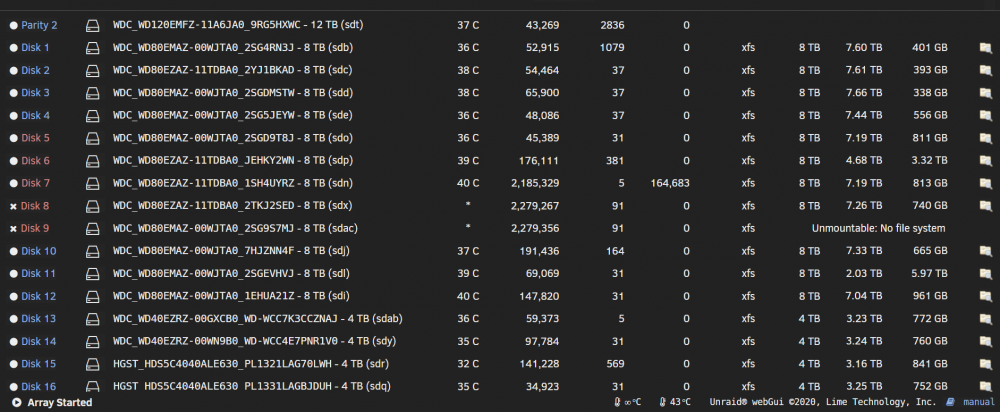
Yes I do here. I have attached the Diagnostics and a sceenshot after I did a repair. I am still waiting on a new set of cables just to make sure its not that again. Thank you, GTP tower-diagnostics-20210914-0958.zip
-
Thanks for your reply @trurl. I checked my dashboard and it says all my disks are in Healthy status. I re-ordered cables again because this is not the first time this has occurred. I will also have two empty drive ready tomorrow if I need to replace any. I tried to do a repair on disk 8 but it said fatal error Input/Output. I will reach out tomorrow or the next when the cables arrive and after I have replaced the cables again to see if I am able to repair. Since I will have the disks to replace would you recommend just chucking the disabled disks? I also can't seem to repair disk 6. Thanks for your help, I let my server get in bad shape and I am trying to fix it up again. You have helped me before and I always appreciate it. Thank you, GTP
-
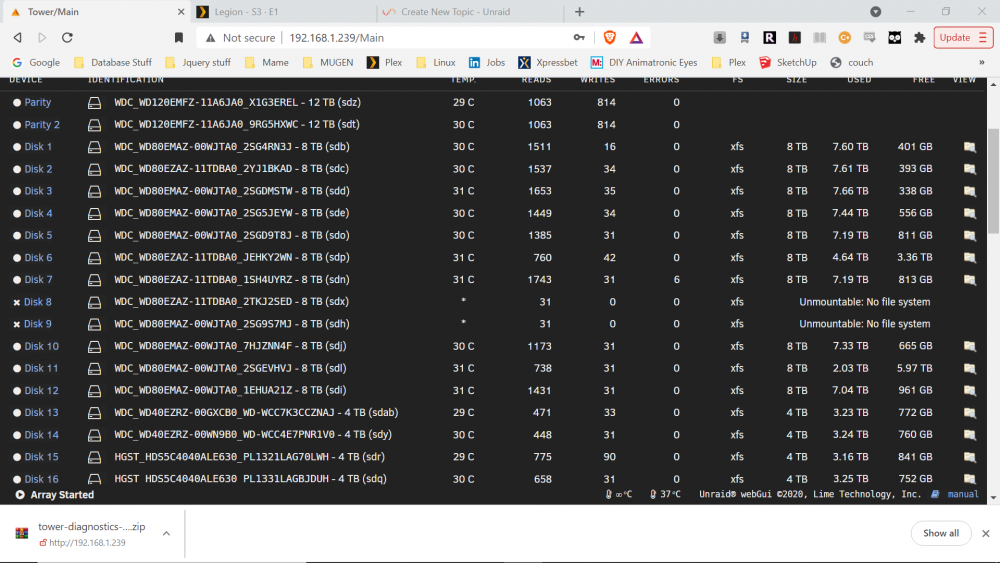
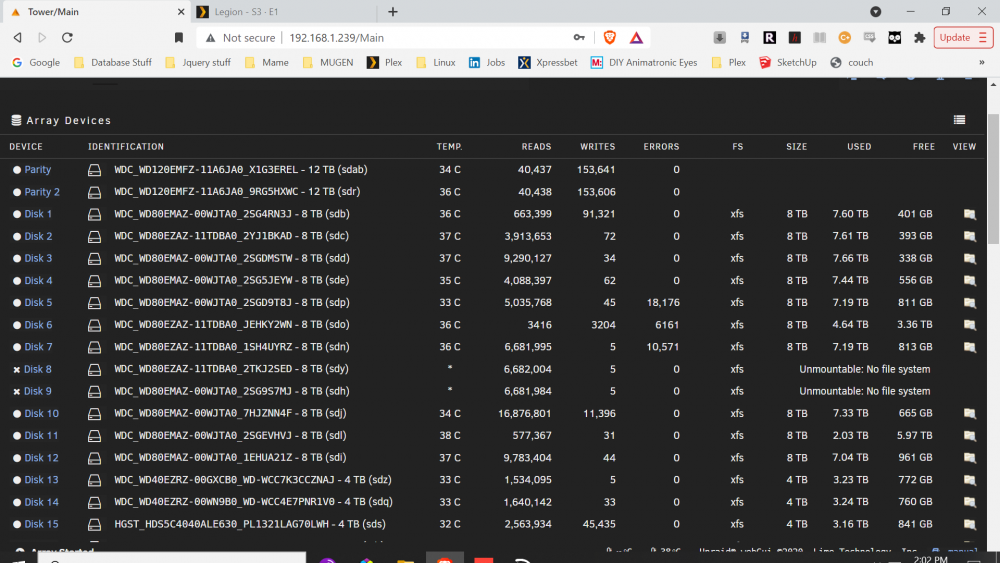
I am trying to figure out what could be causing the errors in my attached screenshot and Diagnostics file. Unraid is telling me I have two unmountable disks. So I did a complete tear down and ensured all connections were solid. Disk 8 and 9 still will not mount and I continue to have errors on others disks. I have attached a screenshot from before (more disk errors) and after a restart after re-securing the cables. Do I have dead drives? Also I noticed that I am several version behind in my Unraid updates should I wait to update until after these issues are resolved. Thanks for your help as always! GTP tower-diagnostics-20210913-1449.zip
-
Rebuilding now should be done inbetween 12 hours and 2 days I will close the issue then. Thank you for your help again @johnnie.black Best, GTP
-
OK I'll give it a shot thank you


