





awediohead
Members
-
Joined
-
Last visited
-
I run powertop. (as in powertop --auto-tune &>/dev/null ) every time I start my unraid server - would this be an example of doing something that would conflict with your plugin? Thanks
-
I rebooted and got a green notification stating 'array turned good' Hopefully that's the end of it, but I'll give it 24 hours before making this as solved. Many thanks
-
no more errors since the parity check completed so I'll just keep an eye on it. I have a back up drive ready to go when needed at least. btw how do I reset the errors?
-
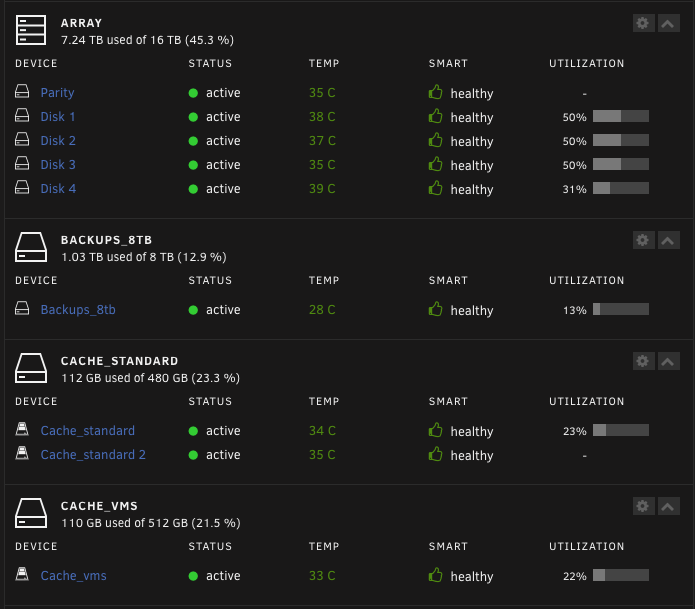
As the report below shows I got another error saying the array was a "FAIL" about 90 minutes before the parity check completed with 0 errors. This is from the dashboard: I've acknowledged the warning and the bell icon has gone back to black - so what to do now? Wait and keep an eye on it?
-
parity running now - will be done in about six hours when I'll post back. Thanks
-
Thanks for replying JorgeB Here's the diagnostics - let me know if you need them un-anonymised? singthesis-nas-diagnostics-20241114-1519.zip
-
The last week or so I've started getting orange FAIL notifications: Unraid Status Notice [SINGTHESIS-NAS] - array health report [FAIL] Array has 9 disks (including parity & pools) warning Parity - ST4000VN008-2DR166_ZGY94KWQ (sdd) - standby [OK] Disk 1 - WDC_WD40EMAZ-11ZRJB0_WD-WX21D690LHA4 (sde) - standby (disk has read errors) [NOK] Disk 2 - WDC_WD40EMAZ-51TKPB0_WD-WX61D480DE19 (sdb) - active 26 C [OK] Disk 3 - ST4000VN008-2DR166_ZGY869D0 (sdc) - active 25 C [OK] Disk 4 - TOSHIBA_HDWQ140_X014K2WNFAYG (sdg) - standby [OK] Backups_8tb - TOSHIBA_HDWG480_71R0A06XFA3H (sdf) - standby [OK] Cache_standard - KIOXIA-EXCERIA_SATA_SSD_X0KB80PVKJC2 (sdj) - active 30 C [OK] Cache_standard 2 - KIOXIA-EXCERIA_SATA_SSD_Z0PB81E0KA93 (sdk) - active 31 C [OK] Cache_vms - SPCC_Solid_State_Disk_BB0407911E5300517164 (sdi) - standby [OK] Parity is valid Last checked on Friday, 01-11-2024, 11:10 (yesterday), finding 0 errors. Duration: 9 hours, 10 minutes, 24 seconds. Average speed: 121.1 MB/s But then when I check again Disk 1 SMART says it's managed to exclude the bad blocks (or something like that) and the status is green and 'healthy'. This seems to have happened repeatedly, but I don't know if it's telling me about the same problem multiple times or if the problem is recurring? Is this just something to keep an eye on or should I swap out Disk 1 for a new one ASAP ? I also installed Scrutiny and that tells me that all the disks are 'passed' and this particular disk is 'passed' for all attributes. I bought a new replacement drive so I'm ready to swap it out when needed, I just don't know how to interpret this info. There's nothing on the array that's super critical, for e.g. my security cameras use an unassigned SSD to store info to as do my family's PC back ups.
-
Update: OK so without changing anything in the set up file I changed the url to http and changed the port to 5000 so now it works, but when you choose the webui for Frigate you get 'bad request' - how to fix this please? I'm probably doing something dumb - I had Frigate 0.14 working pretty well having just upgraded it from previous versions within Unraid's Docker Window, then I noticed the recommendation to delete and do a fresh install for 0.14 which I hadn't done - so I saved my config.yaml file and now I have a login screen which I didn't have previously? The only change I made was to add a Frigate+ API key in the relevant field, but my Frigate+ login credentials return as invalid, though they work to sign me in the the Frigate+ website. The other thing I notice is the "Authenticated UI and API access without TLS. Reverse proxies should use this port: 8971 - but I don't have a reverse proxy ? The old HTTP port of 5000 is missing from the set up - should I add it back?
-
Ok - fair enough - so any idea how to explain my experience? Sorry but having just spent literally weeks trying to 'fix' my config only to discover that all I had to do to make it work reliably was to change my browser, I'm extremely confused - but at the same time would really like to understand?
-
The problem can happen with h264 or h265 or any combination of the two in Firefox based browsers. I tested this with multiple changes and reversions of my config switching between h264 and h265. In all cases when it wouldn't work in Firefox when the same Frigate WEBUI is accessed via Brave (and presumably Chrome) or Safari - it "just works", indicating that there is a fault with Firefox. It was the threads you linked to - plus others - that first made me consider that it might be a browser problem and not a Frigate config or camera problem - both of which were reasonable assumptions I would have thought. I doubt very much that it would occur to many regular Unraid users (as opposed to devs and professional IT guys) that the browser they've been using to administrate Unraid for years without issue, is the reason their Frigate docker appears not to work! Obviously this is not the place to report bugs or inadequacies with Firefox !! I just hoped my sharing my experience might prevent other Firefox users trying to set up Frigate on Unraid from wasting as much time as I have. IOW just trying to help!
-
re-writing original question to express myself better: So having banged my head against a brick wall for quite a few weeks (time and health allowing) trying to figure out why I was getting "Playback cannot continue. No available working or supported playlists." errors - when the live streams were viewable and the saved recordings were viewable via VLC once downloaded off my server - I finally tried a config that was not working in Firefox or Waterfox (in terms of my being able to watch recordings) with Safari and then Brave browsers - where it worked perfectly. I would really like to understand why? Is this a known problem? Secondly, having tried to find answers to this for weeks now with various search engines, reading the Frigate docs and threads here and elsewhere, I think it's understandable that I've assumed all along that there was something very wrong with my config for such a basic functionality to be broken. We're talking a HUGE amount of time totally wasted trying to fix something that wasn't broken in the first place. At least now I can proceed with setting up my config - but I am concerned that others maybe in the same boat and just give up on Frigate entirely - maybe there should be some sort of pinned warning not to use Mozilla browsers? Or am I missing something? Thanks
-
Thanks for clarifying and confirming it's not something I need for now. It had been suggested to me as necessary previously, hence my question to double check. Cheers
-
--gpus=all --shm-size=256mb --mount type=tmpfs,target=/tmp/cache,tmpfs-size=100000000 --restart unless-stopped Can someone explain what the --gpus=all part does of the above Extra Parameters? When is it necessary / useful as its not in the default ?
-
I'm trying to set up Frigate as a docker with a static IP on Unraid BUT this is about my network and NOT specific to any particular docker, but a more general question about dockers on VLANs and custom networks. I'm also concerned that on pfsense's DHCP leases page I've got the same MAC address being associated with my server (as the IP address for my server) and the VLAN IP for my cameras: Where Unraid Intel eth0 (hostname) and 'singthesis-nas' (hostname) are 192.168.1.92 AND 10.0.44.200 respectively, with the Mac Address being 00:26:55:e1:xx:xx for both leases. Is this OK because I have a LAGG and VLANs between pfsense, my managed switch and two ports on Unraid or is it a problem waiting to happen? Put another way, the 10.0.44.200 is a DHCP automatically assigned IP because the DHCP range on that VLAN is 10.0.44.200 to 10.0.44.254, so it's just handed out the first IP in the range. On the Docker instance if I don't specify a static IP of 10.0.44.210 for Frigate it defaults to 10.0.44.2 which is not within the DHCP lease pool, so I'm worried that's going to cause problems? If I try to use --mac-address and use one of the docker specific Mac Addresses in Extra Parameters I get an error when starting the docker - something about ipvlan versus macvlan? Bearing in mind that there are doubtless large holes in my understanding of networking I'm probably asking the wrong questions and possibly seeing a problem that isn't there! Hope someone can help! P.S. I've tried to open the docker console and use ifconfig but it just says 'not found'
-
Oh I have - dozens of times by now! The problem is that states: As the camera I need to get working is 4K the example given is pretty much useless and I've had to search elsewhere for answers. Still, I'm getting gradually more familiar with the terminology and broad principles - but as many others have said, the Frigate documentation assumes a hell of a lot of knowledge. Even so with a working iGPU at least I can trial and error the process and make a little progress. If the built in .config editor wasn't checking syntax I'd have given up long ago.

