





pearce1340
Members
-
Joined
-
Last visited
Everything posted by pearce1340
-
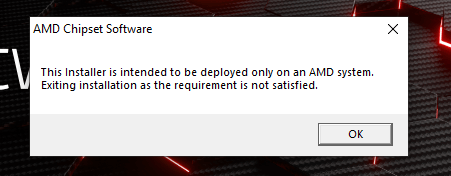
Hi All, A bit of help please. I have my RX 5700 XT GPU Passthrough to a Win11 VM (fresh install). The actual card is working fine and I have the vendor reset in place (can restart multiple times with no issues). When I try to install the AMD Drivers using the software from AMD's site, I get the following error. I don't have this issue on my other VM, so I think I've missed something simple. I keep going through my XML and can't see it. Can I ask for a bit of help/advice? Below is my XML <?xml version='1.0' encoding='UTF-8'?> <domain type='kvm'> <name>Windows 11 - Gaming</name> <uuid>4915030b-662b-282f-044b-76d025e99aa7</uuid> <metadata> <vmtemplate xmlns="unraid" name="Windows 11" icon="windows11.png" os="windowstpm"/> </metadata> <memory unit='KiB'>16777216</memory> <currentMemory unit='KiB'>16777216</currentMemory> <memoryBacking> <nosharepages/> </memoryBacking> <vcpu placement='static'>24</vcpu> <cputune> <vcpupin vcpu='0' cpuset='4'/> <vcpupin vcpu='1' cpuset='20'/> <vcpupin vcpu='2' cpuset='5'/> <vcpupin vcpu='3' cpuset='21'/> <vcpupin vcpu='4' cpuset='6'/> <vcpupin vcpu='5' cpuset='22'/> <vcpupin vcpu='6' cpuset='7'/> <vcpupin vcpu='7' cpuset='23'/> <vcpupin vcpu='8' cpuset='8'/> <vcpupin vcpu='9' cpuset='24'/> <vcpupin vcpu='10' cpuset='9'/> <vcpupin vcpu='11' cpuset='25'/> <vcpupin vcpu='12' cpuset='10'/> <vcpupin vcpu='13' cpuset='26'/> <vcpupin vcpu='14' cpuset='11'/> <vcpupin vcpu='15' cpuset='27'/> <vcpupin vcpu='16' cpuset='12'/> <vcpupin vcpu='17' cpuset='28'/> <vcpupin vcpu='18' cpuset='13'/> <vcpupin vcpu='19' cpuset='29'/> <vcpupin vcpu='20' cpuset='14'/> <vcpupin vcpu='21' cpuset='30'/> <vcpupin vcpu='22' cpuset='15'/> <vcpupin vcpu='23' cpuset='31'/> </cputune> <os> <type arch='x86_64' machine='pc-q35-7.2'>hvm</type> <loader readonly='yes' type='pflash'>/usr/share/qemu/ovmf-x64/OVMF_CODE-pure-efi-tpm.fd</loader> <nvram>/etc/libvirt/qemu/nvram/4915030b-662b-282f-044b-76d025e99aa7_VARS-pure-efi-tpm.fd</nvram> </os> <features> <acpi/> <apic/> <hyperv mode='custom'> <relaxed state='on'/> <vapic state='on'/> <spinlocks state='on' retries='8191'/> <vendor_id state='on' value='123456789123'/> </hyperv> <kvm> <hidden state='on'/> </kvm> <vmport state='off'/> <ioapic driver='kvm'/> </features> <cpu mode='host-passthrough' check='none' migratable='on'> <topology sockets='1' dies='1' cores='12' threads='2'/> <cache mode='passthrough'/> <feature policy='require' name='topoext'/> </cpu> <clock offset='localtime'> <timer name='hypervclock' present='yes'/> <timer name='hpet' present='no'/> </clock> <on_poweroff>destroy</on_poweroff> <on_reboot>restart</on_reboot> <on_crash>restart</on_crash> <devices> <emulator>/usr/local/sbin/qemu</emulator> <disk type='file' device='disk'> <driver name='qemu' type='raw' cache='writeback'/> <source file='/mnt/user/domains/Windows 11 - Gaming/vdisk1.img'/> <target dev='hdc' bus='virtio'/> <serial>vdisk1</serial> <boot order='2'/> <address type='pci' domain='0x0000' bus='0x03' slot='0x00' function='0x0'/> </disk> <disk type='file' device='cdrom'> <driver name='qemu' type='raw'/> <source file='/mnt/user/isos/Windows 11/en-gb_windows_11_business_editions_updated_april_2022_x64_dvd_1c55c769.iso'/> <target dev='hda' bus='sata'/> <readonly/> <boot order='1'/> <address type='drive' controller='0' bus='0' target='0' unit='0'/> </disk> <disk type='file' device='cdrom'> <driver name='qemu' type='raw'/> <source file='/mnt/user/isos/virtio-win-0.1.240-1.iso'/> <target dev='hdb' bus='sata'/> <readonly/> <address type='drive' controller='0' bus='0' target='0' unit='1'/> </disk> <controller type='sata' index='0'> <address type='pci' domain='0x0000' bus='0x00' slot='0x1f' function='0x2'/> </controller> <controller type='pci' index='0' model='pcie-root'/> <controller type='pci' index='1' model='pcie-root-port'> <model name='pcie-root-port'/> <target chassis='1' port='0x10'/> <address type='pci' domain='0x0000' bus='0x00' slot='0x02' function='0x0' multifunction='on'/> </controller> <controller type='pci' index='2' model='pcie-root-port'> <model name='pcie-root-port'/> <target chassis='2' port='0x11'/> <address type='pci' domain='0x0000' bus='0x00' slot='0x02' function='0x1'/> </controller> <controller type='pci' index='3' model='pcie-root-port'> <model name='pcie-root-port'/> <target chassis='3' port='0x12'/> <address type='pci' domain='0x0000' bus='0x00' slot='0x02' function='0x2'/> </controller> <controller type='pci' index='4' model='pcie-root-port'> <model name='pcie-root-port'/> <target chassis='4' port='0x13'/> <address type='pci' domain='0x0000' bus='0x00' slot='0x02' function='0x3'/> </controller> <controller type='pci' index='5' model='pcie-root-port'> <model name='pcie-root-port'/> <target chassis='5' port='0x14'/> <address type='pci' domain='0x0000' bus='0x00' slot='0x02' function='0x4'/> </controller> <controller type='pci' index='6' model='pcie-root-port'> <model name='pcie-root-port'/> <target chassis='6' port='0x15'/> <address type='pci' domain='0x0000' bus='0x00' slot='0x02' function='0x5'/> </controller> <controller type='virtio-serial' index='0'> <address type='pci' domain='0x0000' bus='0x02' slot='0x00' function='0x0'/> </controller> <controller type='usb' index='0' model='qemu-xhci' ports='15'> <address type='pci' domain='0x0000' bus='0x00' slot='0x07' function='0x0'/> </controller> <interface type='bridge'> <mac address='52:54:00:59:ff:b8'/> <source bridge='br0.6'/> <model type='virtio-net'/> <address type='pci' domain='0x0000' bus='0x01' slot='0x00' function='0x0'/> </interface> <serial type='pty'> <target type='isa-serial' port='0'> <model name='isa-serial'/> </target> </serial> <console type='pty'> <target type='serial' port='0'/> </console> <channel type='unix'> <target type='virtio' name='org.qemu.guest_agent.0'/> <address type='virtio-serial' controller='0' bus='0' port='1'/> </channel> <input type='tablet' bus='usb'> <address type='usb' bus='0' port='5'/> </input> <input type='mouse' bus='ps2'/> <input type='keyboard' bus='ps2'/> <tpm model='tpm-tis'> <backend type='emulator' version='2.0' persistent_state='yes'/> </tpm> <graphics type='vnc' port='-1' autoport='yes' websocket='-1' listen='0.0.0.0' keymap='en-gb'> <listen type='address' address='0.0.0.0'/> </graphics> <audio id='1' type='none'/> <video> <model type='qxl' ram='65536' vram='65536' vgamem='16384' heads='1' primary='yes'/> <address type='pci' domain='0x0000' bus='0x00' slot='0x01' function='0x0'/> </video> <hostdev mode='subsystem' type='pci' managed='yes'> <driver name='vfio'/> <source> <address domain='0x0000' bus='0x0f' slot='0x00' function='0x0'/> </source> <rom file='/mnt/user/isos/ROMS/AMD.RX5700XT.8192.190616.rom'/> <address type='pci' domain='0x0000' bus='0x04' slot='0x00' function='0x0' multifunction='on'/> </hostdev> <hostdev mode='subsystem' type='pci' managed='yes'> <driver name='vfio'/> <source> <address domain='0x0000' bus='0x0f' slot='0x00' function='0x1'/> </source> <address type='pci' domain='0x0000' bus='0x04' slot='0x00' function='0x1'/> </hostdev> <hostdev mode='subsystem' type='usb' managed='no'> <source> <vendor id='0x046d'/> <product id='0xc52b'/> </source> <address type='usb' bus='0' port='1'/> </hostdev> <hostdev mode='subsystem' type='usb' managed='no'> <source> <vendor id='0x0b05'/> <product id='0x190e'/> </source> <address type='usb' bus='0' port='2'/> </hostdev> <hostdev mode='subsystem' type='usb' managed='no'> <source> <vendor id='0x0e8d'/> <product id='0x1806'/> </source> <address type='usb' bus='0' port='3'/> </hostdev> <hostdev mode='subsystem' type='usb' managed='no'> <source> <vendor id='0x8087'/> <product id='0x0029'/> </source> <address type='usb' bus='0' port='4'/> </hostdev> <memballoon model='none'/> </devices> </domain>
-
Yes I do. It downloads it from the cloud, unlocks the array and starts the array, then deletes itself. do I need to disable the script to allow formatting?
-
Hi, I was following a guide in order to convert one of my drives to ZFS. It was previously XFS Encrypted. I erased the disk and changed the type to ZFS Encrypted, however now when I try to format the drive, nothing happens. I've attached a screenshot of how the drive hows in my array. When I format it, it tries to format and the "Formatting devices" appears and shows "Formatting" next to the device... however this only shows briefly and then it reverts back to "Unmountable: Volume not encrypted". Any ideas on how I can re-add this drive to my array and format it? (Disk log below and Diagnostics attached) Thanks Steve DISK LOG: text error warn system array login Aug 14 09:21:20 Unraid kernel: ata5: SATA max UDMA/133 abar m2048@0xfc000000 port 0xfc000100 irq 89 Aug 14 09:21:20 Unraid kernel: ata5: SATA link up 6.0 Gbps (SStatus 133 SControl 300) Aug 14 09:21:20 Unraid kernel: ata5.00: ATA-9: WDC WD60EFRX-68L0BN1, 82.00A82, max UDMA/133 Aug 14 09:21:20 Unraid kernel: ata5.00: 11721045168 sectors, multi 16: LBA48 NCQ (depth 32), AA Aug 14 09:21:20 Unraid kernel: ata5.00: configured for UDMA/133 Aug 14 09:21:20 Unraid kernel: sd 6:0:0:0: [sdb] 11721045168 512-byte logical blocks: (6.00 TB/5.46 TiB) Aug 14 09:21:20 Unraid kernel: sd 6:0:0:0: [sdb] 4096-byte physical blocks Aug 14 09:21:20 Unraid kernel: sd 6:0:0:0: [sdb] Write Protect is off Aug 14 09:21:20 Unraid kernel: sd 6:0:0:0: [sdb] Mode Sense: 00 3a 00 00 Aug 14 09:21:20 Unraid kernel: sd 6:0:0:0: [sdb] Write cache: enabled, read cache: enabled, doesn't support DPO or FUA Aug 14 09:21:20 Unraid kernel: sd 6:0:0:0: [sdb] Preferred minimum I/O size 4096 bytes Aug 14 09:21:20 Unraid kernel: sdb: sdb1 Aug 14 09:21:20 Unraid kernel: sd 6:0:0:0: [sdb] Attached SCSI removable disk Aug 14 09:22:32 Unraid emhttpd: WDC_WD60EFRX-68L0BN1_WD-WX31D29J50AP (sdb) 512 11721045168 Aug 14 09:22:32 Unraid emhttpd: read SMART /dev/sdb Aug 14 09:27:20 Unraid emhttpd: WDC_WD60EFRX-68L0BN1_WD-WX31D29J50AP (sdb) 512 11721045168 Aug 14 09:27:20 Unraid kernel: mdcmd (2): import 1 sdb 64 5860522532 1 WDC_WD60EFRX-68L0BN1_WD-WX31D29J50AP Aug 14 09:27:20 Unraid kernel: md: import disk1: (sdb) WDC_WD60EFRX-68L0BN1_WD-WX31D29J50AP size: 5860522532 erased Aug 14 09:27:20 Unraid emhttpd: read SMART /dev/sdb Aug 14 09:27:36 Unraid emhttpd: shcmd (356): echo 128 > /sys/block/sdb/queue/nr_requests Aug 14 09:27:58 Unraid emhttpd: writing GPT on disk (sdb), with partition 1 byte offset 32KiB, erased: 0 Aug 14 09:27:58 Unraid emhttpd: shcmd (447): sgdisk -Z /dev/sdb Aug 14 09:27:59 Unraid kernel: sdb: sdb1 Aug 14 09:28:00 Unraid kernel: sdb: sdb1 Aug 14 09:28:00 Unraid emhttpd: shcmd (448): sgdisk -o -a 8 -n 1:32K:0 /dev/sdb Aug 14 09:28:01 Unraid kernel: sdb: sdb1 Aug 14 09:30:42 Unraid emhttpd: shcmd (450): /sbin/wipefs -a /dev/sdb Aug 14 09:30:43 Unraid root: /dev/sdb: 8 bytes were erased at offset 0x00000200 (gpt): 45 46 49 20 50 41 52 54 Aug 14 09:30:43 Unraid root: /dev/sdb: 8 bytes were erased at offset 0x57541e95e00 (gpt): 45 46 49 20 50 41 52 54 Aug 14 09:30:43 Unraid root: /dev/sdb: 2 bytes were erased at offset 0x000001fe (PMBR): 55 aa Aug 14 09:30:43 Unraid root: /dev/sdb: calling ioctl to re-read partition table: Success Aug 14 09:30:43 Unraid emhttpd: writing GPT on disk (sdb), with partition 1 byte offset 32KiB, erased: 0 Aug 14 09:30:43 Unraid emhttpd: shcmd (451): sgdisk -Z /dev/sdb Aug 14 09:30:44 Unraid emhttpd: shcmd (452): sgdisk -o -a 8 -n 1:32K:0 /dev/sdb Aug 14 09:30:45 Unraid kernel: sdb: sdb1 Aug 15 07:45:27 Unraid emhttpd: shcmd (603): /sbin/wipefs -a /dev/sdb Aug 15 07:45:28 Unraid root: /dev/sdb: 8 bytes were erased at offset 0x00000200 (gpt): 45 46 49 20 50 41 52 54 Aug 15 07:45:28 Unraid root: /dev/sdb: 8 bytes were erased at offset 0x57541e95e00 (gpt): 45 46 49 20 50 41 52 54 Aug 15 07:45:28 Unraid root: /dev/sdb: 2 bytes were erased at offset 0x000001fe (PMBR): 55 aa Aug 15 07:45:28 Unraid root: /dev/sdb: calling ioctl to re-read partition table: Success Aug 15 07:45:28 Unraid emhttpd: writing GPT on disk (sdb), with partition 1 byte offset 32KiB, erased: 0 Aug 15 07:45:28 Unraid emhttpd: shcmd (604): sgdisk -Z /dev/sdb Aug 15 07:45:29 Unraid emhttpd: shcmd (605): sgdisk -o -a 8 -n 1:32K:0 /dev/sdb Aug 15 07:45:30 Unraid kernel: sdb: sdb1 Aug 15 07:52:18 Unraid emhttpd: shcmd (622): /sbin/wipefs -a /dev/sdb Aug 15 07:52:18 Unraid root: /dev/sdb: 8 bytes were erased at offset 0x00000200 (gpt): 45 46 49 20 50 41 52 54 Aug 15 07:52:18 Unraid root: /dev/sdb: 8 bytes were erased at offset 0x57541e95e00 (gpt): 45 46 49 20 50 41 52 54 Aug 15 07:52:18 Unraid root: /dev/sdb: 2 bytes were erased at offset 0x000001fe (PMBR): 55 aa Aug 15 07:52:18 Unraid root: /dev/sdb: calling ioctl to re-read partition table: Success Aug 15 07:52:18 Unraid emhttpd: writing GPT on disk (sdb), with partition 1 byte offset 32KiB, erased: 0 Aug 15 07:52:18 Unraid emhttpd: shcmd (623): sgdisk -Z /dev/sdb Aug 15 07:52:19 Unraid emhttpd: shcmd (624): sgdisk -o -a 8 -n 1:32K:0 /dev/sdb Aug 15 07:52:20 Unraid kernel: sdb: sdb1 unraid-diagnostics-20230815-0755.zip

-
Hi, Bit of a strange problem. Sometimes when rebooting I am unable to access the webgui. I see the login page, enter the correct details and then Unraid just hangs trying to load the dashboard (or any other page). When this happens, I also find that my VM's do not auto-start and only half my dockers seem to load. The dockers that have loaded correctly, work perfectly and I can access the webgui's for them. The array itself also seems to be fine. But obviously I can only manage my system through the CLI. Weirdly if I hard reset, it can all come back up normally - so its pot luck when this happens. I have attached my syslog that I could pull from the CLI - but please let me know if I need to dump anything else. Thanks Steve syslog.txt
-
This is amazing, its exactly what I needed. Before you ask, not the dog... the move command lol. I've stuck it in a user script to run when the array first starts - which should do the trick! Little b&%$%d occasionally hits the reset button with a claw as well... so I'll disable that
-
Hi Everyone, I've done some searching already on this topic and can't find a solution that works for me, so I'm hoping I'm missing something really easy. I need to disable the 'off' command when the power button is pressed on my machine. I have a cat that likes to sleep on it and despite placing a cover etc... he still manages to turn the bloody thing off! lol I can't just unplug the button from the motherboard as I still want the ability to 'turn it on' the reason why is I have the Navi 10 reset problem and use a script to reset the card, which places my machine in standby mode. I'm hoping there is a really easy way I can just change the button's behaviour in linux - so that it does nothing when pressed if already on. I'm using the release candidate 6.9 of Unraid and my motherboard is a X570 Aurus Xtreme (may help). Thanks, Steve
-
Hey - Did anyone get a solution for this? I seem to be experiencing the exact same behaviour. I've completely remove the directory and plg files from the flash drive.

