





Grohmand
Members
-
Joined
-
Last visited
-
But /config folder could be encrypted and other parts right? I don't think plugin and those configuration needs to be available at that time
-
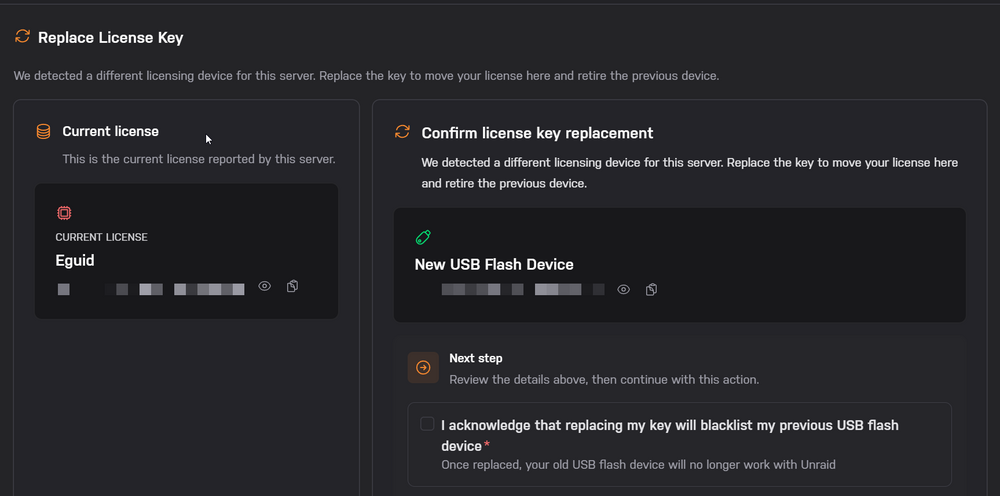
Yes I am using internal boot with TPM currently. Thank you, I am sorry for hijacking the topic but regarding the internal boot as we are on the topic, this won't blacklist my old TPM right? It will just blacklist the USB drive if I had any (I used a new USB drive as I believe the old one to be blacklisted when I originally did the TPM transfer) Original USB (blacklisted) -> TPM -> New USB (TPM fine for blacklist?)
-
I see thank you, how would I move the license to an USB before I transfer it into a VM as I don't get the option anywhere, this is baremetal with Unraid running directly on it.
-
How many times can you transfer TPM licenses?
-
To ask about this, trying to passthrough TPM through proxmox seems to trigger invalid boot device and license even though the TPM is available and can be queried like a normal TPM device. Is there any alternatives for this?
-
Will we be able to encrypt the Internal boot device in future or can we do it now considering tpm 2.0 licensing instead. I want this really to be a feature cause it's a big problem config is unencrypted
-
I seem to have disk 1 disabled yue-diagnostics-20260115-0847.zip
-
yue-diagnostics-20251202-0539.zip The rebuild is done and no read errors ,so I assume it is okay now?
-
Thank you I will do so, and if it doesn't work I will also source new cables, I currently have a LSI SAS card flashed as passthrough with 2x4 cables so it would take some time to arrange new replacements for that. I will update once this is done
-
yue-diagnostics-20251201-0858.zip I restarted and reseated all cables, and I notice now that disk 1 is disabled and content is emulated, but we know disk 1 had read errors, so should I now recreate the array and recreate parity or what should next step be?
-
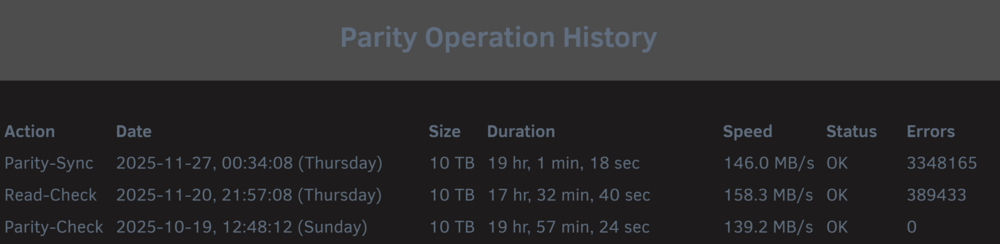
Parity was disabled though I am not sure if read errors from disk 1 caused it to be disabled, so I unassigned it, started array maintenance and stopped array and added it and parity rebuild, and now it is done. And we have read errors on drive 1 currently. I can physically access the machine next week so I will try do a live memory test to rule out RAM errors also.
-
The initial issue as I understand was that the parity drive became disabled, and then I noticed there was read errors, but I did a read sync after parity and same errors. The parity is now done but there was read errors, so can I consider this parity okay? Or is there still a possibility that the issue corrupted the other drives?
-
There is no rebuild, the parity drive failed though, is that cause of the data drive 1? Cause the parity drive was disabled for me, and that's the one I had to recreate so it is rebuilding parity now
-
Will do so when I can, is there any issues with rebuilding parity now or will it try to recover read-errors and still calculate parity? And is there at any time of point that I could have overwritten the data disk with my actions?
-
yue-diagnostics-20251126-1505.zip Here you go! Though I did restart the server once so I am not sure if it contains the original retention, but I believe I have not done any operations to data drive from parity or I hope so at least, is it possibly the parity could have overwritten the data drive or does it only work the other way around?


