





Cyd
Members
-
Joined
-
Last visited
Everything posted by Cyd
-
@growlith That is a good idea. I also created a companion that container that runs a lite http server to host the dynamic config files. It also monitors the ./Config directories and resets the permissions on the config files so they remain editable from the shares. And extracts backups of the ./Saved directories (on a 10 day rotation). I think maybe we should combine the functions and publish it.
-
If you need to change any of the port mappings they need to be deleted and recreated not just changed. I would recommend deleting that container and starting with a fresh new install. I would advise that you also forward the UDP ports in from your router as well (7777&7778 by default).
-
@growlith correct there is more to it than that code snip, I was just asking ich weather he wants to roll in my edits to his images or have me publish them as new/forked.
-
ARK "-automanagedmods" First, I love ARK, second I hate ARK. The automanagedmods function is hardcoded in the server binary to use a copy of SteamCMD in a specific location relative to it self to fetch the workshop content, which it then expects to find in a different location than where SteamCMD actually downloaded it to, so that it can create the .mod meta files that get put in to the server rotation... To that end I have added a small amount of code to ich777's start-server.sh and added some variables and volume mappings to the XML to make sure that ShooterGameServer can find the SteamCMD installation and then to locate the downloaded workshop... We have been playing on it for quite some time now and it has preformed as expected. @ich777 do you want to add this small code block to start-server.sh or would you rather I put up a fork under my dockerhub id and then maybe you could help me get the XMLs published to the CA? ... echo "---Server ready---" if [ ! "${MODIDS}" == "" ]; then echo "---setting Mod config---" GAME_PARAMS=${GAME_PARAMS}?GameModIds=${MODIDS} GAME_PARAMS_EXTRA="${GAME_PARAMS_EXTRA} -automanagedmods" echo "--- ModID(s) ${MODIDS} set ---" fi if [ ! "${CLUSTERID}" == "" ]; then echo "--- setting ClusterID --- " GAME_PARAMS_EXTRA="${GAME_PARAMS_EXTRA} -clusterid=${CLUSTERID} -ClusterDirOverride=/serverdata/serverfiles/clusterfiles" echo "--- ClusterID set to ${CLUSTERID} ---" fi if [ ! "${CDCURL}" == "" ]; then echo "--- setting DynamicConfig --- " GAME_PARAMS="${GAME_PARAMS}?customdynamicconfigurl=\"${CDCURL}\"" GAME_PARAMS_EXTRA="${GAME_PARAMS_EXTRA} -UseDynamicConfig" echo "--- DynamicConfig set to \"${CDCURL}\" ---" fi echo "---Start Server---" ...
-
If I had to take a wild guess, it would be that there is a typo at or near where you edited the ModIDs... maybe a space where there shouldn't be... Are you using the automod manager in ark? or adding the files manually? I have a new XML and container image that triggers the ARK automodmanager to download and update them, I will try to post it when I get home.
-
@nikaiwolf You will need to add a volume mapping to all of the servers that you want clustered that they can all read/write data to. add this mapping to all of your containers: /serverdata/serverfiles/clusterfiles <> /mnt/cache/appdata/ark-se/clusterfiles When you look in /mnt/cache/appdata/ark-se/clusterfiles you should see a folder with the name of your cluster.
-
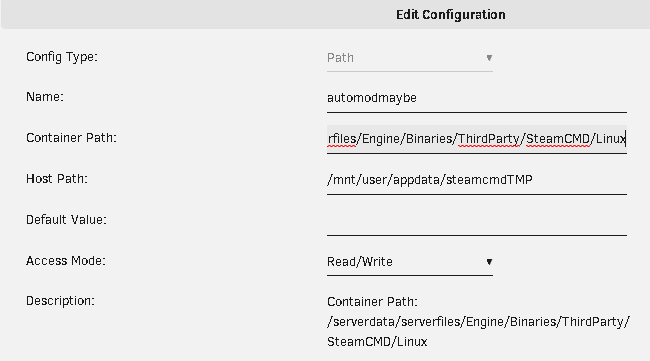
when you Pm'd me i assumed that you read through my earlier posts about ARK... the automodmanager that wild card crammed in has all of its paths hardcoded into the game engine. Your choices are to install "YACOsteamCMD" (Yet Another Copy Of SteamCMD) or create some additional volume mappings for your container so that the game engine can find the SteamCMD folder and to the location of the workshop files, or to copy the workshop files from your client PC game folder to the server game folder. Adding these volume mapping should fix up the automodmanager: /serverdata/serverfiles/Engine/Binaries/ThirdParty/SteamCMD/Linux <> /mnt/user/appdata/steamcmd /serverdata/Steam/steamapps <> /mnt/cache/appdata/steamcmd/steamapps /serverdata/serverfiles/Engine/Binaries/ThirdParty/SteamCMD/Linux/steamapps <> /mnt/cache/appdata/steamcmd/steamapps
-
the dynamic config is for a small number of options that can be changed without restarting the server. ?customdynamicconfigurl="<link>"a direct link to config file e.g.: http://arkdedicated.com/dynamicconfig.ini ; currently only the following options are supported to be adjusted dynamically: TamingSpeedMultiplier, HarvestAmountMultiplier, XPMultiplier, MatingIntervalMultiplier, BabyMatureSpeedMultiplier, EggHatchSpeedMultiplier, BabyFoodConsumptionSpeedMultiplier, CropGrowthSpeedMultiplier, MatingSpeedMultiplier, BabyCuddleIntervalMultiplier, BabyImprintAmountMultiplier, CustomRecipeEffectivenessMultiplier, TributeItemExpirationSeconds, TributeDinoExpirationSeconds, EnableFullDump, GUseServerNetSpeedCheck, bUseAlarmNotifications, HexagonRewardMultiplier and NPCReplacements. Introduced in patch 307.2
-
Understood, Thank you.
-
@ich777 I was thinking about docker networking and administrative access... Is there a particular reason that the bridged option is used rather than host? Host mode networking could be useful to optimize performance, as it does not require network address translation (NAT), and no “userland-proxy” would be created for each port. And If Host mode were used the port information could be passed into the containers via variables to be plugged into the server startup command line, then any needed changes could be done from the GUI without having to delete and recreate port entries.
-
The reason a restart works is that the startup scripts set all of the permissions to 0666 on startup so you can modify them unti ShooterGameServer touches them and sets them back to 0600. Unfortunately ShooterGameServer does not respect the UMASK set and writes all of its files with 0600 permissions (read/write for owner only). I have mitigated this problem by adding a inotifywatch to the container that i use to serve the DynamicConfig.ini that re-applys a 0666 permission to files in the "Saved" directory. It's a little ham fisted but i haven't figured out a better solution yet. I am the only admin of the FSAarkstar cluster so i havent had to think about granting or securing outside access... let me noodle on that. Most of the options require a server restart to take effect, except for the handful that can be managed via the DynamicConfig.ini, so any outside management would also need to have the authority to restart the server/docker container...
-
@altorn_achm I have been refining my setup to include auto updating of mods. I will write a guide and reupload the xml files as soon as i can.
-
dont forget to also forward 7778udp as well.
-
You can add them to the command line GAME_PARAMS ?GameModIds=${MODIDS} and not have to modify either of the ini files. I like the volume mount ideas, I will test them out.
-
@Cornflake that looks like a successful launch to me. Take a look at your tower/docker page and look at the memory usage for the container, it should be spooling up. It seems to me that shootergameserver has the last message held in a queue. If you open the console in the container and look in ShooterGame/Content/Mods/ you should see all of the .mod meta files there and available. @ich777 understood, we have indeed been living in interesting times.
-
@Cornflake & @ich777 You are correct!! manipulation of the Game.ini is not necessary, adding "?GameModIds=" to the $GAME_PARAMS is sufficient to trigger the automod manager. the new code block would be: if [ ! "${MODIDS}" == "" ]; then echo "---setting Mod config---" ln -sf /serverdata/Steam/steamapps /serverdata/serverfiles/Engine/Binaries/ThirdParty/SteamCMD/Linux/steamapps GAME_PARAMS=${GAME_PARAMS}?GameModIds=${MODIDS} GAME_PARAMS_EXTRA="${GAME_PARAMS_EXTRA} -automanagedmods" echo "--- ModID(s) ${MODARR[@]} set ---" fi if [ ! "${CDCURL}" == "" ]; then echo "--- setting DynamicConfig --- " GAME_PARAMS="${GAME_PARAMS}?customdynamicconfigurl=\"${CDCURL}\"" GAME_PARAMS_EXTRA="${GAME_PARAMS_EXTRA} -UseDynamicConfig" echo "--- DynamicConfig set to \"${CDCURL}\" ---" fi
-
I will have to look into that, if they do not need to be in the Game.ini and can be simply included in the command line that would alleviate having to manitupate ether file.
-
@ich777 have you had the opportunity to read though my proposed additions to the are-se container?
-
I see sed and read are included in the container we can use those to sanitize the Game.ini and then echo in the ModIDs to the bottom of the file without disrupting the other settings. So @ich777 I propose the following additions to the ark-se container: Add a path for the SteamCMD tools: <Config Name="automodSteamCMD" Target="/serverdata/serverfiles/Engine/Binaries/ThirdParty/SteamCMD/Linux" Default="" Mode="rw" Description="Container Path: /serverdata/serverfiles/Engine/Binaries/ThirdParty/SteamCMD/Linux" Type="Path" Display="always" Required="false" Mask="false">/mnt/user/appdata/steamcmd</Config> Add var for a comma separated list of ModID numbers to be passed in: <Config Name="Steam Mod Workshop IDs" Target="MODIDS" Default="" Mode="" Description="Enter a comma-separated list of Steam Workshop Mod ID numbers " Type="Variable" Display="always" Required="false" Mask="false"></Config> and a var that will hold the location of a custom dynamic configuration url: <Config Name="dynamic config location" Target="CDCURL" Default="" Mode="" Description="Leave blank to disable or enter your fully qualified Dynamic config URL http://www.domain.mine/dynamicconfig.ini or http://arkdedicated.com/dynamicconfig.ini to use the official servers config." Type="Variable" Display="always" Required="false" Mask="false"></Config> This code should be added to the end of the "---Prepare Server---" block of /opt/scripts/start-server.sh if [ ! "${MODIDS}" == "" ]; then echo "---setting Mod config---" ln -sf /serverdata/Steam/steamapps /serverdata/serverfiles/Engine/Binaries/ThirdParty/SteamCMD/Linux/steamapps sed -i '/^$/d;/ModInstaller/d;/ModIDS/d;' ${SERVER_DIR}/ShooterGame/Saved/Config/LinuxServer/Game.ini echo "[ModInstaller]" >> ${SERVER_DIR}/ShooterGame/Saved/Config/LinuxServer/Game.ini IFS=',' read -a MODARR <<< "$MODIDS" for i in ${MODARR[@]} do echo "ModIDS=$i" >> ${SERVER_DIR}/ShooterGame/Saved/Config/LinuxServer/Game.ini done GAME_PARAMS=${GAME_PARAMS}?GameModIds=${MODIDS} GAME_PARAMS_EXTRA="${GAME_PARAMS_EXTRA} -automanagedmods" echo "--- ModID(s) ${MODARR[@]} set ---" fi if [ ! "${CDCURL}" == "" ]; then echo "--- setting DynamicConfig --- " GAME_PARAMS="${GAME_PARAMS}?customdynamicconfigurl=\"${CDCURL}\"" GAME_PARAMS_EXTRA="${GAME_PARAMS_EXTRA} -UseDynamicConfig" echo "--- DynamicConfig set to \"${CDCURL}\" ---" fi
-
@ich777 and @Cornflake I have it figured out. This enables the game engine to find and use the already available SteamCMD tools. However SteamCMD is smarter than the game engine, it stores downloaded workshop content to its user home directory under "/serverdata/Steam/steamapps/workshop/content/346110/2229978458/" yet the server expects to find it in the directory from which it called the steamCMD tools "/serverdata/serverfiles/Engine/Binaries/ThirdParty/SteamCMD/Linux/steamapps/workshop/content/346110/2229978458" so the soft link is still required because the Steam users home working directory is in the container not on the host. ln -s /serverdata/Steam/steamapps /serverdata/serverfiles/Engine/Binaries/ThirdParty/SteamCMD/Linux/steamapps This could simply be included in the startup script block as the /serverdata/serverfiles/Engine/Binaries/ThirdParty/SteamCMD/Linux directory will exist because of the Path mapping. adding "?GameModIds=2229978458,..." to the Game Parameters and "-automanagedmods" to the Extra Game Parameters would be easy enough to parse in the start-server.sh with the other variables... I am still at a loss of how to safely and reliably modify the Game.ini, any ideas gents?
-
that is the plan, I just havent dug far enough yet.
-
Assuming you are not getting into the mess of running a cluster just yet and the folder paths are stock, you can set mods up for auto update pretty easily... Install a copy of SteamCMD that the ARK server can control From tower/docker, Go to the containers console and issue these commands (minus the quotes of course) 'cd /serverdata/serverfiles' './SteamCMDInstall.sh' 'ln -s /serverdata/serverfiles/Engine/Binaries/ThirdParty/SteamCMD/Linux/steamapps /serverdata/Steam/steamapps' then you need to add the mods to the Game.ini ether by cating them in from the console or how ever you prefer to edit your config files. They do not need to be in the same order as they are in the GUS.ini (or on the command line depending on how you load them) but I tend to keep them that way for sanity. 'cd /serverdata/serverfiles/ShooterGame/Saved/Config/LinuxServer/' 'cat << EOF >> Game.ini [ModInstaller] ModIDS=2229978458 ModIDS=1083349027 ModIDS=1211297684 EOF' You should add -automanagedmods to the command line but I have found that the existence of [ModInstaller] in the Game.ini is enough to trigger the server to fire the subroutine that fetches the mods from the workshop, unpacks them, and writes the .mod file. be aware that if you add the -automanagedmods or [ModInstaller] and have not set up the SteamCMD correctly the server will fail to start with a segfault because it is calling an external application that isn't available.
-
@ich777 After much heartache I have gotten the ARK servers automod system to work... It makes a call out to SteamCMD (in a different hard coded directory, of course...) to fetch mods from the work shop, then does some post processing to create a metadata .mod file. A soft link can be made from /serverdata/serverfiles/Engine/Binaries/ThirdParty/SteamCMD/Linux/steamapps -> /serverdata/Steam/steamapps probably at the end of the "---Prepare Server---" code block. ---sudo code--- if [ ! -f ${SERVER_DIR}/Engine/Binaries/ThirdParty/SteamCMD/Linux/ ]; then echo "---SteamCMD automanagedmods link not found, creating---" /serverdata/serverfiles/SteamCMDInstall.sh ln -s /serverdata/serverfiles/Engine/Binaries/ThirdParty/SteamCMD/Linux/steamapps -> /serverdata/Steam/steamapps fi Then GameModIds could then be passed into the container as a variable and need to be used in two places. First they need to be enumerated one per line in /serverdata/serverfiles/ShooterGame/Saved/Config/LinuxServer/Game.ini in a block for the fetch/installer function to find, I am not thrilled that they chose to put them here rather than in there own file as there are other settings that get placed in this file. But It is not written to by ShooterGameServer as far as I know... [ModInstaller] ModIDS=2229978458 ModIDS=1083349027 ModIDS=1211297684 And second they need to be presented to the ShooterGameServer itself ether on the command line as a part of the GAME_PARAMS string (ie ...?GameModIds=2229978458,1083349027,1211297684?...) or in the /serverdata/serverfiles/ShooterGame/Saved/Config/LinuxServer/GameUserSettings.ini in the [ServerSettings] block as [ServerSettings] ActiveMods=2229978458,1083349027,1211297684 I think I would prefer adding them to the command line arguments rather than in the file, as ShooterGameServer writes to this file and there is no guarantee that they will remain in the same place in the file to check for there presence. I have also figured out a better solution to the CustomDynamicConfig url problem. Could you add a DynamicConfig URL ($CDCURL) var to the XML that if populated would append -UseDynamicConfig to the end of GAME_PARAMS_EXTRA and ?CustomDynamicConfigUrl="$CDCURL" (needs to be passed in with the double quotes) to the end of GAME_PARAMS Both of those arguments need to be the last in the respective strings. If you are feeling really generous the server clustering things could be passed in as variables and paths too. -clusterid=MyClusterName and -ClusterDirOverride=/serverdata/serverfiles/clusterfiles can be passed in with GAME_PARAMS_EXTRA string and then the containers just need a common shared path var so they can pass player files back and forth my XML looks like this: <Config Name="ClusterFiles" Target="/serverdata/serverfiles/clusterfiles" Default="" Mode="rw" Description="Container Path: /serverdata/serverfiles/clusterfiles" Type="Path" Display="always" Required="false" Mask="false">/mnt/cache/appdata/arkclusterfiles</Config> I think the GAME_ID variable could be removed from the XML and hard coded as the container is already customized enough that it is unlikely to be useable for any other game at this point and it would be one less thing for people to mess up.
-
I looked at the code block in the conan, I think it would, salted to taste anyway. ark handles mod IDs differently than conan but i think we can get it figured out
-
I do my dynamicconfig.ini editing from an ssh shell as root ... which I know I probably shouldn’t . I looked and the permissions on the file are 0770. So you have two choices there, ether use a shell on the host or “chmod o+rw” on the file then you could edit it from the app data share. I will update the docker container to add the permissions on the default file so that it can be edited in the app data share tomorrow. The way I set it up you will have to make changes to each config. But any mods will only have to be downloaded once. I wanted to be able to have different settings by server. There isn’t any reason you couldn’t put soft links in the 2-10 config directories pointed at the 1 folder... but ark does write to its config file too so you would then end up with a bunch of redundant lines and other garbage all in the one config file. i am working on automating the update of mods, right now it is a manual process of downloading them and then placing them in the content/mods folder.


