Cyd
Members
-
Joined
-
Last visited
Everything posted by Cyd
-
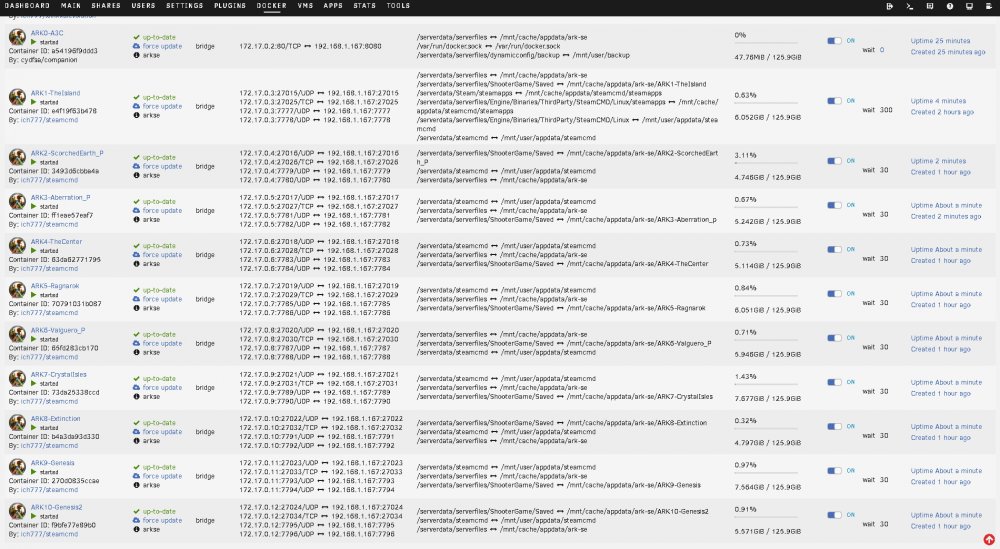
This will hopefully shed some light on the underside working bits of building a cluster of servers for ARK:SurvivalEvolved. With the inspiration (read thievery) from @growlith I present the A3C (ARK Cluster Companion Container). It and the accompanying XLM files should allow for a fairly simple stand up of a new ARK server cluster. https://github.com/CydFSA/A3C Go to the github, fetch the XMLs for however many servers you want to use in your new cluster, salt them to taste with your information (server names, cluster name, passwords, adminpasswords, ect...). Good Luck and Happy Hunting! historical information left below (really go get the newer stuff from github) ------------------------------ We are going to start with getting -UseDynamicConfig working and talking to our config file rather than the Official one out at http://arkdedicated.com/dynamicconfig.ini , I know it feels like that should come last but bear with me. First we have a simple http server running by itself serving up the "dynamicconfig.ini" on port 80 on its container, this is mapped out to the host on 8080 and is not really needed but makes it easy to take a quick glance at tower:8080 to see what the settings are. I ran this container first so that it would receive a predictable IP address (172.17.0.2:80) that is then used in the configurations of the remaining containers to add an entry to the hosts file (--add-host=arkdedicated.com:172.17.0.2) so that requests to http://arkdedicated.com/dynamicconfig.ini in the game servers are pointed to the container running at 172.17.0.2. If you don't want or care to use the dynamic configs, omit the ARK0 container and remove -UseDynamicConfig from the "Extra Game Parameters" of all subsequent ARK's you deploy. Next I deployed 10 ARK server instances, why 10 when there are only 9 maps? Well, I assume that Wild card will have another map for Genesis Part 2 coming in the spring so I added a container to house it, currently it is configured as a 2nd Genesis1 map with all the correct ports and paths. If they do release a new map it will only require changing the map name in the config and starting the container. The ports are mapped sequentially so you will only need to insert three port forward blocks into your gateway router (UDP 7777-7796, UDP 27015-27024, TCP 27025-27034) You do not need anything forwarded to ARK0 as it is only there to talk to ARKs 1-10. ARK0-dynamicconfig tcp 80:8080 ARK1-TheIsland Udp1 7777 UDP2 7778 UDPSteam 27015 TCPRCON 27025 ARK2-ScorchedEarth_P Udp1 7779 UDP2 7780 UDPSteam 27016 TCPRCON 27026 ARK3-Aberration_P Udp1 7781 UDP2 7782 UDPSteam 27017 TCPRCON 27027 ARK4-TheCenter Udp1 7783 UDP2 7784 UDPSteam 27018 TCPRCON 27028 ARK5-Ragnarok Udp1 7785 UDP2 7786 UDPSteam 27019 TCPRCON 27029 ARK6-Valguero_P Udp1 7787 UDP2 7788 UDPSteam 27020 TCPRCON 27030 ARK7-CrystalIsles Udp1 7789 UDP2 7790 UDPSteam 27021 TCPRCON 27031 ARK8-Extinction Udp1 7791 UDP2 7792 UDPSteam 27022 TCPRCON 27032 ARK9-Genesis Udp1 7793 UDP2 7794 UDPSteam 27023 TCPRCON 27033 ARK10-Genesis2 Udp1 7795 UDP2 7796 UDPSteam 27024 TCPRCON 27034 Path mappings are slightly more complex. SteamCMD is in its original location per @ich777's standard and the binary data for ARK is also in the default location. Having the server binaries shared also means that when there is an update to ARK (and/or SteamCMD) it only has to be downloaded one time rather than 10. The update procedure is to bring all of the ARKs down then start ARK1 let it update and initialize then bring the others back up en mass, as a precaution I have the wait timer on ARKs 2-10 set to 600 seconds so that if the Tower host gets rebooted ARK1 has time to pull any updates and initialize. The ARK savegame data and Server Config files are mapped into the proper location on a per container basis. This prevents each server instance from mucking up the servers config .inis (which they liked to do), this also means that you can use different options on each ark and makes managing the SavedArks less hair pully outy. The clustering function is done with a shared resource directory and a ClusterID (-clusterid=arkStar under "Extra Game Parameters") Dynamiccimfig data: /dynamicconfig<>/mnt/cache/appdata/ark-se/dynamicconfig SteamCMD: /serverdata/steamcmd<>/mnt/user/appdata/steamcmd ARK data: /serverdata/serverfiles<>/mnt/cache/appdata/ark-se Cross ARK cluster data: /serverdata/serverfiles/clusterfiles<>/mnt/cache/appdata/ark-se/cluster ARK configs and Save Data: /serverdata/serverfiles/ShooterGame/Saved<>/mnt/cache/appdata/ark-se/ARK1-TheIsland /serverdata/serverfiles/ShooterGame/Saved<>/mnt/cache/appdata/ark-se/ARK2-ScorchedEarth_P /serverdata/serverfiles/ShooterGame/Saved<>/mnt/cache/appdata/ark-se/ARK3-Aberration /serverdata/serverfiles/ShooterGame/Saved<>/mnt/cache/appdata/ark-se/ARK4-TheCenter /serverdata/serverfiles/ShooterGame/Saved<>/mnt/cache/appdata/ark-se/ARK5-Ragnarok /serverdata/serverfiles/ShooterGame/Saved<>/mnt/cache/appdata/ark-se/ARK6-Valguero_P /serverdata/serverfiles/ShooterGame/Saved<>/mnt/cache/appdata/ark-se/ARK7-CrystalIsles /serverdata/serverfiles/ShooterGame/Saved<>/mnt/cache/appdata/ark-se/ARK8-Extinction /serverdata/serverfiles/ShooterGame/Saved<>/mnt/cache/appdata/ark-se/ARK9-Genesis /serverdata/serverfiles/ShooterGame/Saved<>/mnt/cache/appdata/ark-se/ARK10-Genesis2 The XML files are attached below, if you chose to use them please make sure to edit them to your taste; server names, passwords, clusterIDs, ect. They can be used by placing them in /boot/config/plugins/dockerMan/templates-user then going to "Docker/Add Container" then choosing from the "Template:" drop down. Or maybe @ich777 will do us all a favor and decide to add them to his already impressive XML collection
-
Working on it right now!
-
@ich777 Thank you for your work on this project! You should have some beverages on me. I started running an ARK for our local group, which quickly evolved into a server cluster, then I figured out and added the dynamic configuration capabilities and all is going well. I am in the process of cleaning up my kludgy design to make it replicable by others.