





Kalembang
Members
-
Joined
-
Last visited
Everything posted by Kalembang
-
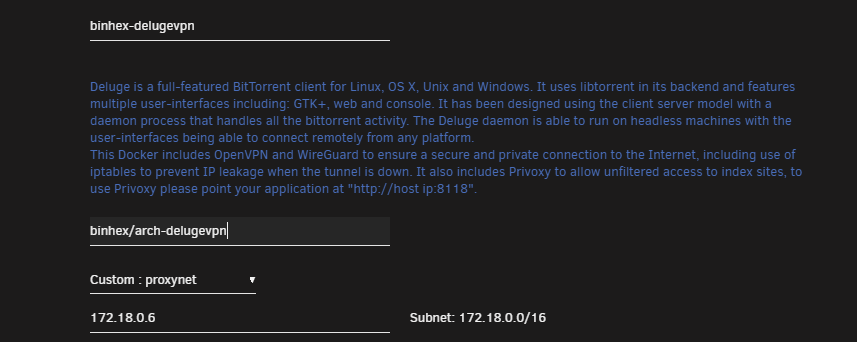
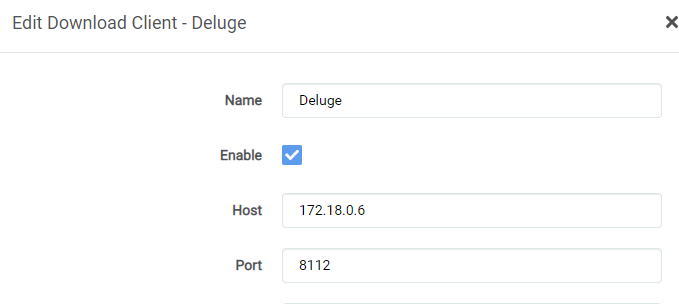
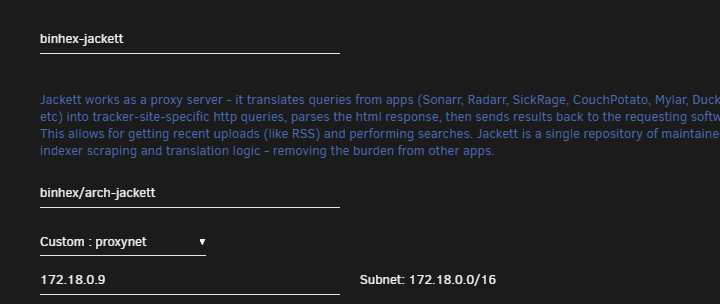
@BackupAddict @TRusselo @orlando500 Think I fixed it! If you guys want to try this as well. I went into Sonarr/Radarr WebUI and updated the "Host" attribute with in Settings > Download Clients: I had to change it from 192.168.1.* to the listed IP address for Deluge found below: I also had to assign a fixed IP to the Jackett application: Once that was set to a fixed IP. I had to go and update all my indexers with in Sonarr/Radarr to use that IP address instead of the 192.168.1.*. Hope it helps you guys out!
-
I am having the same issue as well. Was working fine previously.
-
Since everyone is aware of google removing their unlimited photo storage. I only see fit to have LibrePhotos (Self hosted Google Photos clone). Seems to be a fork of OwnPhotos, but with some much needed bugfixes. https://github.com/LibrePhotos/librephotos Found a DockerHub and attempted to install via CA, but no luck. If anyone was able to get this working please let me know. https://hub.docker.com/r/reallibrephotos/librephotos-proxy/ https://hub.docker.com/r/reallibrephotos/librephotos-frontend/ https://hub.docker.com/r/reallibrephotos/librephotos/ Demo Site: https://demo2.librephotos.com/
-
Thank you soooo much! This is working for me, but I noticed anytime I apply a change to the docker it removes pdlib. Anyway to get this to retain?
