




Skip to content
View in the app

A better way to browse. Learn more.

Unraid

A full-screen app on your home screen with push notifications, badges and more.

To install this app on iOS and iPadOS
  1. Tap the Share icon in Safari
  2. Scroll the menu and tap Add to Home Screen.
  3. Tap Add in the top-right corner.
To install this app on Android
  1. Tap the 3-dot menu (⋮) in the top-right corner of the browser.
  2. Tap Add to Home screen or Install app.
  3. Confirm by tapping Install.

thorneo

Members
  • Joined

  • Last visited

  1. OK I see what you are saying now. And it does make sense to myself now..
  2. Thank you for your help I was wondering if I needed both parity drives to be 8 tera's so that anwser would be yes..
  3. here is what it says at the bottom where the start button is..

  4. All it says when I add it is new device. It will not let me format or start the raid..
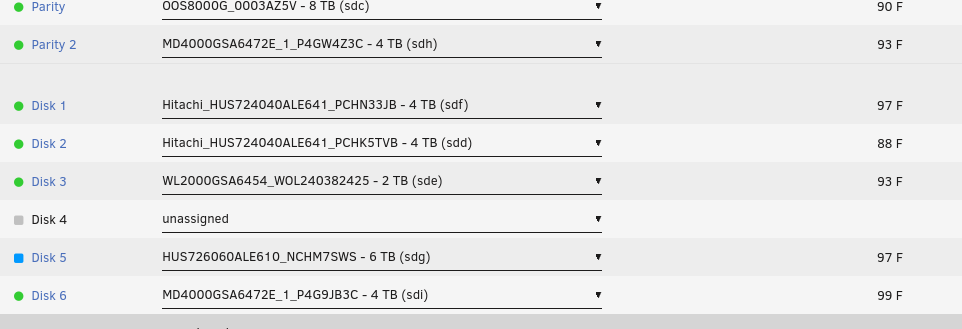
  5. I have tried numerous times to get my server to use a 6 tera precleared drive (i used UD preclear) and all I get is is new device it won't foremat the new drive or anything like that.. What am I doing wrong??

Account

Navigation

Search

Search

Configure browser push notifications

Chrome (Android)
  1. Tap the lock icon next to the address bar.
  2. Tap Permissions → Notifications.
  3. Adjust your preference.
Chrome (Desktop)
  1. Click the padlock icon in the address bar.
  2. Select Site settings.
  3. Find Notifications and adjust your preference.