





ephigenie
Members
-
Joined
-
Last visited
Everything posted by ephigenie
-
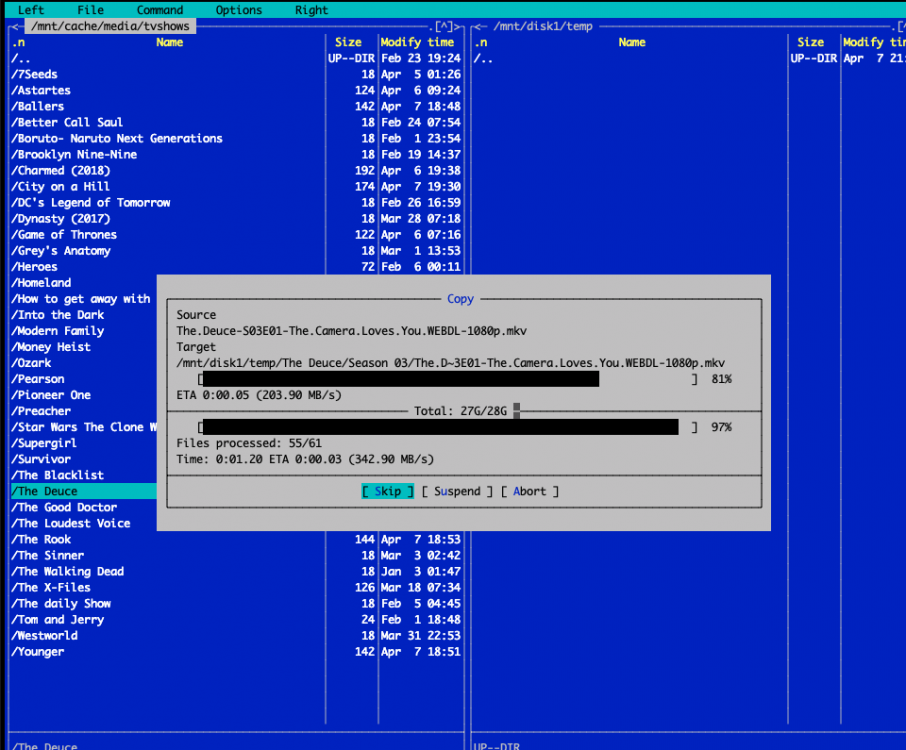
If i copy via "mc" the speed is within the expected range. No wait IO either. Brings me back to the point - something is wrong with the mover ? Btw. the array is up, and 2 persons streaming (locally) from disks 1080p. I am easily reaching speeds >170Mbyte/s - so i would exclude neither the sending controller (LSI 2008 IT) nor the receiving controller ( Perc710P ) . So what's wrong with the mover and BTRFS ? Looks to me as if I should try as well to move to have my two SSD's converted to XFS and get over it?
-
I still have this issue as well - and i think as well its related to BTRFS and maybe as well the way the mover is handling the Cache. Can anyone enlighten us with the full process on what exactly the cache layer is doing ? I mean its not a blockwise cache ... So in my scenario i can write with almost line speed to the cache (125Mbyte/s) . However moving from the Cache to the disks seems super slow and the wait IO goes through the sky. I will try tonight to copy from Cache to the Disks via i.e. unBalance. Lets see what happens then.
-
I had a no-name 6 channel Sata 6gb controller before (same issue) and i tried the onboard 3Gb Sata Controller ( felt worse ) my server is a Dell T620 - so the onboard controller is only meant for a i.e. DVDRom, not really for disks - its a Perc 110. I also tried running that controller in Raid as well as AHCI mode - but it didn't make any difference. My conclusion so far - I don't think its an issue of the (LSI) controller - during i.e. scrubbing i see performance > 500Mbyte / s on both SSD's at the same time, well above 1Gbyte/s .
-
Well if i would see those performance numbers i would be happy. but while the mover is running i see 20-30 Mbyte / s and 30% IO wait times... Thats not normal. All SSDs are currently running against a LSI2008 (flashed to IT mode Perc310) fw p16 because no trim with p20 ... The other disks are on an 710p as raid0 each ( i know not optimal for later - and two more 310 are on its way to me to migrate asap. ) Anyhow HDD performance is ok so far - just the SSD's once the mover is running are under total lockup. I still tend to think its an issue with btrfs and the partition offset. The other box has a Samsung 850 SSD. Performance is easily in the 500Mbyte/s range on that single SSD - and didn't suffocate with all those docker containers. Before that box was the only box - so all the IO intensive things were running on it - IO was never an issue - just not enough disk mounting space and RAM, hence the new box. Alignment in the old box (850 SSD) : root@box:~# lsblk -o NAME,ALIGNMENT,MIN-IO,OPT-IO,PHY-SEC,LOG-SEC /dev/sdd NAME ALIGNMENT MIN-IO OPT-IO PHY-SEC LOG-SEC sdd 0 512 0 512 512 ├─sdd1 0 512 0 512 512 └─sdd2 0 512 0 512 512 New box : root@Tower:/var/log# lsblk -o NAME,ALIGNMENT,MIN-IO,OPT-IO,PHY-SEC,LOG-SEC /dev/sd[a-o] NAME ALIGNMENT MIN-IO OPT-IO PHY-SEC LOG-SEC sda 0 512 0 512 512 └─sda1 0 512 0 512 512 sdb 0 512 0 512 512 └─sdb1 0 512 0 512 512 sdc 0 512 0 512 512 └─sdc1 0 512 0 512 512 sdd 0 512 0 512 512 └─sdd1 0 512 0 512 512 sde 0 512 0 512 512 └─sde1 0 512 0 512 512 sdf 0 512 0 512 512 └─sdf1 0 512 0 512 512 sdg 0 512 0 512 512 └─sdg1 0 512 0 512 512 sdh 0 512 0 512 512 └─sdh1 0 512 0 512 512 sdi 0 512 0 512 512 └─sdi1 0 512 0 512 512 sdj 0 512 0 512 512 └─sdj1 0 512 0 512 512 SSD 860 QVO sdk 0 512 0 512 512 └─sdk1 0 512 0 512 512 SSD 860 QVO sdl 0 512 0 512 512 └─sdl1 0 512 0 512 512 sdm 0 4096 0 4096 512 └─sdm1 0 4096 0 4096 512 sdn 0 4096 0 4096 512 └─sdn1 0 4096 0 4096 512 sdo 0 4096 0 4096 512 └─sdo1 0 4096 0 4096 512
-
Well i have a separate machine with local ssd storage and capacity drives as download client. This is in order to separate the IO a bit and have the main machine free for other tasks. However this means that sometimes a few 100GB are being copied over to the cache. As long as the mover is not running, access speeds are fine, UI is reacting properly etc. I am also hosting a bunch of containers ( from cache only ) on both sides (on the download & main machine ). However while the single SSD on the download machine (which has much lower specs) can easily cope with parallel IO (running ext4fs) the big Unraid box is struggeling totally. Now i want to find out why and remove this problem. I know my way around strace etc. and the next time i will do a bit more investigation to see what is really going on. However the hints so far from this forum are the partition start for Samsung SSD's which should not start at sector 64 but 2048.
-
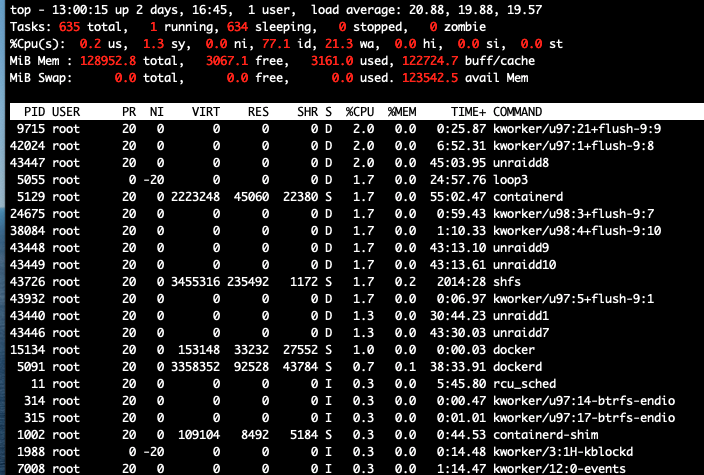
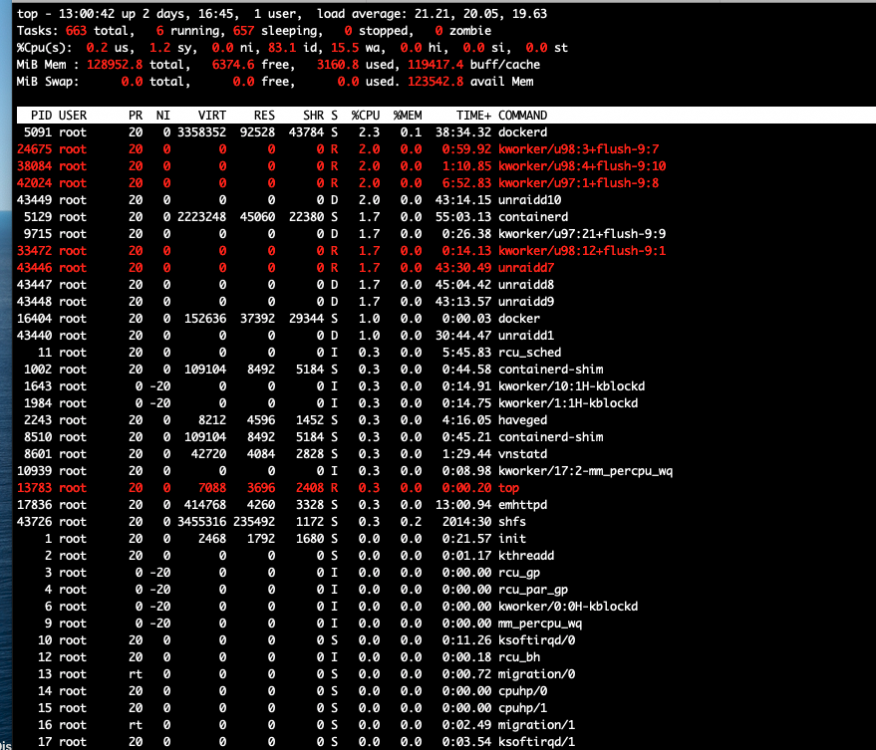
Ok i mean this is also a possibility "just throw more money at the problem" . However i think this should concern the Limetech Team and there needs to be a bugfix for this. The docker is up, because i tried before to update "one" docker image. Took 1h, i gave up (binhex-plexpass). This is so bad. I have a Single SSD in my old box running plain Debian and 40+ Containers (it was my previous media server) and have never had those kind of performance issues. This is really a shame. I don't think its near anywhere acceptable having a 128gb, dual xeon, 2 x ssd bla bla server idling there basically completely and utterly busy with himself only. I used mergerfs in my old box before and it was performing really nice. Now i thought this does look better and neatly integrated and for me in order not to fiddle around anymore with those things i bought into Unraid. I just later saw unfortunately there are solutions based on ZFS as well that have emerged to have nice interfaces now as well... And docker etc. However. Now can we get this fixed please ? What more information is needed to narrow done on that bug ?
-
so this seems then also related to all the other cases when unraid seems frozen / unresponsive etc. Why is no one looking into this Can't be so difficult to allow a different partition offset for some disks ? I just bought this PRO license and thought i am getting some support for this as well. The system otherwise looks really nice and promising, but if the issues are not being fixed ??
-
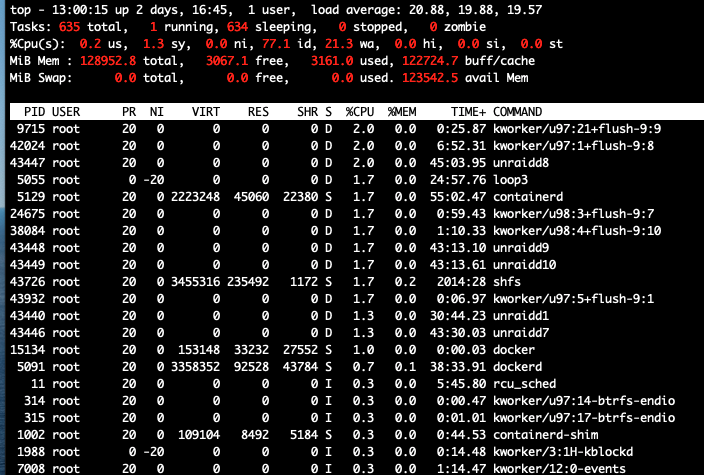
And again. Reformatted the cache disks, put them into a raid0, ran balance, ran fstrim -av etc.. Performance is an abosute disaster when the mover is active. Docker container die, VM's become unusable etc. This is a serious BUG! The write / read speed btw. during those times is around 15Mbyte/s per SSD, 50Mbyte/s read + write for the full array ( 13 disks ) . Mover runs since 10h +
-
I have almost exactly the same server (128gb ram, dual xeon 2690, 2 x QVO 860 1 TB ) - same issue. Sounds to me as if it is related to this topic :
-
Hi there, i just started with Unraid but i am also affected - i have 2x 1TB 860 qvo SSD's My IO wait goes >60 sometimes and the server locks up almost fully. During rebalance etc i see 2 x 500 Mbyte/s so bandwidth or controller is hardly an issue. I tried configuring the ssd's as raid1 and raid0, same issue. Did try to figure out how to change it to XFS, but unfortunately i found out, that the btrfs raid1 did not work as expected - and so i am currently re-playing the backups & downloading meta data This is very annoying! I hope this gets fixed soon! Can't be so difficult to allow for a partition offset ? Server : UnraidPro 6.8.3, T620 2 x 2690v1 Xeon, 128GB, 8x8TB, 5x14TB - ssd's are on 2118IT p16 (trim enabled).
-
This looks nice! Maybe with an optional integration of dm-cache to avail a transparent hotblock based cache, that will make the speed of the SSD's transparently usable for everything without the risk of dataloss - and without wasting cache space by effectively only caching those hot spots that are really frequently accessed (i.e. the index of some databases, some blocks of a vm, some parts of a docker, certain tools, thumbnails etc ) ?


