





RichardRob
Members
-
Joined
-
Last visited
Everything posted by RichardRob
-
I just had the same problem after upgrading to 6.9.1. And the last time I know it was working, I had connected using WinSCP. I'm going to so some experimentation to see if I can reproduce the bug.
-
Is that the proxy-confs/gitlab-ce.subdomain.conf file which everyone mentions in this thread without ever providing a full path?
-
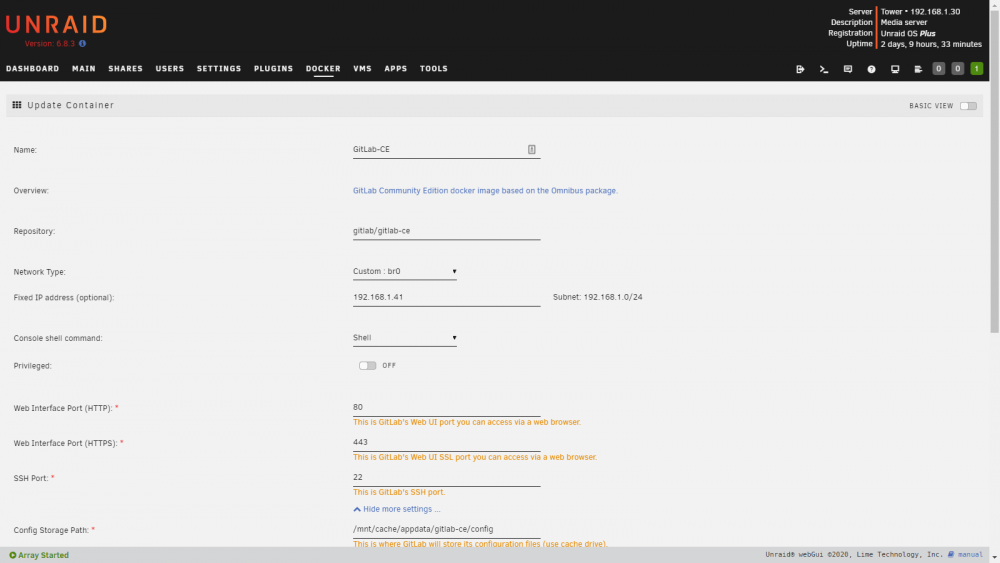
So I've got this image running, but I'd like to be able to point my browser directly to it without having to specify the http(s) port. I've set the network to br0 with it's own IP address. I also changed all of the port numbers to their standard values (80, 443, 22). When I open the webgui from the unraid docker page, the url still goes to port 9080 and it works. But if I just enter the IP address without specifying a port, the connection is refused. How come the image doesn't respect the port settings? What else do I have to change?
-
I'm having the same issue ("Sorry, a session error has occurred"). I noticed this in the image log: Automatic configuration failed, see /usr/local/openvpn_as/init.log You can configure manually using the /usr/local/openvpn_as/bin/ovpn-init tool. /var/lib/dpkg/info/openvpn-as.postinst: line 72: systemctl: command not found Stopping openvpn-as now; will start again later after configuring I this is the last line of init.log: Enabling service Error: Could not execute 'systemctl enable openvpnas' to enable startup/shutdown scripts I switched the shell to bash and tried running the command manually in the console, but it won't tab complete systemctl. It seems the command is just missing. Is this normal and I'm barking up the wrong tree? Or is an image possibly missing? Edit: My run command is : root@localhost:# /usr/local/emhttp/plugins/dynamix.docker.manager/scripts/docker run -d --name='openvpn-as' --net='br0' --ip='192.168.1.31' --privileged=true -e TZ="America/Denver" -e HOST_OS="Unraid" -e 'TCP_PORT_943'='943' -e 'TCP_PORT_9443'='9443' -e 'UDP_PORT_1194'='1194' -e 'PGID'='100' -e 'PUID'='99' -v '/mnt/user/appdata/openvpn-as':'/config':'rw' --cap-add=NET_ADMIN 'linuxserver/openvpn-as'
