





TheSkaz
Members
-
Joined
-
Last visited
Everything posted by TheSkaz
-
I have spent some time understanding zfs and zpools and whatnot. I have an array of drives and dont want to use the OOTB array that unraid does. right now, I have a USB 3.1 drive (64GB) as the only array disk so that it starts up. Currently using 6.10.0-rc1. [0:0:0:0] disk USB DISK 3.0 PMAP /dev/sda 62.0GB [1:0:0:0] disk USB SanDisk 3.2Gen1 1.00 /dev/sdb 30.7GB [4:0:0:0] disk ATA Patriot Blast 12.2 /dev/sdc 240GB [4:0:1:0] disk ATA Patriot Blast 12.2 /dev/sdd 240GB [4:0:2:0] disk ATA WDC WDBNCE0020P 40RL /dev/sde 2.00TB [4:0:3:0] disk ATA WDC WDBNCE0020P 40RL /dev/sdf 2.00TB [4:0:4:0] disk ATA Patriot Blast 12.2 /dev/sdg 240GB [4:0:5:0] disk ATA Patriot Blast 12.2 /dev/sdh 240GB [4:0:6:0] disk ATA WDC WDS200T2B0A 40WD /dev/sdi 2.00TB [4:0:7:0] disk ATA Patriot Blast 12.2 /dev/sdj 240GB [4:0:8:0] disk ATA Patriot Blast 22.3 /dev/sdk 240GB [4:0:9:0] disk ATA WDC WDS200T2B0A 40WD /dev/sdl 2.00TB [4:0:11:0] disk ATA WDC WD20EFRX-68E 0A82 /dev/sdm 2.00TB [4:0:12:0] disk ATA ST16000NM001G-2K SN03 /dev/sdn 16.0TB [4:0:13:0] disk ATA ST16000NM001G-2K SN03 /dev/sdo 16.0TB [4:0:14:0] disk ATA ST16000NM001G-2K SN03 /dev/sdp 16.0TB [4:0:15:0] disk ATA ST16000NM001G-2K SN03 /dev/sdq 16.0TB [4:0:16:0] disk ATA ST16000NM001G-2K SN03 /dev/sdr 16.0TB [4:0:17:0] disk ATA ST16000NM001G-2K SN03 /dev/sds 16.0TB [4:0:18:0] disk ATA WDC WD20EFRX-68E 0A82 /dev/sdt 2.00TB [4:0:19:0] disk ATA Hitachi HDS5C302 AA10 /dev/sdu 2.00TB [4:0:20:0] disk ATA ST16000NM001G-2K SN03 /dev/sdv 16.0TB [4:0:21:0] disk ATA ST16000NM001G-2K SN03 /dev/sdw 16.0TB [4:0:22:0] disk ATA Hitachi HDS5C302 AA10 /dev/sdx 2.00TB [4:0:23:0] disk ATA WDC WD20EFRX-68E 0A82 /dev/sdy 2.00TB [4:0:24:0] disk ATA ST16000NM001G-2K SN03 /dev/sdz 16.0TB [4:0:25:0] disk ATA ST16000NM001G-2K SN03 /dev/sdaa 16.0TB [N:0:1:1] disk Force MP600__1 /dev/nvme0n1 2.00TB [N:1:1:1] disk Sabrent Rocket Q4__1 /dev/nvme1n1 2.00TB [N:2:1:1] disk Sabrent Rocket Q4__1 /dev/nvme2n1 2.00TB [N:3:1:1] disk PCIe SSD__1 /dev/nvme3n1 1.00TB [N:4:1:1] disk Sabrent Rocket Q4__1 /dev/nvme4n1 2.00TB current setup: pool: datastore state: ONLINE scan: scrub repaired 0B in 00:03:36 with 0 errors on Fri Sep 24 07:00:44 2021 config: NAME STATE READ WRITE CKSUM datastore ONLINE 0 0 0 mirror-0 ONLINE 0 0 0 sdf ONLINE 0 0 0 sdi ONLINE 0 0 0 mirror-1 ONLINE 0 0 0 sde ONLINE 0 0 0 sdl ONLINE 0 0 0 errors: No known data errors pool: fast state: ONLINE scan: scrub repaired 0B in 00:02:44 with 0 errors on Thu Sep 23 22:47:49 2021 config: NAME STATE READ WRITE CKSUM fast ONLINE 0 0 0 nvme0n1 ONLINE 0 0 0 nvme1n1 ONLINE 0 0 0 nvme2n1 ONLINE 0 0 0 nvme-Sabrent_Rocket_Q4_03F10707144404184492 ONLINE 0 0 0 errors: No known data errors pool: tank state: DEGRADED status: One or more devices could not be used because the label is missing or invalid. Sufficient replicas exist for the pool to continue functioning in a degraded state. action: Replace the device using 'zpool replace'. see: https://openzfs.github.io/openzfs-docs/msg/ZFS-8000-4J scan: scrub in progress since Mon Sep 27 08:42:25 2021 6.13T scanned at 4.81G/s, 412G issued at 323M/s, 6.13T total 0B repaired, 6.56% done, 05:10:03 to go config: NAME STATE READ WRITE CKSUM tank DEGRADED 0 0 0 raidz1-0 ONLINE 0 0 0 ata-ST16000NM001G-2KK103_ZL267CE1 ONLINE 0 0 0 ata-ST16000NM001G-2KK103_ZL267NDH ONLINE 0 0 0 ata-ST16000NM001G-2KK103_ZL2672V8 ONLINE 0 0 0 ata-ST16000NM001G-2KK103_ZL268CAW ONLINE 0 0 0 ata-ST16000NM001G-2KK103_ZL2660YG ONLINE 0 0 0 ata-ST16000NM001G-2KK103_ZL266MEX ONLINE 0 0 0 ata-ST16000NM001G-2KK103_ZL267LNF ONLINE 0 0 0 ata-ST16000NM001G-2KK103_ZL2678RA ONLINE 0 0 0 ata-ST16000NM001G-2KK103_ZL266CQD ONLINE 0 0 0 ata-ST16000NM001G-2KK103_ZL267S9C ONLINE 0 0 0 raidz1-1 DEGRADED 0 0 0 ata-WDC_WD20EFRX-68EUZN0_WD-WCC4M1NJR9X5 ONLINE 0 0 0 ata-WDC_WD20EFRX-68EUZN0_WD-WCC4M4TRDPV1 ONLINE 0 0 0 ata-Hitachi_HDS5C3020ALA632_ML4230FA10X4EK ONLINE 0 0 0 ata-Hitachi_HDS5C3020ALA632_ML0230FA16RPLD ONLINE 0 0 0 ata-WDC_WD20EFRX-68EUZN0_WD-WCC4M6FLJJNK UNAVAIL 98 499 0 logs nvme3n1 ONLINE 0 0 0 errors: No known data errors pool: vmstorage state: ONLINE scan: scrub repaired 0B in 00:04:08 with 0 errors on Thu Sep 23 22:44:03 2021 config: NAME STATE READ WRITE CKSUM vmstorage ONLINE 0 0 0 raidz1-0 ONLINE 0 0 0 sdc ONLINE 0 0 0 sdd ONLINE 0 0 0 sdg ONLINE 0 0 0 sdh ONLINE 0 0 0 sdj ONLINE 0 0 0 sdk ONLINE 0 0 0 errors: No known data errors I want to redo tank and vmstorage. I am going to wipe raidz1-1 out of tank (means ill delete and recreate the pool) and throw those drives out. they are really old WD Red 2TB and 2 hitachi 2TBs. I am going to buy another 10 16TB drives and I think that i can use the 240GB SSDs as cache/log drives. maybe a mirror array on both cache and log, then 2 hot spares? I have no use case for vmstorage since I now have the fast pool. my ask, is given the info above, what would be the best config with performance as #1 with some redundancy. these will not be mission critical files, if they are, they will be backed up elsewhere. 2 vdevs of raidz with 10 disks each? and cache/log setup in mirrors? or something else? I also have a 1TB nvme drive that wouldnt be utilized.
-
fair enough, Figured enough people use it. Ill move it.
-
I have spent some time understanding zfs and zpools and whatnot. I have an array of drives and dont want to use the OOTB array that unraid does. right now, I have a USB 3.1 drive (64GB) as the only array disk so that it starts up. Currently using 6.10.0-rc1. [0:0:0:0] disk USB DISK 3.0 PMAP /dev/sda 62.0GB [1:0:0:0] disk USB SanDisk 3.2Gen1 1.00 /dev/sdb 30.7GB [4:0:0:0] disk ATA Patriot Blast 12.2 /dev/sdc 240GB [4:0:1:0] disk ATA Patriot Blast 12.2 /dev/sdd 240GB [4:0:2:0] disk ATA WDC WDBNCE0020P 40RL /dev/sde 2.00TB [4:0:3:0] disk ATA WDC WDBNCE0020P 40RL /dev/sdf 2.00TB [4:0:4:0] disk ATA Patriot Blast 12.2 /dev/sdg 240GB [4:0:5:0] disk ATA Patriot Blast 12.2 /dev/sdh 240GB [4:0:6:0] disk ATA WDC WDS200T2B0A 40WD /dev/sdi 2.00TB [4:0:7:0] disk ATA Patriot Blast 12.2 /dev/sdj 240GB [4:0:8:0] disk ATA Patriot Blast 22.3 /dev/sdk 240GB [4:0:9:0] disk ATA WDC WDS200T2B0A 40WD /dev/sdl 2.00TB [4:0:11:0] disk ATA WDC WD20EFRX-68E 0A82 /dev/sdm 2.00TB [4:0:12:0] disk ATA ST16000NM001G-2K SN03 /dev/sdn 16.0TB [4:0:13:0] disk ATA ST16000NM001G-2K SN03 /dev/sdo 16.0TB [4:0:14:0] disk ATA ST16000NM001G-2K SN03 /dev/sdp 16.0TB [4:0:15:0] disk ATA ST16000NM001G-2K SN03 /dev/sdq 16.0TB [4:0:16:0] disk ATA ST16000NM001G-2K SN03 /dev/sdr 16.0TB [4:0:17:0] disk ATA ST16000NM001G-2K SN03 /dev/sds 16.0TB [4:0:18:0] disk ATA WDC WD20EFRX-68E 0A82 /dev/sdt 2.00TB [4:0:19:0] disk ATA Hitachi HDS5C302 AA10 /dev/sdu 2.00TB [4:0:20:0] disk ATA ST16000NM001G-2K SN03 /dev/sdv 16.0TB [4:0:21:0] disk ATA ST16000NM001G-2K SN03 /dev/sdw 16.0TB [4:0:22:0] disk ATA Hitachi HDS5C302 AA10 /dev/sdx 2.00TB [4:0:23:0] disk ATA WDC WD20EFRX-68E 0A82 /dev/sdy 2.00TB [4:0:24:0] disk ATA ST16000NM001G-2K SN03 /dev/sdz 16.0TB [4:0:25:0] disk ATA ST16000NM001G-2K SN03 /dev/sdaa 16.0TB [N:0:1:1] disk Force MP600__1 /dev/nvme0n1 2.00TB [N:1:1:1] disk Sabrent Rocket Q4__1 /dev/nvme1n1 2.00TB [N:2:1:1] disk Sabrent Rocket Q4__1 /dev/nvme2n1 2.00TB [N:3:1:1] disk PCIe SSD__1 /dev/nvme3n1 1.00TB [N:4:1:1] disk Sabrent Rocket Q4__1 /dev/nvme4n1 2.00TB current setup: pool: datastore state: ONLINE scan: scrub repaired 0B in 00:03:36 with 0 errors on Fri Sep 24 07:00:44 2021 config: NAME STATE READ WRITE CKSUM datastore ONLINE 0 0 0 mirror-0 ONLINE 0 0 0 sdf ONLINE 0 0 0 sdi ONLINE 0 0 0 mirror-1 ONLINE 0 0 0 sde ONLINE 0 0 0 sdl ONLINE 0 0 0 errors: No known data errors pool: fast state: ONLINE scan: scrub repaired 0B in 00:02:44 with 0 errors on Thu Sep 23 22:47:49 2021 config: NAME STATE READ WRITE CKSUM fast ONLINE 0 0 0 nvme0n1 ONLINE 0 0 0 nvme1n1 ONLINE 0 0 0 nvme2n1 ONLINE 0 0 0 nvme-Sabrent_Rocket_Q4_03F10707144404184492 ONLINE 0 0 0 errors: No known data errors pool: tank state: DEGRADED status: One or more devices could not be used because the label is missing or invalid. Sufficient replicas exist for the pool to continue functioning in a degraded state. action: Replace the device using 'zpool replace'. see: https://openzfs.github.io/openzfs-docs/msg/ZFS-8000-4J scan: scrub in progress since Mon Sep 27 08:42:25 2021 6.13T scanned at 4.81G/s, 412G issued at 323M/s, 6.13T total 0B repaired, 6.56% done, 05:10:03 to go config: NAME STATE READ WRITE CKSUM tank DEGRADED 0 0 0 raidz1-0 ONLINE 0 0 0 ata-ST16000NM001G-2KK103_ZL267CE1 ONLINE 0 0 0 ata-ST16000NM001G-2KK103_ZL267NDH ONLINE 0 0 0 ata-ST16000NM001G-2KK103_ZL2672V8 ONLINE 0 0 0 ata-ST16000NM001G-2KK103_ZL268CAW ONLINE 0 0 0 ata-ST16000NM001G-2KK103_ZL2660YG ONLINE 0 0 0 ata-ST16000NM001G-2KK103_ZL266MEX ONLINE 0 0 0 ata-ST16000NM001G-2KK103_ZL267LNF ONLINE 0 0 0 ata-ST16000NM001G-2KK103_ZL2678RA ONLINE 0 0 0 ata-ST16000NM001G-2KK103_ZL266CQD ONLINE 0 0 0 ata-ST16000NM001G-2KK103_ZL267S9C ONLINE 0 0 0 raidz1-1 DEGRADED 0 0 0 ata-WDC_WD20EFRX-68EUZN0_WD-WCC4M1NJR9X5 ONLINE 0 0 0 ata-WDC_WD20EFRX-68EUZN0_WD-WCC4M4TRDPV1 ONLINE 0 0 0 ata-Hitachi_HDS5C3020ALA632_ML4230FA10X4EK ONLINE 0 0 0 ata-Hitachi_HDS5C3020ALA632_ML0230FA16RPLD ONLINE 0 0 0 ata-WDC_WD20EFRX-68EUZN0_WD-WCC4M6FLJJNK UNAVAIL 98 499 0 logs nvme3n1 ONLINE 0 0 0 errors: No known data errors pool: vmstorage state: ONLINE scan: scrub repaired 0B in 00:04:08 with 0 errors on Thu Sep 23 22:44:03 2021 config: NAME STATE READ WRITE CKSUM vmstorage ONLINE 0 0 0 raidz1-0 ONLINE 0 0 0 sdc ONLINE 0 0 0 sdd ONLINE 0 0 0 sdg ONLINE 0 0 0 sdh ONLINE 0 0 0 sdj ONLINE 0 0 0 sdk ONLINE 0 0 0 errors: No known data errors I want to redo tank and vmstorage. I am going to wipe raidz1-1 out of tank (means ill delete and recreate the pool) and throw those drives out. they are really old WD Red 2TB and 2 hitachi 2TBs. I am going to buy another 10 16TB drives and I think that i can use the 240GB SSDs as cache/log drives. maybe a mirror array on both cache and log, then 2 hot spares? I have no use case for vmstorage since I now have the fast pool. my ask, is given the info above, what would be the best config with performance as #1 with some redundancy. these will not be mission critical files, if they are, they will be backed up elsewhere. 2 vdevs of raidz with 10 disks each? and cache/log setup in mirrors? or something else? I also have a 1TB nvme drive that wouldnt be utilized.
-
side note, absolutely killing me that its using 1 core....
-
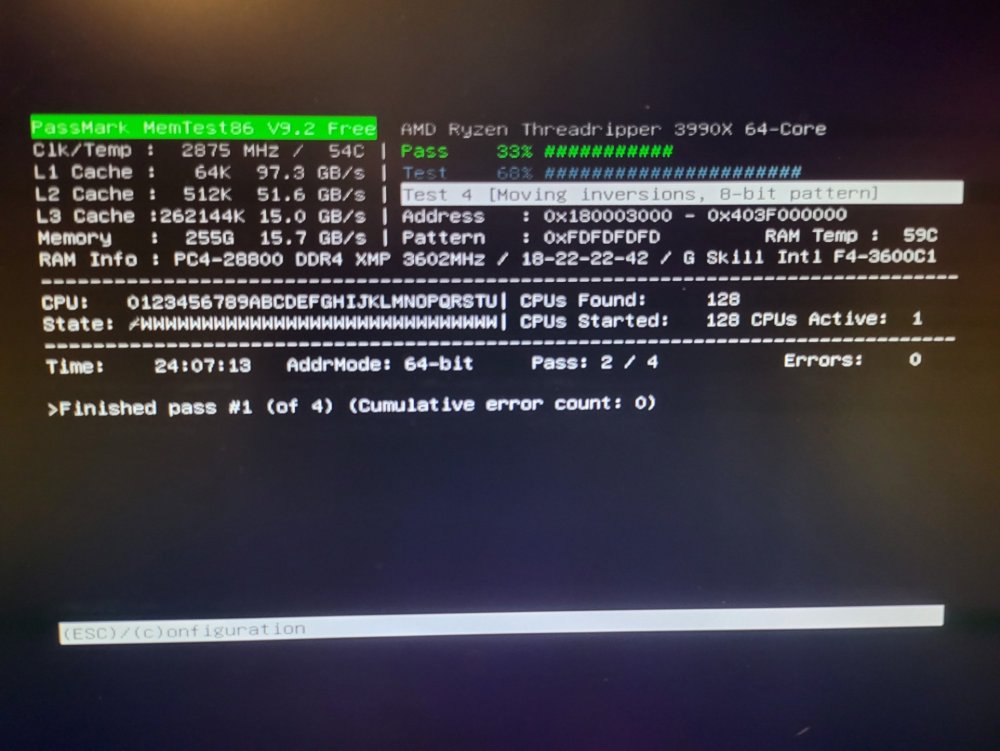
I was still having issues, and am rerunning memtest: it takes about 24 hours for 1 pass, is it good to go, or do I need to let all the passes complete? Also, i finally found the zfs settings that are best for nvme drives (as proposed by LTT), and have them implemented. I still get weird memory errors. primarycache=metadata autortrim=on atime=off
-
did not consider that... ok then. thanks!
-
Please dont kill me.... Is there anything that would allow (in the works, or currently exists) the mover to multithread the movement of documents to the spinning rust? Scenario: I have a 1TB NVME cache drive and 10ish 16TB drives in an array. The cache drive is 100% full and the mover is active. it seems to grab files one at a time and move them. So my overall speed to move the files are reduced to the write speed of a single drive. since my drives are set as "most free" it will copy the next file to the next drive. if it could do them in parallel, that would be tons faster than it currently is. is this something that is possible or feasible?
-
Full error: Tower kernel: usb 12-3-port4: Cannot enable. Maybe the USB cable is bad? I do not have any usb devices plugged in. this is flooding my logs, making it hard to find real issues. I think it might be the Aura RGB stuff, but not sure. if i can disable whatever it is, that would be awesome. unless, of course, I actually need it. tower-diagnostics-20210916-1138.zip
-
Memtest resulted in 0 errors. what I observed was that if RAM usage shot up (like filling up a ramdrive or similar) the "cached ram" would not release fast enough causing system crash. also, ZFS seems to be a culprit. Effectively having 4 Sabrent Gen4 2TB NVME drives in a Raid0 equiv array seems to cause issues with high write speeds. at the moment, I think I have the RAM under control, and researching ZFS.
-
I just realized I might have been trying to mount the parity drive... I just tried to mount another and it worked fine...
-
further explanation: I am trying to use my extra space for chia plots. I have around 150TBs of extra space that can be used for something, so I decided to plot for the time being. the issue is that the fast plotter I am using (madMAx43v3r/chia-plotter (github.com)) thrashes the RAM instead of the nvme drives. this is the only system that I have enough RAM (256GB) to do this, but it keeps crashing within Unraid. It will work 2-3 times then crash. I figured if i went to barebones ubuntu, and just mount each of the 16TB drives 1 at a time, and write the plots, this will work efficiently. once they are all written, I can boot Unraid back up and mount everything as normal.
-
Disk /dev/sdl: 14.57 TiB, 16000900661248 bytes, 31251759104 sectors Disk model: ST16000NM001G-2K Units: sectors of 1 * 512 = 512 bytes Sector size (logical/physical): 512 bytes / 4096 bytes I/O size (minimum/optimal): 4096 bytes / 4096 bytes Disklabel type: gpt Disk identifier: DDB2E669-D1DA-4232-8C49-3E867F7B43CB Device Start End Sectors Size Type /dev/sdl1 64 31251759070 31251759007 14.6T Linux filesystem /dev/sdz2: UUID="597002c4-2d94-4b44-aa05-e1e80e8e767a" TYPE="ext4" PARTUUID="db3a80ee-d9ea-411b-b720-854c0c4e942f" /dev/loop0: TYPE="squashfs" /dev/loop1: TYPE="squashfs" /dev/loop2: TYPE="squashfs" /dev/loop3: TYPE="squashfs" /dev/loop5: TYPE="squashfs" /dev/nvme0n1p1: LABEL="fast" UUID="4179580394884417541" UUID_SUB="12847431488902245656" TYPE="zfs_member" PARTLABEL="zfs-0cfad0fea46b414a" PARTUUID="41a2681c-2bd6-3147-8631-a397c1e25f14" /dev/nvme2n1p1: LABEL="fast" UUID="4179580394884417541" UUID_SUB="15543906779802372019" TYPE="zfs_member" PARTLABEL="zfs-3fbe5c2bc68ba8ed" PARTUUID="0610b1a9-f1d4-624c-a40e-04b3f75a89e4" /dev/nvme1n1p1: LABEL="fast" UUID="4179580394884417541" UUID_SUB="6492103685729250771" TYPE="zfs_member" PARTLABEL="zfs-e81f23cae5a73bcf" PARTUUID="fb7e4f63-48d8-ab43-a87e-2cf7d7406c34" /dev/nvme4n1p1: LABEL="fast" UUID="4179580394884417541" UUID_SUB="13649481275645943769" TYPE="zfs_member" PARTLABEL="zfs-ee79cd07d03ede87" PARTUUID="116d3468-57ea-e44d-89fb-b8d6ad04c3c0" /dev/nvme3n1p1: UUID="59591a90-d1b2-4d27-acfa-30485563deda" UUID_SUB="09c71c32-8b4e-4b9d-b657-b3c5fc929a62" TYPE="btrfs" PARTUUID="1bc3545e-01" /dev/sda1: LABEL="vmstorage" UUID="16302881269565465280" UUID_SUB="4922239508972696224" TYPE="zfs_member" PARTLABEL="zfs-ab30a848780c9330" PARTUUID="672f6248-cf61-f44d-bc16-68c0066c8805" /dev/sde1: LABEL="vmstorage" UUID="16302881269565465280" UUID_SUB="13336565585547709039" TYPE="zfs_member" PARTLABEL="zfs-7b1ab658861ef082" PARTUUID="26af02ef-c7ef-2146-9381-a8bf095a9117" /dev/sdh1: LABEL="vmstorage" UUID="16302881269565465280" UUID_SUB="2814332359404138817" TYPE="zfs_member" PARTLABEL="zfs-9e344a20b0ec5662" PARTUUID="17f6819d-5cd7-b146-8450-6c7031c143e0" /dev/sdf1: LABEL="vmstorage" UUID="16302881269565465280" UUID_SUB="8862187382222672228" TYPE="zfs_member" PARTLABEL="zfs-0e2ab6be8ff4bd2d" PARTUUID="c9240531-9051-f24a-bf65-9d129a158185" /dev/sdi1: LABEL="vmstorage" UUID="16302881269565465280" UUID_SUB="3631782970123668525" TYPE="zfs_member" PARTLABEL="zfs-567b78a5f1f11d82" PARTUUID="b765ac26-ddb6-654b-b748-2e937ba1c8c6" /dev/sdw1: UUID="ca02e3c6-deb5-47b6-b349-1d9e8bb6156a" TYPE="xfs" PARTUUID="bdd06172-01" /dev/sdb1: LABEL="vmstorage" UUID="16302881269565465280" UUID_SUB="3994191215598499814" TYPE="zfs_member" PARTLABEL="zfs-cf50b6f6af3297f4" PARTUUID="fb600641-01ad-df4e-9be1-c7023f6fa55f" /dev/sdu1: UUID="f98cba39-6600-40ee-a141-ec0135a70bd8" TYPE="xfs" PARTUUID="adc2b10e-732a-45e7-9d1f-d99a1c6c004e" /dev/sdc1: LABEL="datastore" UUID="7743322362316987465" UUID_SUB="18411294586795704829" TYPE="zfs_member" PARTLABEL="zfs-dbc1b87cebfad658" PARTUUID="232aa618-37c1-044f-825c-88f4f6c8abe8" /dev/sdj1: LABEL="datastore" UUID="7743322362316987465" UUID_SUB="13718147040912579959" TYPE="zfs_member" PARTLABEL="zfs-29ac71d3f7a5db12" PARTUUID="0a8bca1d-c041-0b4a-afaf-6da2106b74f5" /dev/sdt1: UUID="e5464de7-7848-401b-8327-82dcf7ef1c91" TYPE="xfs" PARTUUID="a39b64b2-1413-4b13-8140-9a0b329ae5ef" /dev/sdg1: LABEL="datastore" UUID="7743322362316987465" UUID_SUB="6664917712746874192" TYPE="zfs_member" PARTLABEL="zfs-4ff1ee9f5510e801" PARTUUID="c6620fc1-b2cf-8745-a77d-3618f70e918d" /dev/sdk1: UUID="32f525a5-3690-44ab-b2d1-86c8f68528b2" TYPE="xfs" PARTUUID="03c6803f-01" /dev/sdd1: LABEL="datastore" UUID="7743322362316987465" UUID_SUB="5243161482392972071" TYPE="zfs_member" PARTLABEL="zfs-548f15a0a9ab2de8" PARTUUID="e38c6de6-fff6-b349-a14c-30f2b73f30d7" /dev/sdr1: UUID="bce3380b-c6d8-48e1-9a73-067a9c2e4c81" TYPE="xfs" PARTUUID="e330e92a-01" /dev/sdx1: UUID="889e69cf-e862-4afb-98ec-95d6ee824ff6" TYPE="xfs" PARTUUID="040f2350-535c-46a5-a0ce-43c73b4f9ebe" /dev/sdo1: UUID="fcd84261-18a8-40de-841f-f009bb9c0da8" TYPE="xfs" PARTUUID="2f935342-ee9c-4951-8641-a9c437848b34" /dev/sdp1: UUID="a2fc349a-b529-42ce-8e04-2185a27f3572" TYPE="xfs" PARTUUID="7751df81-8679-433e-9399-2f72ff6dcb81" /dev/sdq1: UUID="308e88b0-286d-431d-99f9-9ba63ed42084" TYPE="xfs" PARTUUID="e3ef1233-a87e-45df-a421-ab86e86852c6" /dev/sdy1: UUID="5195a2ae-457e-44f3-8f80-ddf71e93eacd" TYPE="xfs" PARTUUID="d7fe6931-5178-412d-a072-7d036b2403d3" /dev/sdn1: UUID="9c1962c8-d2d2-421d-9ddd-0ac750eda130" TYPE="xfs" PARTUUID="29782d04-2ca7-4731-a7f6-2b8414353473" /dev/sdm1: UUID="0d789e6d-bc1f-4dc3-8021-7b0fd1c46fab" TYPE="xfs" PARTUUID="aca01ccd-c765-4497-9ac5-4d6da9e32e1e" /dev/sds1: UUID="5d91a4ea-ff7f-4ec0-8815-51ad2a1a7d8c" TYPE="xfs" PARTUUID="03c68026-01" /dev/sdv1: UUID="04d5c909-3807-4ab3-9906-9ae4f3a2ca49" TYPE="xfs" PARTUUID="03c68025-01" /dev/sdz1: UUID="2AF4-6E17" TYPE="vfat" PARTLABEL="EFI System Partition" PARTUUID="1a689b2a-f028-4555-bfd2-a05232b5a903" /dev/loop4: TYPE="squashfs" /dev/nvme0n1p9: PARTUUID="cd50e6df-fafb-5e48-8569-e25d65bf6e56" /dev/nvme2n1p9: PARTUUID="d4f4fb59-4790-1946-b30d-9d83272263e4" /dev/nvme1n1p9: PARTUUID="9ff64f1b-9faf-4641-a299-1db01b27395d" /dev/nvme4n1p9: PARTUUID="902a0f4e-8d87-2649-be02-3dad34de51d6" /dev/sda9: PARTUUID="62da27ba-5d1a-c045-a3f1-abed8632977c" /dev/sde9: PARTUUID="9184685b-1d22-5e4f-bf56-57096128710b" /dev/sdh9: PARTUUID="f98d5a2c-7761-a64f-8c17-e0bfa315a1f1" /dev/sdf9: PARTUUID="6034ba94-6426-f740-bdec-b59f2548d532" /dev/sdi9: PARTUUID="4d17a6f6-6bb5-8740-82bb-78e5c96e3de8" /dev/sdb9: PARTUUID="791e00ea-469e-484a-8b66-7c73da5d42e6" /dev/sdc9: PARTUUID="adb9fac4-83df-6f48-b3c4-b0a3e345969b" /dev/sdj9: PARTUUID="ce68e481-bc97-4d4e-9003-866697c2e295" /dev/sdg9: PARTUUID="151669c9-126c-b940-8ddf-88b80d5c2720" /dev/sdd9: PARTUUID="abe4fb4e-180d-8e4f-9a01-3b6a08b81f3b" /dev/sdl1: PARTUUID="718c3da6-e902-4253-a3a5-52b8f98bcb7c"
-
I do. Hoping that a parity sync or something might work once put back in
-
I installed ubuntu on a thumb drive and booted my machine that normally has unraid on it. I would like to mount (1 at a time) the disks and write to them directly. When i try to mount them, I get an error: mount: /mnt/data: wrong fs type, bad option, bad superblock on /dev/sdl1, missing codepage or helper program, or other error. I believe it is xfs and I have xsf, zfs, and btrfs installed in this ubuntu distro. (20.04)
-
@steini84 Would there be any reason that you know of that the zfs plugin (or zfs in general) would have issues with super fast drives? I have a raid array with Gen4 2TB nvme drives (4 in the array) and when im writing a lot of data at once, the pool gets corrupt, which causes unresponsiveness and crashes. upon reboot: pool: fast state: ONLINE status: One or more devices has experienced an error resulting in data corruption. Applications may be affected. action: Restore the file in question if possible. Otherwise restore the entire pool from backup. see: https://openzfs.github.io/openzfs-docs/msg/ZFS-8000-8A scan: scrub repaired 0B in 00:11:15 with 2 errors on Wed Sep 8 10:52:31 2021 config: NAME STATE READ WRITE CKSUM fast ONLINE 0 0 0 nvme0n1 ONLINE 0 0 0 nvme1n1 ONLINE 0 0 0 nvme2n1 ONLINE 0 0 0 nvme-Sabrent_Rocket_Q4_03F10707144404184492 ONLINE 0 0 0 It only seems to be if Im transferring higher than 2Tb/s or so.... this happens on my other raidz array also, only when when writing or reading a lot: pool: vmstorage state: ONLINE status: One or more devices has experienced an error resulting in data corruption. Applications may be affected. action: Restore the file in question if possible. Otherwise restore the entire pool from backup. see: https://openzfs.github.io/openzfs-docs/msg/ZFS-8000-8A scan: scrub repaired 129K in 00:32:13 with 1 errors on Wed Sep 8 11:13:23 2021 config: NAME STATE READ WRITE CKSUM vmstorage ONLINE 0 0 0 raidz1-0 ONLINE 0 0 0 sdb ONLINE 0 0 0 sdc ONLINE 0 0 0 sdf ONLINE 0 0 0 sdg ONLINE 0 0 0 sdi ONLINE 0 0 0 sdj ONLINE 0 0 0 errors: Permanent errors have been detected in the following files: /vmstorage/domains/Lightning Node/vdisk1.img now, on this one, I cannot just delete that file....
-
I have been testing that. I have been doing writes only to the cache drive (nvme 1TB drive) and its "more" stable but will still crash
-
after a ton of googling, I ran echo 3 > /proc/sys/vm/drop_caches this morning, and that cleared up a lot of the ram. system still crashed overnight.
-
looking at processes, shows that I have 0% memory usage over all 2367 processes
-
did it again. this time I have 0 dockers running, and the VM service stopped. it is showing that I am using 85ish GB of RAM... tower-diagnostics-20210908-1451.zip
-
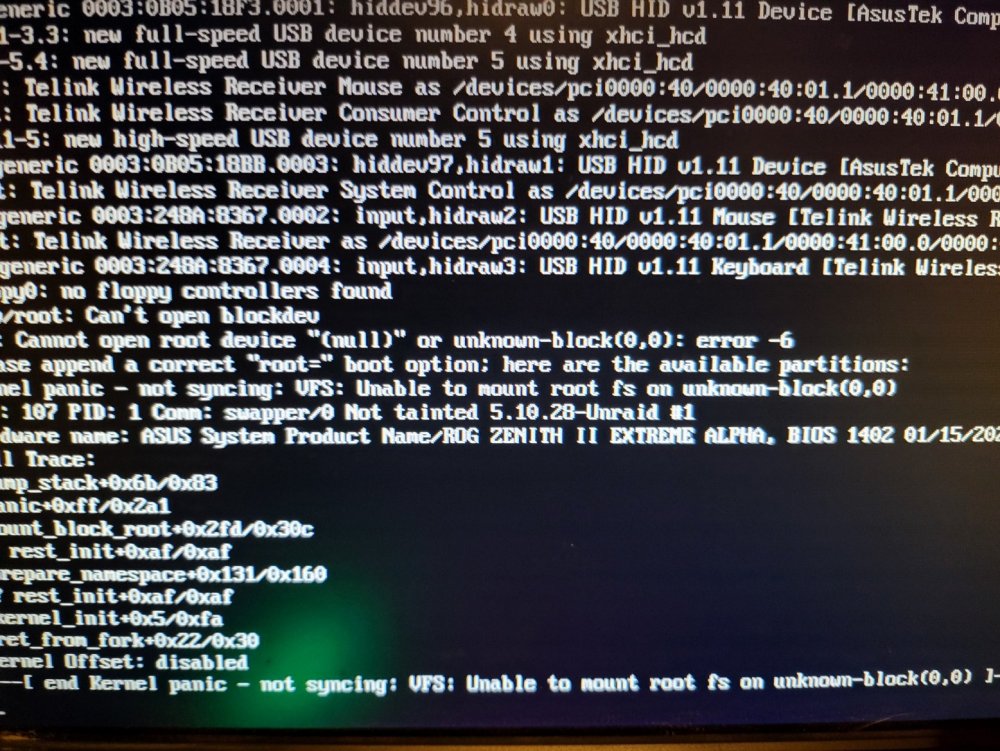
that may be possible... let me see. on a different front, It crashed again. So what happends after a crash is I reboot, get a kernel panic, reboot again and it boots up: this happens consistently.
-
within a docker or vm in unraid
-
Those are ZFS pool that I did create myself. Usually its writing to those pools at 2TB/s or greater that seems to cause this. I could be wrong. and upon reboot, the vmstorage and fast pools have corrupt files on them. I delete the files, scrub, and clean the pools and we are good to go. I dont know if the system crashing is causing the corruption, or the corruption is causing the system to crash. fast is a raidz array of 2TB nvme drives vmstorage is a raidz array of 240GB ssd drives.
-
Sep 8 02:28:40 Tower nginx: 2021/09/08 02:28:40 [crit] 26160#26160: ngx_slab_alloc() failed: no memory Sep 8 02:28:40 Tower nginx: 2021/09/08 02:28:40 [error] 26160#26160: shpool alloc failed Sep 8 02:28:40 Tower nginx: 2021/09/08 02:28:40 [error] 26160#26160: nchan: Out of shared memory while allocating message of size 3559. Increase nchan_max_reserved_memory. Sep 8 02:28:40 Tower nginx: 2021/09/08 02:28:40 [error] 26160#26160: *436728 nchan: error publishing message (HTTP status code 500), client: unix:, server: , request: "POST /pub/var?buffer_length=1 HTTP/1.1", host: "localhost" Sep 8 02:28:40 Tower nginx: 2021/09/08 02:28:40 [error] 26160#26160: MEMSTORE:00: can't create shared message for channel /var Sep 8 02:28:40 Tower nginx: 2021/09/08 02:28:40 [crit] 26160#26160: ngx_slab_alloc() failed: no memory Sep 8 02:28:40 Tower nginx: 2021/09/08 02:28:40 [error] 26160#26160: shpool alloc failed Sep 8 02:28:40 Tower nginx: 2021/09/08 02:28:40 [error] 26160#26160: nchan: Out of shared memory while allocating message of size 2892. Increase nchan_max_reserved_memory. Sep 8 02:28:40 Tower nginx: 2021/09/08 02:28:40 [error] 26160#26160: *436730 nchan: error publishing message (HTTP status code 500), client: unix:, server: , request: "POST /pub/devs?buffer_length=1 HTTP/1.1", host: "localhost" Sep 8 02:28:40 Tower nginx: 2021/09/08 02:28:40 [error] 26160#26160: MEMSTORE:00: can't create shared message for channel /devs Sep 8 02:28:40 Tower nginx: 2021/09/08 02:28:40 [crit] 26160#26160: ngx_slab_alloc() failed: no memory Sep 8 02:28:40 Tower nginx: 2021/09/08 02:28:40 [error] 26160#26160: shpool alloc failed Sep 8 02:28:40 Tower nginx: 2021/09/08 02:28:40 [error] 26160#26160: nchan: Out of shared memory while allocating message of size 2289. Increase nchan_max_reserved_memory. Sep 8 02:28:40 Tower nginx: 2021/09/08 02:28:40 [error] 26160#26160: *436731 nchan: error publishing message (HTTP status code 500), client: unix:, server: , request: "POST /pub/shares?buffer_length=1 HTTP/1.1", host: "localhost" Sep 8 02:28:40 Tower nginx: 2021/09/08 02:28:40 [error] 26160#26160: MEMSTORE:00: can't create shared message for channel /shares Sep 8 02:28:40 Tower nginx: 2021/09/08 02:28:40 [crit] 26160#26160: ngx_slab_alloc() failed: no memory Sep 8 02:28:40 Tower nginx: 2021/09/08 02:28:40 [error] 26160#26160: shpool alloc failed Sep 8 02:28:40 Tower nginx: 2021/09/08 02:28:40 [error] 26160#26160: nchan: Out of shared memory while allocating message of size 3233. Increase nchan_max_reserved_memory. Sep 8 02:28:40 Tower nginx: 2021/09/08 02:28:40 [error] 26160#26160: *436732 nchan: error publishing message (HTTP status code 500), client: unix:, server: , request: "POST /pub/cpuload?buffer_length=1 HTTP/1.1", host: "localhost" Sep 8 02:28:40 Tower nginx: 2021/09/08 02:28:40 [error] 26160#26160: MEMSTORE:00: can't create shared message for channel /cpuload System froze again. here is something of use I think.
-
My server freezes and requires a hard reset at random times. It seems that creating/moving large data sets triggers this. Ill attempt to see if I can recreate it now that I have syslog writing to flash. tower-diagnostics-20210907-0907.zip
-
@steini84 getting a weird error: Sep 27 13:14:40 Tower kernel: VERIFY3(zfs_btree_find(tree, value, &where) != NULL) failed (0000000000000000 != 0000000000000000) Sep 27 13:14:40 Tower kernel: PANIC at btree.c:1780:zfs_btree_remove() Sep 27 13:14:40 Tower kernel: Showing stack for process 8689 Sep 27 13:14:40 Tower kernel: CPU: 54 PID: 8689 Comm: txg_sync Tainted: P O 4.19.107-Unraid #1 Sep 27 13:14:40 Tower kernel: Hardware name: System manufacturer System Product Name/ROG ZENITH II EXTREME ALPHA, BIOS 1101 06/05/2020 Sep 27 13:14:40 Tower kernel: Call Trace: Sep 27 13:14:40 Tower kernel: dump_stack+0x67/0x83 Sep 27 13:14:40 Tower kernel: spl_panic+0xcf/0xf7 [spl] Sep 27 13:14:40 Tower kernel: ? zfs_btree_find_in_buf+0x4a/0x99 [zfs] Sep 27 13:14:40 Tower kernel: ? zfs_btree_find_in_buf+0x4a/0x99 [zfs] Sep 27 13:14:40 Tower kernel: ? zfs_btree_find+0x148/0x182 [zfs] Sep 27 13:14:40 Tower kernel: zfs_btree_remove+0x57/0x7d [zfs] Sep 27 13:14:40 Tower kernel: range_tree_add_impl+0x4f3/0xa97 [zfs] Sep 27 13:14:40 Tower kernel: ? _cond_resched+0x1b/0x1e Sep 27 13:14:40 Tower kernel: ? __kmalloc_node+0x11e/0x12f Sep 27 13:14:40 Tower kernel: ? range_tree_remove_impl+0xad5/0xad5 [zfs] Sep 27 13:14:40 Tower kernel: range_tree_vacate+0x16a/0x1b3 [zfs] Sep 27 13:14:40 Tower kernel: metaslab_sync_done+0x327/0x4c2 [zfs] Sep 27 13:14:40 Tower kernel: ? _cond_resched+0x1b/0x1e Sep 27 13:14:40 Tower kernel: vdev_sync_done+0x42/0x66 [zfs] Sep 27 13:14:40 Tower kernel: spa_sync+0xbd1/0xd6a [zfs] Sep 27 13:14:40 Tower kernel: txg_sync_thread+0x246/0x3f2 [zfs] Sep 27 13:14:40 Tower kernel: ? txg_thread_exit.isra.0+0x50/0x50 [zfs] Sep 27 13:14:40 Tower kernel: thread_generic_wrapper+0x67/0x6f [spl] Sep 27 13:14:40 Tower kernel: ? __thread_exit+0xe/0xe [spl] Sep 27 13:14:40 Tower kernel: kthread+0x10c/0x114 Sep 27 13:14:40 Tower kernel: ? kthread_park+0x89/0x89 Sep 27 13:14:40 Tower kernel: ret_from_fork+0x22/0x40 froze up my vms that are stored on the zfs pools. does this make any sense? is there any way to recover without rebooting?

