TheSkaz
Members
-
Joined
-
Last visited
Everything posted by TheSkaz
-
on reboot, fstab reverts back... what the....
-
so, after 1 year or more of messing with Unraid/Zfs and a DAS enc. I decided to move the large storage area to another server (Dell R420) and share it out to Unraid. my question is with NFS, I am trying to figure out if I got everything correct: Server: theskaz@nas:/mnt/datastore$ sudo exportfs -v /mnt/tank 192.168.1.39(rw,wdelay,root_squash,no_subtree_check,sec=sys,rw,secure,root_squash,no_all_squash) /mnt/datastore 192.168.1.39(rw,wdelay,root_squash,no_subtree_check,sec=sys,rw,secure,root_squash,no_all_squash) Unraid: /dev/sdb1 /boot vfat rw,flush,noatime,nodiratime,dmask=77,fmask=177,shortname=mixed /boot/bzmodules /lib/modules squashfs ro,defaults /boot/bzfirmware /lib/firmware squashfs ro,defaults tmpfs /dev/shm tmpfs defaults hugetlbfs /hugetlbfs hugetlbfs defaults 192.168.1.3:/mnt/tank /tank nfs auto,noatime,nolock,tcp,actimeo=1800 0 0 192.168.1.3:/mnt/datastore /datastore nfs auto,noatime,nolock,tcp,actimeo=1800 0 0 I mirrored what the file structure was when the zfs pools were local. Does this look right?: root@Tower:/datastore# ls -latr total 312064341 drwxrwxrwx 5 65534 65534 5 Oct 2 10:18 influxdb/ -rwxrwxrwx 1 65534 65534 805306368000 Oct 12 11:04 sql_data.img* drwxrwxrwx 6 65534 65534 7 Oct 15 07:12 mariadb/ drwxrwxrwx 4 65534 65534 6 Oct 26 13:10 ./ -rwxrwxrwx 1 65534 65534 322122547200 Dec 5 21:35 plotter_temp.img* drwxr-xr-x 23 root root 500 Dec 8 12:03 ../ the 65534 part looks odd to me.
-
I need to add the kASAN config to the 5.13 kernel. I dont need to make any other changes. How can I accomplish this without effing up everything? this is to debug ZFS on my machine in its natural habitat.
-
plex does seem to work just fine. I just realized that I have OC settings in the miner. didnt remember that I did that. im going to do some more testing with no OC'ing and see if its still an issue, if so, then Ill reach out. Thank you for your help @ich777!
-
did you go into plex and set it to hardware transcoding?
-
after some testing, I think its the Phoenix Miner docker. no matter what config I use, whether its 1, 2, or 3 GPUs they will eventually crash. If I dont run the docker zfs crashes the system, but will not do it near as often.
-
I did that and was getting kernel panics from ZFS hourly... had to downgrade
-
I just assigned plex to the 3rd GPU (Titan) and ill give that a shot right now.
-
they are watercooled and dont go north of 52-4c. I ran plex, no transcode, no nothing. i navigated to a show I wanted to watch, and then it crashed. Plex is tied to the 2080 Ti. the server is still going strong... without any of the nvidia based dockers running. normally it would have crashed by now. if its a memory map issue, could it be due to a memory size difference between the first and 2nd card? the fact that I have 3 cards? the fact that plex is pointing to the smaller one? assuming that the thermals arent an issue, should this be able to run multiple docker containers pointing to the same GPU?
-
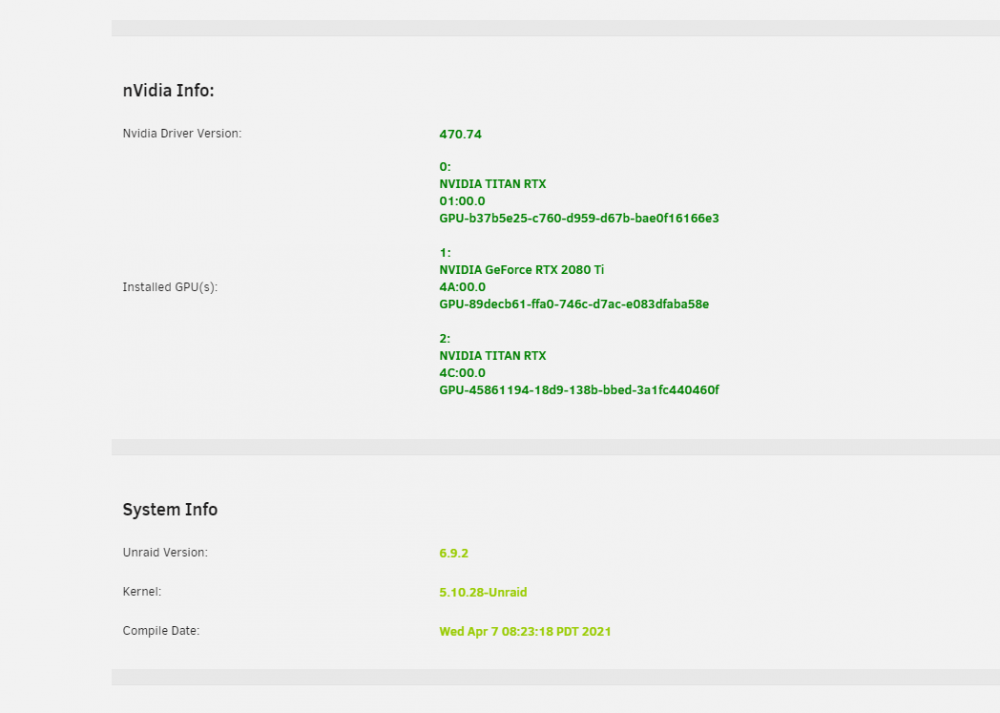
I think Im having an issue with the Nvidia Plugin: Sep 30 07:10:08 Tower kernel: BUG: kernel NULL pointer dereference, address: 00000000000000b1 Sep 30 07:10:08 Tower kernel: #PF: supervisor read access in kernel mode Sep 30 07:10:08 Tower kernel: #PF: error_code(0x0000) - not-present page Sep 30 07:10:08 Tower kernel: PGD 2d5955067 P4D 2d5955067 PUD 2aded0067 PMD 0 Sep 30 07:10:08 Tower kernel: Oops: 0000 [#1] SMP NOPTI Sep 30 07:10:08 Tower kernel: CPU: 72 PID: 106336 Comm: nvidia-smi Tainted: P O 5.10.28-Unraid #1 Sep 30 07:10:08 Tower kernel: Hardware name: ASUS System Product Name/ROG ZENITH II EXTREME ALPHA, BIOS 1402 01/15/2021 Sep 30 07:10:08 Tower kernel: RIP: 0010:_nv031699rm+0x79/0x940 [nvidia] Sep 30 07:10:08 Tower kernel: Code: 07 00 00 41 bf 01 00 00 00 4c 8d 65 48 31 db 44 89 7d 10 66 0f 1f 44 00 00 41 f6 c5 01 0f 84 90 00 00 00 49 8b 86 30 1a 00 00 <80> b8 b1 00 00 00 00 74 12 b8 01 00 00 00 89 d9 d3 e0 41 85 86 94 Sep 30 07:10:08 Tower kernel: RSP: 0018:ffffc9000303b978 EFLAGS: 00010202 Sep 30 07:10:08 Tower kernel: RAX: 0000000000000000 RBX: 0000000000000000 RCX: 0000000000000002 Sep 30 07:10:08 Tower kernel: RDX: ffff88824b6f0008 RSI: ffff88817b692008 RDI: ffff888198f88008 Sep 30 07:10:08 Tower kernel: RBP: ffff8884806ddd80 R08: 0000000000000002 R09: 0000000000000020 Sep 30 07:10:08 Tower kernel: R10: 0000000000000002 R11: 0000000000000002 R12: ffff8884806dddc8 Sep 30 07:10:08 Tower kernel: R13: 0000000000000003 R14: ffff88817b692008 R15: 0000000000000001 Sep 30 07:10:08 Tower kernel: FS: 0000152f94ef2b80(0000) GS:ffff88bf3e000000(0000) knlGS:0000000000000000 Sep 30 07:10:08 Tower kernel: CS: 0010 DS: 0000 ES: 0000 CR0: 0000000080050033 Sep 30 07:10:08 Tower kernel: CR2: 00000000000000b1 CR3: 000000048e7d4000 CR4: 0000000000350ee0 Sep 30 07:10:08 Tower kernel: Call Trace: Sep 30 07:10:08 Tower kernel: ? _nv031813rm+0x82/0x270 [nvidia] Sep 30 07:10:08 Tower kernel: ? _nv031846rm+0x17/0x30 [nvidia] Sep 30 07:10:08 Tower kernel: ? _nv022821rm+0xc0/0x1b0 [nvidia] Sep 30 07:10:08 Tower kernel: ? _nv022826rm+0x11b/0x230 [nvidia] Sep 30 07:10:08 Tower kernel: ? _nv022826rm+0x211/0x230 [nvidia] Sep 30 07:10:08 Tower kernel: ? _nv022828rm+0x310/0x310 [nvidia] Sep 30 07:10:08 Tower kernel: ? _nv023498rm+0x32d/0x470 [nvidia] Sep 30 07:10:08 Tower kernel: ? _nv023498rm+0x304/0x470 [nvidia] Sep 30 07:10:08 Tower kernel: ? _nv000722rm+0x32a/0x680 [nvidia] Sep 30 07:10:08 Tower kernel: ? _nv000715rm+0x1802/0x23d0 [nvidia] Sep 30 07:10:08 Tower kernel: ? rm_init_adapter+0xc5/0xe0 [nvidia] Sep 30 07:10:08 Tower kernel: ? ttwu_queue_wakelist+0x93/0x9a Sep 30 07:10:08 Tower kernel: ? nv_open_device+0x44b/0x676 [nvidia] Sep 30 07:10:08 Tower kernel: ? nvidia_open+0x266/0x3d1 [nvidia] Sep 30 07:10:08 Tower kernel: ? nvidia_frontend_open+0x62/0x8d [nvidia] Sep 30 07:10:08 Tower kernel: ? chrdev_open+0x150/0x187 Sep 30 07:10:08 Tower kernel: ? cdev_put+0x19/0x19 Sep 30 07:10:08 Tower kernel: ? do_dentry_open+0x184/0x289 Sep 30 07:10:08 Tower kernel: ? path_openat+0x85e/0x937 Sep 30 07:10:08 Tower kernel: ? filename_lookup+0xb8/0xdf Sep 30 07:10:08 Tower kernel: ? do_filp_open+0x4c/0xa9 Sep 30 07:10:08 Tower kernel: ? _cond_resched+0x1b/0x1e Sep 30 07:10:08 Tower kernel: ? getname_flags+0x24/0x146 Sep 30 07:10:08 Tower kernel: ? kmem_cache_alloc+0x108/0x130 Sep 30 07:10:08 Tower kernel: ? do_sys_openat2+0x6f/0xec Sep 30 07:10:08 Tower kernel: ? do_sys_open+0x35/0x4f Sep 30 07:10:08 Tower kernel: ? do_syscall_64+0x5d/0x6a Sep 30 07:10:08 Tower kernel: ? entry_SYSCALL_64_after_hwframe+0x44/0xa9 Sep 30 07:10:08 Tower kernel: Modules linked in: xfs md_mod zfs(PO) zunicode(PO) zzstd(O) zlua(O) zavl(PO) icp(PO) zcommon(PO) znvpair(PO) spl(O) nvidia_drm(PO) nvidia_modeset(PO) drm_kms_helper syscopyarea sysfillrect sysimgblt fb_sys_fops nvidia(PO) drm backlight agpgart ip6table_filter ip6_tables iptable_filter ip_tables x_tables bonding edac_mce_amd amd_energy wmi_bmof mxm_wmi kvm_amd kvm crct10dif_pclmul crc32_pclmul crc32c_intel ghash_clmulni_intel aesni_intel crypto_simd cryptd glue_helper mpt3sas atlantic nvme ahci i2c_piix4 raid_class rapl i2c_core scsi_transport_sas input_leds ccp nvme_core libahci led_class k10temp wmi button acpi_cpufreq Sep 30 07:10:08 Tower kernel: CR2: 00000000000000b1 Sep 30 07:10:08 Tower kernel: ---[ end trace d232d3a5b0583cf9 ]--- Sep 30 07:10:08 Tower kernel: RIP: 0010:_nv031699rm+0x79/0x940 [nvidia] Sep 30 07:10:08 Tower kernel: Code: 07 00 00 41 bf 01 00 00 00 4c 8d 65 48 31 db 44 89 7d 10 66 0f 1f 44 00 00 41 f6 c5 01 0f 84 90 00 00 00 49 8b 86 30 1a 00 00 <80> b8 b1 00 00 00 00 74 12 b8 01 00 00 00 89 d9 d3 e0 41 85 86 94 Sep 30 07:10:08 Tower kernel: RSP: 0018:ffffc9000303b978 EFLAGS: 00010202 Sep 30 07:10:08 Tower kernel: RAX: 0000000000000000 RBX: 0000000000000000 RCX: 0000000000000002 Sep 30 07:10:08 Tower kernel: RDX: ffff88824b6f0008 RSI: ffff88817b692008 RDI: ffff888198f88008 Sep 30 07:10:08 Tower kernel: RBP: ffff8884806ddd80 R08: 0000000000000002 R09: 0000000000000020 Sep 30 07:10:08 Tower kernel: R10: 0000000000000002 R11: 0000000000000002 R12: ffff8884806dddc8 Sep 30 07:10:08 Tower kernel: R13: 0000000000000003 R14: ffff88817b692008 R15: 0000000000000001 Sep 30 07:10:08 Tower kernel: FS: 0000152f94ef2b80(0000) GS:ffff88bf3e000000(0000) knlGS:0000000000000000 Sep 30 07:10:08 Tower kernel: CS: 0010 DS: 0000 ES: 0000 CR0: 0000000080050033 Sep 30 07:10:08 Tower kernel: CR2: 00000000000000b1 CR3: 000000048e7d4000 CR4: 0000000000350ee0 this happens at random times. I have 3 GPUs 2x RTX Titans and 1x 2080Ti: I have 3 Docker Containers that utilize the GPUs. PhoenixMiner (uses all 3), Plex (2080Ti), Deepstack(Dual Titans). I thought maybe they couldnt all run together, so I stopped the others and just ran plex. system still crashed. right now they are all off, and Its still running, but time will tell.. Ill leave an update if it crashes again. syslog.zip tower-diagnostics-20211009-0736.zip
-
Attached is my updated one, using the 1.8.4 Influx. You were right, my non_negative_derivatives were set at 1s instead of 1ms. ZFS-1.8.json
-
the Arc Demand is throwing me off. I can get the Data Hit Ratio, I think. but the pivot that you have going on, I have no clue.
-
from(bucket: v.bucket) |> range(start: v.timeRangeStart, stop: v.timeRangeStop) |> filter(fn: (r) => r[\"_measurement\"] == \"zfs\") |> filter(fn: (r) => r[\"pools\"] == \"hddmain::ssdnvme::ssdsata\") |> filter(fn: (r) => r[\"_field\"] == \"arcstats_size\" or r[\"_field\"] == \"arcstats_data_size\" or r[\"_field\"] == \"arcstats_metadata_size\" or r[\"_field\"] == \"arcstats_mfu_size\" or r[\"_field\"] == \"arcstats_dnode_size\" or r[\"_field\"] == \"arcstats_mru_size\") |> aggregateWindow(every: v.windowPeriod, fn: mean) |> map(fn: (r) => ({ _value: r._value, _time:r._time, _field : r._field}))", Arc Size, converted to this so far: SELECT mean("arcstats_size") as Size, mean("arcstats_data_size") as Data, mean("arcstats_metadata_size") as Metadata, mean("arcstats_mfu_size") as MFU, mean("arcstats_dnode_size") as DNODE, mean("arcstats_mru_size") as MRU FROM "zfs" WHERE $timeFilter GROUP BY time($__interval) fill(none)
-
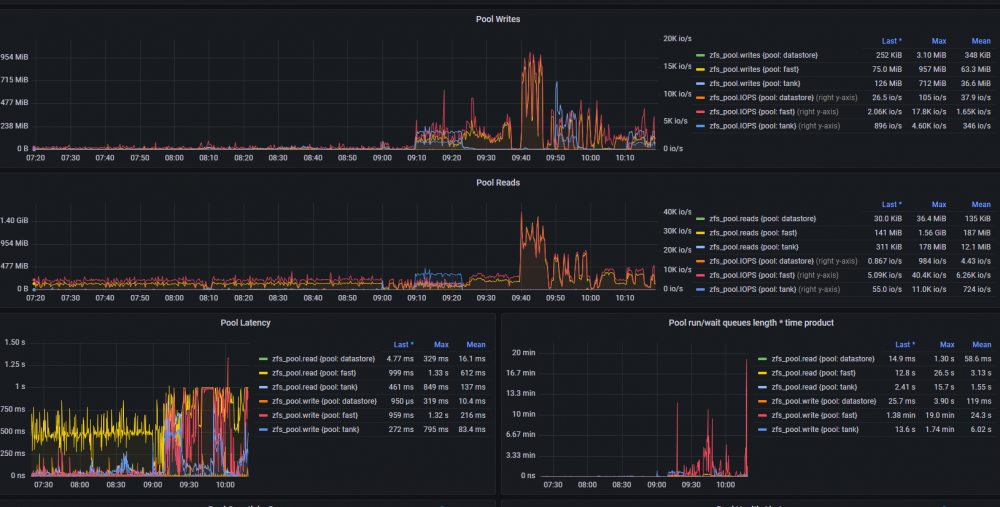
took your sample and edited it for the other graphs. currently working on ARC size and demand
-
thank you. quick question, fr the influxdb queries, mine show "select measurement" on all of them, so I assume that I dont have the corresponding metrics in the db? my telegraf.conf has zfs enabled with pool and dataset metrics set to true.
-
@Iker would you be able to share the json for your dashboard as a starting point? I have everything else working.
-
I did some googling. and currently testing with fio and doing some benchmarks. I might open another thread and post them with all the settings and such.
-
created zpools: root@Tower:~# zpool create tank raidz sdm sdn sdo sdp sdq sdr sdu sdv sdy sdz root@Tower:~# zpool create fast raidz nvme0n1 nvme1n1 nvme2n1 nvme4n1 root@Tower:~# zpool status pool: fast state: ONLINE config: NAME STATE READ WRITE CKSUM fast ONLINE 0 0 0 raidz1-0 ONLINE 0 0 0 nvme0n1 ONLINE 0 0 0 nvme1n1 ONLINE 0 0 0 nvme2n1 ONLINE 0 0 0 nvme4n1 ONLINE 0 0 0 errors: No known data errors pool: tank state: ONLINE config: NAME STATE READ WRITE CKSUM tank ONLINE 0 0 0 raidz1-0 ONLINE 0 0 0 sdm ONLINE 0 0 0 sdn ONLINE 0 0 0 sdo ONLINE 0 0 0 sdp ONLINE 0 0 0 sdq ONLINE 0 0 0 sdr ONLINE 0 0 0 sdu ONLINE 0 0 0 sdv ONLINE 0 0 0 sdy ONLINE 0 0 0 sdz ONLINE 0 0 0 errors: No known data errors root@Tower:~# how can I stress test this without putting real data on here to see if it craps out?
-
quick question: Im getting a lot of noise in syslog with this: (1000s of them) Sep 29 20:17:42 Tower kernel: usb 12-3-port4: Cannot enable. Maybe the USB cable is bad? and I dont have anything plugged into the usb ports aside from the keyboard, the flash drive, and APC UPS. root@Tower:~# lsusb Bus 016 Device 001: ID 1d6b:0003 Linux Foundation 3.0 root hub Bus 015 Device 001: ID 1d6b:0002 Linux Foundation 2.0 root hub Bus 014 Device 001: ID 1d6b:0003 Linux Foundation 3.0 root hub Bus 013 Device 001: ID 1d6b:0002 Linux Foundation 2.0 root hub Bus 012 Device 003: ID 174c:3074 ASMedia Technology Inc. ASM1074 SuperSpeed hub Bus 012 Device 002: ID 174c:3074 ASMedia Technology Inc. ASM1074 SuperSpeed hub Bus 012 Device 001: ID 1d6b:0003 Linux Foundation 3.0 root hub Bus 011 Device 003: ID 174c:2074 ASMedia Technology Inc. ASM1074 High-Speed hub Bus 011 Device 004: ID 0781:5581 SanDisk Corp. Ultra Bus 011 Device 002: ID 174c:2074 ASMedia Technology Inc. ASM1074 High-Speed hub Bus 011 Device 001: ID 1d6b:0002 Linux Foundation 2.0 root hub Bus 009 Device 004: ID 0b05:18bb ASUSTek Computer, Inc. AURA LED Controller Bus 009 Device 003: ID 0b05:18f3 ASUSTek Computer, Inc. AURA LED Controller Bus 009 Device 002: ID 05e3:0610 Genesys Logic, Inc. 4-port hub Bus 009 Device 001: ID 1d6b:0002 Linux Foundation 2.0 root hub Bus 010 Device 001: ID 1d6b:0003 Linux Foundation 3.0 root hub Bus 008 Device 001: ID 1d6b:0003 Linux Foundation 3.0 root hub Bus 007 Device 002: ID c0f4:04c0 SZH usb keyboard Bus 007 Device 001: ID 1d6b:0002 Linux Foundation 2.0 root hub Bus 006 Device 001: ID 1d6b:0003 Linux Foundation 3.0 root hub Bus 005 Device 001: ID 1d6b:0002 Linux Foundation 2.0 root hub Bus 004 Device 001: ID 1d6b:0003 Linux Foundation 3.0 root hub Bus 003 Device 002: ID 051d:0003 American Power Conversion UPS Bus 003 Device 001: ID 1d6b:0002 Linux Foundation 2.0 root hub Bus 002 Device 001: ID 1d6b:0003 Linux Foundation 3.0 root hub Bus 001 Device 001: ID 1d6b:0002 Linux Foundation 2.0 root hub If I read the error correctly, is it complaining about the ASM1074 SuperSpeed hub? edit: went into bios and there was a front and back asm1074 hub. disabled the front, still gave same error, disabled back and the flash drive wasnt recognized. moved the flash drive to the only USB2 port there was (BIOS Flash port) and it booted, no more usb errors. now that that is done, next steps
-
did that. I moved my important info off of the pools and destroyed them all. currenly there are 0 zfs pools and was still getting kernel panics. I have now installed a clean version of 6.9.2 with a couple plugins installed. docker and vms are disabled. system froze again, but no kernel panic. will do a couple more things and report back
-
what hardware are you running? how is your Array connected to the computer? how are the unassigned drives connected to the computer? (sata? sas? usb3/2?) how is your "share" configured? (most free/etc) how are you copying the files? (/mnt/user/xxxx or /mnt/disk1/xxxxx) i have the Exos 16TBs and I can confirm they can write at 100MB sustained, through a SAS controller note: I looked up Krusader and It looks like a SFTP application like WinSCP. if it works just like WinSCP you could have network issues. where the file is copied to the computer running krusader and then copying back to the new disk. try SSHing into the box and do something like 'mv -v /external/drive/folder /mnt/disk1/media' and see if that is any faster. (change the paths obviously)
-
booting in safe mode fails. I get an error about mounting a bad fs. I didnt record its exact error.
-
nope, crashed again. took much longer this time though....
-
if I dont access the web UI, and instead go through ssh, seems to stay up... will report back
-
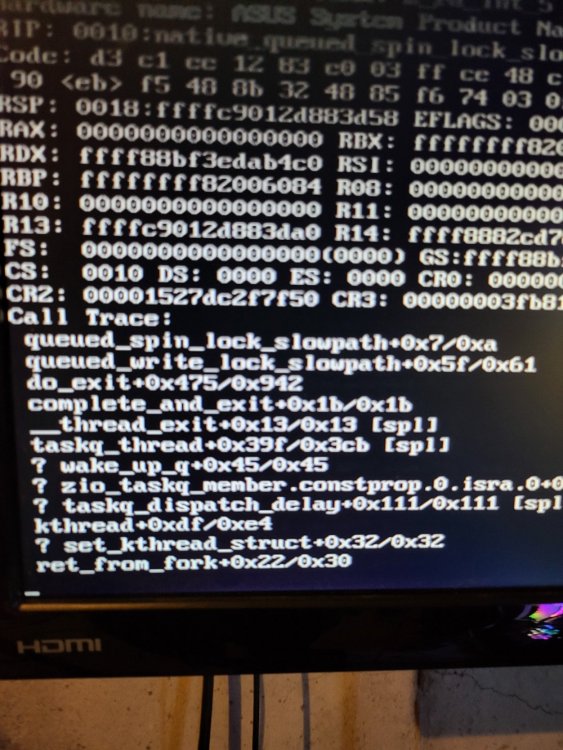
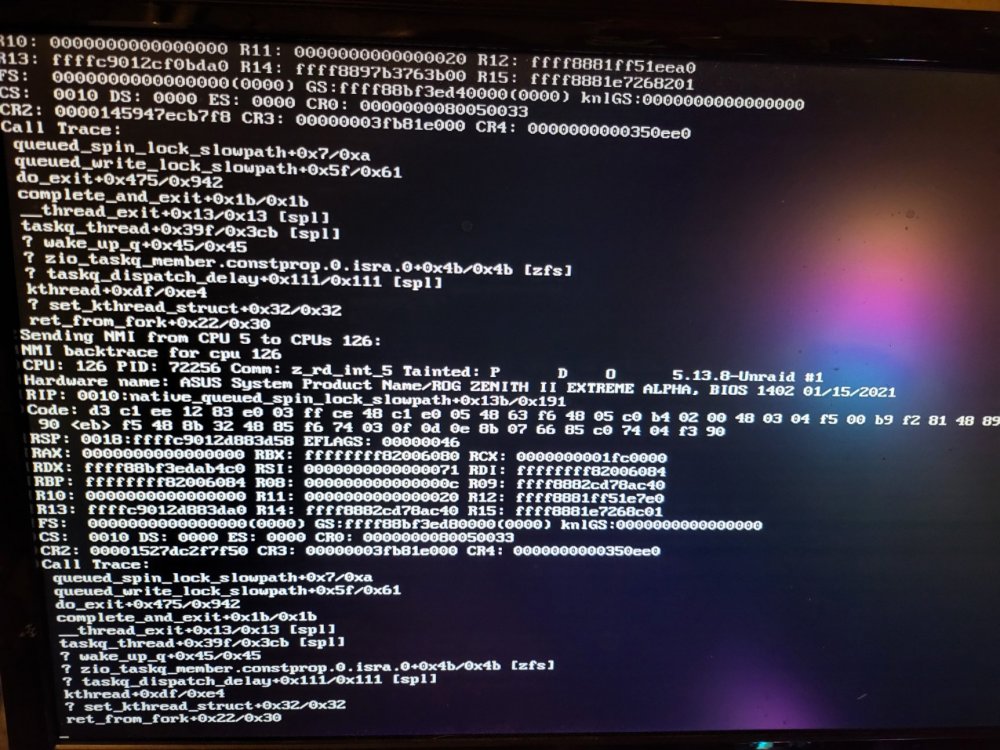
I cant get get the server to stay running. it boots completely, then after about 5 minutes or so, kernel panics: I just finally got to the point that I can add vms and docker images. after adding them, this started happening.... is it zfs? something I can do about it? syslog.zip server-diagnostics-20210929-1255.zip