ctrl-z
Members
-
Joined
-
Last visited
Everything posted by ctrl-z
-
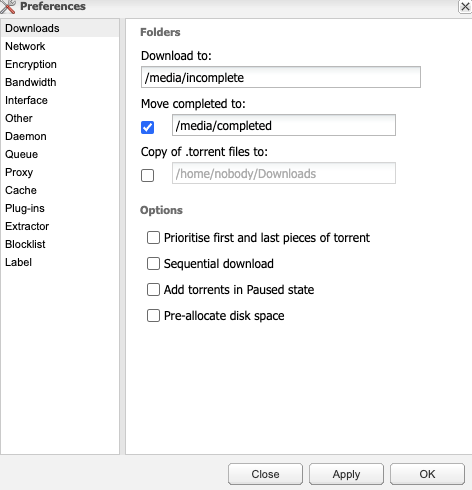
I recently changed the host path of my docker container and also changed in the deluge settings where the files that get downloaded go to, and now Deluge won't work for any new files. i have heard that changing the folders will do that. History - i have been using Deluge alongside Radarr, and was getting a lot of alerts about it being an issue that my download client was sending to a root folder, so I switched it to a non root folder. Now it won't download. Also seeing in Radarr now that the I am missing a root folder. What is the best set up to have?


-
I cam across this thread that pertains to an issue I am having: I have had a licensed SanDisk USB for a couple years now and it has worked flawlessly up until a day or two ago. I stumbled across that thread and am wondering if my USB disk fits into this thread's topic. I now am unable to boot via USB on my R720, and am curious what options I Have to regain access to my OS. My drives are all still in working order, is this as simple as licensing a new USB and replacing it, what else should I be looking for in order to access my OS? I am concerned I may be at a loss without being able to restore my access. Also what process should I follow to add a new stick to my server and be bale to boot into my Unraid.
-
I have had a licensed SanDisk USB for a couple years now and it has worked flawlessly up until a day or two ago. I stumbled across this thread and am wondering if my USB disk fits into this thread's topic. I now am unable to boot via USB on my R720, and am curious what options I Have to regain access to my OS. MY drives are all still in working order, is this as simple as licensing a new USB and replacing it, what else should I be looking for in order to access my OS? I am concerned I may be at a loss without being able to restore my access.
-
I would like to add a drive (4 TB WD Purple) specifically for NVR into my Unraid server. I don't want to add it to my existing array of WD Red NAS drives. What should the process be that I follow? Should I leave as an unassigned drive, do I need to create a new array (don't anticipate expanding this), do I need another drive to act as parity (not concerned with keeping an extensive amount of recordings here, just wanting to keep a few day's worth of data if I need to look back. Will be filling data from 3-4 cameras. That's what I've got so far, let me know if you have any questions or wanna talk through anything! Thanks!
-
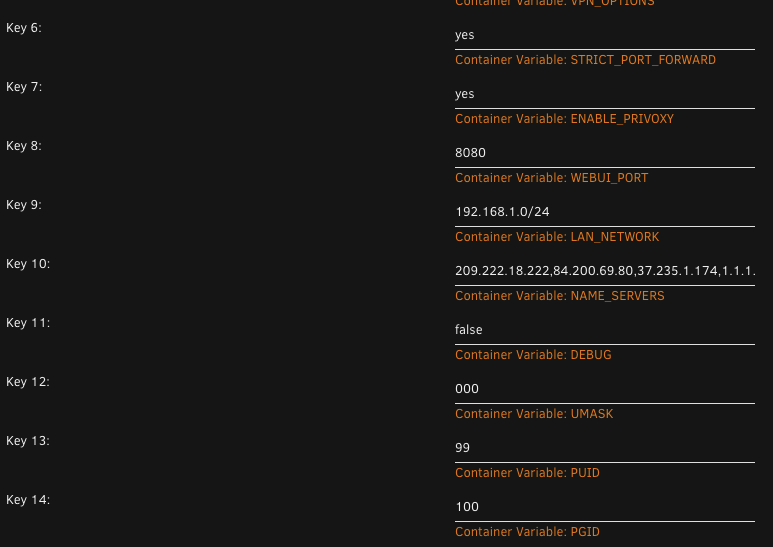
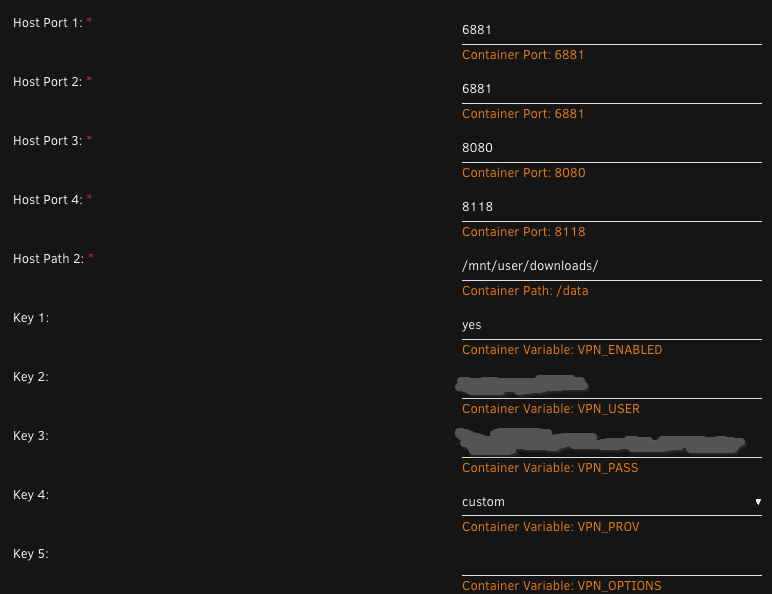
Thanks! The only two ports that overlap on these are port 8118, which it seems is required to use privoxy. " This Docker includes OpenVPN and WireGuard to ensure a secure and private connection to the Internet, including use of iptables to prevent IP leakage when the tunnel is down. It also includes Privoxy to allow unfiltered access to index sites, to use Privoxy please point your application at "http://host ip:8118"." Is it possibel to assign a different port to use Privoxy or am i going to need to use a different setup. Main use case is to seperate video media from audio and print media - using different download clients for each.
-
If I wanted to run both qBittorrentvpn and Delugevpn on the same server what do I need to consider? I run deluge now, and just installed qb and am getting a server error. Was curious if both using pots 8118 as a host port would cause an issue, otherwise I used the predefined host ports for the others, which are different and no other containers are using those ports.
-
I am using DHCP, yes. I know this because in the past, when I moved from ISP router to Unifi router, and back, just for separate testing purposes (not related to assigning IP addresses) my NAS would show up on my network with its new assigned IP address. In the past, it would just show up on the network, with a different IP address,a nd I would use my router interface to find out what it was and log into it from there. I didn't do this more than once, as it was mostly just speed comparison testing, but it at least would show up int he past. THe only thing different this time is the factory reset, but can't see Unraid IP address.
-
The r720 Server is, but not the Unraid Server running off it. They both have historically had different IP addresses, and i would always log into the unraid one. I knew it would reassign a new IP address, but in the router interface the unraid server isn't showing upa s a connected device. Everything else on the network is, both Ethernet and wifi. The unraid server is Ethernet, obviously, so i have tried different router ports and it still wont show.
-
As the title suggests, I cannot access the GUI for my unraid server because I cannot see it on my network to access the IP address. I recently had to factory reset my router because of some internet issues that were occurring where I couldn't even access the network, so I couldn't even log into the server to shut it down. After the factory reset, the Unraid IP address does not show up in my network at all. The Server IP itself, where I log into the iDRAC settings (DellR720) shows up and I can get into that, but cannot find my unraid IP address. I am using a Mac locally to access the server via web GUIO, and am not as IT savy as many of you others. What should I do? How can I get into the Web GUI? Thanks!
-
This may seem like a silly question, but with regards to getting this search issue to work, how does one update Mono? I applied an update to the container, but still have no luck with finding any movies in search.
-
My torrents are all stalling from going to slow. Finally using PIA to have the Strict_Port_Forwarding labeled 'yes'. (Also tried it at 'no with same stalling issue). Torrents coming in from Radarr/Sonarr with Proxy turned on from enabled Privoxy. I have everything set up for a min. of 2 peers, and all qbittorrent settings set up the way I had them on my local machine (not in a docker). Anyone else have similar issues on their initial startup and what did you do to fix this? Here is a snippet from my logs showing the endpoint that I am using is in the list of endpoints supporting port forwarding. 2020-04-18 12:16:18,964 DEBG 'start-script' stdout output: [info] PIA endpoint 'ca-montreal.privateinternetaccess.com' is in the list of endpoints that support port forwarding 2020-04-18 12:16:18,965 DEBG 'start-script' stdout output: [info] List of PIA endpoints that support port forwarding:- [info] ca-montreal.privateinternetaccess.com [info] ca-vancouver.privateinternetaccess.com [info] de-berlin.privateinternetaccess.com [info] de-frankfurt.privateinternetaccess.com [info] sweden.privateinternetaccess.com [info] swiss.privateinternetaccess.com
-
So I am having trouble with speeds in qbittorrent as well. I know the documentation says that if we aren't using PIA we have to manually set up port forwarding for the VPN provider we are using. I have Nord (I guess they don't have allow port forwarding), but the rest of the container seems to work great alongside privoxy for web traffic and other container proxies (sonarr, radarr, etc.). Does anyone know if top speeds will be possible with this setup and Nord, or am I outta luck on that?