





Uplinkpro
Members
-
Joined
-
Last visited
Everything posted by Uplinkpro
-
Getting this error as well
-
Facepalming myself it was 8080 still popped in 443 and we are green. I think thie text under the panel confused me "If you are running the daemon behind Cloudflare you should set the daemon port to 8443 to allow websocket proxying over SSL."
-
Tried that still same issue:

-
Updated config, this one fully boots wings however panel will not see it: debug: false uuid: ef7170ba-047f-4e9c-8360-d0f8b125af29 token_id: slX4KidQjXLT8bH1 token: JABT7ebQA8NPFMBcPwHWcaGAk22wJfNwMignEBWxrh1r49XJG6myEIgpo7OJvMF5 api: host: 0.0.0.0 port: 8080 ssl: enabled: false cert: /etc/letsencrypt/live/node.upclutch.xyz/fullchain.pem key: /etc/letsencrypt/live/node.upclutch.xyz/privkey.pem upload_limit: 1024 system: data: /mnt/user/appdata/pelican-wing/data sftp: bind_port: 2022 allowed_mounts: [] remote: 'https://panel.upclutch.xyz' The heart stays red and if you go to the node it says this: {"error":"The required authorization heads were not present in the request."}

-
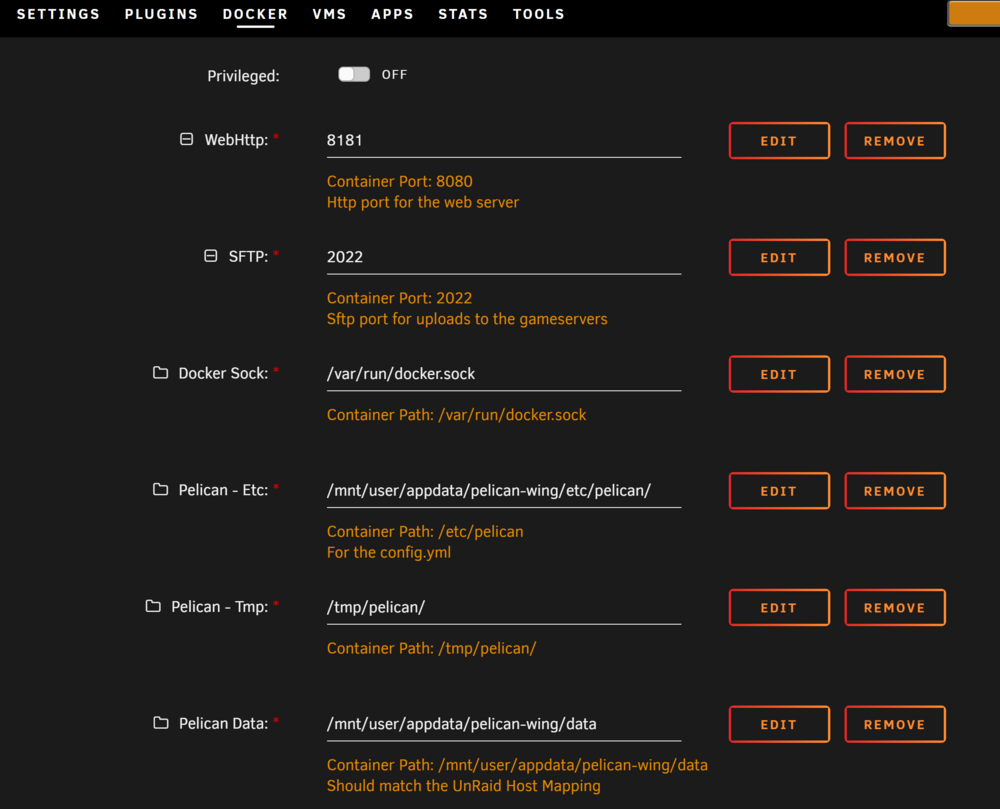
That fixed it, now im having issues starting wings says no file is there but it absolutely is and its able to access it this is the log : INFO: [Apr 5 09:33:59.805] writing log files to disk path=/var/log/pelican/wings.log INFO: [Apr 5 09:33:59.805] loading configuration from file config_file=/etc/pelican/config.yml INFO: [Apr 5 09:33:59.809] configured wings with system timezone timezone=America/Los_Angeles INFO: [Apr 5 09:33:59.809] configured system user successfully gid=100 uid=99 username=nobody INFO: [Apr 5 09:33:59.810] fetching list of servers from API INFO: [Apr 5 09:34:00.058] processing servers returned by the API total_configs=0 INFO: [Apr 5 09:34:00.058] finished processing server configurations duration=57.358µs INFO: [Apr 5 09:34:00.060] configuring system crons interval=1m0s subsystem=cron INFO: [Apr 5 09:34:00.060] starting cron processes subsystem=cron INFO: [Apr 5 09:34:00.060] updating server states on Panel: marking installing/restoring servers as normal INFO: [Apr 5 09:34:00.060] configuring internal webserver host_address=0.0.0.0 host_port=8443 use_auto_tls=false use_ssl=true FATAL: [Apr 5 09:34:00.060] failed to configure HTTPS server auto_tls=false error=open /etc/letsencrypt/live/node.upclutch.xyz/fullchain.pem: no such file or directory Stacktrace: open /etc/letsencrypt/live/node.upclutch.xyz/fullchain.pem: no such file or directory github.com/pelican-dev/wings/cmd.rootCmdRun github.com/pelican-dev/wings/cmd/root.go:392 github.com/spf13/cobra.(*Command).execute github.com/spf13/[email protected]/command.go:989 github.com/spf13/cobra.(*Command).ExecuteC github.com/spf13/[email protected]/command.go:1117 github.com/spf13/cobra.(*Command).Execute github.com/spf13/[email protected]/command.go:1041 github.com/pelican-dev/wings/cmd.Execute github.com/pelican-dev/wings/cmd/root.go:71 main.main ./wings.go:17 runtime.main runtime/proc.go:271 runtime.goexit runtime/asm_amd64.s:1695 My config.yml : debug: false uuid: ef7170ba-047f-4e9c-8360-d0f8b125af29 token_id: slX4KidQjXLT8bH1 token: JABT7ebQA8NPFMBcPwHWcaGAk22wJfNwMignEBWxrh1r49XJG6myEIgpo7OJvMF5 api: host: 0.0.0.0 port: 8443 ssl: enabled: true cert: /etc/letsencrypt/live/node.upclutch.xyz/fullchain.pem key: /etc/letsencrypt/live/node.upclutch.xyz/privkey.pem upload_limit: 1024 system: data: /mnt/user/appdata/pelican-wing/data sftp: bind_port: 2022 allowed_mounts: [] remote: 'https://panel.upclutch.xyz' Finally my docker config for wings is below, if i use ssl it will not fully boot wings, If I attempt just port 8080 it will boot but panel will never see it.
-
Attempting to start the panel docker and it refuses to stay on, logs give me this issue Error: The directory named as part of the path /var/www/html/storage/logs/supervisord/supervisord.log does not exist For help, use /usr/bin/supervisord -h touch: /pelican-data/.env: Permission denied docker/entrypoint.sh: line 16: can't create /pelican-data/.env: Permission denied docker/entrypoint.sh: line 23: can't create /pelican-data/.env: Permission denied grep: .env: No such file or directory Error: The directory named as part of the path /var/www/html/storage/logs/supervisord/supervisord.log does not exist For help, use /usr/bin/supervisord -h touch: /pelican-data/.env: Permission denied docker/entrypoint.sh: line 16: can't create /pelican-data/.env: Permission denied docker/entrypoint.sh: line 23: can't create /pelican-data/.env: Permission denied grep: .env: No such file or directory Error: The directory named as part of the path /var/www/html/storage/logs/supervisord/supervisord.log does not exist For help, use /usr/bin/supervisord -h Starting PHP-FPM with NGINX Starting Supervisord external vars don't exist.
-
That got it for me too thanks!!
-
Sadly no matter what I do I cannot get this to scrape metadata at all is anyone else using this having this issue??
-
My servers a brand new one started with 0 data and my logs seem fine just completely unconnectable. Connecting anonymously to Steam Public...OK Waiting for client config...OK Waiting for user info...OK ---Update Server--- Redirecting stderr to '/serverdata/Steam/logs/stderr.txt' Logging directory: '/serverdata/Steam/logs' [ 0%] Checking for available updates... [----] Verifying installation... UpdateUI: skip show logoSteam Console Client (c) Valve Corporation - version 1721172922 -- type 'quit' to exit -- Loading Steam API...OK Connecting anonymously to Steam Public...OK Waiting for client config...OK Waiting for user info...OK Update state (0x3) reconfiguring, progress: 0.00 (0 / 0) Update state (0x11) preallocating, progress: 12.47 (78382436 / 628445842) Update state (0x61) downloading, progress: 4.24 (26621784 / 628445842) Update state (0x61) downloading, progress: 12.14 (76285284 / 628445842) Update state (0x61) downloading, progress: 12.47 (78382620 / 628445842) Update state (0x61) downloading, progress: 19.33 (121466524 / 628445842) Update state (0x61) downloading, progress: 33.56 (210895509 / 628445842) Update state (0x61) downloading, progress: 55.64 (349659536 / 628445842) Update state (0x61) downloading, progress: 67.40 (423559895 / 628445842) Update state (0x61) downloading, progress: 82.65 (519403304 / 628445842) Update state (0x61) downloading, progress: 89.08 (559826407 / 628445842) Update state (0x61) downloading, progress: 95.49 (600078172 / 628445842) Update state (0x61) downloading, progress: 99.00 (622159372 / 628445842) Update state (0x61) downloading, progress: 99.01 (622236361 / 628445842) Update state (0x61) downloading, progress: 99.03 (622321121 / 628445842) Update state (0x61) downloading, progress: 99.04 (622387623 / 628445842) Update state (0x81) verifying update, progress: 35.26 (221620618 / 628445842) Success! App '1963720' fully installed. ---Prepare Server--- ---Checking for old display lock files--- ---Checking for old logfiles--- ---Server ready--- ---Starting Xvfb server--- ---Start Server--- Server Game ID: Mcq3ScsEzq7FVi1S92caFU2eAwMU
-
Having a strange issue with Core Keeper, Server starts just fine but cannot be connected to no matter what no idea what the Issue is
-
So I have installed the docker and i have mariadb setup already and fully accessible (tested it with adminer) however no matter what settings i use i get this error : INFO: [init][2024-06-10 19:30:35] Starting up, please wait... INFO: [init][2024-06-10 19:30:40] starting redis-server 10:C 10 Jun 2024 19:30:40.489 # WARNING Memory overcommit must be enabled! Without it, a background save or replication may fail under low memory condition. Being disabled, it can also cause failures without low memory condition, see https://github.com/jemalloc/jemalloc/issues/1328. To fix this issue add 'vm.overcommit_memory = 1' to /etc/sysctl.conf and then reboot or run the command 'sysctl vm.overcommit_memory=1' for this to take effect. 10:C 10 Jun 2024 19:30:40.489 * oO0OoO0OoO0Oo Redis is starting oO0OoO0OoO0Oo 10:C 10 Jun 2024 19:30:40.489 * Redis version=7.2.4, bits=64, commit=00000000, modified=0, pid=10, just started 10:C 10 Jun 2024 19:30:40.489 * Configuration loaded 10:M 10 Jun 2024 19:30:40.489 * monotonic clock: POSIX clock_gettime 10:M 10 Jun 2024 19:30:40.489 * Running mode=standalone, port=6379. 10:M 10 Jun 2024 19:30:40.490 * Server initialized 10:M 10 Jun 2024 19:30:40.490 * Loading RDB produced by version 7.2.4 10:M 10 Jun 2024 19:30:40.490 * RDB age 35607 seconds 10:M 10 Jun 2024 19:30:40.490 * RDB memory usage when created 11.30 Mb 10:M 10 Jun 2024 19:30:40.630 * Done loading RDB, keys loaded: 12, keys expired: 2. 10:M 10 Jun 2024 19:30:40.631 * DB loaded from disk: 0.141 seconds 10:M 10 Jun 2024 19:30:40.631 * Ready to accept connections tcp ERROR: [init][2024-06-10 19:30:41] Something went horribly wrong with our database
-
Trying to run this on a server with a NAS attached as a rootshare. No matter what I do, even if i run it on the NAS when it goes to move the files from cache it "fails to move file" with an error and stops working. I cannot find any logfiles to see why it cannot move the files, all the files have the 0777 permissions so im at a loss as to why its failing. I have tried with both cache specific tosort folder and a "general' tosort folder both fail. it has no problem moving to the cache, only moving from.
-
Having the same issues as above with permissions [openbox ] Openbox-Message: 11:56:10.796: Unable to make directory '/config/xdg/cache/openbox': Permission denied my-ROMVault.xml
-
Good news bad news , We might have figured it out! Brand new ram lit up like Christmas on memtest86 with so many corruptions its unreal. Bad news is now i havta RMA and my unraid test key will likely be dead by the time i get it back.
-
Downgraded and still seems to be an issue: -What exactly are you doing to make it crash to see if other users can replcate Moving a large folder of ISO's and Bins from a windows machine is one way, but also just checking crc on files already on the array. Updated syslog if that helps syslog
-
Here ya go, i can get it to crash on command syslog
-
Ay first i thought it was a VM but now im 100% sure its not. Anytime I do anything with the array like CRC checking files or moving large files the whole system crashes down. Not sure where to start Diagnostics below.. This is a newer system i just put together. retro-tower-diagnostics-20221025-0216.zip
-
Running a Debian 11 Bullseye VM very minimal, mostly just SSH to it and have a share mounted to it using virtuio. All works well. However I want to run a server software named Retronas on the VM. so i installed it and its setup and for the most part it works just fine, Retronas has a feature to CRC check and organize files. Anytime i run one of these scans against my files on the array, after some time the VM freezes, the webui completely crashes yet the server is still on, and the shares are still active. I have tried to force the webui to restart with no success, at this stat it requires a full reboot. Im not sure if its a configuration issue or something more serious, i have included diagnostics. retro-tower-diagnostics-20221021-2224.zip
-
Surprised no one has requested this little guy yet, its basically an unbadged U-Nas 4 bay
-
Im not able to test that sorry, I fully reinstalled windows 11 and now it works just fine. Hopefully that fix helps someone.
-
Changed that, and immediately was able to login, thanks I was about to reinstall windows >.< Scratch that it worked once then stopped completely again
-
So playing with it all day i got it working on a new pc also on the network just not mine, so i think it has to be something on my windows machine but checking the workgroup is not on a domain so im not sure what else to do on it.
-
I used to run a domain however i decommissioned the AD and only run a homegroup now.
-
My network is setup to support it but I'll change it back for debuging sake.
-
Wish i could say it worked, it did not.



