





Uplinkpro
Members
-
Joined
-
Last visited
Everything posted by Uplinkpro
-
credential issues, i click tower it asks for login, i type the IP in and its the same. I tried root and the user i added and both fail.
-
Swapped it all and rebooted it changed the output but still cannot access it.
-
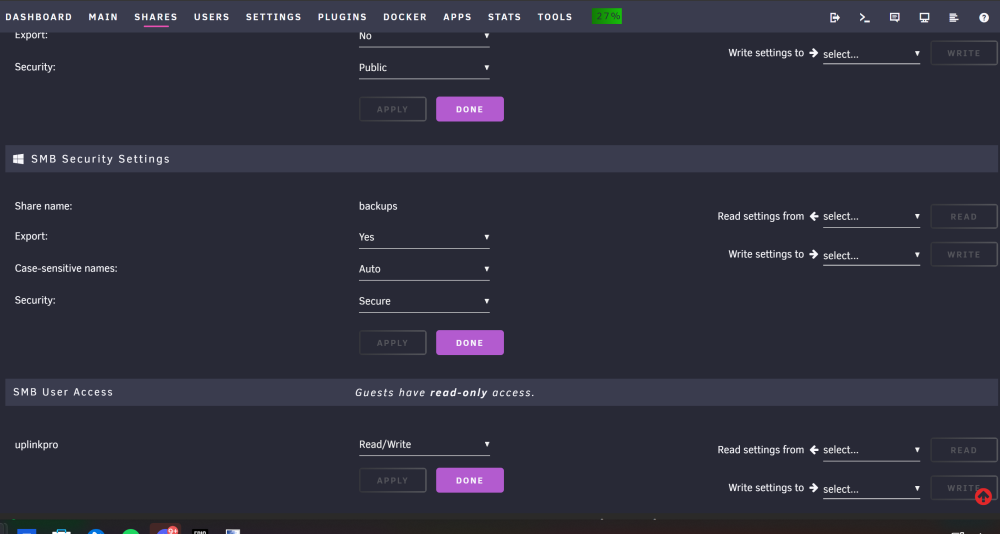
The flash drive is pretty new as well thats kinda crappy, but what you say makes since about the public access, i dont have it set for that if you see in the gui, this is how they are set
-
here is the output ( i also removed the addon and yea still nothing new) root@Tower:~# cat /etc/samba/smb-shares.conf [flash] path = /boot comment = Unraid OS boot device browseable = yes # Secure public = yes writeable = no write list = case sensitive = auto preserve case = yes short preserve case = yes map archive = no map system = no map hidden = no map readonly = yes force user = root [appdata] path = /mnt/user/appdata comment = browseable = yes # Secure public = yes writeable = no write list = uplinkpro case sensitive = auto preserve case = yes short preserve case = yes [backups] path = /mnt/user/backups comment = browseable = yes # Secure public = yes writeable = no write list = uplinkpro case sensitive = auto preserve case = yes short preserve case = yes [data] path = /mnt/user/data comment = browseable = yes # Public public = yes writeable = yes case sensitive = auto preserve case = yes short preserve case = yes [roms] path = /mnt/user/roms comment = browseable = yes # Public public = yes writeable = yes case sensitive = auto preserve case = yes short preserve case = yes
-
Done, same issue
-
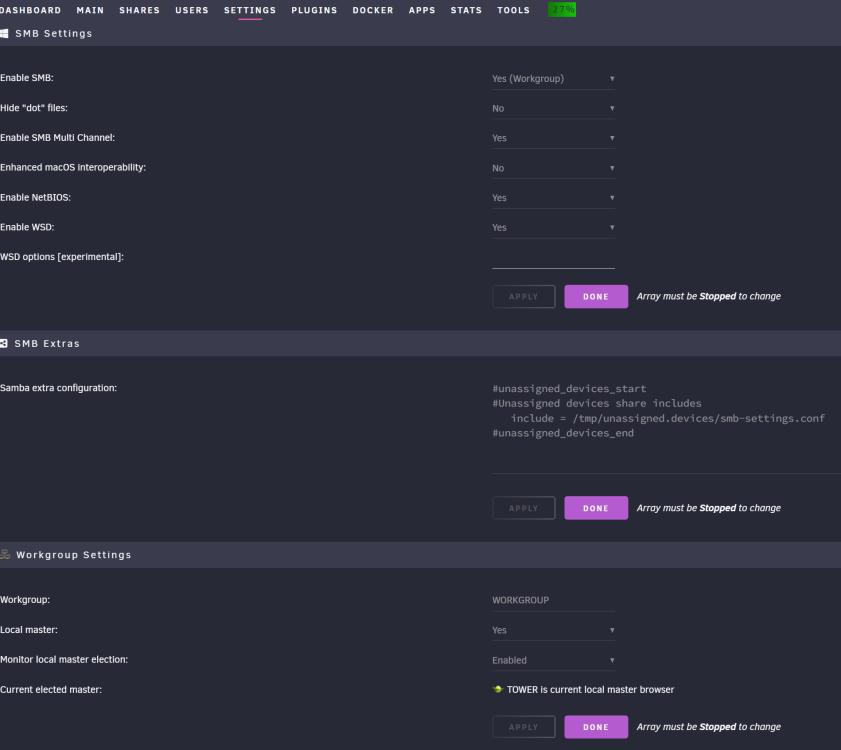
here you go
-
nothings changed
-
first and 3rd thing I tried haha sadly no luck
-
root@Tower:~# ls -la /mnt/user total 0 drwxrwxrwx 1 nobody users 61 Sep 24 09:53 ./ drwxr-xr-x 11 root root 220 Sep 24 09:42 ../ drwxrwxrwx 1 nobody users 43 Sep 18 03:32 .Trash-0/ drwxrwxrwx 1 nobody users 360 Sep 21 15:25 appdata/ drwxrwxrwx 1 nobody users 6 Jul 20 19:26 backups/ drwxrwxrwx 1 nobody users 27 Jul 6 00:08 data/ drwxrwxrwx 1 nobody users 254 Sep 24 09:43 docker/ drwxrwxrwx 1 nobody users 6 Sep 15 05:58 roms/
-
Not sure what happened but I had everything setup with an MS user logging in to the network shares just fine. After 6.11 when I click tower it asks for user credentials and tells me my credentials are wrong. In the WebUI I have reset the password, and in windows i have cleared all saved credentials and still nothing. I (Accidently) ran New Permissions to try to help (and destroyed all of my dockers yay) and still nothing. diagnostics below, not sure where to start. tower-diagnostics-20220924-1254.zip
-
I have been looking into this project for awhile and funny enough my whole unraid setup exists only to backup my collection so this would be an awesome addition as a docker
-
I moved the drive to another area of my backplane with the same error happening so i guess its a dead drive?
-
Its in unassigned devices at the moment as i have tried to remove it and add it back with no luck.
-
So recently after cleaning out my server I booted it up and noticed one of my parity disks had a big red X, I stopped the array tested the drive and it seems ok but any time I try to bring it back online I get this error that its been stopped. Is the drive bad? I checked the plugs into my drive cages all seem fine. tower-diagnostics-20220424-1203.zip tower-smart-20220424-0956.zip
-
only the login, after i login the webui stops and gives me an error that the server is not sending data.
-
Fresh install the only options i changed for the docker was the java version to 16, however after i try to login i get no response from the server at all. logs all seem just fine.


