





Uplinkpro
Members
-
Joined
-
Last visited
-
Getting this error as well
-
Facepalming myself it was 8080 still popped in 443 and we are green. I think thie text under the panel confused me "If you are running the daemon behind Cloudflare you should set the daemon port to 8443 to allow websocket proxying over SSL."
-
Tried that still same issue:

-
Updated config, this one fully boots wings however panel will not see it: debug: false uuid: ef7170ba-047f-4e9c-8360-d0f8b125af29 token_id: slX4KidQjXLT8bH1 token: JABT7ebQA8NPFMBcPwHWcaGAk22wJfNwMignEBWxrh1r49XJG6myEIgpo7OJvMF5 api: host: 0.0.0.0 port: 8080 ssl: enabled: false cert: /etc/letsencrypt/live/node.upclutch.xyz/fullchain.pem key: /etc/letsencrypt/live/node.upclutch.xyz/privkey.pem upload_limit: 1024 system: data: /mnt/user/appdata/pelican-wing/data sftp: bind_port: 2022 allowed_mounts: [] remote: 'https://panel.upclutch.xyz' The heart stays red and if you go to the node it says this: {"error":"The required authorization heads were not present in the request."}

-
That fixed it, now im having issues starting wings says no file is there but it absolutely is and its able to access it this is the log : INFO: [Apr 5 09:33:59.805] writing log files to disk path=/var/log/pelican/wings.log INFO: [Apr 5 09:33:59.805] loading configuration from file config_file=/etc/pelican/config.yml INFO: [Apr 5 09:33:59.809] configured wings with system timezone timezone=America/Los_Angeles INFO: [Apr 5 09:33:59.809] configured system user successfully gid=100 uid=99 username=nobody INFO: [Apr 5 09:33:59.810] fetching list of servers from API INFO: [Apr 5 09:34:00.058] processing servers returned by the API total_configs=0 INFO: [Apr 5 09:34:00.058] finished processing server configurations duration=57.358µs INFO: [Apr 5 09:34:00.060] configuring system crons interval=1m0s subsystem=cron INFO: [Apr 5 09:34:00.060] starting cron processes subsystem=cron INFO: [Apr 5 09:34:00.060] updating server states on Panel: marking installing/restoring servers as normal INFO: [Apr 5 09:34:00.060] configuring internal webserver host_address=0.0.0.0 host_port=8443 use_auto_tls=false use_ssl=true FATAL: [Apr 5 09:34:00.060] failed to configure HTTPS server auto_tls=false error=open /etc/letsencrypt/live/node.upclutch.xyz/fullchain.pem: no such file or directory Stacktrace: open /etc/letsencrypt/live/node.upclutch.xyz/fullchain.pem: no such file or directory github.com/pelican-dev/wings/cmd.rootCmdRun github.com/pelican-dev/wings/cmd/root.go:392 github.com/spf13/cobra.(*Command).execute github.com/spf13/[email protected]/command.go:989 github.com/spf13/cobra.(*Command).ExecuteC github.com/spf13/[email protected]/command.go:1117 github.com/spf13/cobra.(*Command).Execute github.com/spf13/[email protected]/command.go:1041 github.com/pelican-dev/wings/cmd.Execute github.com/pelican-dev/wings/cmd/root.go:71 main.main ./wings.go:17 runtime.main runtime/proc.go:271 runtime.goexit runtime/asm_amd64.s:1695 My config.yml : debug: false uuid: ef7170ba-047f-4e9c-8360-d0f8b125af29 token_id: slX4KidQjXLT8bH1 token: JABT7ebQA8NPFMBcPwHWcaGAk22wJfNwMignEBWxrh1r49XJG6myEIgpo7OJvMF5 api: host: 0.0.0.0 port: 8443 ssl: enabled: true cert: /etc/letsencrypt/live/node.upclutch.xyz/fullchain.pem key: /etc/letsencrypt/live/node.upclutch.xyz/privkey.pem upload_limit: 1024 system: data: /mnt/user/appdata/pelican-wing/data sftp: bind_port: 2022 allowed_mounts: [] remote: 'https://panel.upclutch.xyz' Finally my docker config for wings is below, if i use ssl it will not fully boot wings, If I attempt just port 8080 it will boot but panel will never see it.
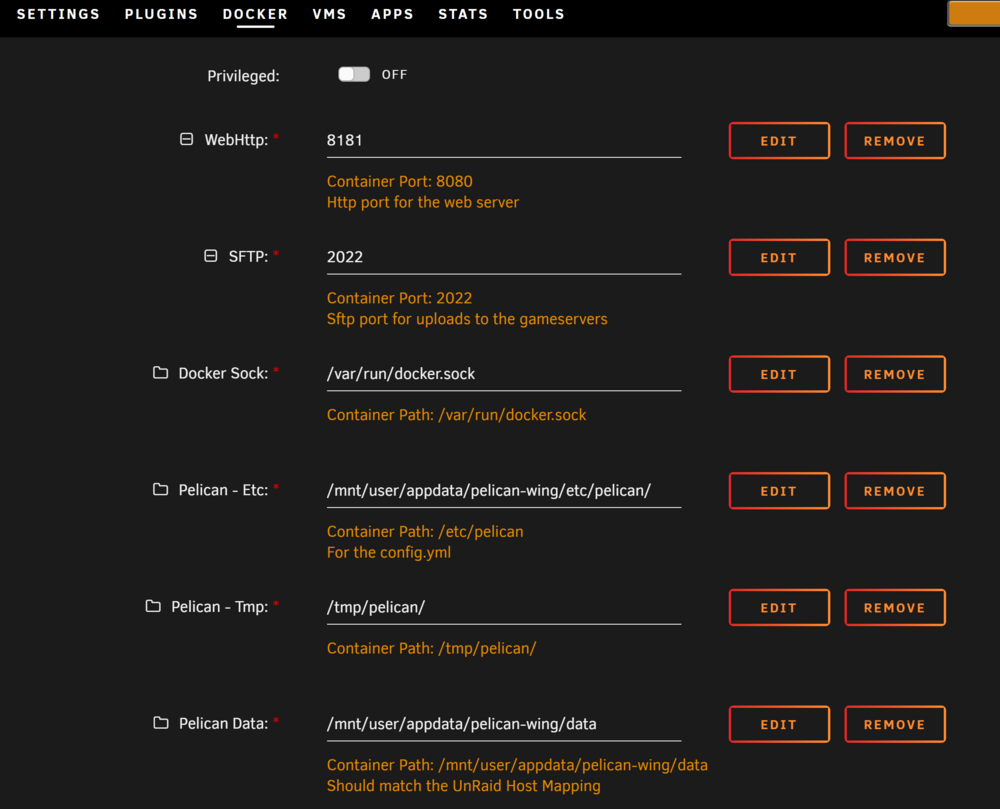
-
Attempting to start the panel docker and it refuses to stay on, logs give me this issue Error: The directory named as part of the path /var/www/html/storage/logs/supervisord/supervisord.log does not exist For help, use /usr/bin/supervisord -h touch: /pelican-data/.env: Permission denied docker/entrypoint.sh: line 16: can't create /pelican-data/.env: Permission denied docker/entrypoint.sh: line 23: can't create /pelican-data/.env: Permission denied grep: .env: No such file or directory Error: The directory named as part of the path /var/www/html/storage/logs/supervisord/supervisord.log does not exist For help, use /usr/bin/supervisord -h touch: /pelican-data/.env: Permission denied docker/entrypoint.sh: line 16: can't create /pelican-data/.env: Permission denied docker/entrypoint.sh: line 23: can't create /pelican-data/.env: Permission denied grep: .env: No such file or directory Error: The directory named as part of the path /var/www/html/storage/logs/supervisord/supervisord.log does not exist For help, use /usr/bin/supervisord -h Starting PHP-FPM with NGINX Starting Supervisord external vars don't exist.
-
That got it for me too thanks!!
-
Sadly no matter what I do I cannot get this to scrape metadata at all is anyone else using this having this issue??
-
My servers a brand new one started with 0 data and my logs seem fine just completely unconnectable. Connecting anonymously to Steam Public...OK Waiting for client config...OK Waiting for user info...OK ---Update Server--- Redirecting stderr to '/serverdata/Steam/logs/stderr.txt' Logging directory: '/serverdata/Steam/logs' [ 0%] Checking for available updates... [----] Verifying installation... UpdateUI: skip show logoSteam Console Client (c) Valve Corporation - version 1721172922 -- type 'quit' to exit -- Loading Steam API...OK Connecting anonymously to Steam Public...OK Waiting for client config...OK Waiting for user info...OK Update state (0x3) reconfiguring, progress: 0.00 (0 / 0) Update state (0x11) preallocating, progress: 12.47 (78382436 / 628445842) Update state (0x61) downloading, progress: 4.24 (26621784 / 628445842) Update state (0x61) downloading, progress: 12.14 (76285284 / 628445842) Update state (0x61) downloading, progress: 12.47 (78382620 / 628445842) Update state (0x61) downloading, progress: 19.33 (121466524 / 628445842) Update state (0x61) downloading, progress: 33.56 (210895509 / 628445842) Update state (0x61) downloading, progress: 55.64 (349659536 / 628445842) Update state (0x61) downloading, progress: 67.40 (423559895 / 628445842) Update state (0x61) downloading, progress: 82.65 (519403304 / 628445842) Update state (0x61) downloading, progress: 89.08 (559826407 / 628445842) Update state (0x61) downloading, progress: 95.49 (600078172 / 628445842) Update state (0x61) downloading, progress: 99.00 (622159372 / 628445842) Update state (0x61) downloading, progress: 99.01 (622236361 / 628445842) Update state (0x61) downloading, progress: 99.03 (622321121 / 628445842) Update state (0x61) downloading, progress: 99.04 (622387623 / 628445842) Update state (0x81) verifying update, progress: 35.26 (221620618 / 628445842) Success! App '1963720' fully installed. ---Prepare Server--- ---Checking for old display lock files--- ---Checking for old logfiles--- ---Server ready--- ---Starting Xvfb server--- ---Start Server--- Server Game ID: Mcq3ScsEzq7FVi1S92caFU2eAwMU
-
Having a strange issue with Core Keeper, Server starts just fine but cannot be connected to no matter what no idea what the Issue is
-
So I have installed the docker and i have mariadb setup already and fully accessible (tested it with adminer) however no matter what settings i use i get this error : INFO: [init][2024-06-10 19:30:35] Starting up, please wait... INFO: [init][2024-06-10 19:30:40] starting redis-server 10:C 10 Jun 2024 19:30:40.489 # WARNING Memory overcommit must be enabled! Without it, a background save or replication may fail under low memory condition. Being disabled, it can also cause failures without low memory condition, see https://github.com/jemalloc/jemalloc/issues/1328. To fix this issue add 'vm.overcommit_memory = 1' to /etc/sysctl.conf and then reboot or run the command 'sysctl vm.overcommit_memory=1' for this to take effect. 10:C 10 Jun 2024 19:30:40.489 * oO0OoO0OoO0Oo Redis is starting oO0OoO0OoO0Oo 10:C 10 Jun 2024 19:30:40.489 * Redis version=7.2.4, bits=64, commit=00000000, modified=0, pid=10, just started 10:C 10 Jun 2024 19:30:40.489 * Configuration loaded 10:M 10 Jun 2024 19:30:40.489 * monotonic clock: POSIX clock_gettime 10:M 10 Jun 2024 19:30:40.489 * Running mode=standalone, port=6379. 10:M 10 Jun 2024 19:30:40.490 * Server initialized 10:M 10 Jun 2024 19:30:40.490 * Loading RDB produced by version 7.2.4 10:M 10 Jun 2024 19:30:40.490 * RDB age 35607 seconds 10:M 10 Jun 2024 19:30:40.490 * RDB memory usage when created 11.30 Mb 10:M 10 Jun 2024 19:30:40.630 * Done loading RDB, keys loaded: 12, keys expired: 2. 10:M 10 Jun 2024 19:30:40.631 * DB loaded from disk: 0.141 seconds 10:M 10 Jun 2024 19:30:40.631 * Ready to accept connections tcp ERROR: [init][2024-06-10 19:30:41] Something went horribly wrong with our database
-
Trying to run this on a server with a NAS attached as a rootshare. No matter what I do, even if i run it on the NAS when it goes to move the files from cache it "fails to move file" with an error and stops working. I cannot find any logfiles to see why it cannot move the files, all the files have the 0777 permissions so im at a loss as to why its failing. I have tried with both cache specific tosort folder and a "general' tosort folder both fail. it has no problem moving to the cache, only moving from.
-
Having the same issues as above with permissions [openbox ] Openbox-Message: 11:56:10.796: Unable to make directory '/config/xdg/cache/openbox': Permission denied my-ROMVault.xml
-
Good news bad news , We might have figured it out! Brand new ram lit up like Christmas on memtest86 with so many corruptions its unreal. Bad news is now i havta RMA and my unraid test key will likely be dead by the time i get it back.
-
Downgraded and still seems to be an issue: -What exactly are you doing to make it crash to see if other users can replcate Moving a large folder of ISO's and Bins from a windows machine is one way, but also just checking crc on files already on the array. Updated syslog if that helps syslog


